First time doing power planes, how should I lay them out?

Thread Starter

eipiplusoneequalszero

Joined Oct 25, 2024
6
Hi!

I am trying to learn about power planes and ground planes for the first time ever. The PCB I am building is just a hobbyist project, so nothing commercial or state-of-the-art EMI resistant, but I'd still like to follow as many best practises as possible. The project is an USB-C powered timer project with a few LEDs, some buttons, a buzzer, and an Attiny84A.

My PCB has USB-C input that goes through a switch. The switch "output" is used to power the rest of the circuit.

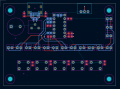
You can find the board below:
1767987924298.png
I was trying to lay out power planes for this board, and I came up with this layout:
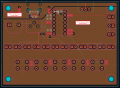
1767988190368.png

My question is if this could be done better or if it looks good.

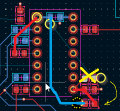
I can personally find one problem, but I am not sure how worried I should be. That problem is the fact that there is a crossing between two power planes (seems to be bad practice from what I could find online):
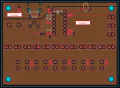
1767988267752.png
I am not sure how to lay out the board without needing to route that power plane crossing.

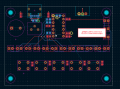
What I find tricky is the fact that the USB-C power input and power switch output pins (on the switch, top right) are very next to each other.
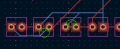
A split between the two planes here (see red line) would certainly make the space between the power planes a bit too tight:
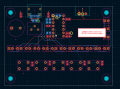
1767988059617.png

Thoughts?
 

Jon Chandler

Joined Jun 12, 2008
1,560
A little off your question....

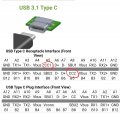
It looks like you don't have resistors to the CC pins on the USB-C connector. Without those resistors, if your device is connected to a USB-C-PD supply, NO power will be supplied.

5.1k pull-down resistors on each CC pin will tell a PD supply to provide 5 volt power.

Screenshot_20260109_122043_Electrodoc Pro.jpg
 

panic mode

Joined Oct 10, 2011
4,864
DRC will find that tracks are too close - if setup is ok. so... what are your settings?

also judging by the brownish color of the zones, your board is setup for at least 4 layers... but only front and back have any tracks.
tracks are too tiny. don't go to extremes if you don't have to. this makes manufacturing harder and more expensive as well. there is tons of free space there, you are not making a smart phone.

for prototyping with THT, i tend to choose IC footprints with elongated pads. less chances of screwing things up be inexperienced tech (torturing board and scraping off or lifting pads). also with larger tracks it is easier to make modifications or changes.

i prefer to keep parts orientation the same (with as few exceptions as possible), specially when board is for THT parts - because of manual assembly. who ever is going to put it together can make mistakes, so why take chances... keeping orientation uniform gives the board more professional look.

as passive parts are not polarized, orientation does not matter. so why not rotate them to optimize routing? here is an example of relocating and rotating one of them, then connections are simpler and without vias.

1767993123824.png
 
Hi!

I am trying to learn about power planes and ground planes for the first time ever. The PCB I am building is just a hobbyist project, so nothing commercial or state-of-the-art EMI resistant, but I'd still like to follow as many best practises as possible. The project is an USB-C powered timer project with a few LEDs, some buttons, a buzzer, and an Attiny84A.

My PCB has USB-C input that goes through a switch. The switch "output" is used to power the rest of the circuit.

You can find the board below:
View attachment 361815
I was trying to lay out power planes for this board, and I came up with this layout:
View attachment 361817

My question is if this could be done better or if it looks good.

I can personally find one problem, but I am not sure how worried I should be. That problem is the fact that there is a crossing between two power planes (seems to be bad practice from what I could find online):
View attachment 361818
I am not sure how to lay out the board without needing to route that power plane crossing.

What I find tricky is the fact that the USB-C power input and power switch output pins (on the switch, top right) are very next to each other.
A split between the two planes here (see red line) would certainly make the space between the power planes a bit too tight:
View attachment 361816

Thoughts?
Hi! Cool project—learning power/ground planes is a great skill to build. :)

From looking at the layout, I'd suggest cleaning up the signal routing first. Try to stick to 45 angles and make sure traces come off pads straight where possible it makes the pours and planes behave much more prefictably. regarding the planes, try to avoid unnecessary splits. Splits can increase impedance and mess up return paths if signals cross over the gaps.........If you have to separate 5V from another raillk, keep clear boundaries or use vias to jump layers instead of having them sit right next to each other. definitely look into adding the proper USB‑C CC resistors so you actually get power from USB-PD supplies, and double-check your DRC clearances so you don't hit manufacturing snags. it’s a solid start, and just a bit of tidying up will make it much more reliable!
 

Thread Starter

eipiplusoneequalszero

Joined Oct 25, 2024
6
Thank you for all your valuable feedback. As you may have guessed, I'm not a professional PCB designer. But I am eager to learn and therefore I am very happy to have received all your replies.

Regarding the CC resistors: thanks for the heads-up!
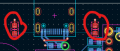
I actually have CC resistors, they are here:
1768417725401.png
They have not been routed yet, so I don't blame you if you didn't spot them.
 

Thread Starter

eipiplusoneequalszero

Joined Oct 25, 2024
6
Hey @dl324 @Oliver Taylor @panic mode and others, I tried to clean up the routing a little bit.

From what I understood, the main issues were that the tracks were entering pads and THTs in a non-90 degree angle, and that some of the traces running near the LEDs were a bit too close to each other.

I increased the track width from 0.2 to 0.3mm. The power-related traces are, and have always been, 0.4mm.
I realized I did not leave the disclaimer that the LEDs are using Charlieplexing, this is a method that requires a lot of wires. It's also why I flipped some of the LEDs, otherwise the routing would be even more spaghetti-y.

Note: the routing is still incomplete.

This time I also made sure to attach a PDF of the routing. Note: I'll fix the bad label positioning that you can see in the PDF before sending the board to prod.

Does the routing look better now or does it still look bad? I have routed a few PCBs before, but I am a hobbyist and I have never known even the most basic best practises. Therefore, forgive me if my small changes are not enough. Appreciate your feedback on how I can improve.

1768501316631.png
 

Attachments

Hey @dl324 @Oliver Taylor @panic mode and others, I tried to clean up the routing a little bit.

From what I understood, the main issues were that the tracks were entering pads and THTs in a non-90 degree angle, and that some of the traces running near the LEDs were a bit too close to each other.

I increased the track width from 0.2 to 0.3mm. The power-related traces are, and have always been, 0.4mm.
I realized I did not leave the disclaimer that the LEDs are using Charlieplexing, this is a method that requires a lot of wires. It's also why I flipped some of the LEDs, otherwise the routing would be even more spaghetti-y.

Note: the routing is still incomplete.

This time I also made sure to attach a PDF of the routing. Note: I'll fix the bad label positioning that you can see in the PDF before sending the board to prod.

Does the routing look better now or does it still look bad? I have routed a few PCBs before, but I am a hobbyist and I have never known even the most basic best practises. Therefore, forgive me if my small changes are not enough. Appreciate your feedback on how I can improve.

View attachment 362105
One thing I’d add for a first-time power-plane layout is to think less in terms of 'where do I pour copper' and more in terms of impedance and return current paths. beginners often focus on the DC connection, but at higher frequencies, the current follows the path of least inductance, not least resistance...

Continuous planes with short, direct return paths almost always outperform split or heavily cut planes. I’ve noticed that beginners often underestimate how much plane fragmentation and via stitching matter—a wide, uninterrupted plane with strategic stitching vias behaves much better than a 'Swiss cheese' plane full of holes from signal vias...

If you treat the power and ground planes as part of the signal's transmission line rather than just static copper fills, most common EMI and signal integrity issues tend to solve themselves..

Do other people agree this?
 
Top