ESD protection / detection

Thread Starter

Dzanej

Joined Dec 23, 2021
7
Hello there,

I am working on a product that has an integrated TFT display, which is controlled by a custom made PCB with a microcontroller on it. I've sent the product to an institution to get a CE certificate and there they conduct a few tests, one of which is an ESD event. The product doesn't pass the ESD test because it freezes though it should continue normally after the event.
I found out by testing it that it is not the microcontroller that freezes but the TFT screen does. I have already made a watchdog timer on the microcontroller so that if it freezes it gets reset. I would now need to make a watchdog for the TFT display. I've tried making a re-initialisation every few seconds so that way it cannot freeze for longer than that period - but that makes the display very hard to watch because it is constantly refreshinh (black screen and rewriting/drawing everything again).
I was now thinking the solution would be to make a circuit that detects an ESD event and triggers an interrupt on the microcontroller so that he restarts the screen when an ESD event odccurs.
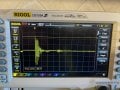
I am now asking for any advice or schematic for such circuit that detects very short pulses of high voltage spikes. I am attaching a picture of the event captured with an oscilloscope - i've made a recreation of the event with a 5-7kV spark near the product. From the scope it is clear that the event lasts about 200ns (sometimes less, sometimes more) and there are a few spikes with the voltages going up to 240V (again that may differ from event to event of course).
To sum up what I want: a circuit that detects souch ESD event and outputs a 5V signal that is latched or a few milliseconds long (a few 10ms).
Thank you all.
 

Attachments

drjohsmith

Joined Dec 13, 2021
1,584
The problem you might be facing,
is what is an ESD event ?

Do you want to reset the system even if "an event" has not had an effect on your system,
 

Thread Starter

Dzanej

Joined Dec 23, 2021
7
The problem you might be facing,
is what is an ESD event ?

Do you want to reset the system even if "an event" has not had an effect on your system,
I think the detection circuit should be designed in such way it does not falsely restart the system. On the other hand it is not that critical if the system gets reset - greater problem would be that the system (or i should say the screen) gets frozen when the ESD event occurs. After all such an event would probably be very rare - but it is required if I want to pass the static discharge test to get the CE certificate.
 

djsfantasi

Joined Apr 11, 2010
9,237
So what happens to the TFT when an ESD event occurs? I don’t mean physically, but how it responds to commands? Since the microcontroller doesn’t freeze, how can it tell that the TFT has?

This is the event you need to trap and then and only then do you need to reset the TFT.

On the other hand, rather than detecting the failure, what techniques have you considered to protect the TFT from an ESC event?
 

drjohsmith

Joined Dec 13, 2021
1,584
A high impedance input with a wire on it will detect spikes.

Just use a comparitor with a wire attached

But. It's going to pick up all the ESD around , so will probably reset the display every few seconds ...

A better approach is to look at where the ESD is getting in and shielding or filtering .

Out of interest is the display your using ESD rated certified ?
If not , that is the place to start.
 

Thread Starter

Dzanej

Joined Dec 23, 2021
7
So what happens to the TFT when an ESD event occurs? I don’t mean physically, but how it responds to commands? Since the microcontroller doesn’t freeze, how can it tell that the TFT has?

This is the event you need to trap and then and only then do you need to reset the TFT.

On the other hand, rather than detecting the failure, what techniques have you considered to protect the TFT from an ESC event?
Well the microcontroller doesn't know if the TFT has frozen or not, it is simply sending it commands and doesn't know what is happening to the screen.

Yes, I have tried shielding (shielding the cable to the screen as well as the screen itself) but when i was testing, one time out of 10 lets say it still got frozen. Probably my shielding wasn't perfect but I would build a detection circuit rather than modifying the completed plastic enclosure to suit a full ESD shield.
 

Thread Starter

Dzanej

Joined Dec 23, 2021
7
A high impedance input with a wire on it will detect spikes.

Just use a comparitor with a wire attached

But. It's going to pick up all the ESD around , so will probably reset the display every few seconds ...

A better approach is to look at where the ESD is getting in and shielding or filtering .

Out of interest is the display your using ESD rated certified ?
If not , that is the place to start.
I have tried a few comparators but I think the pulse is too fast for the comparators that I have tried.
About the picking up the ESD around, I think the circuit would need a threshold over which it triggers the event.
And yes, the display is not ESD rated and certified, i am using a china imported screen (Adafruit 1.44" Color TFT lcd)
 

ronsimpson

Joined Oct 7, 2019
4,664
Try adding a very thin piece of plastic Infront of the display. Something like the no scratch sheet that is added to a cell phone.
You might also look at grounding the micro board to the display. Is there metal around the display? Ground it to the computer board with solder wick.
 

drjohsmith

Joined Dec 13, 2021
1,584
Well the microcontroller doesn't know if the TFT has frozen or not, it is simply sending it commands and doesn't know what is happening to the screen.

Yes, I have tried shielding (shielding the cable to the screen as well as the screen itself) but when i was testing, one time out of 10 lets say it still got frozen. Probably my shielding wasn't perfect but I would build a detection circuit rather than modifying the completed plastic enclosure to suit a full ESD shield.
Can the micro controller read the display as well as write to it ?
if so the micro can detect the screen has locked up

What ESD protection do you have between the Adafruit and your Micro ?

Sorry ,
you onto a looser trying to detect an ESD event that causes you problems,
if your in a plastic box, then your board designs need carefull attention to ESD and EMI
to keep signals protected,
 

Thread Starter

Dzanej

Joined Dec 23, 2021
7
No, the micro cannot read the display in any way.
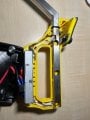
I am attaching a photo of the product, if anyone has any ideas on how to make a suitable esd protection. IMG_0564.jpgIMG_0565.jpgOn the bottom side there is the control PCB inside a metal shield box. On the top there is the display I was talking about and it is connected with a 10 pin ribbon cable to the micro. I am guessing that the cable is acting like an antenna and picking up the interferance. If I want to make an esd protection I would need to shield the cable as well as the screen right?
 

drjohsmith

Joined Dec 13, 2021
1,584
ESD is funny stuff
at least I find I laugh after I solved the problem,

Is this your LCD ?
https://learn.adafruit.com/adafruit-1-44-color-tft-with-micro-sd-socket/downloads

If so, then this can be read as well a written to,
which can be used to check is the TFT / processor is still alive

Regarding ESD protection
do yo have an ESD gin to generate a charge ?

this can tell you where the charge is getting in
The most likely places are the high impedance lines to the display,
or the control switches,

Put an earth near them,
and ESD tranzorbs to the lines,
Place as near to the out side world as possible,
stops the ESD getting inside.

One last thing,
you will end up adding earth shielding, pull ups , tranzorbs every where
you aim is to get the interface lines to be low impedance so they dont pick up a capacitive discharge.

Once you have it fixed,
try taking a few bits off, as they might no longer be needed,

The thing to learn , is next time
design for low impedance lines and ESD protection is much cheaper than retro fitting.

retro fitting is never easy,
sorry no magic here, just hard engineering trial and error needed,
 

Thread Starter

Dzanej

Joined Dec 23, 2021
7
No, this is not the display I am using, mine is using the SPI communication and it is using only the MOSI pin and not MISO.
I don't have the ESD gun, but I have a 7kV source that can deliver a spark to simulate an ESD gun.
So you are saying that I should put shielding as far from the display as I can and connect that shielding to earth. In my case the product is powered from 12V battery - in that case should I connect the shielding to the negative terminal of the battery or not?
 

drjohsmith

Joined Dec 13, 2021
1,584
No, this is not the display I am using, mine is using the SPI communication and it is using only the MOSI pin and not MISO.
I don't have the ESD gun, but I have a 7kV source that can deliver a spark to simulate an ESD gun.
So you are saying that I should put shielding as far from the display as I can and connect that shielding to earth. In my case the product is powered from 12V battery - in that case should I connect the shielding to the negative terminal of the battery or not?
Im not saying that at all.

Also,
ESD spec is a specific specification "spike"
Are you looking at human contact spec, or direct contact spec, or what ?

You can not just hit your machine with a random 7 Kv ish spike,

Do you have the report as to where the gear failed ?
 

drjohsmith

Joined Dec 13, 2021
1,584
No, this is not the display I am using, mine is using the SPI communication and it is using only the MOSI pin and not MISO.
I don't have the ESD gun, but I have a 7kV source that can deliver a spark to simulate an ESD gun.
So you are saying that I should put shielding as far from the display as I can and connect that shielding to earth. In my case the product is powered from 12V battery - in that case should I connect the shielding to the negative terminal of the battery or not?
Earth in this case is used to mean "the reference"

as in a car,
it has a 12v battery , but we still say the chaise is the earth,

The idea is that all voltages that are not wanted are passed to "earth" as close to the place they enter the system as possible,
so if a switch is at the end of a long wire, then the wire becomes an antenna when it is zapped by the ESD,
so the wire needs a route to pass the excess to "earth" as near to the point it is zapped.

Shielding is good,
but if you have a switch, with wires, then the ESD jumps straight to the wires,
so you need protection to stop the ESD getting in

At the very least , you need ESD filtering on all the connections to the electronics,

If you can post your display, then we might be able to help more,
 

Thread Starter

Dzanej

Joined Dec 23, 2021
7
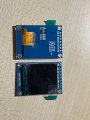
There is one more quite important thing i forgot to mention and that is when I am testing with the 7kv spark, I am not directly zapping the product on its enclousure, rather I am making the spark jump on the ground around 10cm away from the product. So that way I think the problem is in the induced voltages on the display rather than the spark hitting it directly. If I hit it directly than the micro resets with the watchdog timer.IMG_0602.jpgThis is the screen I am using.

A few days ago I ordered some TVS diodes (PESD5V2S2UT) - are they any good for the purpose of protecting the high voltage spikes? I would need to add them to every signal path am I right?
 

drjohsmith

Joined Dec 13, 2021
1,584
There is one more quite important thing i forgot to mention and that is when I am testing with the 7kv spark, I am not directly zapping the product on its enclousure, rather I am making the spark jump on the ground around 10cm away from the product. So that way I think the problem is in the induced voltages on the display rather than the spark hitting it directly. If I hit it directly than the micro resets with the watchdog timer.View attachment 256393This is the screen I am using.

A few days ago I ordered some TVS diodes (PESD5V2S2UT) - are they any good for the purpose of protecting the high voltage spikes? I would need to add them to every signal path am I right?
I seem to remember your display was an ada fruit,
and was SPI ,

This has no ada fruit logo,
and has I2C pin names !

Yes TVS are good,
provided you have the right voltage

Any line you do not protect,
can be a conduction path

But it sounds like you have given us half information,
so we can do but our best guess,
 
Top