Electromagnet and IR Beam Sensor project

sghioto

Joined Dec 31, 2017
8,634
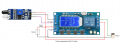
Wiring diagram using the IR module as a reflectance sensor. When the spider passes by the sensor the beam is reflected back to the IR receiver which triggers the timer.

1643302103144.png
 

Thread Starter

mmccra2858

Joined Jan 12, 2022
23
Wiring diagram using the IR module as a reflectance sensor. When the spider passes by the sensor the beam is reflected back to the IR receiver which triggers the timer.

View attachment 258875
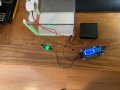
Spider Trap Project.jpgSo I have the sensor hooked up, but it's not working. I went over the wiring diagram, everything seems to be ok. The timer counts down when it starts up when it reaches zero the magnet turns on.
The sensor doesn't seem to do anything at all.
Could you please have a look.
Thank you.
 

sghioto

Joined Dec 31, 2017
8,634
Could you please have a look.
Sure.
From the photo I can see that the sensor is activated. First thing to do is to turn down the sensitivity. Rotate the control fully counter clockwise and see if the bottom LED will shut off.
The layout of the spider trap is important. The other side from where the sensor is pointed needs to be non reflective.
The timer counts down when it starts up when it reaches zero the magnet turns on.
The Timer needs to be programmed in the P4 mode not P1.
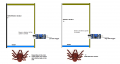
The trap can be setup in two ways as illustrated below.
I prefer the break beam setup.
1643487223052.png
 
Last edited:

Thread Starter

mmccra2858

Joined Jan 12, 2022
23
Sure.
From the photo I can see that the sensor is activated. First thing to do is to turn down the sensitivity. Rotate the control fully counter clockwise and see if the bottom LED will shut off.
The layout of the spider trap is important. The other side from where the sensor is pointed needs to be non reflective.

The Timer needs to be programmed in the P4 mode not P1.
The trap can be setup in two ways as illustrated below.
I prefer the break beam setup.
View attachment 259113
Thanks, great illustration, I've been cleaning up after our Nor'easter here in Massachusetts, so I probably won't do anything with it tonight. I will work on it tomorrow and let you know how it goes.
 

Thread Starter

mmccra2858

Joined Jan 12, 2022
23
OK sounds good.
I saw the weather forecast for your area last night on the news, it looked gnarly.:eek:
Turning fully CCW does turn the led off. I've set the pgm to P4.I have the sensor looking at a cardboard surface about 4" away.
At this point the magnet is energized, bot when something passes in front of the sensor, nothing is happening.
 

sghioto

Joined Dec 31, 2017
8,634
OK using the left setup start with the sensitivity fully counter clockwise, then adjust until the LED turns on then back up some to turn off.
 

Thread Starter

mmccra2858

Joined Jan 12, 2022
23
OK using the left setup start with the sensitivity fully counter clockwise, then adjust until the LED turns on then back up some to turn off.
Ok I've done that, not very much adjustment left. Nothing happening when I pass an object in front of the sensor.
 

sghioto

Joined Dec 31, 2017
8,634
The cardboard surface needs to be non reflective, what color is it?
The object passing through needs to be reflective, white works best.
May have too much ambient light present as well. Try wrapping some black electrical tape or similar around the outside of the two IR sensors for shielding.
BTW I have the same IR sensor and Timer on my bench and it's working just fine.
 
Last edited:

Thread Starter

mmccra2858

Joined Jan 12, 2022
23
The cardboard surface needs to be non reflective, what color is it?
The object passing through needs to be reflective, white works best.
May have too much ambient light present as well. Try wrapping some black electrical tape or similar around the outside of the two IR sensors for shielding.
BTW I have the same IR sensor and Timer on my bench and it's working just fine.
The cardboard is gray, I'm passing a white piece of plastic between the cardboard and sensor, same result. I tried wrapping black electrical tap around the IR sensors for shielding, same result. I tried a black background as well, same result.
On the timer the screen says p4:CL, is that correct?
Could I see a picture of your set up?
Thanks
 
Top