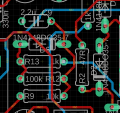
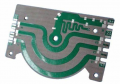
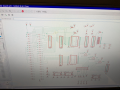
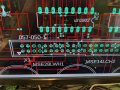
Is that auto or by hand?
90 and 45 is done because it takes less CPU power to do the job. IMO
Some people really reject anything other than 45. I think it is for "looks" not function.
I was doing this before computers. We had two different methods then. One did curves nicely and one did not. There was not a 45 law.
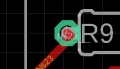
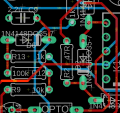
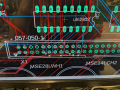
By what I see it looks like the grid and the holes for the parts are not the same. It might be an "English" part and a "metric" grid. Almost everywhere the trace gets close to the hole and then heads to the center of the hole. That makes me think the holes are not on grid.
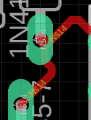
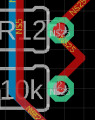
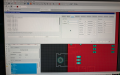
I am just commenting on looks and why. On the right that R12 to R? trace should be one line not 5. On the left two more examples. It looks like the computer is hell bent on snapping to grid and does not care about snapping to parts.
Not many CAD programs can draw curves. It makes the Gerber files large.
By what I see it looks like the grid and the holes for the parts are not the same. It might be an "English" part and a "metric" grid. Almost everywhere the trace gets close to the hole and then heads to the center of the hole. That makes me think the holes are not on grid. View attachment 341910
I am just commenting on looks and why. On the right that R12 to R? trace should be one line not 5. On the left two more examples. It looks like the computer is hell bent on snapping to grid and does not care about snapping to parts. View attachment 341911View attachment 341912
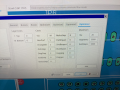
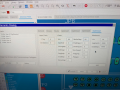
I work in mm. I went in and changed the autorouter grid to 0.1mm. Then I manually tried to "fix" many of the leads. Is this normal? Maybe I've been relying on the autorouter too much.
That looks good. I do not use auto routers. They get better every year. They can give you good/bad ideas.
Some CAD programs have a "look ahead" function. Different name for each company. When you start a rout, the computer puts dotted lines as to where it would rout this net. If you like it, lift the mouse button, and the computer finished the job. It you continue to move the mouse but choose to go right not left around, the computer will change the dotted line to say just ahead of you. At any point you can tell the computer to finish the job. This I use.
I work in mm. I went in and changed the autorouter grid to 0.1mm. Then I manually tried to "fix" many of the leads. Is this normal? Maybe I've been relying on the autorouter too much.
The topo (TopRouter in Eagle) autorouter is pretty good with the correct constraints. For critical stuff I route that by hand and move components a bit to help it do the right thing, the rest I let the computer handle it with my own variants files.
Many of the defaults work for a usable board but may not be visually pleasing to the human eye. Read about what they do and explore what works for you.
As long as we are talking about PCBs.
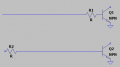
I have made good money trouble shooting PCBs. See the difference between the two schematics. Auto routers and people without an understanding on of electronics will do the bottom layout. To force the top version, you need to declare the Base net to be "short".
As long as we are talking about PCBs.
I have made good money trouble shooting PCBs. See the difference between the two schematics. Auto routers and people without an understanding on of electronics will do the bottom layout. To force the top version, you need to declare the Base net to be "short". View attachment 341931
I usually also help the router make the correct choice by physically 'forcing' a short trace by moving R2 next to the Q1 base pin on the board during the physical layout phase. The physical layout phase can minimize routing issues if you take care to see electromagnetic beauty instead of visual beauty.
Sometimes they are the same but many times, they are not.
I thought autorouting was ONLY for traces, didn't actually MOVE components. Yes I spend a lot of time moving components so the traces are shorter. Am I missing something?
I thought autorouting was ONLY for traces, didn't actually MOVE components. Yes I spend a lot of time moving components so the traces are shorter. Am I missing something?
Correct, you, the human place the components (but there are component placement design criteria for fast parts, thermal, mounting, manufacturing, etc ...). There is an interplay between autorouting and component placement that can help or hurt your PCB layout objectives.

 Facebook
 Google
 GitHub
 Linkedin