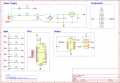
Critique my schematic

Thread Starter

redgear

Joined Oct 17, 2019
136
I didn't try to follow the schematic because I don't find that style conducive to understanding circuit intent.

The relay is switching neutral and the lamps are always connected to line. It would be safer to switch line with the relay. I'd also swap the positions of the switches and fuses so the switches wouldn't have line voltage if a fuse blew.
Thanks, I will make those changes.
 

Irving

Joined Jan 30, 2016
5,123
I'd redraw, including all comments to date.

That 12-0-12 transformer is massively overspecc'd, if you go to 9v as suggested you don't need a 9-0-9, only a 9v, eg this
 

ErnieM

Joined Apr 24, 2011
8,415
Two things I see:

1. A 1N4148 for D1 is a bit marginal. I'd go 1N4001 for reliability.

2. Never switch the Neutral. Switch the Hot leg so "Off" is OFF and safe (safer).
 

eetech00

Joined Jun 8, 2013
4,705
Hello

Hi

A few drawing suggestions:

1. The control block is not really a control block.
Rename it to "input block". Then move Relay (see 3 below).

2. Rename Logic Block to "Arduino Block" or "MCU Block".
The ULN2003 doesnt really perform any logic, so move from this block (see 3 below).

3. Create a new "Output Block". Then add the ULN2003 and Relay.
If the Lamps are on board, add them to this block, otherwise, leave off.

4. Already suggested, but move regulator into power supply block

So, with the above changes, you will end up with the following blocks:

1. Power Supply Block
2. Input Block
3. MCU Block
4. Output Block


Design comments:
1. There will be voltage drops by the diode bridge and a minimum voltage needed by the 12v regulator.
Usually 3v higher then the output. So you'll need a higher voltage transformer to feed the 12v regulator.

2. Are you powering the Arduino Module using the onboard DC jack?
If so, you don't need a external voltage regulator because it already has one to provide internal 5v.
You could power it directly from the DC jack with the 12V power supply regulator

3. I don't think you need large 10k resistors at the switch inputs. These could be 1k each. The inputs will also need to be pulled up or pulled down. Also, remember the outputs will tri-state on bootup or reset.


eT
 
Last edited:

djsfantasi

Joined Apr 11, 2010
9,237
3. I don't think you need large 10k resistors at the switch inputs. These could be 1k each. The inputs will also need to be pulled up or pulled down. Also, remember the outputs will tri-state on bootup or reset.
The logic states of your inputs aren’t relevant when using a micro, as your code can invert them to the desired states.

Recognizing that, Arduino designs often use active low inputs (the switches connect ground to the Arduino). That is because the Arduino supports defining an input pin to use an internal pull-up resistor. This saves on parts count and current requirements.

Use this syntax:
PinMode(myPin, INPUT_PULLUP);​
 

Irving

Joined Jan 30, 2016
5,123
The logic states of your inputs aren’t relevant when using a micro, as your code can invert them to the desired states.

Recognizing that, Arduino designs often use active low inputs (the switches connect ground to the Arduino). That is because the Arduino supports defining an input pin to use an internal pull-up resistor. This saves on parts count and current requirements.

Use this syntax:
PinMode(myPin, INPUT_PULLUP);​
True, but they are high value pull-ups and in a noisy environment you might need more signal conditioning. I wouldn't necessarily rely on them in a production environment. But 1k could be thought too low and wasteful of power in a wearable for instance.
 

eetech00

Joined Jun 8, 2013
4,705
The logic states of your inputs aren’t relevant when using a micro, as your code can invert them to the desired states.

Recognizing that, Arduino designs often use active low inputs (the switches connect ground to the Arduino). That is because the Arduino supports defining an input pin to use an internal pull-up resistor. This saves on parts count and current requirements.

Use this syntax:
PinMode(myPin, INPUT_PULLUP);​
hi

yes...but I didn’t know the TS intent. In addition I don’t see any RC filters to help debounce.

thanks
 

MisterBill2

Joined Jan 23, 2018
27,522
There is one safety issue which is that the incoming power from the line cord should go to the fuses first, and then to the switches. That is to protect the wiring inside the enclosure in case of a short circuit in the wiring to the switch. It is the opposite of industrial enclosures where the power goes first to a fused disconnect switch.

Chopping the circuit up into blocks makes it very hard to follow for understanding how it works. And having it in separate blocks makes it very easy to miss making a connection when putting the thing together.
 

Irving

Joined Jan 30, 2016
5,123
Chopping the circuit up into blocks makes it very hard to follow for understanding how it works. And having it in separate blocks makes it very easy to miss making a connection when putting the thing together.
On something this simple I tend to agree though breaking it up into functional groupings for larger circuits is good practice too. With experience comes understanding of where the transition is useful.

On this I'd probably have 2 blocks, the power supply and everything else. Which might reflect the two PCBs (or two distinct areas of 1 PCB) it was on.
 

Thread Starter

redgear

Joined Oct 17, 2019
136
Good start, nice to see a clean layout.

Put the 12v - 5v regulator in with the rest of the power supply and label the block"Power Supply", it makes no sense for it to be on its own.

Signals should flow left to right. So your switches should have +5v to left and SWx to right. I'd call that block "Inputs"

Similarly flip your UNO over so SWx comes in from left. There's no need to show the Uno and the ULN2003 disconnected like that unless Signal is going elsewhere.

Put the relay in with the lamps - thats your "Outputs" block. Some would argue that should be on RH side.

On something this simple its not really necessary to break it down, but its good practice for the future.
I have made the change as suggested.

You need capacitors on input and output of 7805.
Yes. Capacitors need to be close to IC pins.
Don’t forget capacitors on all ICs from Vcc to GND.
Added the caps. Please take a look.

Use a 5V relay then you can ditch the 12V regulator, and use a 5V transformer
5V transformer's might fall below 5v depending on load. So I opted for a 9v transformer.

Ditch the ULN2003 and replace it with a 2N7000 (or an NPN with suitable base resistors) unless you are planning expansion where the other drivers will be used.
The transistor is expensive than the ULN2003A, so sticking with it for now. Let me know, if there are any issues with this.

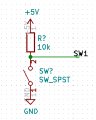
Your switches leave the input pins floating. If the pins have internal pulldowns, the 10K resistors could cause an indeterminate logic level. Common practice is to connect the switch directly from the pin to ground and use an internal or external pullup.

Bob
I have re-positioned the switches to connect to ground. Please take a look and let me know what your suggestions.

Not appreciably.
You need higher capacitance, but can use a lower voltage rating, which tends to balance out the relative cost.
And you eliminate the 12V regulator, and save some power since you no longer need to drop the 12V to 5V.
I'm not confident about the right capacitance value. Different formulas give different values that are very different. Which one of the two formulas is correct? \( C = \frac{I(mA)}{2*\pi*f*V_o} \) or \( C = \frac{I(mA)*dt(s)}{V_{peak} - V_{min}} \)

100nF ceramic is fine. As said, you need 10uF on outputs of regulators.

I'd second using MOSFET to switch relay and using 5v relay.

An alternative is use an logic input SSR rather than transistor/relay combo. Something like this or for higher power, this.


Are you planning to put this on a PCB or something else?
I'm planning to put this on a PCB. 10uF? I'm uisng 0.1uF. Should I replace them with 10uF?
I have thinking to replace the relays with TRIACS+optocoupler. Thought of opening a different thread to discuss about it. What do you think about it? Will TRIACs or SSR be more reliable and faster than relays? Will the noise generated be a concern?

I didn't try to follow the schematic because I don't find that style conducive to understanding circuit intent.

The relay is switching neutral and the lamps are always connected to line. It would be safer to switch line with the relay. I'd also swap the positions of the switches and fuses so the switches wouldn't have line voltage if a fuse blew.
I have made the changes. The relay is now switching live and the fuses are placed before switches.

I'd redraw, including all comments to date.

That 12-0-12 transformer is massively overspecc'd, if you go to 9v as suggested you don't need a 9-0-9, only a 9v, eg this
Thanks for the link. I'm attaching the updated schematic with this post.

Two things I see:

1. A 1N4148 for D1 is a bit marginal. I'd go 1N4001 for reliability.

2. Never switch the Neutral. Switch the Hot leg so "Off" is OFF and safe (safer).
Replaced the diodes. Also, switching live with relay.

The power switch and fuse must be interchanged.
The first thing AC line input encounters is the fuse.
Done.

Hello

Hi

A few drawing suggestions:

1. The control block is not really a control block.
Rename it to "input block". Then move Relay (see 3 below).

2. Rename Logic Block to "Arduino Block" or "MCU Block".
The ULN2003 doesnt really perform any logic, so move from this block (see 3 below).

3. Create a new "Output Block". Then add the ULN2003 and Relay.
If the Lamps are on board, add them to this block, otherwise, leave off.

4. Already suggested, but move regulator into power supply block

So, with the above changes, you will end up with the following blocks:

1. Power Supply Block
2. Input Block
3. MCU Block
4. Output Block
Done.
Design comments:
1. There will be voltage drops by the diode bridge and a minimum voltage needed by the 12v regulator.
Usually 3v higher then the output. So you'll need a higher voltage transformer to feed the 12v regulator.

2. Are you powering the Arduino Module using the onboard DC jack?
If so, you don't need a external voltage regulator because it already has one to provide internal 5v.
You could power it directly from the DC jack with the 12V power supply regulator

3. I don't think you need large 10k resistors at the switch inputs. These could be 1k each. The inputs will also need to be pulled up or pulled down. Also, remember the outputs will tri-state on bootup or reset.


eT
1. Changed the transformer to 9v. The minimum voltage for 7805 is 7v. DF10M has a voltage drop around 1v. So, 7+1 =8, the 9v transformer outputs 9.6v even with high load.
2. No, I wont be using the arduino. But just the ATmega328 with the oscillator. So, i have to provide 5v.
3. Can you ELI5?

True, but they are high value pull-ups and in a noisy environment you might need more signal conditioning. I wouldn't necessarily rely on them in a production environment. But 1k could be thought too low and wasteful of power in a wearable for instance.
How do I make it more reliable?

yes...but I didn’t know the TS intent. In addition I don’t see any RC filters to help debounce.

thanks
I am including code for software debouncing. Is hardware debounce more reliable than do it on the code?

There is one safety issue which is that the incoming power from the line cord should go to the fuses first, and then to the switches. That is to protect the wiring inside the enclosure in case of a short circuit in the wiring to the switch. It is the opposite of industrial enclosures where the power goes first to a fused disconnect switch.

Chopping the circuit up into blocks makes it very hard to follow for understanding how it works. And having it in separate blocks makes it very easy to miss making a connection when putting the thing together.
Changed the circuit.
If I don't split it into block, the wiring does not look tidy. I have reduced the number of blocks. Will try to redraw without splitting them up.


Updated Schematic:
Updated-Design.PNG

How does it look now? Is the circuit considered reliable in production standards? What changes/improvements do I need?


Thanks a lot for everyone... :)
 

MisterBill2

Joined Jan 23, 2018
27,522
ONE SERIOUS COMMENT: the purpose of a drawing iis never to look tidy. The reason for a drawing is to depict the circuit of a system. A drawing split into little blocks is not very useful when there is a need for somebody to understand the system circuit. I have a lot of experience with drawings and equipment and what is useful and what is far less useful.
The input block has the signals from the buttons pointed away from the MCU block, which is where they go to. That makes following the circuit more work.

There are a number of standards for drawings that are intended to make them easier to follow and understand. Those have been created because it is important to correctly understand the drawings.

Quite a few of the comments here were about the design of the circuit, which is also very important, but separate from about the drawing. The comments about the design were reasonable and made sense..

But still, a group of small details is a challenge to follow, and even though the connection ID flags are present they take more effort to read.
And if this is a drawing for a printed circuit board, will all of the parts shown be mounted on that circuit board? Even the lamps and the buttons?
 

Thread Starter

redgear

Joined Oct 17, 2019
136
ONE SERIOUS COMMENT: the purpose of a drawing iis never to look tidy. The reason for a drawing is to depict the circuit of a system. A drawing split into little blocks is not very useful when there is a need for somebody to understand the system circuit. I have a lot of experience with drawings and equipment and what is useful and what is far less useful.
The input block has the signals from the buttons pointed away from the MCU block, which is where they go to. That makes following the circuit more work.

There are a number of standards for drawings that are intended to make them easier to follow and understand. Those have been created because it is important to correctly understand the drawings.

Quite a few of the comments here were about the design of the circuit, which is also very important, but separate from about the drawing. The comments about the design were reasonable and made sense..

But still, a group of small details is a challenge to follow, and even though the connection ID flags are present they take more effort to read.
And if this is a drawing for a printed circuit board, will all of the parts shown be mounted on that circuit board? Even the lamps and the buttons?
Thanks. I am working on a schematic that's not split into block. Will update it soon.
Yes, except for the bulbs everything will be on the PCB.
 

Irving

Joined Jan 30, 2016
5,123
Getting there. Lamps don't really need to be separate.

10uF 16v capacitor needed on o/p of 7805 in parallel with 0.1uF - they have different purposes.

You don't need the diode across the relay, there's one already built into the ULN2003.
The relay is still showing a part family that I don't think has a 5v version (I could be wrong on that, i didnt do much searching)

Switches, well you can do that. A better arrangement is:
1594639387227.png
Then you can change R to a lower value for more noise immunity, but realistically 10k is almost a standard pull-up value. If the switch is off-board, via a connector then show it something like the below, showing the pull up is on the board. There are various different ways to do this. Look at manufacturers schematics to see examples (both good and bad). If you have a bank of switches you can use a resistor network/array rather than individual resistors.

1594639972527.png
Also note the use of KiCAD's standard power and ground symbols rather than labels.
 

Thread Starter

redgear

Joined Oct 17, 2019
136
Getting there. Lamps don't really need to be separate.

10uF 16v capacitor needed on o/p of 7805 in parallel with 0.1uF - they have different purposes.

You don't need the diode across the relay, there's one already built into the ULN2003.
The relay is still showing a part family that I don't think has a 5v version (I could be wrong on that, i didnt do much searching)

Switches, well you can do that. A better arrangement is:
View attachment 212046
Then you can change R to a lower value for more noise immunity, but realistically 10k is almost a standard pull-up value. If the switch is off-board, via a connector then show it something like the below, showing the pull up is on the board. There are various different ways to do this. Look at manufacturers schematics to see examples (both good and bad). If you have a bank of switches you can use a resistor network/array rather than individual resistors.

View attachment 212049
Also note the use of KiCAD's standard power and ground symbols rather than labels.
Thanks a lot!
Alright, I will add 10uF 16v caps to the 7805 output. What are these caps for?
Yes, I just added the relays to be extra safe.
You are right. I used the same symbol as KiCad did not have a symbol for the relay I have chosen. The pinouts were same, so didn't want to waste time creating a new symbol.
Should I change to 1k or use 10k? Will 10k with a 0.1uF cap be a nice idea?
This looks cool. How do I search for the connector symbol?

I have been reading up on SSR, TRIACS and relays. Different sources give different information. Which of relay, SSR or TRAIC be the most safe and reliable solution for my application? I have noob question, I kinda got confused in between, should the current rating of relays be higher than the current draw of the components it is switching?

EDIT: is the formula used for calculating capacitance of the filter cap of the bridge rectifier correct?
 

jpanhalt

Joined Jan 18, 2008
11,087
Thanks. I am working on a schematic that's not split into block. Will update it soon.
Yes, except for the bulbs everything will be on the PCB.
I do not agree completely with the implied premise that one should avoid blocks and net labels instead of "wired" connections. Take this example from PAX Instruments:

1594642020639.png

That is only about 1/4 of the entire schematic. There are some common connections (such as VBUS) and many labels. Each block has a clear purpose. I would much rather see something like that than something with every single pin of a 66-pin MCU connected to something else with a "wire" on a single sheet, particularly if it is monochrome.

The purpose of a schematic is communication. Communication is facilitated by clarity of presentation and logical organization. You can go overboard with blocks or wires.
 

BobTPH

Joined Jun 5, 2013
11,515
Well, you got half of what I suggested. See the switch schematic in post #35. That is what I intended, though I was suggesting the internal pullup.

What you have will most likely not work. The internal pullup and the 10K resistor form a voltage divider, the output of which is unknown.

Bob
 

Thread Starter

redgear

Joined Oct 17, 2019
136
ONE SERIOUS COMMENT: the purpose of a drawing iis never to look tidy. The reason for a drawing is to depict the circuit of a system. A drawing split into little blocks is not very useful when there is a need for somebody to understand the system circuit. I have a lot of experience with drawings and equipment and what is useful and what is far less useful.
The input block has the signals from the buttons pointed away from the MCU block, which is where they go to. That makes following the circuit more work.

There are a number of standards for drawings that are intended to make them easier to follow and understand. Those have been created because it is important to correctly understand the drawings.

Quite a few of the comments here were about the design of the circuit, which is also very important, but separate from about the drawing. The comments about the design were reasonable and made sense..

But still, a group of small details is a challenge to follow, and even though the connection ID flags are present they take more effort to read.
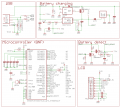
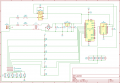
Here is a schematic that's not split into blocks.
no-block.PNG

I do not agree completely with the implied premise that one should avoid blocks and net labels instead of "wired" connections. Take this example from PAX Instruments:

View attachment 212050

That is only about 1/4 of the entire schematic. There are some common connections (such as VBUS) and many labels. Each block has a clear purpose. I would much rather see something like that than something with every single pin of a 66-pin MCU connected to something else with a "wire" on a single sheet, particularly if it is monochrome.

The purpose of a schematic is communication. Communication is facilitated by clarity of presentation and logical organization. You can go overboard with blocks or wires.
Yeah, I think it's the individual's preference.

Well, you got half of what I suggested. See the switch schematic in post #35. That is what I intended, though I was suggesting the internal pullup.

What you have will most likely not work. The internal pullup and the 10K resistor form a voltage divider, the output of which is unknown.

Bob
Take a look now. Let me know if this what you meant. And also, you suggest that I should drop the external 10k and use the internal pullup instead? After I get my schematic proper, I don't intend to use the Arduino board on my PCB, instead I will just include the uC in my design.
It is same as the circuit given in Arduino's official tutorials.


Is hardware debouncing better than having it in code?
 

MrChips

Joined Oct 2, 2009
34,814
It depends on the purpose of the switch. Not all switches need to be debounced.
Debouncing a single-pole switch in hardware is not foolproof. Software is an easier solution.
 
Top