Cotrolling LCD driver AY0438 with pic mictrontroller in C

Thread Starter

guetkar

Joined Mar 9, 2022
45
Hi guys,

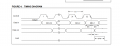
I have a problem, I trying to control the "AY0438 LCD driver" using a pic16 microcontroller, in the datasheet of AY0438 they give an example in assembler on the way it's controllered, but since I don't master assembler yet, I wanted to control it C.

The way the AY0438 work, is similar to I2C (but without adresse), I tryied different ways, but didn't work.

Any one did some thing similar, or have an idea on the way it's controlled ?

Thanks in advance

Karim
 

Attachments

JohnInTX

Joined Jun 26, 2012
4,787
Welcome to AAC!

It's not I2C, it's just a 32 bit shift register with a separate LOAD pin that copies the shifted value from the shift register to a static latch that drives the LCD segments. There is no decoding, 1 bit, 1 segment whatever that is connected to on the LCD glass.

To drive it is pretty simple. You set up a 32 bit register with the segment pattern then shift it out bit by bit and toggle the LOAD pin.

In C, you could use a 32 bit integer (an unsigned long in XC8), a 4 byte array or whatever you want. On a 32 bit unsigned long you would set the DATA IN pin to whatever the LSB of the long int is then toggle the CLOCK. The bit value is shifted into the shift register on the falling edge of CLOCK. After that, shift the long int left one bit and repeat the process. To extract the data bit from the long, you could use an AND function, something like
C:
void SendLCD(unsigned int data_word){
unsigned short i;

for(i=0;i<32;i++{  do 32 bits
 if (data_word & 0x8000)  // set DATA_OUT to value of MSbit of the data register
   DATA_OUT = 1;
 else
   DATA_OUT = 0;
 CLOCK_OUT = 1;  // toggle clock
 (clock width delay if necessary)
 CLOCK_OUT = 0;
 data_word = data_word << 1;  // shift next bit up
}
 LOAD_OUT = 1
 (load width delay)
 LOAD_OUT = 0;
}
You could also use a hardware SPI peripheral if you have it. The procedure is pretty much the same except that the SPI will do 8 bits at a time.

Good luck!
 

click_here

Joined Sep 22, 2020
548
What I'm about to say may not be a problem, because you are not currently planning to change compilers, but making sure you have a portable piece of code can be tricky...

Under the stdint.h header there is uint32_t (unsigned integer of 32 bits) which should be fine for most things (including the XC8 compiler).

However you should note that intN_t and uintN_t are actually optional and are not guarenteed to be there.

C99 7.18.1.1 Exact-width integer types
3 - "These types are optional. However, if an implementation provides integer types with widths of 8, 16, 32, or 64 bits, no padding bits, and (for the signed types) that have a two’s complement representation, it shall define the corresponding typedef names..."

For portable options...
There is a datatype called "uint_least32_t" that asks for memory that is large enough to hold an unsigned 32bit. There is another that asks for the fastest datatype that holds at least 32 bits uint_fast32_t (i.e. on a 64bit machine a 64 bit unsigned integer may be faster). And lastly there is the maximum that the environment can provide that has a minimum of 64bits "uintmax_t".

Otherwise an unsigned long int is guarenteed by the standards to have at least 32bits.

As I said, it probably won't affect you for this project, but is worth looking into :)
 
Last edited:

Thread Starter

guetkar

Joined Mar 9, 2022
45
Does anyone knows how to convert a float value, into a char array ? or other types of conversions that may be helpful for displaying in an LCD 7 segment (4 digits) screen ?

Thanks
 

JohnInTX

Joined Jun 26, 2012
4,787
Does anyone knows how to convert a float value, into a char array ? or other types of conversions that may be helpful for displaying in an LCD 7 segment (4 digits) screen ?

Thanks
sprintf(array,”%4.4f”,value);
converts 'value' to an ASCII string with DP in array.
Subtract 30h from each digit to get to 0h - 9h
Convert 0h-9h to segments

You can also mess with direct math on 'value'. Scale and convert to an integer then use / and % to extract the digits. It's kind of painful compared to sprintf but might save some codespace. This member is doing some of that here starting on line 286:
https://forum.allaboutcircuits.com/threads/temperature-indicator-project.185708/post-1718367
 
Last edited:

Thread Starter

guetkar

Joined Mar 9, 2022
45
Thanks @JohnInTX, instead of doing what you said "converting to ascii value, subtract 30h after ....", I found an already done table "character to segement code :

static const data_to_binary_char[] = {
{'A',0b1110111},{'B',0b1111111},{'C',0b1001110},{'D',0b1111110},{'E',0b1001111},{'F',0b1000111},
{'G',0b1011110},{'H',0b0110111},{'I',0b0110000},{'J',0b0111100},{'L',0b0001110},{'N',0b1110110},
{'O',0b1111110},{'P',0b1100111},{'R',0b0000101},{'S',0b1011011},{'T',0b0001111},{'U',0b0111110},
{'Y',0b0100111},{'[',0b1001110},{']',0b1111000},{'_',0b0001000},{'a',0b1110111},{'b',0b0011111},
{'c',0b0001101},{'d',0b0111101},{'e',0b1001111},{'f',0b1000111},{'g',0b1011110},{'h',0b0010111},
{'i',0b0010000},{'j',0b0111100},{'l',0b0001110},{'n',0b0010101},{'o',0b1111110},{'p',0b1100111},
{'r',0b0000101},{'s',0b1011011},{'t',0b0001111},{'u',0b0011100},{'y',0b0100111},{'-',0b0000001},
{' ',0b0000000},{'0',0b1111110},{'1',0b0110000},{'2',0b1101101},{'3',0b1111001},{'4',0b0110011},
{'5',0b1011011},{'6',0b1011111},{'7',0b1110000},{'8',0b1111111},{'9',0b1111011},{'/0',0b0000000},
};


This is useful, but I don't know how to manipulate this type of "table", I guess we don't manage it as a table !!
 

JohnInTX

Joined Jun 26, 2012
4,787
I found an already done table "character to segement code :
Right idea but wrong table. All you have are the digits 0-9, not the alphabetic characters.
Your flow using sprintf looks like this. In main:
  • After reading the ADC and scaling to a float with 4 digits before the decimal point.
  • sprintf(array,”%4.4f”,value); - converts the floating point number 'value; into an ASCII string and terminates the string with a 0x00. You don't care about the 0x00 but you do have to make space for it in the array. For example if 'value' is 1234 the buffer will be 31h, 32h, 33h, 34h,00h (not counting a possible decimal point for now)
  • To output the first digit you would:
  • Subtract 30h to convert ASCII to a raw binary digit. 31h-30h - 01h in this case.
  • Use the result of that subtraction as the index into an array of segment patterns:
  • unsigned char segment_patterns[] = {0b11111100, 0b01100000, 0b11001010, ... }; segment_patterns[0] is segment pattern to display '0', segment_patterns[1] is segment pattern to display '1' and so on for digits 0-9.
  • For the display refresh, after sprintf, convert each digit to a segment pattern in an array:
  • unsigned char digit_segments_out[4]; and load each element of the array with the segment pattern for the corresponding digit. That array becomes the segment pattern to output to the display by the interrupt driven multiplexer.

On each interrupt, select the next digit and get that segment pattern from the digit_segments_out(digit_number)
Your segments are on different ports so to output the segment pattern pass it to a routine that distributes the segment bits to the proper IO bits.
Select the appropriate digit and exit the interrupt routine.

There are other ways to get from float to ASCII to segment patterns. One alternate would be to scale the float up by multiplying by a factor that would yield a number in the range of 0.0 to 9999.0 then cast to an integer and either use sprintf with a %d specifier or use / and % operators to extract digits to use as indexes into the segment array.

The important point we are getting to is to build an array of quickly accessible segment patterns in main using whatever process you are comfortable with where time does not matter as much and output those patterns to the display digits one at a time to refresh the display under interrupt control where time does matter.

Good luck!
 
Last edited:

MrSalts

Joined Apr 2, 2020
2,767
John,

look again, he is not showing a complete alphabet - just the characters that can be imagined with a 7-segment digit. Notice that the D is the same as the numerals zero. The R and E and o are all possible as are A, b, c, (or C), d, E, and F if hex values are needed.
 

JohnInTX

Joined Jun 26, 2012
4,787
John,

look again, he is not showing a complete alphabet - just the characters that can be imagined with a 7-segment digit. Notice that the D is the same as the numerals zero. The R and E and o are all possible as are A, b, c, (or C), d, E, and F if hex values are needed.
I understand but it looked like overkill for just displaying numerical data. Still, it would be useful if TS wanted alphanumeric output.


The important point we are getting to is to build an array of quickly accessible segment patterns in main using whatever process you are comfortable with where time does not matter as much and output those patterns to the display digits one at a time to refresh the display under interrupt control where time does matter.
 

click_here

Joined Sep 22, 2020
548
Thanks @JohnInTX, instead of doing what you said "converting to ascii value, subtract 30h after ....", I found an already done table "character to segement code :

static const data_to_binary_char[] = {
{'A',0b1110111},{'B',0b1111111},{'C',0b1001110},{'D',0b1111110},{'E',0b1001111},{'F',0b1000111},
{'G',0b1011110},{'H',0b0110111},{'I',0b0110000},{'J',0b0111100},{'L',0b0001110},{'N',0b1110110},
{'O',0b1111110},{'P',0b1100111},{'R',0b0000101},{'S',0b1011011},{'T',0b0001111},{'U',0b0111110},
{'Y',0b0100111},{'[',0b1001110},{']',0b1111000},{'_',0b0001000},{'a',0b1110111},{'b',0b0011111},
{'c',0b0001101},{'d',0b0111101},{'e',0b1001111},{'f',0b1000111},{'g',0b1011110},{'h',0b0010111},
{'i',0b0010000},{'j',0b0111100},{'l',0b0001110},{'n',0b0010101},{'o',0b1111110},{'p',0b1100111},
{'r',0b0000101},{'s',0b1011011},{'t',0b0001111},{'u',0b0011100},{'y',0b0100111},{'-',0b0000001},
{' ',0b0000000},{'0',0b1111110},{'1',0b0110000},{'2',0b1101101},{'3',0b1111001},{'4',0b0110011},
{'5',0b1011011},{'6',0b1011111},{'7',0b1110000},{'8',0b1111111},{'9',0b1111011},{'/0',0b0000000},
};


This is useful, but I don't know how to manipulate this type of "table", I guess we don't manage it as a table !!
The 2D array is declared like this...
Code:
    static const char data_to_binary_char[][2] = 
    {
        {'A',0b1110111},{'B',0b1111111},{'C',0b1001110},{'D',0b1111110},{'E',0b1001111},{'F',0b1000111}, 
        {'G',0b1011110},{'H',0b0110111},{'I',0b0110000},{'J',0b0111100},{'L',0b0001110},{'N',0b1110110}, 
        {'O',0b1111110},{'P',0b1100111},{'R',0b0000101},{'S',0b1011011},{'T',0b0001111},{'U',0b0111110}, 
        {'Y',0b0100111},{'[',0b1001110},{']',0b1111000},{'_',0b0001000},{'a',0b1110111},{'b',0b0011111}, 
        {'c',0b0001101},{'d',0b0111101},{'e',0b1001111},{'f',0b1000111},{'g',0b1011110},{'h',0b0010111}, 
        {'i',0b0010000},{'j',0b0111100},{'l',0b0001110},{'n',0b0010101},{'o',0b1111110},{'p',0b1100111}, 
        {'r',0b0000101},{'s',0b1011011},{'t',0b0001111},{'u',0b0011100},{'y',0b0100111},{'-',0b0000001},
        {' ',0b0000000},{'0',0b1111110},{'1',0b0110000},{'2',0b1101101},{'3',0b1111001},{'4',0b0110011},
        {'5',0b1011011},{'6',0b1011111},{'7',0b1110000},{'8',0b1111111},{'9',0b1111011},{'/0',0b0000000}
    };
Hope that helps :)
 

Thread Starter

guetkar

Joined Mar 9, 2022
45
Thanks guys for help. The display is working fine, however I have a weird problem (if that happened to someone).
I display many things (for testing), I display a value, and keep it 1 second (using delay), the second value and waiting 1 second as well, and so on up to 5 value. The problem is that it shows the first value during one second, the second during one second as well, it shows quickly the third and it goes back to the first (it doesn't show the fourth and fifth ....).

If I reduce the delay time (making 0.5 s), it show the 1st value, the 2nd, 3rd the 4th, and fifth is shown quickly than it's supposed to.

I seems like, if the total delay is more than certain threshold, it restart again.

Does any one have an idea please ?

The code is (main):

char *message;
message = "test";

float value1 = -3.48;
float value2 = -6.53;
float value3 = -7.19;
float value4 = 23.28;


data1 = val_2_code(value1); // convert value to binary code
display(data1); // generate the binary on the output
__delay_ms(3000);


word = char_2_code(message); // convert message to binary code
display(word); // generate the binary on the output
__delay_ms(3000);


data2 = val_2_code(value2);
display(data2);
__delay_ms(3000);


data3 = val_2_code(value3);
display(data3);
__delay_ms(1000);


data4 = val_2_code(value4);
display(data4);
__delay_ms(1000);
 

Thread Starter

guetkar

Joined Mar 9, 2022
45
I didn't use any watch dog. Here is the code


Display code:
/*


#include <xc.h>
#include <stdio.h>
#include <stdlib.h>
#include <math.h>

#define _XTAL_FREQ 16000000

char val [54] = {'A','B','C','D','E','F','G','H','I','J','L','N','O','P','R',
'S','T','U','Y','[',']','_','a','b','c','d','e','f','g','h','i','j','l','n','o','p','r','s','t','u','y','-',' ','0','1','2','3','4','5','6','7','8','9','/0'};

unsigned long seg[54] =
{
0b11101110,0b11111110,0b10011100,0b11111100,0b10011110,0b10001110,
0b10111100,0b01101110,0b01100000,0b01111000,0b00011100,0b11101100,
0b11111100,0b11001110,0b00001010,0b10110110,0b00011110,0b01111100,
0b01001110,0b10011100,0b11110000,0b00010000,0b11101110,0b00111110,
0b00011010,0b01111010,0b10011110,0b10001110,0b10111100,0b00101110,
0b00100000,0b01111000,0b00011100,0b00101010,0b11111100,0b11001110,
0b00001010,0b10110110,0b00011110,0b00111000,0b01001110,0b00000010,
0b00000000,0b11111100,0b01100000,0b11011010,0b11110010,0b01100110,
0b10110110,0b10111110,0b11100000,0b11111110,0b11110110,0b00000000
};

unsigned long val_2_code (float value)
{
    int i = 0;
    int j = 0;
    unsigned long  temp_result;
    unsigned long  dicimal_id = 0x00000000;
    unsigned long  coded_value =0x00000000;
    char char_val[5];
    if ((-10 < value ) & (value < 100))
        sprintf (char_val,"%2.2f",value);
    else if (value < -10)
        sprintf (char_val,"%2.1f",value);
      if     (char_val[1]== '.')
           dicimal_id = 0x01000000;
      else if(char_val[2]== '.')
           dicimal_id = 0x00010000;
      else if(char_val[3]== '.')
           dicimal_id = 0x00000100;
      else
           dicimal_id = 0x00000000;
          for (i=39;i<52;i++)
      {
          if (char_val[0] == val[i])
            {
              coded_value = (( coded_value | seg[i] ));
              if (j<3)
              {
              coded_value = coded_value <<8;
              j++;
              }
            }
      }
            for (i=35;i<52;i++)
      {
          if (char_val[1] == val[i])
            {
              coded_value = ((coded_value | seg[i]));
              if (j<3)
              {
              coded_value = coded_value << 8;
              j++;
              }
              temp_result = coded_value ;
            }
      }
          for (i=35; i<52; i++)
      {
          if (char_val[2] == val[i])
            {
              coded_value = ((coded_value | seg[i]));
              if(j<3)
              {
              coded_value = coded_value <<8;
              j++;
              }
              temp_result = coded_value ;
            }
      }
          for (i=35; i<52; i++)
      {
          if (char_val[3] == val[i])
          {
              coded_value = (( coded_value | seg[i]));
              if (j<3)
              {
              coded_value = coded_value <<8;
              j++;
              }
          }
      }
          for (i=35; i<52; i++)
      {
          if (char_val [4] == val[i])
            {
              coded_value = (coded_value | (seg[i]));
              if (j<3)
              {
              coded_value = coded_value <<8;
              j++;
              }
            }
      }
        coded_value = coded_value | dicimal_id;
        return coded_value;
}

void display (unsigned long coded_value)
{
    TRISCbits.TRISC1 = 0; // data
    TRISCbits.TRISC2 = 0; // clock
    TRISCbits.TRISC3 = 0; // Load
    PORTCbits.RC1 = 0; // data
    PORTCbits.RC2 = 0; // clock
    PORTCbits.RC3 = 0; // Load

    unsigned long a = 1;
    int i = 0;
    for(i=0;i<32;i++)
    {
        if ((coded_value & a ) == a)
        {
        PORTCbits.RC2 = 1; //clock
        _delay(2);
        PORTCbits.RC1 = 1; //data i
        _delay(5);
        PORTCbits.RC2 = 0; //clock
        _delay(5);
        }
        else
        {
        PORTCbits.RC2 = 1; //clock
        _delay(2);
        PORTCbits.RC1 = 0; //data
        _delay(5);
        PORTCbits.RC2 = 0; //clock
        _delay(5);
        }
        a = a<< 1;
    }
    PORTCbits.RC3 = 1; // Load
    _delay(5);
    PORTCbits.RC3 = 0; // Load
}

unsigned long char_2_code (char *word)
{
    int i = 0;
    //int j = 0;
    unsigned long  coded_value =0x00000000;
            for (i=0; i<52; i++)
      {
          if (word[0] == val[i])
            {
            coded_value = (( coded_value | seg[i] ));
            coded_value = coded_value <<8;
            }
      }
            for (i=0;i<52;i++)
      {
          if (word[1] == val[i])
            {
            coded_value = ((coded_value | seg[i]));
            coded_value = coded_value <<8;
            }
      }
          for (i=0; i<52; i++)
      {
          if (word[2] == val[i])
            {
            coded_value = ((coded_value | seg[i]));
            coded_value = coded_value <<8;
            }
      }
          for (i=0;i<52;i++)
      {
          if (word[3] == val[i])
          {
            coded_value = (( coded_value | seg[i]));
          }
      }
    return coded_value;
}


void main(void)
{
  
OSCCON = 0x7A;

unsigned long data1, data2, data3, data4, word;
char *message;
message = "test";

float value1 = -3.48;
float value2 = -6.53;
float value3 = -7.19;
float value4 = 23.28;


data1 = val_2_code(value1);
display(data1);
__delay_ms(1000);


word = char_2_code(message);
display(word);
__delay_ms(1000);


data2 = val_2_code(value2);
display(data2);
__delay_ms(1000);


data3 = val_2_code(value3);
display(data3);
__delay_ms(1000);


data4 = val_2_code(value4);
display(data4);
__delay_ms(1000);


}
 

click_here

Joined Sep 22, 2020
548
I didn't use any watch dog. Here is the code


Display code:
/*


#include <xc.h>
#include <stdio.h>
#include <stdlib.h>
#include <math.h>

#define _XTAL_FREQ 16000000

char val [54] = {'A','B','C','D','E','F','G','H','I','J','L','N','O','P','R',
'S','T','U','Y','[',']','_','a','b','c','d','e','f','g','h','i','j','l','n','o','p','r','s','t','u','y','-',' ','0','1','2','3','4','5','6','7','8','9','/0'};

unsigned long seg[54] =
{
0b11101110,0b11111110,0b10011100,0b11111100,0b10011110,0b10001110,
0b10111100,0b01101110,0b01100000,0b01111000,0b00011100,0b11101100,
0b11111100,0b11001110,0b00001010,0b10110110,0b00011110,0b01111100,
0b01001110,0b10011100,0b11110000,0b00010000,0b11101110,0b00111110,
0b00011010,0b01111010,0b10011110,0b10001110,0b10111100,0b00101110,
0b00100000,0b01111000,0b00011100,0b00101010,0b11111100,0b11001110,
0b00001010,0b10110110,0b00011110,0b00111000,0b01001110,0b00000010,
0b00000000,0b11111100,0b01100000,0b11011010,0b11110010,0b01100110,
0b10110110,0b10111110,0b11100000,0b11111110,0b11110110,0b00000000
};

unsigned long val_2_code (float value)
{
    int i = 0;
    int j = 0;
    unsigned long  temp_result;
    unsigned long  dicimal_id = 0x00000000;
    unsigned long  coded_value =0x00000000;
    char char_val[5];
    if ((-10 < value ) & (value < 100))
        sprintf (char_val,"%2.2f",value);
    else if (value < -10)
        sprintf (char_val,"%2.1f",value);
      if     (char_val[1]== '.')
           dicimal_id = 0x01000000;
      else if(char_val[2]== '.')
           dicimal_id = 0x00010000;
      else if(char_val[3]== '.')
           dicimal_id = 0x00000100;
      else
           dicimal_id = 0x00000000;
          for (i=39;i<52;i++)
      {
          if (char_val[0] == val[i])
            {
              coded_value = (( coded_value | seg[i] ));
              if (j<3)
              {
              coded_value = coded_value <<8;
              j++;
              }
            }
      }
            for (i=35;i<52;i++)
      {
          if (char_val[1] == val[i])
            {
              coded_value = ((coded_value | seg[i]));
              if (j<3)
              {
              coded_value = coded_value << 8;
              j++;
              }
              temp_result = coded_value ;
            }
      }
          for (i=35; i<52; i++)
      {
          if (char_val[2] == val[i])
            {
              coded_value = ((coded_value | seg[i]));
              if(j<3)
              {
              coded_value = coded_value <<8;
              j++;
              }
              temp_result = coded_value ;
            }
      }
          for (i=35; i<52; i++)
      {
          if (char_val[3] == val[i])
          {
              coded_value = (( coded_value | seg[i]));
              if (j<3)
              {
              coded_value = coded_value <<8;
              j++;
              }
          }
      }
          for (i=35; i<52; i++)
      {
          if (char_val [4] == val[i])
            {
              coded_value = (coded_value | (seg[i]));
              if (j<3)
              {
              coded_value = coded_value <<8;
              j++;
              }
            }
      }
        coded_value = coded_value | dicimal_id;
        return coded_value;
}

void display (unsigned long coded_value)
{
    TRISCbits.TRISC1 = 0; // data
    TRISCbits.TRISC2 = 0; // clock
    TRISCbits.TRISC3 = 0; // Load
    PORTCbits.RC1 = 0; // data
    PORTCbits.RC2 = 0; // clock
    PORTCbits.RC3 = 0; // Load

    unsigned long a = 1;
    int i = 0;
    for(i=0;i<32;i++)
    {
        if ((coded_value & a ) == a)
        {
        PORTCbits.RC2 = 1; //clock
        _delay(2);
        PORTCbits.RC1 = 1; //data i
        _delay(5);
        PORTCbits.RC2 = 0; //clock
        _delay(5);
        }
        else
        {
        PORTCbits.RC2 = 1; //clock
        _delay(2);
        PORTCbits.RC1 = 0; //data
        _delay(5);
        PORTCbits.RC2 = 0; //clock
        _delay(5);
        }
        a = a<< 1;
    }
    PORTCbits.RC3 = 1; // Load
    _delay(5);
    PORTCbits.RC3 = 0; // Load
}

unsigned long char_2_code (char *word)
{
    int i = 0;
    //int j = 0;
    unsigned long  coded_value =0x00000000;
            for (i=0; i<52; i++)
      {
          if (word[0] == val[i])
            {
            coded_value = (( coded_value | seg[i] ));
            coded_value = coded_value <<8;
            }
      }
            for (i=0;i<52;i++)
      {
          if (word[1] == val[i])
            {
            coded_value = ((coded_value | seg[i]));
            coded_value = coded_value <<8;
            }
      }
          for (i=0; i<52; i++)
      {
          if (word[2] == val[i])
            {
            coded_value = ((coded_value | seg[i]));
            coded_value = coded_value <<8;
            }
      }
          for (i=0;i<52;i++)
      {
          if (word[3] == val[i])
          {
            coded_value = (( coded_value | seg[i]));
          }
      }
    return coded_value;
}


void main(void)
{
 
OSCCON = 0x7A;

unsigned long data1, data2, data3, data4, word;
char *message;
message = "test";

float value1 = -3.48;
float value2 = -6.53;
float value3 = -7.19;
float value4 = 23.28;


data1 = val_2_code(value1);
display(data1);
__delay_ms(1000);


word = char_2_code(message);
display(word);
__delay_ms(1000);


data2 = val_2_code(value2);
display(data2);
__delay_ms(1000);


data3 = val_2_code(value3);
display(data3);
__delay_ms(1000);


data4 = val_2_code(value4);
display(data4);
__delay_ms(1000);


}
Where are your configuration bits?

See here
 
Top