Correct LOGIC circuit?

sghioto

Joined Dec 31, 2017
8,634
Would this then mean that I can connect the output of the 4011 directly to the signal pins of the sound module (with a resistor in series to go from 12V to 5V)?
Not with resistors but using diodes D1 and D2 for isolation as seen in post #15.
If the 4011 is connected to the 5 volt supply the diodes can be eliminated but 2 resistors are needed to drop the output on pin3 of U1 to 5 volts, so same number of parts.
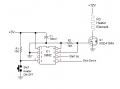
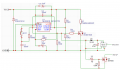
Option #3:
1750886636105.png
 
Last edited:

Thread Starter

juliaaaan

Joined Jan 22, 2025
45
Either one is fine. Personally I like option #3.
Which ever one you think is easier to construct.
Then we'll go with option #3. I just have e few questions about the following:


  • When the MOSFET is turned on, it will pull the startup pin to ground (which is what we want). I assume the circuit with the 555 timer does the same for the shutdown sound. I just don't understand how this happens, could you explain it?

  • Since only ground is being switched here and there's no voltage present on the pins when the output pins are not being used (and thus not pulled to ground), there's no need for resistors to lower the voltage from 12V to 5V, correct?

  • Is there a possible replacement for the 2N7000 MOSFET that has an SMD package (due to lack of space for the holes for the pins)? Same for the diode. I was also wondering if it was possible to replace the capacitors to ceramic ones due to the lower height of de package ( I don't want to compromise the functionality of the circuit, so if electrolytic capacitors are truly better, I'll have to modify some of the space where the board will be placed)
 
Last edited:

sghioto

Joined Dec 31, 2017
8,634
I assume the circuit with the 555 timer does the same for the shutdown sound. I just don't understand how this happens, could you explain it?
When pin3 of U1 is High that supplies power to U2 through diode D1 and charges C6.
Since pin2 of U2 is grounded the discharge pin7 of U2 is an open connection immediately.
When pin3 of U1 goes Low that pulls reset pin4 of U2 Low which in turn pulls pin7 Low briefly as C6 discharges through U2.
D1 blocks C6 from discharging back through U1.
No need for diodes or resistors on the output as pin7 of U2 is an open collector transistor and Q2 is open drain.
If U2 is replaced with a cmos 555 (LMC555) C6 can be reduced to 1uf.
For C5 and C6 use surface mount tantalum capacitors. D1 is available in a surface mount package also.
Replace Q2 with a 2N7002 (surface mount).
 
Last edited:
Another option is a cheap microcontroller. Ardruino Uno (Ardruino C++ code) or Pi Pico (Micropython code) are sufficient for this project. Your program is a few if-statements and is very little code to learn. I used A.I. to generate two examples for you. deepai.org is a pretty good free no signup chatbot to help you learn code which is very useful when combined with other resources.

C++:
// Pin numbers
const int buttonPin = 2;   // Pin connected to the button
const int outputA = 3;     // First output (e.g., LED or relay)
const int outputB = 4;     // Second output

// Variables to keep track of button state
int lastButtonState = HIGH;   // Previous reading of the button (start with HIGH because of pull-up)
int cycleStep = 0;            // 0: waiting for first press, 1: outputA active, 2: outputB active

void setup() {
  // Set the button pin as input with internal pull-up resistor
  pinMode(buttonPin, INPUT_PULLUP);
 
  // Set the output pins as outputs
  pinMode(outputA, OUTPUT);
  pinMode(outputB, OUTPUT);
 
  // Make sure outputs are off at the start
  digitalWrite(outputA, LOW);
  digitalWrite(outputB, LOW);
}

void loop() {
  // Read the current state of the button
  int currentButtonState = digitalRead(buttonPin);
 
  // Check if the button was just pressed (transition from HIGH to LOW)
  if (lastButtonState == HIGH && currentButtonState == LOW) {
    delay(50); // Short delay for button debounce
    
    // Wait until the button is released
    while (digitalRead(buttonPin) == LOW) {
      delay(10);
    }
    
    // Depending on the current step, turn on the correct output
    if (cycleStep == 0) {
      // First press: turn on outputA for 1 second
      digitalWrite(outputA, HIGH); // Turn on outputA
      delay(1000);                 // Wait 1 second
      digitalWrite(outputA, LOW);  // Turn off outputA
      cycleStep = 1;               // Next time, turn on outputB
    } else if (cycleStep == 1) {
      // Second press: turn on outputB for 1 second
      digitalWrite(outputB, HIGH); // Turn on outputB
      delay(1000);                 // Wait 1 second
      digitalWrite(outputB, LOW);  // Turn off outputB
      cycleStep = 0;               // Reset to wait for first press again
    }
  }

  // Save the current button state for the next loop
  lastButtonState = currentButtonState;
}
Python:
from machine import Pin
import utime

# Set up pins
button = Pin(2, Pin.IN, Pin.PULL_UP)      # Button connected to GPIO 2
outputA = Pin(3, Pin.OUT)                 # Output A on GPIO 3
outputB = Pin(4, Pin.OUT)                 # Output B on GPIO 4

last_button_state = 1   # Button not pressed (pull-up)
cycle_step = 0          # 0: wait for first press, 1: outputA active, 2: outputB active

while True:
    current_button_state = button.value()

    # Detect button press (from high to low)
    if last_button_state == 1 and current_button_state == 0:
        utime.sleep_ms(50)  # debounce delay
        # Wait until button is released
        while button.value() == 0:
            utime.sleep_ms(10)

        # Toggle outputs based on cycle_step
        if cycle_step == 0:
            # Turn on outputA for 1 second
            outputA.value(1)
            utime.sleep(1)
            outputA.value(0)
            cycle_step = 1
        elif cycle_step == 1:
            # Turn on outputB for 1 second
            outputB.value(1)
            utime.sleep(1)
            outputB.value(0)
            cycle_step = 0

    last_button_state = current_button_state
    utime.sleep_ms(10)  # small delay to prevent high CPU usage
And here is an A.I. generated summary of what these programs do:

"Certainly! Here's a high-level explanation of what each program (Arduino, Python, MicroPython) is doing:

---

### **Arduino Program (C++):**

**Purpose:**
Waits for a button press, then alternates turning on one of two outputs (like LEDs or other devices) each time the button is pressed. Each output stays on for 1 second.

**High-Level Steps:**

1. **Setup:**
- Configure the button pin with an internal pull-up resistor (so it reads HIGH when not pressed).
- Configure two output pins (outputA and outputB) as outputs.
- Turn off both outputs initially.

2. **Main Loop:**
- Continuously check the button state.
- Detect when the button transitions from not pressed to pressed (HIGH to LOW).
- When a press is detected:
- Wait briefly to debounce (avoid false triggers).
- Wait until the button is released.
- Depending on the current cycle step:
- Turn on outputA for 1 second, then turn it off.
- Or turn on outputB for 1 second, then turn it off.
- Switch to the next cycle step (so next press activates the other output).

**Result:**
Each button press causes one of the outputs to turn on for 1 second, alternating between the two outputs.

---

### **Python Program (for Raspberry Pi with gpiozero):**

**Purpose:**
Similar behavior: wait for button presses, then turn on one of two outputs for 1 second each time, alternating on each press.

**High-Level Steps:**

1. **Setup:**
- Assign GPIO pins for a button and two outputs (like LEDs).
- Initialize the outputs (LEDs) as off.

2. **Event Handling:**
- When the button is pressed, execute a function (`handle_press`).
- Inside this function:
- Check the current cycle step.
- Turn on the corresponding output (LED) for 1 second.
- Turn it off afterward.
- Switch to the other output for the next press.

3. **Main Loop:**
- Keep the program running indefinitely, waiting for button presses to trigger the handler.

**Result:**
Each button press lights up an output (LED) for 1 second, alternating between the two outputs.

---

### **MicroPython Program (for ESP32 or similar):**

**Purpose:**
Same as above: respond to button presses, turn on one of two outputs for 1 second, then switch to the other output on the next press.

**High-Level Steps:**

1. **Setup:**
- Configure GPIO pins for the button (with internal pull-up) and two outputs.

2. **Main Loop:**
- Continuously read the button state.
- Detect when the button transitions from not pressed to pressed.
- When detected:
- Debounce briefly to avoid false triggers.
- Wait until the button is released.
- Depending on the current cycle state:
- Turn on outputA for 1 second, then turn it off.
- Or turn on outputB for 1 second, then turn it off.
- Switch to the other output for the next press.

**Result:**
Same as the others: each press causes one output to turn on for 1 second, alternating outputs with each press.

---

### **Summary (All programs):**

- They **wait for a button press**.
- When pressed, they **activate one of two outputs** (like LEDs or other devices) **for 1 second**.
- They **alternate** which output turns on each time the button is pressed.
- They **repeat this cycle indefinitely**.

Hope that makes it clear! Let me know if you'd like me to clarify any part."
 

Thread Starter

juliaaaan

Joined Jan 22, 2025
45
When pin3 of U1 is High that supplies power to U2 through diode D1 and charges C6.
Since pin2 of U2 is grounded the discharge pin7 of U2 is an open connection immediately.
When pin3 of U1 goes Low that pulls reset pin4 of U2 Low which in turn pulls pin7 Low briefly as C6 discharges through U2.
D1 blocks C6 from discharging back through U1.
No need for diodes or resistors on the output as pin7 of U2 is an open collector transistor and Q2 is open drain.
If U2 is replaced with a cmos 555 (LMC555) C6 can be reduced to 1uf.
For C5 and C6 use surface mount tantalum capacitors. D1 is available in a surface mount package also.
Replace Q2 with a 2N7002 (surface mount).
Thanks a lot, I will go for this route for now.
 

Thread Starter

juliaaaan

Joined Jan 22, 2025
45
Another option is a cheap microcontroller. Ardruino Uno (Ardruino C++ code) or Pi Pico (Micropython code) are sufficient for this project. Your program is a few if-statements and is very little code to learn. I used A.I. to generate two examples for you. deepai.org is a pretty good free no signup chatbot to help you learn code which is very useful when combined with other resources.

C++:
// Pin numbers
const int buttonPin = 2;   // Pin connected to the button
const int outputA = 3;     // First output (e.g., LED or relay)
const int outputB = 4;     // Second output

// Variables to keep track of button state
int lastButtonState = HIGH;   // Previous reading of the button (start with HIGH because of pull-up)
int cycleStep = 0;            // 0: waiting for first press, 1: outputA active, 2: outputB active

void setup() {
  // Set the button pin as input with internal pull-up resistor
  pinMode(buttonPin, INPUT_PULLUP);

  // Set the output pins as outputs
  pinMode(outputA, OUTPUT);
  pinMode(outputB, OUTPUT);

  // Make sure outputs are off at the start
  digitalWrite(outputA, LOW);
  digitalWrite(outputB, LOW);
}

void loop() {
  // Read the current state of the button
  int currentButtonState = digitalRead(buttonPin);

  // Check if the button was just pressed (transition from HIGH to LOW)
  if (lastButtonState == HIGH && currentButtonState == LOW) {
    delay(50); // Short delay for button debounce
  
    // Wait until the button is released
    while (digitalRead(buttonPin) == LOW) {
      delay(10);
    }
  
    // Depending on the current step, turn on the correct output
    if (cycleStep == 0) {
      // First press: turn on outputA for 1 second
      digitalWrite(outputA, HIGH); // Turn on outputA
      delay(1000);                 // Wait 1 second
      digitalWrite(outputA, LOW);  // Turn off outputA
      cycleStep = 1;               // Next time, turn on outputB
    } else if (cycleStep == 1) {
      // Second press: turn on outputB for 1 second
      digitalWrite(outputB, HIGH); // Turn on outputB
      delay(1000);                 // Wait 1 second
      digitalWrite(outputB, LOW);  // Turn off outputB
      cycleStep = 0;               // Reset to wait for first press again
    }
  }

  // Save the current button state for the next loop
  lastButtonState = currentButtonState;
}
Python:
from machine import Pin
import utime

# Set up pins
button = Pin(2, Pin.IN, Pin.PULL_UP)      # Button connected to GPIO 2
outputA = Pin(3, Pin.OUT)                 # Output A on GPIO 3
outputB = Pin(4, Pin.OUT)                 # Output B on GPIO 4

last_button_state = 1   # Button not pressed (pull-up)
cycle_step = 0          # 0: wait for first press, 1: outputA active, 2: outputB active

while True:
    current_button_state = button.value()

    # Detect button press (from high to low)
    if last_button_state == 1 and current_button_state == 0:
        utime.sleep_ms(50)  # debounce delay
        # Wait until button is released
        while button.value() == 0:
            utime.sleep_ms(10)

        # Toggle outputs based on cycle_step
        if cycle_step == 0:
            # Turn on outputA for 1 second
            outputA.value(1)
            utime.sleep(1)
            outputA.value(0)
            cycle_step = 1
        elif cycle_step == 1:
            # Turn on outputB for 1 second
            outputB.value(1)
            utime.sleep(1)
            outputB.value(0)
            cycle_step = 0

    last_button_state = current_button_state
    utime.sleep_ms(10)  # small delay to prevent high CPU usage
And here is an A.I. generated summary of what these programs do:

"Certainly! Here's a high-level explanation of what each program (Arduino, Python, MicroPython) is doing:

---

### **Arduino Program (C++):**

**Purpose:**
Waits for a button press, then alternates turning on one of two outputs (like LEDs or other devices) each time the button is pressed. Each output stays on for 1 second.

**High-Level Steps:**

1. **Setup:**
- Configure the button pin with an internal pull-up resistor (so it reads HIGH when not pressed).
- Configure two output pins (outputA and outputB) as outputs.
- Turn off both outputs initially.

2. **Main Loop:**
- Continuously check the button state.
- Detect when the button transitions from not pressed to pressed (HIGH to LOW).
- When a press is detected:
- Wait briefly to debounce (avoid false triggers).
- Wait until the button is released.
- Depending on the current cycle step:
- Turn on outputA for 1 second, then turn it off.
- Or turn on outputB for 1 second, then turn it off.
- Switch to the next cycle step (so next press activates the other output).

**Result:**
Each button press causes one of the outputs to turn on for 1 second, alternating between the two outputs.

---

### **Python Program (for Raspberry Pi with gpiozero):**

**Purpose:**
Similar behavior: wait for button presses, then turn on one of two outputs for 1 second each time, alternating on each press.

**High-Level Steps:**

1. **Setup:**
- Assign GPIO pins for a button and two outputs (like LEDs).
- Initialize the outputs (LEDs) as off.

2. **Event Handling:**
- When the button is pressed, execute a function (`handle_press`).
- Inside this function:
- Check the current cycle step.
- Turn on the corresponding output (LED) for 1 second.
- Turn it off afterward.
- Switch to the other output for the next press.

3. **Main Loop:**
- Keep the program running indefinitely, waiting for button presses to trigger the handler.

**Result:**
Each button press lights up an output (LED) for 1 second, alternating between the two outputs.

---

### **MicroPython Program (for ESP32 or similar):**

**Purpose:**
Same as above: respond to button presses, turn on one of two outputs for 1 second, then switch to the other output on the next press.

**High-Level Steps:**

1. **Setup:**
- Configure GPIO pins for the button (with internal pull-up) and two outputs.

2. **Main Loop:**
- Continuously read the button state.
- Detect when the button transitions from not pressed to pressed.
- When detected:
- Debounce briefly to avoid false triggers.
- Wait until the button is released.
- Depending on the current cycle state:
- Turn on outputA for 1 second, then turn it off.
- Or turn on outputB for 1 second, then turn it off.
- Switch to the other output for the next press.

**Result:**
Same as the others: each press causes one output to turn on for 1 second, alternating outputs with each press.

---

### **Summary (All programs):**

- They **wait for a button press**.
- When pressed, they **activate one of two outputs** (like LEDs or other devices) **for 1 second**.
- They **alternate** which output turns on each time the button is pressed.
- They **repeat this cycle indefinitely**.

Hope that makes it clear! Let me know if you'd like me to clarify any part."
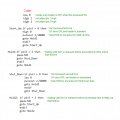
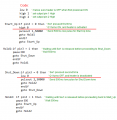
A Picaxe 08M2 8 pin microchip is sufficient if one wishes to go that route.
Circuit schematic:

View attachment 351760
View attachment 351765
I still have some questions about this setup. If I understand correctly, pin 7 (0 in orange) only checks if the input to the MOSFET is low when the car starts. I have the following questions about this:


  • I assume the 555 timer circuit is still necessary with this code. If so, this circuit will apply 12 volts to this input of the MOSFET and therefore also to pin 7 (0 in orange). Is this harmful to the microcontroller? This also applies to the button (pin 4 (3 in orange)).
  • Is it not possible for the microcontroller to take over the function of the 555 timer? (When the button is pressed, pin 7 (0 in orange) goes high, turning on the MOSFET. At the same time, pin 6 (1 in orange) is held high for 1 second for the startup sound. When the button is pressed again, pin 7 (0 in orange) goes low, turning off the seat heater, and simultaneously pin 5 (2 in orange) is held high for 1 second for the shutdown sound.)
Additionally, I was wondering if there is a replacement microcontroller for the Picaxe 08M2 that is also available at LCSC Electronics.
 
Last edited:

sghioto

Joined Dec 31, 2017
8,634
Correct, the micro replaces both 555 circuits and Q2. Operates exactly as you described except the outputs on pins 5 and 6 (1 and 2) are active lows directly connected to the sound amp inputs.
The Mico is powered by the same 5 volt regulator as the sound amp.
 

Thread Starter

juliaaaan

Joined Jan 22, 2025
45
Correct, the micro replaces both 555 circuits and Q2. Operates exactly as you described except the outputs on pins 5 and 6 (1 and 2) are active lows directly connected to the sound amp inputs.
The Mico is powered by the same 5 volt regulator as the sound amp.
Could you point out where in the code pin 7 (0) is controlled to turn on and off (to activate the MOSFET and thus the control heating)?
 

sghioto

Joined Dec 31, 2017
8,634
I did, the 08M2 which is probably the easiest to program directly from computer to chip.
Other than that I don't have any experience with other micros.
Besides the 08M2 maybe an Atmega8.
 
Last edited:

Thread Starter

juliaaaan

Joined Jan 22, 2025
45
I did, the 08M2 which is probably the easiest to program directly from computer to chip.
Other than that I don't have any experience with other micros.
Besides the 08M2 maybe an Atmega8.
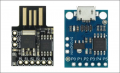
don't you need a flasher board to flash to code from the computer to te microcontroller?
 
Top