Connecting mobile phone to computer? Building a call center answering machine...

Thread Starter

bulaboo

Joined Aug 20, 2022
17
Hello everybody!

Any ideas how to connect a mobile phone to a computer? The purpose is to get the computer to answer phone calls. You know, ”press one if you want...”.
That shouldn't be too difficult. I manage basic electronics, can do some programming, I even understand some of it. But, what would be the easiest, practical way? I did not find and commercial products (I used to have Ovolab, which worked fine).

planB.jpg

My idea so far is:

1) some simple mobile phone that I wire thru the earbud/mic jack to the computer.
I guess the computer can listen, play sound and even answer calls thru that?

2) some software that listens to dtmf -signals and doing stuff (recording, playing instructions etc) depending on that.

Is there any major bug in that plan above?
What would be the proper connection, some USB-to-mic/speaker system? I guess there are available some. How about the answering, that should be 1 bit out. Anything else?

All ideas welcome! Do you know if there are some commercial software or systems available? For Mac?
Thanks in advance!
 

wayneh

Joined Sep 9, 2010
18,088
Years ago I recall using software that turned your Mac into a phone and an answering machine. I don’t remember the name, nor the details of how the phone line got attached. It was definitely a wired connection.

These days I can answer or make calls with my Mac as long as my cellphone is nearby (on the same WiFi, I suppose). There’s probably software that will answer an incoming call and go from there, just like receiving a fax. Sorry I don’t have a recommendation other than to search for macOS phone apps.
 

MisterBill2

Joined Jan 23, 2018
27,181
I see a whole number of bugs: First, how is the phone answered?? Min is answered sliding an icon on the screen, Then, how to sense that it is answered so that the computer can decide what to do next?? Figure those out and I will list more bugs. OR others can do it.
 

Thread Starter

bulaboo

Joined Aug 20, 2022
17
Years ago I recall using software that turned your Mac into a phone and an answering machine. I don’t remember the name, nor the details of how the phone line got attached. It was definitely a wired connection.
That could be that OVOLAB-system I used. It was the software + dongle between Mac and the landline. Worked just fine enough but got broken later...
These days I can answer or make calls with my Mac as long as my cellphone is nearby (on the same WiFi, I suppose). ..
Yeah, that is definetly one way to do it. However, I try to resist that for a while because it’s kind of too complicated — too many software layers involved.
 

Thread Starter

bulaboo

Joined Aug 20, 2022
17
I see a whole number of bugs: First, how is the phone answered?? Min is answered sliding an icon on the screen, Then, how to sense that it is answered so that the computer can decide what to do next?? Figure those out and I will list more bugs. OR others can do it.
Good points.
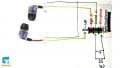
I think the easiest way to get the computer answering the call is using the phone’s earbud connection. Doesn’t most phones, new and old ones, make it possible to answer the incoming call by pressing some headset button? Needs only 1 bit from the computer.
airbud.jpg
 

Ya’akov

Joined Jan 27, 2019
10,226
Welcome to AAC.

What you want to do is generally called IVR (Interactive Voice Response). Depending on where you live, I would be much more inclined to solve this problem using a VoIP provider that offers IVR (there are many, I use VoIP.ms and I am very happy with them).

With this approach you would buy a DID (Direct Inward Dial)—Telco/VoIP jargon for a phone number—which would cost you about one dollar and a dollar a month (US). Then you can use the web interface to create the IVR which is basically a list of options related to particular DTMF entries.

Thanks to an extensive API, and voicemail, I think you'd be able to do what you want without hardware and for low cost. The rates for calls are small fractions of a cent per minute so the dollar or so for the DID plus the actual call time is all you will pay.

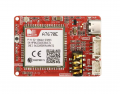
If you really want to do this in hardware, then I would suggest using a breakout using a SIMCOM module that supports 4G and voice calls like the A7670E. These are readily available, for example (only) here.

1737019405083.png
The module just takes a SIM card and is controlled by an AT command set through the UART (serial) interface. You can answer calls, hang up, place calls, &c. via computer control, and the headphone jack offers an audio interface for voice.

Alternatively, you could get a "hat" version and place it on a cheap RPi Zero front-ending the connection to the computer, or providing all the functionality itself. I would lean to this approach considering the low cost and the freeing of the computer.
 

BobTPH

Joined Jun 5, 2013
11,463
I would look into how generic smart watches work. They interface to an app via bluetooth and can answer and initiate calls.
 

MisterBill2

Joined Jan 23, 2018
27,181
OK, a bunch of good ideas, and none using the existing phone with only a connection to the earphone jack. So even the simple options are totally different and more complex.
 

Thread Starter

bulaboo

Joined Aug 20, 2022
17
What you want to do is generally called IVR (Interactive Voice Response). Depending on where you live, I would be much more inclined to solve this problem using a VoIP provider that offers IVR (there are many, I use VoIP.ms and I am very happy with them)....
Good idea, thanks, but nope.
I have some reasons why I try to stay away from voip, cloud-services and such.
The goal is to make a concept for simple, cheap, stand-alone solution.
Othervise that would be good.
 

Thread Starter

bulaboo

Joined Aug 20, 2022
17
OK, a bunch of good ideas, and none using the existing phone with only a connection to the earphone jack. So even the simple options are totally different and more complex.
Correct. I found some promising instructions already. It looks like this phone connecting to a computer thru mic-earbud-cable is easier than I assumed...
 

Thread Starter

bulaboo

Joined Aug 20, 2022
17
So what? I don’t understand the reluctance. Your Mac can be set to auto-answer incoming calls. Isn’t that a huge portion of the solution you’re looking for?
I try to keep this project easy, lean and elastic. For example, years ago when I used some other systems I bumped to wall when trying to merge to other functions. So, if I keep this self-made and simple, then I imagine it’s easier for me :)
 
Top