Connecting microswitches to Arduino Leonardo

djsfantasi

Joined Apr 11, 2010
9,237
What are you switching, in other words, what are they used for? Because there are several ways to connect them.

The simplest is to connect the common terminal to the Leonardo GPIO pin and the NO switch terminal to ground. If you program the pin to be INPUT_PULLUP, then when you input from the pin, it will be high when the switch is not pressed and low when it is. While you may think this is non-intuitive, it really doesn’t matter to the software.
 

djsfantasi

Joined Apr 11, 2010
9,237
I forgot to add, the Leonardo has 20 digital pins, leaving you 5 for other things.

There are ways to connect that many switches that don’t need as many pins. But it’s much more complicated.
 

Jerry-Hat-Trick

Joined Aug 31, 2022
776
To use less pins, a couple of 4017 decade counters would be a simple way to multiplex. Depending on the application some debounce code may be necessary
 

Thread Starter

DragonTheta

Joined Feb 6, 2022
89
What are you switching, in other words, what are they used for? Because there are several ways to connect them.

The simplest is to connect the common terminal to the Leonardo GPIO pin and the NO switch terminal to ground. If you program the pin to be INPUT_PULLUP, then when you input from the pin, it will be high when the switch is not pressed and low when it is. While you may think this is non-intuitive, it really doesn’t matter to the software.
Thank you. I'm making a small custom keyboard. The microswitches have three pins on the bottom. Which is the common terminal, and which is the NO switch? Do I only use two of the pins? Do I have to connect fifteen wires to the ground terminal?

Thanks
 

djsfantasi

Joined Apr 11, 2010
9,237
The microswitches have three pins on the bottom. Which is the common terminal, and which is the NO switch?
Sometimes the terminals are labeled on the plastic body. You can determine which terminal is what by testing continuity with a multimeter.
Do I only use two of the pins?
Yes. As long as the pins are defined as INPUT_PULLUP in the code.
Do I have to connect fifteen wires to the ground terminal?
Yes in effect. However you could daisy chain them with a single wire. Ground pin to NC #1 to NC #2… etc.
Depending on the application some debounce code may be necessary
This comment by Jerry is critical! In a keyboard application, some method of debouncing the input will be needed. Debouncing is a little complex. It can be done in hardware or software. I suggest you Google it for more information.
 

Jerry-Hat-Trick

Joined Aug 31, 2022
776
I'm making a small custom keyboard.
A keyboard is typically made from a matrix of rows and columns - https://www.gammon.com.au/forum/?id=14175
Up to 16 key switches can be read by eight I/O lines in a 4 x 4 matrix where the rows (or columns) are driven high one after the other and the columns (or rows) are checked for their status. In your case, neater to have a 3 x 5 matrix, same number of I/O lines.

Cherry MX are the nicest keyboard switches you can buy, or even tact switches if it needs to be cheap and small - not sure why you'd want to use microswitches but, as previously explained, you only need the common and the ON terminal for this application.

If more than one switch is likely to be pressed at the same time you'll need the diodes (shown in the link) to avoid "ghost" readings.
 

Ya’akov

Joined Jan 27, 2019
10,226
Your proposed method is incredibly brute force. You can use the matrix method @Jerry-Hat-Trick mentioned or use an IO expander which has the advantage of simplicity and no issues with multiple keys. But, one switch per GPIO pin is certainly not scalable.
 

djsfantasi

Joined Apr 11, 2010
9,237
To put Ya’akov and JHR’s comments in perspective, you’d need ridiculously few pins using a combination of the matrix and IO expander methods. For example, with only four pins, you could have over 1,000 keys!

Using multiple IO expanders that require three pins and 8 inputs/outputs (for data, clock and latch) you could implement a 32x32 matrix, giving you up to 1,024 keys. Or even less GPIO pins (2?) if you use I2C IO expanders.

Four 8-bit IO expanders would be daisy chained giving you 32 bits for row addressing. A similar configuration would give you 32 bits for column addressing.

I used this as an extreme example. A standard computer keyboard is 104 keys and can be implemented by an 8x16 matrix. Two 16 bit IO expanders would do the job (you wouldn’t use the last 8 bits on one).
 

Ya’akov

Joined Jan 27, 2019
10,226
Scalability was not in the specification, but simplicity seems to be by, implication. One switch per pin will work fine. Unless the specification changes!
The specification is obviously a naive one. I don’t think facilitating a solution that I can predicts a very good chance of failing is being a good consultant.

If the TS rejects the advice that’s his business but I am going to give the best advice I know, not just help implement something that I believe is a mistake.
 

boostbuck

Joined Oct 5, 2017
1,034
If the TS rejects the advice that’s his business but I am going to give the best advice I know, not just help implement something that I believe is a mistake.
Well, I apologise for offending you. I didn't mean to poke you at all. But I thought that the simpler brute force approach had more chance of success, less complex both in hardware and software, particularly as the pin count is available. I would be interested if you can clarify why feel it has a good (greater?) chance of failing.
 

djsfantasi

Joined Apr 11, 2010
9,237
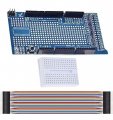
You can also buy a Mega development board prototyping PCB which plugs into the Arduino Mega with plated through holes for all the Mega pins. You could solder your wires to this board and plug it into your Mega. Plus, there is an area that you can use for additional circuits.
IMG_4912.jpeg
I used this board to interface my model railroad to the Mega.
 
Top