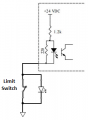
CNC Limit Switch w/ LED Circuit

Thread Starter

marosso

Joined Jun 21, 2023
4
Hi, I'm trying to design a simple circuit that makes an LED light up when a connection to a limit switch is broken. I am a total novice, so any help is appreciated. Here is a schematic. The breakout board the switch will be connected to is a Centroid Acorn cnc controller. The IN 1 on the diagram = Pin 1 on Acorn board. Will either of these circuits work?
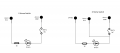
switch.PNG
 

MaxHeadRoom

Joined Jul 18, 2013
30,657
Unless you know the input details of the CNC controller the first diagram with that much series resistance may negatively affect the sense operation.
The better choice is the RH diag.
An alternative is to use a Proximity SW where they have sense indicators mounted in them.
 

Thread Starter

marosso

Joined Jun 21, 2023
4
Unless you know the input details of the CNC controller the first diagram with that much series resistance may negatively affect the sense operation.
The better choice is the RH diag.
An alternative is to use a Proximity SW where they have sense indicators mounted in them.
Thanks for the reply. The Centroid Acorn manual says that the Input pins are 24VDC "sourcing". I'm not sure exactly what sourcing/sinking really means.
 

MaxHeadRoom

Joined Jul 18, 2013
30,657
Sinking/sourcing is the type of input of the module used, and is not important unless a SS prox or similar is used in place of a switch.
It essentially means that the switch has to be capable of connecting the input to GND.
 

MisterBill2

Joined Jan 23, 2018
27,508
Iam thinking that the TS is wanting to verify the integrity of the connections to the limit switch, not the actual operation of the switch. That is quite a bit more complicated. In alarm systems it would be called a "supervised connection", meaning that if the connection failed then a notification is made.
For a single pole normally open switch with only two wires, and a 24 volt DC supply, and an input circuit on th opposite side that changes logic state at 12 volts, that can be done by shunting the switch with a 22K resistor and having a 1K resistor shunting the input and common. Then when the switch is open there will be one volt across the resistor and when it is closed there will be 24 volts across the resistor. So a comparator will be able to sense that the voltage across the resistor is not zero, and all of yhe connections are OK. But if either wire breaks then the voltage will be zero and an alarm will be generated. It will also generate an alarm if either wire becomes connected to the 24 volt common.
In older alarm systems the 1K resistor would instead be a low voltage low current relay.
 

vu2nan

Joined Sep 11, 2014
357
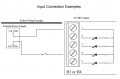
Here's how an Acorn input is configured.

1.png

The limit switch and LED are to be wired as shown below.

2.png

It is to be ascertained whether the LED lights up when the 'NC' contact of the limit switch opens.

Also whether the input goes 'off' or stays 'on' in this condition.

Nandu.
 
Last edited:

MisterBill2

Joined Jan 23, 2018
27,508
Here's how an Acorn input is configured.

View attachment 296922

The limit switch and LED are to be wired as shown below.

View attachment 296925

It is to be ascertained whether the LED lights up when the 'NC' contact of the limit switch opens.

Also whether the input goes 'off' or stays 'on' in this condition.

Nandu.
That circuit shown in post #6 will verify the switch operation, but it will not verify if the wires are broken or not.
So now we need a response from the Thread Starter as to which function they require. There is a real difference.
 

MaxHeadRoom

Joined Jul 18, 2013
30,657
The application is CNC based so I assume the L.S. are either over-travel or zero-position sense, For the former, it is generally ideal & customary to use a N.C. switch

Edit:,
I see they are Home SW's so N.O or N.C. would be OK.
(not sure why the need for visual confirmation??)
 
Last edited:

MisterBill2

Joined Jan 23, 2018
27,508
I perceived that the TS wanted to monitor the integrity of the switch connections, rather than monitor the switch condition, open or closed. "
Hi, I'm trying to design a simple circuit that makes an LED light up when a connection to a limit switch is broken."
That is not the same as indicating the switch is open or closed. At least I do not see it as being the same thing.

So "What we have here is a failure to communicate."
 

MaxHeadRoom

Joined Jul 18, 2013
30,657
Seems very straight forward, the DWG shows a typical home limit switch set up.
For checking the status, the input I/O LED can be used for this. This checks the integrity of the switch and the wiring, and present contact condition.
In all the decades I have either repaired, retro-fitted, or designed small Custom CNC systems, never have I seen the need for a SW status indication on the SW it self.?
 

MisterBill2

Joined Jan 23, 2018
27,508
Verifying a closed switch and wiring is simple. Verifying the integrity of the wiring and switch connection for an open switch is more complicated. And that is what the #1 post was asking for, even though it may not have been what they wanted. That is what asking to tell if a connection is broken means. Much different from telling if a switch is open.
 

MaxHeadRoom

Joined Jul 18, 2013
30,657
All he has to do is command a home position and monitor the result on the system PLC or Input status?
If the procedure completes and is verified visually by the above status means. That is all that is required. And satisfies the original requirement
If there is any error disclosed in the verification, then this obviously points to an error in the check of the integrity of this simple home referencing circuit..
Again, I do not see what an extra indication is going to show, over and above what the system status will tell anyone checking the integrity of the particular axis home circuit.
 
Last edited:

MisterBill2

Joined Jan 23, 2018
27,508
The original request, as I read it, was fora means to verify the integrity of the wires to the switch, nothing else.
Certainly if there was a wiring failure and motion were initiated, the operation would be incorrect, and some damage might happen. So that wouldbe a good reason to verify the connections.
 

MaxHeadRoom

Joined Jul 18, 2013
30,657
So what else would the input (I/O) LED indicate if not an open in the home circuit.?
What is the reason for extra duplicate means.?
Plus No damage would occur if it is a system that also has an overtravel L.S.
The OP declares he is a total novice, so may not be aware that the extra LED is rather redundant, and seldom if ever designed in,
 
Last edited:

MisterBill2

Joined Jan 23, 2018
27,508
So what else would the input (I/O) LED indicate if not an open in the home circuit.?
What is the reason for extra duplicate means.?
Plus No damage would occur if it is a system that also has an overtravel L.S.
The OP declares he is a total novice, so may not be aware that the extra LED is rather redundant, and seldom if ever designed in,
Given that there was no additional description of what sort of CNC package was involved, and thus no assurance that the wiring to the switch was adequately protected, it seemed reasonable that the TS was needing to verify that the connections to the limit switch were connected and not damaged.
Given that we had no indication that this was not some modified arrangement of a CNC machine, wired by one who was "a total novice", the desire to verify the integrity of a rather important connection is reasonable.
Wiring damage does happen on occasions when those doing the modifications make some error.
 

MaxHeadRoom

Joined Jul 18, 2013
30,657
The Centroid Acorn cnc controller shows a LED status LED on the I/O's according to the manual?
If this does posses this standard way of showing a Opto-Isolator style input then NO other means should be necessary and is redundant.
I have installed and build a few CNC controllers and have always conformed to the 'KISS' methodology. If and where possible, And if the OP is a 'total novice' as stated, I would recommend he follow the same course.
Adding extra indicators and duplicating what is already present just makes for a messy and extra fail-prone devices.
If in fact the input LED is present, then this is all that is required for the home input wiring status.

1687789680537.png
 
Last edited:

Thread Starter

marosso

Joined Jun 21, 2023
4
Verifying a closed switch and wiring is simple. Verifying the integrity of the wiring and switch connection for an open switch is more complicated. And that is what the #1 post was asking for, even though it may not have been what they wanted. That is what asking to tell if a connection is broken means. Much different from telling if a switch is open.
That is correct. The concern is more about assuring all wiring and switches are operating as expected. Also, want to try to isolate where a fault would be located in case of a problem. Thanks to all for the input.
 

Thread Starter

marosso

Joined Jun 21, 2023
4
The Centroid Acorn cnc controller shows a LED status LED on the I/O's according to the manual?
If this does posses this standard way of showing a Opto-Isolator style input then NO other means should be necessary and is redundant.
I have installed and build a few CNC controllers and have always conformed to the 'KISS' methodology. If and where possible, And if the OP is a 'total novice' as stated, I would recommend he follow the same course.
Adding extra indicators and duplicating what is already present just makes for a messy and extra fail-prone devices.
If in fact the input LED is present, then this is all that is required for the home input wiring status.

View attachment 297122
That's good advice. I have built a few diy cnc machines, but I consider myself a total novice when it comes to electrical wiring and circuits. My intent was to set up indicators on the panel of the control box to ensure each switch (NC) was closed before running a milling job. If any of the axis LEDs were dark, I'd know before starting that I had a problem. An important secondary purpose was to do this without needed to open the control cabinet and find the LEDs on the Acorn. It's not difficult to get to, but not super easy either, and definitely not as easy as looking at the front panel. You make a great point, though. It may be better to keep things as simple as possible in the wiring department, especially not having a much circuit knowledge. Thanks again
 

MaxHeadRoom

Joined Jul 18, 2013
30,657
. My intent was to set up indicators on the panel of the control box to ensure each switch (NC) was closed before running a milling job.
I would assume that were there any problematic cause that prevent one of the home switches operating the machine would hang.
In any case, normally the homing procedure only has to be done once at power up, after that, the M/C should know exactly where it is?
I assume it is like most DIY M/C's, it does not have over-travel SW's?
 
Top