Clarifying PIC SPI communication and settings

jjw

Joined Dec 24, 2013
823
Hi E,
Regarding the Oshonsoft SPI:
You may be able to see why I am/was puzzled. Vlad had used SW to carry out the HW function. Am I correct then, that it needs the correct HW PINs as the D/S.

As you will recall, I've always used it's software sucessfully. I only questioned it with this 18F4431, as I haven't been able to get it to READ the COMP.

In #17 I said I had results. This is by outputting the RAW DATA, which is early in the sequence. Tomorrow, I'll move it through to the end of the sequence hopefully.
Thanks, C.
You can use any free I/O pin
The defines for the SW SPI tell the compiler which pins ( port, pin) to use for the clock, data in, data out, cs.
If you have more than one slave you don't define cs, but use one pin for each slave to select them separately.
 

Thread Starter

camerart

Joined Feb 25, 2013
3,832
Hi E and J,
I want to use the best method for SPI, either SW or HW.
If I understand correctly, Vlad worte the Oshonsoft SPI SW to either be as 'good' as the HW version, or in his code he uses the HW connections. Either way any pins can be used and this is as good as it gets.
C
 

ericgibbs

Joined Jan 29, 2010
21,451
hi C,
Start with a question...
Are any of the PIC's on the project using more than one SPI connection service to a remote device.?
E
 

Thread Starter

camerart

Joined Feb 25, 2013
3,832
Hi,
As mentioned, I've been trying to get the 18F4431 to READ the compass, and I've found the error:)

It is now sending DATA to the 18LF4620.
Onwards and upwards.
Cheers, C.
$COMPDEG,010,W
$COMPDEG,011,W
$COMPDEG,007,W
$COMPDEG,004,W
$COMPDEG,000,W
$COMPDEG,358,W
$COMPDEG,358,W
$COMPDEG,358,W
$COMPDEG,357,W
$COMPDEG,356,W
$COMPDEG,355,W
$COMPDEG,355,W
$COMPDEG,354,W
$COMPDEG,351,W
$COMPDEG,353,W
$COMPDEG,000,W
$COMPDEG,000,W
$COMPDEG,001,W
$COMPDEG,002,W
$COMPDEG,003,W
$COMPDEG,001,W
$COMPDEG,001,W
$COMPDEG,359,W
$COMPDEG,359,W
$COMPDEG,358,W
$COMPDEG,163,W
 

ericgibbs

Joined Jan 29, 2010
21,451
hi,

In that case I would use the PIC's internal SPI module., use PIC pins to Select the external devices.

Use the Direct Commands as shown in the PIC's datasheet to initialise and control the SPI data flow, it is the fastest method.

We did it this way.

Proc spi_init()
PORTA.4 = 0 'ss
TRISC.3 = 0 'clk
TRISC.4 = 1 'sdi from slave
TRISC.5 = 0 'sdo to slave

ss = 1
SSPSTAT = 0
'SSPSTAT.CKE = 1 'clock trailing edge
'SSPCON1 = 0x10 'full 8mhz 2mhz operation ,,, no SS control
SSPCON1 = %00100000
'00 = fosc/4.. 01 = fosc /16
'10 = fosc/64.. 11 controlled by timer2.
SSPCON1.CKP = 1 'clock polarity unremark for high polarity
End Proc


Proc spi_wr_rd()
ss = 0
spi8 = SSPBUF
SSPBUF = mastout
While Not SSPSTAT.BF
Wend
slavinp = SSPBUF
ss = 1
End Proc
 

Thread Starter

camerart

Joined Feb 25, 2013
3,832
hi,

In that case I would use the PIC's internal SPI module., use PIC pins to Select the external devices.

Use the Direct Commands as shown in the PIC's datasheet to initialise and control the SPI data flow, it is the fastest method.

We did it this way.

Proc spi_init()
PORTA.4 = 0 'ss
TRISC.3 = 0 'clk
TRISC.4 = 1 'sdi from slave
TRISC.5 = 0 'sdo to slave

ss = 1
SSPSTAT = 0
'SSPSTAT.CKE = 1 'clock trailing edge
'SSPCON1 = 0x10 'full 8mhz 2mhz operation ,,, no SS control
SSPCON1 = %00100000
'00 = fosc/4.. 01 = fosc /16
'10 = fosc/64.. 11 controlled by
timer2.
SSPCON1.CKP = 1 'clock polarity unremark for high polarity
End Proc


Proc spi_wr_rd()
ss = 0
spi8 = SSPBUF
SSPBUF = mastout
While Not SSPSTAT.BF
Wend
slavinp = SSPBUF
ss = 1
End Proc
Hi E,
Ok, thanks.
I'll convert evrything over after I've finished the process I'm on.
C
 

Thread Starter

camerart

Joined Feb 25, 2013
3,832
Hi,
For some time, I've been using SPI for PIC to peripheral communication e,g, compass module.
I've just moved a compass from an 18LF4620 working, to an 18F4431 not working.

In my program, I noticed that SSPCON1 is commented out, so I checked the data sheet, and was remined of the many settings for SPI.
I need to re-learn SPI. This page looks a good start: https://microcontrollerslab.com/spi-communication-pic-microcontroller/

Any suggestions or similar pages welcome, please.
Camerart.
Hi C_me,
The 18F4431 doesn't use SSPCON1 but SSPCON instead
C
 

Thread Starter

camerart

Joined Feb 25, 2013
3,832
hi,

In that case I would use the PIC's internal SPI module., use PIC pins to Select the external devices.

Use the Direct Commands as shown in the PIC's datasheet to initialise and control the SPI data flow, it is the fastest method.

We did it this way.

Proc spi_init()
PORTA.4 = 0 'ss
TRISC.3 = 0 'clk
TRISC.4 = 1 'sdi from slave
TRISC.5 = 0 'sdo to slave

ss = 1
SSPSTAT = 0
'SSPSTAT.CKE = 1 'clock trailing edge
'SSPCON1 = 0x10 'full 8mhz 2mhz operation ,,, no SS control
SSPCON1 = %00100000
'00 = fosc/4.. 01 = fosc /16
'10 = fosc/64.. 11 controlled by timer2.
SSPCON1.CKP = 1 'clock polarity unremark for high polarity
End Proc


Proc spi_wr_rd()
ss = 0
spi8 = SSPBUF
SSPBUF = mastout
While Not SSPSTAT.BF
Wend
slavinp = SSPBUF
ss = 1
End Proc
Hi E and all,
I've now got the compass to work ok on the 18F4431 and being READ by the 18LF4620 :)
I'm now going to attemp to switch over to the method above. (I'm still not clear whether it's SW or HW, but as it's using the PIC SPI PINS, I assume it's HW)
C.
 

ericgibbs

Joined Jan 29, 2010
21,451
hi C,
You are confusing HW , SW and Oshonsoft Basic,

Hardware physically exists in the PIC as a specified function module.

Software is the program coding.

The Software Program can be written using the direct function Commands as shown in the datasheet.
The Oshonsoft Compiler will understand these commands and create the machine code. [without any 'frills']
OR
The Software code can be written using Oshonsoft Basic, which the Compiler will turn into Machine code that the PIC understands.
BUT
Oshonsoft Basic often uses pre-written routines which do not use the internal Hardware of the PIC, but the modules are emulated in Vlads software. These routines are usually much slower than the Hardware versions.
Examples are SPI & USB ...+others

Oshonsoft will also accept Assembly coding within a program written in Basic.

E
 

Thread Starter

camerart

Joined Feb 25, 2013
3,832
hi C,
You are confusing HW , SW and Oshonsoft Basic,

Hardware physically exists in the PIC as a specified function module.

Software is the program coding.

The Software Program can be written using the direct function Commands as shown in the datasheet.
The Oshonsoft Compiler will understand these commands and create the machine code. [without any 'frills']
OR
The Software code can be written using Oshonsoft Basic, which the Compiler will turn into Machine code that the PIC understands.
BUT
Oshonsoft Basic often uses pre-written routines which do not use the internal Hardware of the PIC, but the modules are emulated in Vlads software. These routines are usually much slower than the Hardware versions.
Examples are SPI & USB ...+others

Oshonsoft will also accept Assembly coding within a program written in Basic.

E
Hi E,
I think the problem is something to do with SW controls HW, and I can't see the difference.
If I can unpick it!
I am only capable of using Oshonsoft BASIC, and want to use the best method available.
Using OSH, which is the best way to control any SPI PIC?
1/Would that be HW or SW.
2/ With this method does it make any difference whether the dedicated SPI pins are used or not?
C
 

Thread Starter

camerart

Joined Feb 25, 2013
3,832
Hi,
Just received a message from Vlad!
I note that he says his method can only communicate with one device.
At the moment I'm having issues with an 18F4431 and the compass, as it's one to one, then the problem may be in my program.

I think it may be best to try HW. I'll try 'E's example in #26.
C
 

Attachments

jpanhalt

Joined Jan 18, 2008
11,087
That seems to be a pretty serious limitation today. If one assumes a GLCD display, for which SPI is quite common because of speed, that could blow your SPI budget.

Does Oschosoft allow you to write your own code for hardware communication? For example, can you insert C or Assembly inline?
 

Thread Starter

camerart

Joined Feb 25, 2013
3,832
That seems to be a pretty serious limitation today. If one assumes a GLCD display, for which SPI is quite common because of speed, that could blow your SPI budget.

Does Oschosoft allow you to write your own code for hardware communication? For example, can you insert C or Assembly inline?
Hi J2,
There are limitations with Oshonsoft, but I rely on it and can only 'speak' BASIC.
Previously 'E' wrote some CODE in ASM for PWM, which worked ok, I'm not sure about C.
Yes, it allows 'own CODE' to be added, which I'm now trying to do, from the example in #26.
In the example link in Vlads message, it show 1xCS, but I have used 3x different CS for peripherals, including an LCD. There have always been issues, and they're difficult to diagnose, I wonder if it could be Osh or my program?
C.
 

ericgibbs

Joined Jan 29, 2010
21,451
hi John,
Yes, ASM commands are compilable within Oshonsoft Basic programs.
E
eg:
'convert bcd i/o to ascii for lcd
bcd2asc:
ASM: movf b2avall,w
ASM: andlw 0x0f
ASM: iorlw 0x30
ASM: movwf ascbfr0
ASM: movf b2avall,w
ASM: swapf b2avall,w
ASM: andlw 0x0f
ASM: iorlw 0x30
ASM: movwf ascbfr1
Return
 

Thread Starter

camerart

Joined Feb 25, 2013
3,832
Hi,
Looking at the HW CODE, I've had to change a few things, e,g, there is no SSPCON1 in the 18F4431 so I had to use 2x registers.

In this section:
Is this correct?
Proc spi_wr_rd()
ss = 0
spi8 = SSPBUF SPI8 = the address to be writen to
SSPBUF = mastout mastout the BYTE to be sent to that address
While Not SSPSTAT.BF
Wend
slavinp = SSPBUF slavinp the BYTE received from that address
ss = 1
End Proc
C.
 

Thread Starter

camerart

Joined Feb 25, 2013
3,832
Hi,
I've just found a seam of previous messages, relating to this and HW/SW------Embarrasing, I'm slow slow:(
C.
 

Thread Starter

camerart

Joined Feb 25, 2013
3,832
Hi,
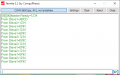
I made up an SPI ribbon connector between the PICs, then with slightly altered programs, I think I may have got to PICs to talk to each other :)

The MASTER outputs a HSEROUT, which I can read in a terminal viewer.
Does this look correct? I can see that some settings are not as they should be, which I'll re-check
C
 

Attachments

Last edited:

Thread Starter

camerart

Joined Feb 25, 2013
3,832
hi C,
That looks familiar.:)
I posted that for you last year, it did work as expected.

E
Hi E,
Yes, only a few changes to get it working.
Since your posting last year and failing to get it to work, I abandoned SPI MASTER/SLAVE and removed the SPI tracks between the PICs on the PCB, and use a serial connection instead. So near yet so far.
Anyway I now almost understand how HW works, so next I'll try to understand how this CODE works and perhaps add the SPI tracks back in on the next PCB.
EDITED
Thanks, C.
 
Last edited:
Top