CD4081(AND gate) help needed

Thread Starter

b3an

Joined Feb 12, 2024
19
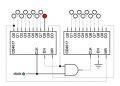
I am currently attempting a LED chaser circuit using a 9V battery, a 555 timer, two CD4017, and a CD4081 (AND gate to link the two 4017s). I simulated the circuit on NI Multisim and it worked fine. I then built the led chaser on a breadboard with one 4017 and it worked fine. But when I added the 4081 and the other 4017, it did not perform as expected.

So, I tried a circuit with only the 4081. I connected the 9V battery positive terminal to pin 14 (VDD) and the negative terminal to pin 7 (GND). I then put a wire from pin 14 to pin 1 to be a input logic "1". Then I put a wire from pin 7 to pin 2 to be a input logic "0". However when I used my multimeter from pin 3 (gate output) to GND, I was getting a reading of a little under 9V when I should be expecting about 0V.

Any tips for where I may be misunderstanding the 4081?
 

eetech00

Joined Jun 8, 2013
4,705
I am currently attempting a LED chaser circuit using a 9V battery, a 555 timer, two CD4017, and a CD4081 (AND gate to link the two 4017s). I simulated the circuit on NI Multisim and it worked fine. I then built the led chaser on a breadboard with one 4017 and it worked fine. But when I added the 4081 and the other 4017, it did not perform as expected.

So, I tried a circuit with only the 4081. I connected the 9V battery positive terminal to pin 14 (VDD) and the negative terminal to pin 7 (GND). I then put a wire from pin 14 to pin 1 to be a input logic "1". Then I put a wire from pin 7 to pin 2 to be a input logic "0". However when I used my multimeter from pin 3 (gate output) to GND, I was getting a reading of a little under 9V when I should be expecting about 0V.

Any tips for where I may be misunderstanding the 4081?
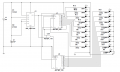
Show a schematic.
 

dl324

Joined Mar 30, 2015
18,327
Sorry for the mess haha, I am a beginner.
You're right, it's very messy. But it looks like it should work.

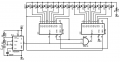
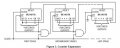
You should draw it more like this (from the Motorola datasheet):
EDIT: Give attribution for the circuit diagram.
CD4017Cascade.jpg
Except that I'd draw the inputs outputs on the top.

I tried a circuit with only the 4081. I connected the 9V battery positive terminal to pin 14 (VDD) and the negative terminal to pin 7 (GND). I then put a wire from pin 14 to pin 1 to be a input logic "1". Then I put a wire from pin 7 to pin 2 to be a input logic "0". However when I used my multimeter from pin 3 (gate output) to GND, I was getting a reading of a little under 9V when I should be expecting about 0V.

Any tips for where I may be misunderstanding the 4081?
Have you been handling the IC's properly? CD4081, and CD4017, are static sensitive.
 
Last edited:

AnalogKid

Joined Aug 1, 2013
12,130
All of the ICs need power supply decoupling capacitors to function correctly. Also, make sure that all of the inputs to the unused AND gates are connected to either 9 V or GND. Leave all unused outputs floating.

Also, a side note: Because only one 4017 output per chip is on (high) at any time, you do not need a current limiting resistor for each LED. For each LED, connect its anode directly to the 4017 output. Then, place one current limiting resistor between each group of 9 LED cathodes and GND. 18 resistors reduces to 2.

ak
 

Thread Starter

b3an

Joined Feb 12, 2024
19
Except that I'd draw the inputs on the top.

Have you been handling the IC's properly? CD4081, and CD4017, are static sensitive.
That is a nice visual. I just used a screenshot from my simulation. Do you have any recommended applications to make circuit diagrams like the one you sent?

I believe I have been handling my ICs with care. I just take them from their bag to the breadboard and there is nothing that should be causing static, floor is cement.


Actually, you're not cascading correctly.
Im sorry, I can not see where mine differs from yours. Can you specify where?
 

Thread Starter

b3an

Joined Feb 12, 2024
19
All of the ICs need power supply decoupling capacitors to function correctly. Also, make sure that all of the inputs to the unused AND gates are connected to either 9 V or GND. Leave all unused outputs floating.

Also, a side note: Because only one 4017 output per chip is on (high) at any time, you do not need a current limiting resistor for each LED. For each LED, connect its anode directly to the 4017 output. Then, place one current limiting resistor between each group of 9 LED cathodes and GND. 18 resistors reduces to 2.

ak
Sorry im new to ICs. So my 555, CD4017, and CD4081 need some kind of capacitor?
With my current circuit I believe that that all of the inputs for the used AND gate should be receive something from either the 555 or the CD4017, then the unused inputs I have nothing connected.

Thank you for the tip with the LEDs!
 

dl324

Joined Mar 30, 2015
18,327
That is a nice visual. I just used a screenshot from my simulation. Do you have any recommended applications to make circuit diagrams like the one you sent?
I used Ditigal Works 3.0.5. It's free, but the commercial parts included are crap. Aside from simple gates, I created my own library of components. That lets me put inputs and outputs in locations I consider appropriate. I started putting pin numbers on the symbols, but my intent is to simulate, not make wiring diagrams. If I'm going to breadboard, or make a board, I'll enter the schematic in Eagle.
I believe I have been handling my ICs with care. I just take them from their bag to the breadboard and there is nothing that should be causing static, floor is cement.
You'd be surprised what can generate enough static to damage a device. Wear some clothing made with synthetics and squirm around in your chair and you can generate enough charge to cause damage. Inputs are usually tested to 2kV. You wouldn't feel a discharge at that voltage.
Im sorry, I can not see where mine differs from yours. Can you specify where?
You'll never see the LED on O9 of the second counter turn on.
Sorry im new to ICs. So my 555, CD4017, and CD4081 need some kind of capacitor?
The rule of thumb is a decoupling cap for every power pin. That's usually overkill, but it saves time troubleshooting problems caused by spikes on the power supply.

But most experienced people will assume power connections and decoupling caps are present. I rarely draw either on my schematics. Firstly, because my schematic editor doesn't have power connections for most devices. Second, I like to avoid clutter that detracts from being able to see circuit intent.
the unused inputs I have nothing connected
That's the problem. Under worst case conditions, floating inputs can cause increased power dissipation. They could also oscillate. That being said, I often leave the inputs for unused gates floating on breadboards. If I make something more permanent, I'll tie off unused inputs.
 

dl324

Joined Mar 30, 2015
18,327
Here's your schematic redrawn in Eagle. You only need one current limiting resistor for the two counters. I changed it to a more realistic value because CD4017 can't source more than a couple mA from a 9V supply:
1708127271535.png
 

MisterBill2

Joined Jan 23, 2018
27,519
I used Ditigal Works 3.0.5. It's free, but the commercial parts included are crap. Aside from simple gates, I created my own library of components. That lets me put inputs and outputs in locations I consider appropriate. I started putting pin numbers on the symbols, but my intent is to simulate, not make wiring diagrams. If I'm going to breadboard, or make a board, I'll enter the schematic in Eagle.
You'd be surprised what can generate enough static to damage a device. Wear some clothing made with synthetics and squirm around in your chair and you can generate enough charge to cause damage. Inputs are usually tested to 2kV. You wouldn't feel a discharge at that voltage.
You'll never see the LED on O9 of the second counter turn on.
The rule of thumb is a decoupling cap for every power pin. That's usually overkill, but it saves time troubleshooting problems caused by spikes on the power supply.

But most experienced people will assume power connections and decoupling caps are present. I rarely draw either on my schematics. Firstly, because my schematic editor doesn't have power connections for most devices. Second, I like to avoid clutter that detracts from being able to see circuit intent.
That's the problem. Under worst case conditions, floating inputs can cause increased power dissipation. They could also oscillate. That being said, I often leave the inputs for unused gates floating on breadboards. If I make something more permanent, I'll tie off unused inputs.
I can vouch for the reality that any non-connected CMOS inputs will prevent the intended function of that device. Probably not instantly but certainly after a short time period. THAT IS CERTAIN!!
 

Thread Starter

b3an

Joined Feb 12, 2024
19
Here's your schematic redrawn in Eagle. You only need one current limiting resistor for the two counters. I changed it to a more realistic value because CD4017 can't source more than a couple mA from a 9V supply:
Thank you so much for your help and teaching me all these new skills. I have finished the circuit on a breadboard with all these changes and its a complete success! Thank you!
 

dl324

Joined Mar 30, 2015
18,327
Thank you so much for your help and teaching me all these new skills. I have finished the circuit on a breadboard with all these changes and its a complete success! Thank you!
I'm glad you got it working.

One other thing to note. When mixing TTL-type logic (the timer) with CMOS, sometimes the output from TTL doesn't go high enough to drive CMOS. If that happens, the fix is to use a pull-up resistor on the TTL outputs. That affects the totem pole outputs, but the circuits should work.

That being said, I can't remember a time when TTL didn't drive CMOS correctly.

CMOS can usually drive TTL, but the number of inputs it can drive will be limited. It's best for novices to not mix logic families.
 
Top