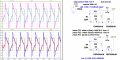
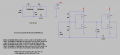
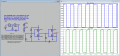
CD4069 oscillator in LT Spice

Papabravo

Joined Feb 24, 2006
22,084
Each symbol on the schematic has a number of attribute fields associated with the symbol. When the SPICE Netlist is created prior to simulation, those attribute fields are strung together to make the netlist contain the proper information. Just like you can view the Spice Error Log you can use the same method to View the SPICE Netlist. Looking at the SPICE netlist will reveal differences between two schematics.

SPICE netlists are transitory; they are built and compiled each time a simulation is run and they disappear when the schematic window is closed. If you want to capture them you can do it in several ways:
  1. Copy the ".net" netlist file to a location where LTspice won't feel compelled to delete it.
  2. Copy the text from the view window to a text editor and save it in a convenient place
  3. Open the file in LTspice and use "Save As" to change the name and or the file extension
 
Last edited:

Thread Starter

dotneck335

Joined Apr 5, 2021
19
Thanks, papabravo!! That was the ticket---I viewed the netlists and found some symbol attributes (C1, L1) on eetech's that weren't on mine (IC, Rser). I added those and now mine works the same! I certainly appreciate the help!!
 

Thread Starter

dotneck335

Joined Apr 5, 2021
19
Thanks! Not sure I totally understand it, but.....
tau = output RC time constant; default = 0
td = propagation delay; default = 0
tripdt = maximum timestep size the simulator takes across state changes.
 

eetech00

Joined Jun 8, 2013
4,709
Thanks! Not sure I totally understand it, but.....
tau = output RC time constant; default = 0
tau is a parameter that is used to specify rise/fall time. The other is tfall/trise.
Each has its use, but I prefer tau because it provides an output waveform that is exponential and friendlier to simulation.
Trise/Tfall provides an output that has sharper,squarer edges and can cause discontinuities that can sometimes result in "timestep to small" errors.

td = propagation delay; default = 0
This is what it states. I looked up the propagation delay in the CD4069UB datasheet a chose an approximate value.

tripdt = maximum timestep size the simulator takes across state changes.
tripdt specifies the length of time for the device to look for state changes. Similar to the "sensitivity" of the device.
Hope that makes sense..
 
Last edited:

Thread Starter

dotneck335

Joined Apr 5, 2021
19
@eetech00: I see where you get the td figure---propagation delay is cited in the CD4069 datasheet as 30nSec. But the figure for tau (output RC time constant), which you referred to as rise/fall time is cited as 50 nSec, not the 20 nSec you used. Please explain. The other poser for me is that it seems the circuit should oscillate at a f= 1 / 2 Pi *RC, which would give a result of about 1/2 the frequency that your 'fixed sensor' circuit gives----????
 

Papabravo

Joined Feb 24, 2006
22,084
Thanks! Not sure I totally understand it, but.....
tau = output RC time constant; default = 0
td = propagation delay; default = 0
tripdt = maximum timestep size the simulator takes across state changes.
They are explained in the LTspice Help file. There are basically two methods of describing the behavior. They are a "slewing rise time", or an RC time constant. You can use one or the other, but not both.
Tau is the output RC time constant. Rule of thumb is that it takes 5 "time constants" for a signal to get "close enough" to the final value. The alternative to specifying tau would be to specify trise and tfall.
Td is the propagation delay, but you knew that. the interpretation of that number is straightforward and corresponds directly device behavior.
You also seem confused about the use of tripdt. Is that the case?
 

eetech00

Joined Jun 8, 2013
4,709
@eetech00: I see where you get the td figure---propagation delay is cited in the CD4069 datasheet as 30nSec. But the figure for tau (output RC time constant), which you referred to as rise/fall time is cited as 50 nSec, not the 20 nSec you used. Please explain. The other poser for
The rise and fall time is typically 50ns for the CD4069UB.
You are welcome to change the parameters any way you wish....

me is that it seems the circuit should oscillate at a f= 1 / 2 Pi *RC, which would give a result of about 1/2 the frequency that your 'fixed sensor' circuit gives----????
I don't think that equation is correct. It doesn't take into account the prop delay and number of inverters.

Be careful to review the CD4069UB datasheet and not the CD4049B. They are different devices.
The UB is "un-buffered" and the TI CD4069B isn't made anymore.
 
Last edited:

Thread Starter

dotneck335

Joined Apr 5, 2021
19
Bordodynov: I went to your website and downloaded the LTspice XVII files but I cannot find anything for 'model CD4069UB'. What am I missing?
 

Papabravo

Joined Feb 24, 2006
22,084
So why it doesn't work on my PC?
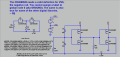
The problem is not your PC, but an understanding of how some digital library parts work without explicit connections to power and ground. Those symbols rely on symbolic nets with particular labels. For the CD4000 family those labels are VDD and VSS. I have corrected your schematic and it now seems to work as it should. A corrected version of your file is attached.

1637012559971.png
 

Attachments

eetech00

Joined Jun 8, 2013
4,709
So why it doesn't work on my PC?
What doesn't work? The schematic on the right works fine.
But you shouldn't use the "uic" directive. That will tell the simulator to skip determining initial conditions. This can mask problems that can later lead to convergence issues. The convergence problems may not show up here, but may when you use the model with a more complex circuit or other models. Use the "startup" directive so voltage sources will ramp from 0v and charge capacitors appropriately.

This directive:

".lib E:\LTC\LTspiceXVII\lib\sub\CD4069UB.sub"

points to the models' subcircut definition file containing the "wiring" that connects the two mosfets together and creates the inverter. Without that, the CD4069UB model won't work.
 

Papabravo

Joined Feb 24, 2006
22,084
What doesn't work? The schematic on the right works fine.
But you shouldn't use the "uic" directive. That will tell the simulator to skip determining initial conditions. This can mask problems that can later lead to convergence issues. The convergence problems may not show up here, but may when you use the model with a more complex circuit or other models. Use the "startup" directive so voltage sources will ramp from 0v and charge capacitors appropriately.

This directive:

".lib E:\LTC\LTspiceXVII\lib\sub\CD4069UB.sub"

points to the models' subcircut definition file containing the "wiring" that connects the two mosfets together and creates the inverter. Without that, the CD4069UB model won't work.
On my machine the CD4069UB model is in Bordodynov's directory .\lib\ZZZ\Logic\logic_my as in his post above.
and I eliminated the ".lib E:\LTC\LTspiceXVII\lib\sub\CD4069UB.sub" statement since that path does not exist on my machine.
Both circuits work fine with the change I made to define VSS.

1637016475190.png
 

Attachments

Last edited:

Jony130

Joined Feb 17, 2009
5,598
What doesn't work?
I forgot to mention that the left circuit does not want to work.

The problem is not your PC, but an understanding of how some digital library parts work without explicit connections to power and ground. Those symbols rely on symbolic nets with particular labels. For the CD4000 family those labels are VDD and VSS.
Thank you, now it's working. Stupid me was trying to rename the GROUND node. But on the schematic shown by Bordodynov's (#53) I do not see any Vss node and the gate is working just fine.
 
Top