
 Facebook
 Google
 GitHub
 Linkedin
Hi everyone, I am working on a project for class, and I am not sure how to make this screen work. The screen is a TFT SPI with the driver ST7796S.
Here is the link: https://www.amazon.com/Hosyond-320x...N58D/ref=cm_cr_arp_d_product_top?ie=UTF8&th=1
Here is how I modified the file "UserSetup.h" in the TFT_eSPI library.
#define USER_SETUP_INFO "User_Setup"
#define ST7796S_DRIVER
#define TFT_WIDTH 480
#define TFT_HEIGHT 320
#define TFT_MISO -1
#define TFT_MOSI 35
#define TFT_SCLK 36
#define TFT_CS 38 // Chip select control pin
#define TFT_DC 37 // Data Command control pin
#define TFT_RST 39 // Reset pin (could connect to RST pin)
#define SPI_FREQUENCY 20000000
Are there any additional files I need to adjust? I also have this code written up and am using Arduino IDE to upload it, but there is no change in the screen. It can upload successfully.
#include <TFT_eSPI.h>
#include <SPI.h>
TFT_eSPI tft = TFT_eSPI();
void setup() {
tft.init();
tft.setRotation(1);
tft.fillScreen(TFT_BLACK);
tft.setTextColor(TFT_WHITE);
tft.setTextSize(2);
tft.setCursor(50, 50);
tft.println("HELLO ESP32-S3");
}
void loop() {
}
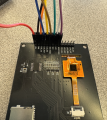
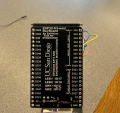
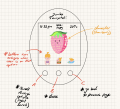
Here are some additional pictures of my devboard and the screen. Also, how would I be able to use the documentation for the ESP-32-s3 mini to help me later on? My project is basically a simplified version of a Tamagotchi.
If there is any additional info that would be needed to help me, please let me know! Or if you have any tips for being able to make the UI look cool and include animations similar to what the modern Tamagotchi looks like now. Would that be too complex?
Many thanks!
Here is the link: https://www.amazon.com/Hosyond-320x...N58D/ref=cm_cr_arp_d_product_top?ie=UTF8&th=1
Here is how I modified the file "UserSetup.h" in the TFT_eSPI library.
#define USER_SETUP_INFO "User_Setup"
#define ST7796S_DRIVER
#define TFT_WIDTH 480
#define TFT_HEIGHT 320
#define TFT_MISO -1
#define TFT_MOSI 35
#define TFT_SCLK 36
#define TFT_CS 38 // Chip select control pin
#define TFT_DC 37 // Data Command control pin
#define TFT_RST 39 // Reset pin (could connect to RST pin)
#define SPI_FREQUENCY 20000000
Are there any additional files I need to adjust? I also have this code written up and am using Arduino IDE to upload it, but there is no change in the screen. It can upload successfully.
#include <TFT_eSPI.h>
#include <SPI.h>
TFT_eSPI tft = TFT_eSPI();
void setup() {
tft.init();
tft.setRotation(1);
tft.fillScreen(TFT_BLACK);
tft.setTextColor(TFT_WHITE);
tft.setTextSize(2);
tft.setCursor(50, 50);
tft.println("HELLO ESP32-S3");
}
void loop() {
}
Here are some additional pictures of my devboard and the screen. Also, how would I be able to use the documentation for the ESP-32-s3 mini to help me later on? My project is basically a simplified version of a Tamagotchi.
If there is any additional info that would be needed to help me, please let me know! Or if you have any tips for being able to make the UI look cool and include animations similar to what the modern Tamagotchi looks like now. Would that be too complex?
Many thanks!
Attachments
-
 2.8 MB Views: 6
 -
 1.7 MB Views: 6
 -
 1.4 MB Views: 6




