Facebook
 Google
 GitHub
 Linkedin
Hello.
This is my first post on this forum and I'm looking for some advice or direction. I have one of those projects in mind that many would say, "why bother" but I'm hooked on finding a solution. I don't have advanced skills in electronics; I've built quite a few small kits and nutted out simple things but don't have the knowledge to work out a solution on my own.
Firstly, I have spent a couple of days trying to google exactly what I'm looking for, and have on a couple of occasions come close, but not exactly.
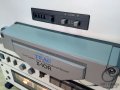
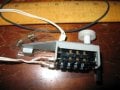
What I'm trying to do is this: I have a very fine old TEAC reel-to-reel tape deck that I would like to replace the analogue tape counter with an LED digital one. My thinking was to use the opto interrupter as used in an old ball mouse, which would be fixed to the driven pulley of the mechanical counter, that would provide the pulse for a 4 digit display. I have a 0.28" 4 digit array that will fit neatly in the existing space.
The problem I have is finding an example that would function in the way required. The replacement needs to act in the following way.
Counter will increment in one direction from 0000 to 9999 and then roll over back to 0000. It needs to be able to decrease in the same manner when the deck is in rewind. It also needs a reset function to return it to 0000 at any time a button is pressed.
This doesn't need to be sophisticated, linked to actual feet of tape or even duration, so long as it provides a point of reference.
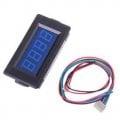
I've bought a 4 digit digital counter from eBay but am unsure whether this will behave in the way I need, and unsure of how to make it function with the opto sensor.
I have so little knowledge in this area that the sensible suggestion would be don't bother, but I'd really like to try. I just need someone who can give this a little thought and explain it to me at idiot level.
Thanks everyone. Hope there's someone out there who'll take pity. Cheers, Wayne
This is my first post on this forum and I'm looking for some advice or direction. I have one of those projects in mind that many would say, "why bother" but I'm hooked on finding a solution. I don't have advanced skills in electronics; I've built quite a few small kits and nutted out simple things but don't have the knowledge to work out a solution on my own.
Firstly, I have spent a couple of days trying to google exactly what I'm looking for, and have on a couple of occasions come close, but not exactly.
What I'm trying to do is this: I have a very fine old TEAC reel-to-reel tape deck that I would like to replace the analogue tape counter with an LED digital one. My thinking was to use the opto interrupter as used in an old ball mouse, which would be fixed to the driven pulley of the mechanical counter, that would provide the pulse for a 4 digit display. I have a 0.28" 4 digit array that will fit neatly in the existing space.
The problem I have is finding an example that would function in the way required. The replacement needs to act in the following way.
Counter will increment in one direction from 0000 to 9999 and then roll over back to 0000. It needs to be able to decrease in the same manner when the deck is in rewind. It also needs a reset function to return it to 0000 at any time a button is pressed.
This doesn't need to be sophisticated, linked to actual feet of tape or even duration, so long as it provides a point of reference.
I've bought a 4 digit digital counter from eBay but am unsure whether this will behave in the way I need, and unsure of how to make it function with the opto sensor.
I have so little knowledge in this area that the sensible suggestion would be don't bother, but I'd really like to try. I just need someone who can give this a little thought and explain it to me at idiot level.
Thanks everyone. Hope there's someone out there who'll take pity. Cheers, Wayne