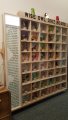
Build a quiz board that indicates right answers AND wrong ones

Thread Starter

gable74

Joined Mar 23, 2016
60
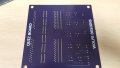
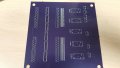
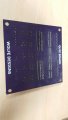
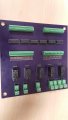
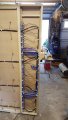
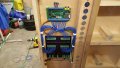
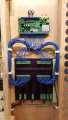
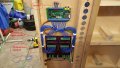
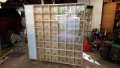
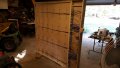
Making more progress. I was able to test the PCB and everything works like it should! Not sure why I thought it might not, but I am always excited/surprised when they do :). Even the ULN2803 chips are providing a proper NEG pulse required for the sound boards to operate. I am only one weekend away from having this project complete. A few small things left and she will be ready to hang on the wall. Here are a few progress shots. I will get a few more tomorrow showing the PCB and how its wired up.
 

Attachments

Thread Starter

gable74

Joined Mar 23, 2016
60
Still moving along. Going on vacation next week but will be 99% done tomorrow. Hope to get this installed as soon as we return. Here are a couple shots of the PCB and sound card installed and a close up of the select Pen. The "Answer" pen is mounted the same way on the opposite side. Also an over all shot after I got the name routed out for the top header in State Park Font! :) If you look closely to the far right and far left of the header name at the top, you will see where I mounted the speakers (on the back side of the header) for the sounds and drilled sound holes for them. At the top of the header are the "Right" (green) and "Wrong" (red) glass owls that light up when selections are made. The center owl stays lit all the time so long as there is power to the board. An odd fact about the sound board is that its being powered by 12vdc and is designed to have the sounds triggered by a momentary switch that "switches" a ground pulse from its own 12vdc ground input. However, I am actually creating a "virtual" ground or a voltage sink I guess using the darlington chips. The weird thing is the darlington chips are getting their ground from the 5vdc input. So the sound board is being triggered by a ground from a completely different voltage source, but it works! Im sure there is a reason why, but I don't know what it is :).

**EDIT**
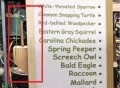
The pictures of the animals will go inside the boxes. They are taped on the outside right now just for sizing and placement.
 

Attachments

Last edited:

Thread Starter

gable74

Joined Mar 23, 2016
60
Well there's good news and bad news....like always..:rolleyes:

Got the board installed at the park...see pictures attached. There seems to be an issue though. After about an hour of using the board, the voltage from the power supply drops to a level that's unusable. It's falling to about 9.8v where it should be around 12.5. I can adjust the voltage up on the power supply but it continues to happen. Let me tell you a few things about the power supply first.

Its a general purpose arcade machine type power supply with 120v primary input and 12v/5v/-5v output. Its 5v @ 16amps and 12v @4 AMP for the output on the secondary side of the power supply.

The circuit board operates @ 5v with 5v relays. The secondary side of the relays operates at 12v to light the right/wrong answers. A strange observation is when there is no selections made as in the board is dormant I see 9.8v where I should see 12v and I see a 4.2v where I should see 5v. When a selection is made those numbers jump up for some reason. When a selection is made I see 11.5v and 5v respectively. The voltage fluctuation is causing strange things to happen like displaying a red light (wrong answer) when a correct answer is made. I assume this is because there is not enough voltage to open/close the relays properly.

Two other things to consider here. First I added 14 small 12v LED modules to illuminate the small section behind the instructions on the upper left part of the board. See photo. Also the sound board with (2) 15w amplifiers on board also operates at 12v. I am thinking that those modules plus the sound board may be over loading the 12v 4amp capacity of the power supply causing the fluctuation, but that's just my theory. Once the issue happens and the voltage drops again I can disconnect all loads to the power supply and the voltage will not change, it will stay low until I adjust it back up again.

Items running continuously on the 12v side:
(14) small LED Modules @ 1w ea. (14w total)
(1) T10 LED @ 2.8w
(1) 20ch sound board minimal draw when no selections are made. 1w maybe?
Total of 17-18w @ 12v

Items running 12v side when a selection is made:
(14) small LED Modules @ 7w ea. (98w total)
(1) T10 LED @ 2.8w
(1) 20ch sound board with (2) 15w amplifiers (Not sure how this factors in with the amplifiers)
(1) right/wrong T10 LED @ 2.8w
Total of 21w @ 12v not counting the sound board.

Items running continuously on the 5v side:
No load, just power to the PCB

Items running 5v side when a selection is made:
Only the draw from 2-3 DTSP relays

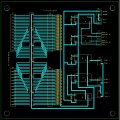
I am asking that someone with more experience than me (most of you :p) have a look at my PCB schematic (see pic attached) and verify there is nothing I have done wrong there that would cause the issue described. Also, does any other opinions of what the issue could be. I am really hoping its the power supply causing the issue as that would be an easy fix. I have ordered separate power supplies this time (one 12v @ 10a and one 5v @10a) to replace the single power supply. Man I hope that's all it is........
 

Attachments

Last edited:

Thread Starter

gable74

Joined Mar 23, 2016
60
Can you measure the current from the supply with a multimeter in series with the output?
Not sure if my multimeter will do that, but I will look. Disconnect the 12v wire from the power supply, clip one lead of the tester to the disconnected wire wire and the other to the 12v lug of the power supply, correct?

Does anything else stand out to you? If its just the power supply, I can fix that. If there is an issue with the PCB.....not so easy to fix.

EDIT***
My 12v output may not be 4amp. It may be lower than that. I will have to verify after work. The symptoms are conducive to fluctuating voltage though and I was hoping someone could review the PCB design and rule that out.
 
Last edited:

crutschow

Joined Mar 14, 2008
38,912
Most multimeters have a separate input for the 10A current measurement.
You would use that input and the common jack in series with the power supply output.
 

Thread Starter

gable74

Joined Mar 23, 2016
60
Most multimeters have a separate input for the 10A current measurement.
You would use that input and the common jack in series with the power supply output.
Okay, got it. I will check when I get home.

Anything else stand out to you as being an issue?
 

Thread Starter

gable74

Joined Mar 23, 2016
60
No, but checking a PCB layout is very tedious, so I'd like to get the results of your current measurement before I look at that.
Sorry, just a little bummed about it not working correctly. I will check the load either this afternoon or tomorrow. The board is at the park and not my house any more now. :oops:

I guess a different way to phrase it would be, "If the draw of the components exceeds the safe output of the power supply, would that cause the issues I am seeing?"
 

Thread Starter

gable74

Joined Mar 23, 2016
60
Upon further investigation it turns out that my power supply is 2a @ 12vdc and 12a @ 5vdc. Or about 19 watts (@12vdc)after you figure in a 20% cusion.

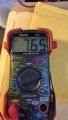
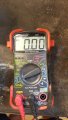
I did as you asked and tried to get a current reading but I am a little more confused than before :confused:. Have a look at the picture attached of my tester and readings. The tester says it is reading Vdc Milliamps up to 10a max. The reading I get with everything hooked up and running is 9.20. Is that 9 Amps? I can't see how that is possible though. The reading pictured is without the sound card hooked up or running. Readings fluctuated a little each time but we generallty the same. I took took a reading of the sound card alone and it read .18 without sound and 1.19 with sound. I just dont know what those numbers represent. Sooms way to low to me milliamps and way to high to be amps.

I had access to another 12v power supply rated at up to 60 watts (or 5a). I installed that and let the 5v run off the other power suplly and all seems fine for now. However, it took an hour or so of use before it started acting funny before, so fingers are crossed.

Any clue what those readings indicate?
 

Attachments

crutschow

Joined Mar 14, 2008
38,912
You need to have the dial set at DC10A when you have the lead plugged into the 10A input.
What did you think that dial setting was for? :confused:
I don't know what the meter is reading when it is set to read DCmA and it is plugged into 10A.
If you want to read mA then the red lead needs to be plugged into the socket on the right.
 

Thread Starter

gable74

Joined Mar 23, 2016
60
You need to have the dial set at DC10A when you have the lead plugged into the 10A input.
What did you think that dial setting was for? :confused:
:mad: aw com'on....I did not even see that setting. Man I feel like an idiot. Sigh.......I will check again tomorrow.
 

Thread Starter

gable74

Joined Mar 23, 2016
60
I have not had a chance to get back to the park to use the tester correctly :oops: and check the current draw yet, but the power supply was obviously the issue as the board ran all day today without any problems :).

Here are a couple shots of the board installed.
 

Attachments

Last edited:

crutschow

Joined Mar 14, 2008
38,912
I have not had a chance to get back to the park to use the tester correctly :oops: and check the current draw yet, but the power supply was obviously the issue as the board ran all day today without any problems :).

Here are a couple shots of the board installed.
Congrats!
See, my procrastination in looking at your board layout paid off. :rolleyes:
 

Thread Starter

gable74

Joined Mar 23, 2016
60
Hello all. Just wanted to bounce back in and let you all know everything is still working great! The kids love it and it actually made the county park news letter. The superintendent will be coming by to look at it this month as well!

Thanks to everyone's help, especially @crutschow
 
Top