
Buck converter with LTC7801 problem

Thread Starter

neocronix

Joined Mar 2, 2016
7
Hey, for a project i need to make a DC to DC converter but i am having some problems. I made a PCB with this schematic:
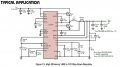
LTC7801_schema_convertor_Figure13 page38.jpg
https://ibb.co/fcX9g7
(Mods Note : The circuit was copied from the page 38 of the datasheet of LTC7801.)

This is from the datasheet of a LTC7801 from Analog Devices. The LTC7801 is used to drive 2 big mosfets.
The problem i'm having is the chip is continuously shutting down and starting back up due to overheating. The chip gets very hot.
I believe i have located the problem, pin 16 (BG) which is used to drive the second mosfet is the problem. I lifted this pin slightly so it doesn't make contact with the trace anymore (I checked with multimeter) and still i measure a short to ground (about one ohm) on that pin. So internally in the chip that pin is shorted to ground somehow. The weird thing is i have 2 LTC7801's, the first one died already because of overheating and after checking, the same pin on this chip also measured a short to ground. Does anyone know what the problem is? I have included my Eagle files of the PCB.

LTC7801 datasheet: http://www.analog.com/media/en/technical-documentation/data-sheets/7801f.pdf
 

Attachments

MisterBill2

Joined Jan 23, 2018
27,508
I suggest contacting AD about the problem. If you are a potential large customer they may be very happy to provide a lot of assistance. It looks to me like something is wrong with the current flow in the FET part of the circuit. Mbot is supposed to switch on to allow current to flow through L1, but it is connected to allow it to flow to ground. First, examine the application PCB artwork to verify that the connection is actually as shown. It just does not look right to me.
 

MisterBill2

Joined Jan 23, 2018
27,508
The applications notes are very extensive, I read through them and that part was not quite clear to me. BUT early on it mentions not supplying voltage or current to either of those gate drive pins. That may be a clue as to what is going wrong.
 

LyraMike

Joined Feb 13, 2019
3
Thanks Bill, my application is just as the schematic (and it is laid out as the evaluation board is routed).
There is nothing connected to the gate drive pins other than the gates.
 

MisterBill2

Joined Jan 23, 2018
27,508
Thanks Bill, my application is just as the schematic (and it is laid out as the evaluation board is routed).
There is nothing connected to the gate drive pins other than the gates.
OK, then I have reached the limit of my switching supply insight, although there might be an issue with that bottom FET, since some supplies would use a schottky diode pointing up so as to allow the inductor current to continue flowing when the top transistor switches off. And one line in the functional description mentions that bottom transistor switching off just as the inductor current would start to reverse. Is it possible that it is drawn wrong in the diagrams? It does not seem reasonable that inductor current should flow to ground at that point. So possibly there is something wrong with the published circuit?? Certainly worth asking about.
 

Thread Starter

neocronix

Joined Mar 2, 2016
7
Sorry for my late response, i do not visit this forum regularly. Unfortunately i turned in the board 1-2 months after the first post. However i did manage to get the chip to work. If i remember correctly i added a bleeder resistor and a resistor to counter the ringing effect. Also i moved some decoupling capacitors around for better decoupling. I think that the chip functioned correctly after these changes, it charged a 12V lead acid battery from a 180W solar panel for about two hours.
 

LyraMike

Joined Feb 13, 2019
3
Thank Neocronix.

In my case it seems to be my misuse of adapting the supplied schematic to give 15V, rather than the example 12V.
I just changed the feedback resistors and checked that the inductance was still valid etc.

I still had the EXTVcc pin connected to the output, as the demo does, but buried in the data sheet there is the phrase
"Do not exceed 14V on this pin". Not good for a 15V power supply......

What then happens, for info, is that the INTVcc is no longer 5 to 10V, it becomes Vin. Which could be up to 140V.
The switching FETs don't like that as a Vgs, so they blow, subsequently blowing pins TG and BG.

Thanks to all that helped!
 

nbb3i

Joined Sep 22, 2009
1
Sorry for my late response, i do not visit this forum regularly. Unfortunately i turned in the board 1-2 months after the first post. However i did manage to get the chip to work. If i remember correctly i added a bleeder resistor and a resistor to counter the ringing effect. Also i moved some decoupling capacitors around for better decoupling. I think that the chip functioned correctly after these changes, it charged a 12V lead acid battery from a 180W solar panel for about two hours.
Hi neocronix,
Can you share the detail of solution that you was made?
Thank in advanced!
 
Sorry for my late response, i do not visit this forum regularly. Unfortunately i turned in the board 1-2 months after the first post. However i did manage to get the chip to work. If i remember correctly i added a bleeder resistor and a resistor to counter the ringing effect. Also i moved some decoupling capacitors around for better decoupling. I think that the chip functioned correctly after these changes, it charged a 12V lead acid battery from a 180W solar panel for about two hours.
Hi Necronix, I too facing the same issue. Could you please share the solution in detail?
 

MisterBill2

Joined Jan 23, 2018
27,508
If that pin that supplies the internal Vcc does not like more than 14 volts then an external linear regulator such as the 78L12 could be a solution. Yes, it adds more components, since you also need the 2x 0.1 MFD bypass capacitors, but the benefit should be a working power supply that is solid, not marginal. So that may be worth it, unless this design is for mass production where minimum cost is far more important than quality. There may be other cheaper ways but this one should be good.
 
Top





