Am I correct to say that the amount of work in the integration of the chess engine into the system will greatly depend on the choice of the chess engine used!?
Coz right now I don't care if the chess engine is stupid and even a 4 year old kid can win the game...
All I want for now is to have a working system that is flexible and can be enhanced later!
Yes but not into details...I think I am still a bit confused with this all chess engine thing...Guess I will have to.
My understanding so far is that Winboard and Xboard are just GUI (one for windows and the other for unix or linux I forgot...lol) used to analyse the actual game on the screen...
You have not answered my question regarding the amount of work and the choice of the engine!
I am gonna assume you are gonna run this on a Windows based system, so the WinBoard (http://www.open-aurec.com/wbforum/viewtopic.php?f=19&t=51528&sid=d9228f6a735cbbd54ee3e78b75420692) would be your best bet, you really do not have to do too much programming on the game part, it will take a user file and read data for the moves, so you can just start with that..... or look into how it uses the other input files and email to play games automatically, then all you have to do is supply it with coordinates for the moves in one of those formats, and "receive" a response back and have your robot make the move.....
My understanding so far is that Winboard and Xboard are just GUI (one for windows and the other for unix or linux I forgot...lol) used to analyse the actual game on the screen...
You have not answered my question regarding the amount of work and the choice of the engine!
WinBoard and XBoard are GUI's, but they are your pre made interface to any of the chess engines..... people have already taken all the hassle out of interfacing to the actual engine, which by the way, is what actually analyzes the game, the GUI's are just there to "Show" you what is going on with your game and the engine..... Best thing I can suggest is to download the one for you operating system, install it, play with it, and learn it. Then you can determine how much work you want to put into it.
So for the chess engine and all that goes with it, heres what I can envision: - Hardware Interface between chessboard and PC. - Creating a communication protocol between chessboard (mcu1) and chess engine. - Hardware interface between PC and controller (arm or ). - Communication protocol between chess engine and controller (mcu2).
The following also need to be figured out: -What format are the inputs of the chess engine? -How are the chess engine and GUI interfaced? And how figure out how GUI display game on the screen. -How the chess engine process the input? (I dont care, do I have to care?). -What are the chess engine outputs? And know how to interpret it! -Find a set of command corresponding to the chess engine output to move the controller appropriately.
Anything else?
So Winboard (or Arena), Chess Engine are to be downloaded and I need to learn how it operates right?
Before I post this I browsed around to find out if it was discussed before and found this link: http://forum.allaboutcircuits.com/showthread.php?t=64123&highlight=chess
which would be a very good starting point as some of my questions have already been answered there but I will have to re-read this for further understanding and questioning.
First I want to go one step backward and plan my design and stick to it!
BTW, I am trying to make a robot that would be able to play chess!
Here's the high level design block diagram I came up with based on the discusion in the above link as seen in attachment hlevel
Any comments or better suggestion?
second, I decided to break the above high level into different modules to design separately and to be assembled later (attachment mod1, mod2, mod3). I have categorised them into hardware and software modules.
The hardware ones has the following ones:
module1 --> design of chessboard & pieces
module2 --> design of the controller to move pieces
As for module2, I am thinking of design an arm that would be used to move and lift the pieces...But this seems to be the most difficult one for me!!!
And I could not even come up with a good block diagram for it...
The software one has:
module3 --> implementation of Chess engine (on a PC) and all that goes with it.
(still researching/investigating on this one)
Third, the possible different interfacings between these modules:
1. interfacing between module1 and module3: I read somewhere (can't remember) parallel port would be easier,...
2. interfacing between module3 and module2: serial cable, bluetooth,...
3. interfacing between module2 and module1 (how are the board and the controller 'arm' attached together? this would be mechanical I guess)
Any suggestion on the different interfacing and their advantages (would definitely choose the one that would make my life easier)
The system would also have the additional software modules:
module4 --> communication protocol between module1 and module3
module5 --> communication protocol between module3 and module2
Well step 1 is find some open source chess game with source code you can pull the chess logic from. Its gonna have to be a 1 player game but should be easy to find. So once you gots your robo up, you won't have to teach it chess.
I am currently working on a chess engine that can do the following:
play between:
* human vs human
* human vs computer
* computer vs computer
I am working on adding my feature: human (external inputs) vs computer, ie accepting inputs from a port...
But I would also like to have critics on the interface!
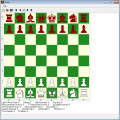
This is an integrated chess engine with gui so I don't have to interface the 'chess engine' and the 'gui'...would make my life much easier...
The right side of the app shows the moves for 'white' and 'black'
Attached is what it looks like...
Here's what I would like to change so far:
- the black piece should be 'black' not red!
- the right side of the app must display "turn" like which player is in turn...
- a button to show/hide all the 'statistics' at the bottom of the board...
- well maybe I can leave the color of the board...
Anyway the above are not that important!
Real thangs will be tackle very soon (communication protocol, simulation,...) !!!
Im still still working on the chess engine but I think I'll be done in one week!
So I was thinking about the hardware communication setup between chessboard and PC! BTW, I have been imposed to make a wireless communication between chessboard and PC.
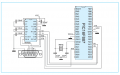
So I thought I would need a similar circuit diagram as attached, the only difference is that I will use:
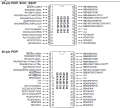
- a PIC18F series with 28 pins (I don't think I would need more pins than that).
- internal oscillator
I am currently quickly reading on how to draw schematics using 'Eagle 6.2.0 Light'.
I am thinking of using a bluetooth module for the wireless comms, so is bluetooth a good choice?
And the chessbboard would be interfaced with a transmitter and the PC with a receiver!
if so any sugestion on possible bluetooth modules to be used?
Also, I think I will have to read on 'Enhanced Universal Synhronous/Asynchronous receiver/transmitter' of the datasheet, am I correct?
I'm trying to get back to this project of mine...will be more active on this from tomorrow...but i have one quick question though..
in post #14, quote 3 and 4 thatoneguy saying that one does not need 64 switches for the 8 by 8 matrix board...I know multiplexing will be used to read the state of the switch/board...I asked before how many switches then if not 64...??? but no one answered and how would they be arranged under the board ??
Unless anyone gives an answer for that...for now I assume 64 reed switches are needed...I ll have more questions tomorrow
I have a schematic in my mind but have to draw it on eagle (that I'm learning...) but then I need two 8-bit port (row and column)...
So Am I correct to say that those pins to be used to read the switches MUST be different from *ICSP pins PGD, PGC and Vpp* correct?
And they should Not be on pin TX, RX as these ones will be used to send/receive data to/from PC...correct?
I am planning to use the 28 pins PIC18F26K20 with he pins:
RA0-RA7: 8 pins here
RC0-RC5, RB0-RB1: 6+2 pins here, RC6,7 are TX, RX pins...
or should i use the 40 pins MCU one with RA0-RA7 and RD0-RD7?
Guess it not a problem to choose pins from a different port, huh?
Hope to get a few comments...and hopefully will post a schematics soon
But I think I will create a new thread in the *general electronics chat* as I will be discussing on the design f the board and pieces...and will leave this thread for the programming part of it!
Don't forget the 64 diodes, scanning a matrix with multiple switches closed doesn't work without them: http://utmrobocon2011.blogspot.co.uk/2011/03/matrix-keypad.html
I think you also need 8 pull-up or pull-down resistors depending on whether you use active high or low for the scanning output. Your PIC might have pullup resistors if you want to save a little board space.
well I don't know if I should already create another thread...
But the microchip library (Eagle light 6.2.0) does not have all the pics mcu...no PIC16F690, no PICF877, no PIC18F26K20, ...how do I add all the other pics to the existing ones?

 Facebook
 Google
 GitHub
 Linkedin



 here.
here.