Breakout Box Help

Thread Starter

bwilliams60

Joined Nov 18, 2012
1,450
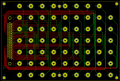
Well I think I am ready for the next step. whatever that is? Gerber files? Anything else I need to do before I proceed? How do I verify my board thickness?
1593018582341.png
I am in Canada. What are some of the favorites for PCB manufacturing and what is your choice?
When I print this on paper, my tracks look very small. Does it print the actual track width or just an outline?
Should I try to maximize my trace width and if so, space between them? What about thickness?
 
Last edited:

hrs

Joined Jun 13, 2014
530
The last half a dozen or so boards I etched at home. The last time I used a PCB manufacturer was in 2017 and it was seeedstudio. It's the only PCB service I've ever used, maybe 3 times. Their work looks nice, good enough for me. Before submitting my order I carefully read this: http://support.seeedstudio.com/know...to-generate-gerber-and-drill-files-from-kicad and various other parts of their faq.
So:
1) I'm not really in a position to recommend any one service over another. There are many threads about it here on AAC.
2) Whatever service you choose, read their specs carefully.

I think printing is to scale and shows the actual track width, which defaults to 0.25 mm in my KiCAD version but I use 1 mm mostly. Read the specs of your PCB service about this though 0.25 mm is probably not a problem for most of them.

In places your tracks look really close together where there is room for them to be further apart. Make sure to run the design rules check to see if you have overlapping or other problems.

Note that you can look at a 3D model via View -> 3D Viewer.
Also I recommend that you just plot a bunch of layers and use the Gerber viewer to see what they are.

Edit: And the board thickness is something you enter at order time. I don't think this is specified anywhere in the KiCAD design files but I could be wrong.
 
Top