Better AC sensing circuit for ADC conversion

Thread Starter

Hasan2019

Joined Sep 5, 2019
199
Your far from slow @Hasan2019
I need to answer when things pop up , trying to guide you here, trying to keep your distractions down , it's what happens when you have many forums / posts

Assuming you want to make a working real system , then I'd be first looking at understanding the auto transformer you have chosen , the voltages on the taps and how the output voltage changes with input voltage.

Can you get on back with what voltages you understand each tap on your transformer will give out at 250 v AC in

Low AC voltages 215, 210, 205....180
High AC voltage 225, 230, 235....

In my mother's country it's 220VAC plus minus 13.
 

Thread Starter

Hasan2019

Joined Sep 5, 2019
199
You could always measure the output voltage. The acceptable limits for a 230V supply are 208V and 253V. All 230V equipment is designed to work within these voltages. So if the output is >245V go down a tap, or if it is <215V go up a tap.
As the acceptable working band is 46V, it is clear that not many taps are actually required.
@drjohsmith , please follow @lan0 here.
 

drjohsmith

Joined Dec 13, 2021
1,614
@drjohsmith , please follow @lan0 here.
Certainly @Hasan2019
Measuring the output is the correct / best way to go , but till now you have always wanted to reassure the input , so I have followed your request.

Measuring the output makes it a "standard" feedback circuit .
You just measure the output , and if it's to high , step down , if it's too low, step up .

You don't even need to know what the actual voltage is , just if it's above or below a number you set in your code .

The simple software now becomes
A. Take a continuous running sum of the input voltage .
B. Every tick , if voltage is above threshold or below , change .appropreatly .

The tick period is how often you want to change the relays. , say 1 second
The amount you want to change , how many taps, depends upon the distance you are from the threshold .

Note: being a feedback circuit , you have to ensure there is sufficient damping in the gain loop to prevent oscillation ,
The advantage of the feedforard you had was this is not a problem ,

Note :
You say you have 5v per tap at 220v in
You have for your 16 relay system , 8 taps up , 8 down .
At 180 v AC in , each tap is now 4v , so you can boost that to 212 v AC
At 260 v AC in , each tap is now 6 volts , so you can step down to 212 v AC
Each taps voltage depends upon the voltage in !

Note.
Not certain why you need this , as others have mentioned , ac powered devices "should" have a fair wide input range they work over as required. Certainly that ra get is wider than your 5v per tap transformer coveres
But it's a interesting intellectual problem.

Are you fairly fixed on the design now ?
You know the number of relays you want ?
Have you decided what voltage measurement circuit your using ?

Any other problems ?
 

Ian0

Joined Aug 7, 2020
13,158
Certainly @Hasan2019
Measuring the output is the correct / best way to go , but till now you have always wanted to reassure the input , so I have followed your request.

Measuring the output makes it a "standard" feedback circuit .
You just measure the output , and if it's to high , step down , if it's too low, step up .

You don't even need to know what the actual voltage is , just if it's above or below a number you set in your code .

The simple software now becomes
A. Take a continuous running sum of the input voltage .
B. Every tick , if voltage is above threshold or below , change .appropreatly .

The tick period is how often you want to change the relays. , say 1 second
The amount you want to change , how many taps, depends upon the distance you are from the threshold .

Note :
You say you have 5v per tap at 220v in
You have for your 16 relay system , 8 taps up , 8 down .
At 180 v AC in , each tap is now 4v , so you can boost that to 212 v AC
At 260 v AC in , each tap is now 6 volts , so you can step down to 212 v AC
Each taps voltage depends upon the voltage in !

Are you fairly fixed on the design now ?
You know the number of relays you want ?
Have you decided what voltage measurement circuit your using ?

Any other problems ?
And you can use a 4-bit up-down counter. Connect the up/down pin to the output of a comparator and clock it slowly. Also needs a dead band connected to clock enable.
Then use the 4-16 decoder to select the relay as before.
 

drjohsmith

Joined Dec 13, 2021
1,614
And you can use a 4-bit up-down counter. Connect the up/down pin to the output of a comparator and clock it slowly. Also needs a dead band connected to clock enable.
Then use the 4-16 decoder to select the relay as before.
That's going back to the pure electrical approach .I understood the OP was insistent on an Arduino .
But yep , many options out there ...
 

Thread Starter

Hasan2019

Joined Sep 5, 2019
199
1. what do you mean by " the analog input at A0 Arduino uno pin is fluctuating too much"
relays confused, you shoukd be able to see which relay is on, and from the volts in, you know what relay that is. no need for transformer model as there is no feddback.
When I was using trim POT, you could say it's a nonsense idea. See on post #1 . I has no feedback path ? Kindly look at that papers circuit, may be to Turn on the relays you need a reference voltage in the output side, without tap changing TR it can also possible in Proteus.


2. statment is true , external circuits and maths have been presented
Ok

3. wrong. you can chose to rectify the ac , or sample the ac , its up to you as to which route to use. filtering can be done in components, or much better in software, its your choice
Let's do it in circuit, I will use the best one.

4. why bother rectifying. when arduino can accept the sine wave directly , its up to you
Post a circuit please, don't avoid here.

5. opto coupler and diac input to arduino ! what forum is that circuit from ?
I don't want to make any argument here, but it better to explain why not.
 

Thread Starter

Hasan2019

Joined Sep 5, 2019
199
Measuring the output is the correct / best way to go , but till now you have always wanted to reassure the input , so I have followed your request. Measuring the output makes it a "standard" feedback circuit . You just measure the output , and if it's to high , step down , if it's too low, step up . You don't even need to know what the actual voltage is , just if it's above or below a number you set in your code .
Can you explain which part of the referenced circuit is selecting the setp UP and step Down ? Its not the ADC flash and priority selector ?

The simple software now becomes
A. Take a continuous running sum of the input voltage .
B. Every tick , if voltage is above threshold or below , change .appropreatly .
You have talk a lot, but unable to post any reference code here.
Take a look the code here, we need correction for sure.

C:
#include <LiquidCrystal.h> // LCD library
//#include <TimerOne.h>  // Initializing for cascaded seven segment display

int cc=0;
char Value[4];

const int rs = 3, en = 8, d4 = 4, d5 = 5, d6 = 6, d7 = 7;
LiquidCrystal lcd(rs, en, d4, d5, d6, d7);


//Input Voltage Sensing
float sensorA = A0;

//Output Voltage Sensing
float sensorB = A1;

//Relay Numbering
int RA = 12;
int RB = 11;
int RC = 10;
int RD = 9;

float invalues; // input voltage sensing values
float outvalues; //output voltage sensing value

//=============================================================
//                Setup
//=============================================================

void setup() {

  // put your setup code here, to run once:
    Serial.begin(9600);

   //Input Voltage and Output Voltage Signal Input   
    pinMode(A1, INPUT);
    pinMode(A0, INPUT);

    //Relay Control
    pinMode(RA, OUTPUT);
    pinMode(RB, OUTPUT);
    pinMode(RC, OUTPUT);
    pinMode(RD, OUTPUT);
    
    // initialize LCD
    lcd.begin(16, 1);// set up the LCD's number of columns and rows: // (note: line 1 is the second row, since counting begins with 0):
    lcd.setCursor(0, 1);// set the cursor to column 0, line 1


}

//=============================================================
//               Loop
//=============================================================

void loop() {

  delay(1000);
  // put your main code here, to run repeatedly:

  //Input Voltage Sensing values

  invalues = analogRead(sensorA);
  float voltagea = invalues * 0.0048828125;

  Serial.println(" ");

  // Output voltage sensing values

  outvalues = analogRead(sensorB);
  float voltageb = outvalues * 0.0048828125;
  Serial.println("The input Voltage is: ");

  //Input AC Voltage Value
  float voltin = voltagea*60.4;
  Serial.println(voltin);

  //Output AC Voltage Value
  float voltout = voltageb*60.4;
  Serial.println(voltout);

 // INPUT VOLTAGE DISPLAY
 
  lcd.setCursor(0, 0);
  // print message
 
  //lcd.print("VIN:");

  lcd.setCursor(0, 1);
  lcd.print(voltin);
  lcd.print("V INPUT");
  delay(1000);
 
  //Cascaded Seven Segment Display Code

  char Volt[4];
 
  //Display Voltage on Segments
  sprintf(Volt,"%03d",voltout);
  Serial.println(voltout,1);//We get ASCII array in Volt
 
  Value[0]=Volt[0] & 0x0F;    //Anding with 0x0F to remove upper nibble
  Value[1]=Volt[1] & 0x0F;    //Ex. number 2 in ASCII is 0x32 we want only 2
  Value[2]=Volt[2] & 0x0F;
  Value[3]=Volt[3] & 0x0F; 
  delay(300);


  if (voltagea>=2.60 && voltagea<2.70)
{
    Serial.println("Relay 1");
    digitalWrite(RA, LOW);
    digitalWrite(RB, LOW);
    digitalWrite(RC, LOW);
    digitalWrite(RD, LOW);
    lcd.setCursor(0, 2);
    lcd.print("RELAY 1 is ON");

    
}

 else if (voltagea>=2.70 && voltagea<2.82)
{

    Serial.println("Relay 2");
    digitalWrite(RA, LOW);
    digitalWrite(RB, LOW);
    digitalWrite(RC, LOW);
    digitalWrite(RD, HIGH);
    lcd.setCursor(0, 2);
    lcd.print("RELAY 2 is ON ");
  
}

 else if (voltagea>=2.82 && voltagea<2.92)
{
    Serial.println("Relay 3");
    digitalWrite(RA, LOW);
    digitalWrite(RB, LOW);
    digitalWrite(RC, HIGH);
    digitalWrite(RD, LOW);
    lcd.setCursor(0, 2);
    lcd.print("RELAY 3 is ON");
    
}

 else if (voltagea>=2.92 && voltagea<3.04)
{
    Serial.println("Relay 4");
    digitalWrite(RA, LOW);
    digitalWrite(RB, LOW);
    digitalWrite(RC, HIGH);
    digitalWrite(RD, HIGH);
    lcd.setCursor(0, 2);
    lcd.print("RELAY 4 is ON");
    
}   
 
 else if (voltagea>=3.04 && voltagea<3.13)
{
    Serial.println("Relay 5");
    digitalWrite(RA, LOW);
    digitalWrite(RB, HIGH);
    digitalWrite(RC, LOW);
    digitalWrite(RD, LOW);
    lcd.setCursor(0, 2);
    lcd.print("RELAY 5 is ON");
  
}

 else if (voltagea>=3.13 && voltagea<3.23)
{
    Serial.println("Relay 6");
    digitalWrite(RA, LOW);
    digitalWrite(RB, HIGH);
    digitalWrite(RC, LOW);
    digitalWrite(RD, HIGH);
    lcd.setCursor(0, 2);
    lcd.print("RELAY 6 is ON");
    
}

 else if (voltagea>=3.23 && voltagea<3.35)
{
    
    Serial.println("Relay 7");
    digitalWrite(RA, LOW);
    digitalWrite(RB, HIGH);
    digitalWrite(RC, HIGH);
    digitalWrite(RD, LOW);
    lcd.setCursor(0, 2);
    lcd.print("RELAY 7 is ON");
    
}

 else if (voltagea>=3.35 && voltagea<3.48)
{
    
    Serial.println("Relay 8");
    digitalWrite(RA, LOW);
    digitalWrite(RB, HIGH);
    digitalWrite(RC, HIGH);
    digitalWrite(RD, HIGH);
    lcd.setCursor(0, 2);
    lcd.print("RELAY 8 is ON");
    
}
else if (voltagea>=3.48 && voltagea<3.54)
{
    
    Serial.println("Relay 9");
    digitalWrite(RA, HIGH);
    digitalWrite(RB, LOW);
    digitalWrite(RC, LOW);
    digitalWrite(RD, LOW);
    lcd.setCursor(0, 2);
    lcd.print("RELAY 9 is ON");
    
}   
else if (voltagea>=3.54 && voltagea<3.64)
{
    
    Serial.println("Relay 10");
    digitalWrite(RA, HIGH);
    digitalWrite(RB, LOW);
    digitalWrite(RC, LOW);
    digitalWrite(RD, HIGH);
    lcd.setCursor(0, 2);
    lcd.print("RELAY 10 is ON ");
    
}
 
 else if (voltagea>=3.64 && voltagea<3.75)
{
    Serial.println("Relay 11");
    digitalWrite(RA, HIGH);
    digitalWrite(RB, LOW);
    digitalWrite(RC, HIGH);
    digitalWrite(RD, LOW);
    lcd.setCursor(0, 2);
    lcd.print("RELAY 11 is ON");
    
}

 else if (voltagea>=3.75 && voltagea<3.86)
{
    
    Serial.println("Relay 12");
    digitalWrite(RA, HIGH);
    digitalWrite(RB, LOW);
    digitalWrite(RC, HIGH);
    digitalWrite(RD, HIGH);
    lcd.setCursor(0, 2);
    lcd.print("RELAY 12 is ON");
  
}

 else if (voltagea>=3.86 && voltagea<3.96)
{
    
    Serial.println("Relay 13");
    digitalWrite(RA, HIGH);
    digitalWrite(RB, HIGH);
    digitalWrite(RC, LOW);
    digitalWrite(RD, LOW);
    lcd.setCursor(0, 2);
    lcd.print("RELAY 13 is ON");
}

 else if (voltagea>=3.96 && voltagea<4.05)
{
    Serial.println("Relay 14");
    digitalWrite(RA, HIGH);
    digitalWrite(RB, HIGH);
    digitalWrite(RC, LOW);
    digitalWrite(RD, HIGH);
    lcd.setCursor(0, 2);
    lcd.print("RELAY 14 is ON");
 
}
//Relay 2
 else if (voltagea>=4.05 && voltagea<4.16)
 {
    Serial.println("Relay 15");
    digitalWrite(RA, HIGH);
    digitalWrite(RB, HIGH);
    digitalWrite(RC, HIGH);
    digitalWrite(RD, LOW);
    lcd.setCursor(0, 2);
    lcd.print("RELAY 15 is ON");
 }
 else
 {
    Serial.println("Relay 16");
    digitalWrite(RA, HIGH);
    digitalWrite(RB, HIGH);
    digitalWrite(RC, HIGH);
    digitalWrite(RD, HIGH);
    lcd.setCursor(0, 2);
    lcd.print("RELAY 16 is ON");
    }
 }

The tick period is how often you want to change the relays. , say 1 second
The amount you want to change , how many taps, depends upon the distance you are from the threshold .

Note: being a feedback circuit , you have to ensure there is sufficient damping in the gain loop to prevent oscillation ,
The advantage of the feedforard you had was this is not a problem ,
Please post a code that tells it, no matter which MCU it is.


Note :
You say you have 5v per tap at 220v in
You have for your 16 relay system , 8 taps up , 8 down .
At 180 v AC in , each tap is now 4v , so you can boost that to 212 v AC
At 260 v AC in , each tap is now 6 volts , so you can step down to 212 v AC
Each taps voltage depends upon the voltage in !
Lets be fixed in this condition, some time I don't understand basic math but can you explain how the tap voltage changing with AC input.

Note.
Not certain why you need this , as others have mentioned , ac powered devices "should" have a fair wide input range they work over as required. Certainly that ra get is wider than your 5v per tap transformer coveres
But it's a interesting intellectual problem.
Can not we consider 220VAC to 240vac ?

Are you fairly fixed on the design now ?
Review this code please, may be I need some time.

You know the number of relays you want ?
I wanted 8 relays in total, 4 for UP and 4 for down.

Have you decided what voltage measurement circuit your using ?
My mind wants to use DIAC one.

Any other problems ?
A lot but I completely forgot now, I will let you know.

I have at least 5 or 6 designs in hand , collected from online, some of them has .hex file but corrupted. I think last 40 years many of us has tried it, may be made some money also. Let me post a typical one where a boy told me it works well, its another type of MCU.

VS.PNG
 

Thread Starter

Hasan2019

Joined Sep 5, 2019
199
And you can use a 4-bit up-down counter. Connect the up/down pin to the output of a comparator and clock it slowly. Also needs a dead band connected to clock enable.
Then use the 4-16 decoder to select the relay as before.
Olden days are may be golden days, post a circuit.
 

drjohsmith

Joined Dec 13, 2021
1,614
Olden days are may be golden days, post a circuit.
You say I have talked a lot , yes I'm trying to help you.
You say I have not posted the code , coding is up to the student , professor does not give code to student ..

You posted some code, is that your code ?
Where's this LCD come from ?
What are the two sensors your reading ?.

Re Tap voltage changing you ask
It's a transformer , the equation for the output voltage is the input voltage times the ratio of the turns ?
So as the input volts change , so does each tap voltage .

Re circuits from the web .
Yep, the web is full of random information,
You need to decide what you want to do ,
Personaly, I'd say start by designing your circuit , and understand what your doing .
We can help

Re the schematics you shoe
Note the taps are 30v apart ..why did you select 5v .

As you have seen , a good few of us here.have done , or could design these . But we have decades of reading, testing and designing under our belts .

What do you want to do.?
 

panic mode

Joined Oct 10, 2011
5,013
schematics in #169 is wrong:
BR1 is backwards.
C2 is polarized capacitor so it will be destroyed by AC.
btw. C2 serves no purpose - its presence or absence makes absolutely no difference for the rest of the circuit.
voltage divider for ac sampling is not isolated.
lamp L1 is completely defeating anything circuit could accomplish since it is in series and - load dependent.
 
Last edited:

Thread Starter

Hasan2019

Joined Sep 5, 2019
199
schematics in #169 is wrong:
BR1 is backwards.
C2 is polarized capacitor so it will be destroyed by AC.
btw. C2 serves no purpose - its presence or absence makes absolutely no difference for the rest of the circuit.
voltage divider for ac sampling is not isolated.
Initially I got panic from you because you were burning with tough questions may be silly to others. But yes, you find out here well, this circuit is a non practical not sure how that boy made it. More or less all circuits are same.
 

panic mode

Joined Oct 10, 2011
5,013
if i was going to do this and use relays and such transformer, i would do it from scratch: pick my own MCU and display, size relays to handle the load and write own code. i would NEVER put myself int locked design found online that does not share source code. basically if it only shares binary file to flash MCU that is a no-go red flag.
 

Thread Starter

Hasan2019

Joined Sep 5, 2019
199
You say I have talked a lot , yes I'm trying to help you.
You say I have not posted the code , coding is up to the student , professor does not give code to student ..
Proffesor Dr. Smith, I want to share a true history . Back in 2013, a biomed proffesor wanted to me to develop his EIT system ( Electrical Impedance Tomography). He gave me a SpO2 German module to talk with Arduino, the communication protocol was easy, but the way it was spitting data was hidden. Anyway I succeed to read it with Arduino, but he wanted me to control it with many ways. Even he had no knowledge on coding, not a single help or suggestions I got from him. It was a project from Samsung.He fired me without a degree. I think not all proffesor is bad, you have a broad mentality.

You posted some code, is that your code ? Where's this LCD come from ?
What are the two sensors your reading ?
Yes it is that code, I moved it to LCD from 7 segment. 2 sensors are identical circuit that I posted in #1. One is for input and other is for output. Check out the voltage equations. Make more comments if possible. LCD is connected with Arduino but by virtual terminal you can read what you want to print.

Re Tap voltage changing you ask
It's a transformer , the equation for the output voltage is the input voltage times the ratio of the turns ?
So as the input volts change , so does each tap voltage .
Ok got it. Need to scale it correctly then.

Re circuits from the web .
Yep, the web is full of random information,
You need to decide what you want to do ,
Personaly, I'd say start by designing your circuit , and understand what your doing .
We can help
Let me try. In some point the code works, that Nepali student( original author) can't answer all of my questions.
What do you want to do.?
Some companies like TI, NXP, Infenion, Analog Devices etc has their good FEA team with reference design and modules as well for voltagestabilizer. I got really good help last 15 years when it comes to my proffesional work at company. I will read more. But won't leave it.
 

panic mode

Joined Oct 10, 2011
5,013
measuring voltage accurately is certainly nice but... in this application i don't think it makes any difference (True RMS, average, peak...). all that matters is reading that changes proportionally with mains voltage. more over, low values are not important - if the voltage drops from 220 to 5V or 15V, or 60V, it makes no difference - all of them are too low. and that means that puny 0.6V drop due to diode makes no significant difference.

so idea in the very first post to measure peak voltage can work but ... it could (and should) use transformer for isolation.
in fact it should be good enough even without dedicated transformer. one could use same transformer that powers Arduino and relays. the key is measuring DC bus voltage before regulator(s). after all load is constant - most of the time. the only change is at the moment you are switching to another relay and - it is always just one relay that needs to be on (so constant load).

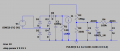
i did a little test:
1768536072659.png

as you can see voltages at nodes marked ADC0 and ADC1 track changes in V1 voltage.

at first it was voltage divider R2/R3 with smoothing cap C2. D5 was added to clamp voltage to safe value to analog input does not get harmed. R4 and C3 are added for extra filtering.
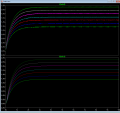
1768536606045.png

and the above graphs are after i introduced a bit of disturbance (I1 to simulate some change in load).
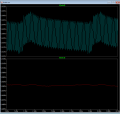
zoomed in it is something like this:
1768536642650.png

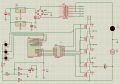
schematics could look something like this:
1768537927695.png
the red lines are for high current. TR1 should produce high enough voltage for relays even when mains voltage is down. due to large swing in unregulated voltage across C2, 12V regulator should be switching type and the simplest option here is to use ready made unit.
 

MrAl

Joined Jun 17, 2014
13,716
When I was using trim POT, you could say it's a nonsense idea. See on post #1 . I has no feedback path ? Kindly look at that papers circuit, may be to Turn on the relays you need a reference voltage in the output side, without tap changing TR it can also possible in Proteus.


Ok


Let's do it in circuit, I will use the best one.


Post a circuit please, don't avoid here.


I don't want to make any argument here, but it better to explain why not.
Hi,

In theory you do not have to rectify, but it does make it harder to sample. It is best to be synced to the line frequency so you can sample the sine wave itself. The way some expensive power converters used to do it was to sample in two places: maybe about 20 degrees to the left of the peak and 20 degrees to the right of the peak. In fact, the magic angle is +45 degrees, so if you sample at +45 and -45 degrees, add the two samples then divide by 2, you automatically get the RMS value of the sine wave, assuming it is always a sine wave or decent approximation (not always true though with a soft power line).

If you are looking for a stable average DC value though, I'd stick with averaging over many samples either with the two 45 degree samples or rectified DC. I can tell you for sure if you do use rectified DC you can get some really stable DC voltage measurements stable to several decimal digits. You use a reasonable RC low pass filter followed by averaging samples in code. The more samples you average the more stable the reading is, but you do sacrifice speed if the DC value changes suddenly. One formula would be:
Vavg=(Vavg*(N-1)+Vsample)/N
where N is roughly the time constant, so if N=10 then if you calculate this 50 times you will get a result that is within 1 percent of the final value.
This requires floating point math, but there are integer versions too where floating point is only needed in the first and last calculations.
 

MrChips

Joined Oct 2, 2009
34,863
The more samples you average the more stable the reading is, but you do sacrifice speed if the DC value changes suddenly. One formula would be:
Vavg=(Vavg*(N-1)+Vsample)/N
where N is roughly the time constant, so if N=10 then if you calculate this 50 times you will get a result that is within 1 percent of the final value.
This requires floating point math, but there are integer versions too where floating point is only needed in the first and last calculations.
Vavg=(Vavg*(N-1)+Vsample)/N
is
Vavg = Vavg + (Vsample - Vavg)/N

Choose N to be a power of 2 (for example, 16 or 32) and you don't need floating point math.

The method I use is to maintain a variable (or register) to hold N*Vavg.
Sum = Sum + (Vsample - Vavg)
Vavg = Sum / N

This is exactly what I do in a PI controller (as in PID controller).
 
Top