Best laid plans...

Thread Starter

SamR

Joined Mar 19, 2019
5,470
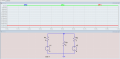
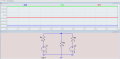
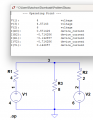
I really want to continue my studies with Boylestad's "Introductory Circuit Analysis" but with my current limitations I have not been able to for some time now. So, I got the great idea of cutting through the confusion by using LTS to model the problem circuits to resolve the complex equations for me as the "calculator". Here is what it gave me for this problem...

1762886512844.png
1762886705504.png


1762886894001.png
Which is incorrect...

Here is the correct solution!
1762887042931.png
Which after formulating the 2 loop equations at the top, I resolved as a matrix simultaneous equation in Microsoft Mathematica. Which with my current brain fog I find almost impossible to resolve due to errors and inability to properly form the equations. Why am I not getting the correct solution from LTS?
 

Attachments

xox

Joined Sep 8, 2017
936
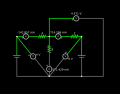
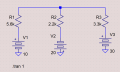
Well that's pretty strange. I'm too lazy to actually run LTS but using a much simpler simulator I got this:

sim.png

Also note that the junction of R1/R2/R3 is at ~4.5V so the current actually flows back into the source at E1!
 

Thread Starter

SamR

Joined Mar 19, 2019
5,470
I'm only showing one case, but it has done this for several similar cases where it shows the center resistor as a net current of 0. Which simulator is that? Looks similar to Falstad.
 

xox

Joined Sep 8, 2017
936
I'm only showing one case, but it has done this for several similar cases where it shows the center resistor as a net current of 0. Which simulator is that? Looks similar to Falstad.
Yep, Falstad.

I can't see why you'd be getting a net current of zero though. Are you sure all of the wires are fully connected? LTSpice is kind of an industry standard and so it's hard to believe that it would malfunction like that!
 

xox

Joined Sep 8, 2017
936
Come to think of it, it looks like you only have R3 connected to a common ground.
 
Last edited:

WBahn

Joined Mar 31, 2012
32,702
I really want to continue my studies with Boylestad's "Introductory Circuit Analysis" but with my current limitations I have not been able to for some time now. So, I got the great idea of cutting through the confusion by using LTS to model the problem circuits to resolve the complex equations for me as the "calculator". Here is what it gave me for this problem...
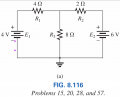
View attachment 358707
View attachment 358708


View attachment 358709
Which is incorrect...

Here is the correct solution!
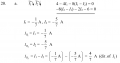
View attachment 358711
Which after formulating the 2 loop equations at the top, I resolved as a matrix simultaneous equation in Microsoft Mathematica. Which with my current brain fog I find almost impossible to resolve due to errors and inability to properly form the equations. Why am I not getting the correct solution from LTS?
Why do you think that the sim results are wrong?

Let's sanity check your results.

If I_R1 = -5/7 A = -714.3 mA, that means that the voltage at the top junction would be

V_top = V1 - I_R1*R1 = 4 V - (-714.3 mA)(4 Ω) = 6.857 V

That would make the current through R3, flowing downward, equal to

I_R3 = V_top / R3 = 6.857 V / 8 Ω = 857.1 mA

But your result claims 4/7 A, which is 571.4 mA

So your results are wrong.

Where does this "correct solution" come from? Is it the author's solution to the problem?

Let's verify the set up equations, since if they aren't correct, we are solving a completely different problem and are guaranteed to get the wrong answer except by sheer coincidence.

Around the first loop, going clockwise and summing up voltage gains, you have:

V1 - R1·I1 - R3·(I1-I2) = 0

Going around the second loop, you have

-R3·(I2 - I1) - R2·I2 - V2 = 0

Plugging in the known quantities, we therefore have

(4 V) - (4 Ω)(I1) - (8 Ω)·(I1-I2) = 0
-(8 Ω)·(I2 - I1) - (2 Ω) - (6 V) = 0

So, other than disregarding units (which is going to bite you sooner or later), the setup appears correct.

Since you don't show any math, it's impossible to tell where your answers came from and why they are incorrect. So let's just do the math right here.

(4 V) - (4 Ω)(I1) - (8 Ω)·(I1-I2) = 0
-(8 Ω)·(I2 - I1) - (2 Ω)·I2 - (6 V) = 0

(- 4 Ω - 8 Ω)·I1 + (8 Ω)·I2 = - 4 V
(8 Ω)·I1 + (- 8 Ω - 2 Ω)·I2 = 6 V

-(12 Ω)·I1 + (8 Ω)·I2 = -4 V
(8 Ω)·I1 - (10 Ω)·I2 = 6 V

Let's divide the top one by 4 Ω and the bottom one by 2 Ω:

-3·I1 + 2·I2 = -1 A
4·I1 - 5·I2 = 3 A

To eliminate I1, let's multiply the top by 4 and the bottom by 3:

-12·I1 + 8·I2 = -4 A
12·I1 - 15·I2 = 9 A

Adding the two together, we get

-7·I2 = 5 A
I2 = -5/7 A

To get I1, we can multiply the top by 5 and the bottom by 2:

-15·I1 + 10·I2 = -5 A
8·I1 - 10·I2 = 6 A

Adding these together, we get:

-7·I1 = 1 A
I1 = -1/7 A

Thus, the currents in the three resistors would be:

I_R1 = 1/7 A = 142.9 mA (ccw)
I_R2 = 5/7 A = 714.3 mA (ccw)
I_R3 = 4/7 A = 571.4 mA (downward)

That puts the voltage at the top node equal to

V_top = 4 V + (1/7 A)·(4 Ω) = 4.571 V

That makes the current down through R3 equal to

I_R3 = 4.571 V / 8 Ω = 571.4 mA

This also puts the current in R2, counterclockwise, at

I_R2 = (6 V - 4.571 V) / (2 Ω) = 714.5 mA

These all agree with the calculated results within the margin of roundoff error.

But, even these corrected values do not agree with the simulation you show.

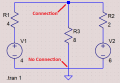
Looking at the schematic you have, the reason is actually pretty obvious.

1762891604079.png

Thus, there can't be any current in R3 and the current in R1 and R2 will be 2 V across 6 Ω resulting in 333.3 mA flowing counterclockwise.
 

Thread Starter

SamR

Joined Mar 19, 2019
5,470
Where does this "correct solution" come from? Is it the author's solution to the problem?
Yes, it's from the solutions manual for the textbook. I tend to learn better when I can verify that my solution is correct. "Trust but verify"! Sometimes it does not conform exactly as the solution manual is for a different edition, but the methodology is typically the same. They sometimes change a few component values for the same circuit between editions. I was a bit dubious (and amused) when I got 0mA for R3 in several similar circuits. Not that it couldn't happen but dubious as the parameters for the components in the circuits were different on each side. So, I checked the solutions manual and my off the cuff evaluation was correct but still confused as to how that could be. I did notice that there was no node junction "box" on the line above the center ground but didn't recognize the significance of it even though I thought it curious. Need to trust my instincts... Mea Culpa
 

crutschow

Joined Mar 14, 2008
38,316
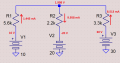
Results with the ground connection added:
(I've added polarity dots to my resistor icons with a plus value indicating current into the ° marked node.)
1762896049597.png
 
Last edited:

Thread Starter

SamR

Joined Mar 19, 2019
5,470
Since you don't show any math
I've been using Microsoft Mathematica for several years to put simultaneous equations into a matrix equation and allow the software to resolve the matrix. It has become extremely difficult for me to even resolve the circuit and state the simultaneous equations, so I am looking for LTS as a crutch to aid me in my endeavors. The real question is whether I will even be able to remember this in a few days... Plus, my ability of stating and resolving multifactorial equations has already diminished.
 

Thread Starter

SamR

Joined Mar 19, 2019
5,470
I continued using LTS to work on the section problems but ran into a snag that I can't seem to unravel. Current direction in the model. I thought it was Conventional Flow, From the Positive terminal to the circuit, and my online query says that LTS does use Conventional Flow. But... When I place the cursor over the voltage source the current direction arrow is from its positive terminal to its negative terminal. Am I not correct that it is indicating Electron flow and not Conventional flow?
 

WBahn

Joined Mar 31, 2012
32,702
I continued using LTS to work on the section problems but ran into a snag that I can't seem to unravel. Current direction in the model. I thought it was Conventional Flow, From the Positive terminal to the circuit, and my online query says that LTS does use Conventional Flow. But... When I place the cursor over the voltage source the current direction arrow is from its positive terminal to its negative terminal. Am I not correct that it is indicating Electron flow and not Conventional flow?
The current at a pin in nearly all simulators is the conventional current flowing INTO that pin.

For a two-pin device like a resistor or voltage source, the current in the device is defined as the current flowing into Pin #1.

The standard voltage source models assign Pin #1 to the positive terminal, which means that conventional current flowing out of the positive terminal is reported as a negative current through the device.
 

Thread Starter

SamR

Joined Mar 19, 2019
5,470
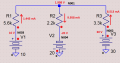
I cannot take a screen shot of the current flow arrow in a voltage source (or any other component) on LTS, but it is internally from the positive pole to the negative pole. Which, to me, indicates that the current flows from the negative pole which would be the Electron Flow model. When you place the cursor over the circuit components in the run mode the arrow for current flow in the component is shown and its exact value is given at the bottom left of the screen. The flow arrow is fixed for resistors which have to be rotated properly to indicate the correct flow direction. Rotating a voltage source to indicate the current flow however changes the circuits polarity! But doing mesh analysis, the current flow is calculated in each loop in the counterclockwise direction with a negative result indicating the current flow is reversed. I would expect LTS to deliver the same current value results, but I don't seem to be getting that.

1763532646003.png
 

Attachments

WBahn

Joined Mar 31, 2012
32,702
I cannot take a screen shot of the current flow arrow in a voltage source (or any other component) on LTS, but it is internally from the positive pole to the negative pole. Which, to me, indicates that the current flows from the negative pole which would be the Electron Flow model. When you place the cursor over the circuit components in the run mode the arrow for current flow in the component is shown and its exact value is given at the bottom left of the screen. The flow arrow is fixed for resistors which have to be rotated properly to indicate the correct flow direction. Rotating a voltage source to indicate the current flow however changes the circuits polarity! But doing mesh analysis, the current flow is calculated in each loop in the counterclockwise direction with a negative result indicating the current flow is reversed. I would expect LTS to deliver the same current value results, but I don't seem to be getting that.

View attachment 359079
For the moment, let's forget about how LTS defines things and just analyze the circuit (using conventional current).

1763536090032.png

Next, let's put Pin 1 indicators (dots) on each component.

Here's the netlist:

Code:
* C:\AAC\LTSpice\Problem20a.asc
R1 N003 N001 5.6k
R2 N004 N001 2.2k
R3 N002 N001 3.3k
V1 N003 0 10
V2 0 N004 20
V3 N002 0 30
;tran 1
.op 1
.backanno
.end
Labeling each node with the name from the netlist and putting a red dot next to Pin #1 on each component, we have:

1763536573958.png

From this, we can determine what LTSpice will report as the currents in each device, which is the current INTO Pin #1.

I(R1) = 1.445 mA
I(R2) = -9.958 mA
I(R3) = 8.513 mA
I(V1) = -1.445 mA
I(V2) = -9.958 mA
I(V3) = -8.513 mA

Now, let's compare this to what LTSpice reports as the DC Operating Point:

Code:
       --- Operating Point ---

V(n003):     10     voltage
V(n001):     1.90751     voltage
V(n004):     -20     voltage
V(n002):     30     voltage
I(R3):     0.00851287     device_current
I(R2):     -0.00995796     device_current
I(R1):     0.00144509     device_current
I(V3):     -0.00851287     device_current
I(V2):     -0.00995796     device_current
I(V1):     -0.00144509     device_current
As we can see, the LTSpice results are in complete agreement with using conventional current.
 

WBahn

Joined Mar 31, 2012
32,702
I edited my resistor icon to add a small dot on the plus side to show the polarity and avoid guessing.
View attachment 359095
Same here -- and also for capacitors and inductors. Except I put a small tick mark on the symbol on Pin #1 that is barely noticeably unless you are looking for it. A dot or anything else tends to confuse others (like customers) because they assume that it means something about the component itself. This is especially true for inductors where people are used to seeing dots to indicate the polarities of mutual inductance.
 

Thread Starter

SamR

Joined Mar 19, 2019
5,470
Couple of follow ups-

The instructor's Resource Manual (answer key with worked solutions), even though the same series edition as my textbook, does not match up. The results are very similar, but their origins are a bit different! There are several 11th Edition texts for US, Korea, International, etc... Yes, when I work the examples in the textbook with LTS I get the same results as the textbook example.

I copied @crutschow 's res(1).asy into my library but it does not have the circle indicator for current alignment (and smaller text)? I will just edit my original in the library to add the indicator...

1765051206640.png
 
Top