Facebook
 Google
 GitHub
 Linkedin
Hey all I am wanting another set of eyes to review my schematic to make sure I have everything connected correctly. It looks like its connected correctly to me but another set of eyes on it is always a good thing!
I'm also wanting to find better substitutes for the C1 470uf and C2 1uf caps. Are there any that I can get that are smaller (height wise)? I'm looking to have the smallest height possible.
Note that I did my own thing for the power conversion and the RGB.
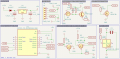
Here is what I used to go by while creating the schematic:
I'm also wanting to find better substitutes for the C1 470uf and C2 1uf caps. Are there any that I can get that are smaller (height wise)? I'm looking to have the smallest height possible.
Note that I did my own thing for the power conversion and the RGB.
Here is what I used to go by while creating the schematic:
Rich (BB code):
    1. Bidirectional Level Shifter (3.3V ↔ 5V) - VERIFIED BIDIRECTIONAL LEVEL SHIFTER

        Valentine One Side (5V)                    ESP32-C3 Side (3.3V)
        ─────────────────────────                  ─────────────────────────
                +5V                                        +3.3V
                 │                                           │
                ╔══╗                                        ╔══╗
                ║R1║ 10kΩ                                   ║R3║ 10kΩ
                ╚══╝                                        ╚══╝
                 │                                           │
                 ├─────────── To V1 DATA                     ├─────────── To GPIO21/TX
                 │            (RJ11 Pin 2)                   │            To GPIO20/RX
                 │                                           │
               Drain                                       Drain
                 │                                           │
             ┌───┴───┐                                   ┌───┴───┐
             │       │                                   │       │
             │  Q1   │                                   │  Q2   │
             │BSS138 │                                   │BSS138 │
             │       │                                   │       │
             └───┬───┘                                   └───┬───┘
               Gate                                        Gate
                 │                                           │
                 └─────────────────┬─────────────────────────┘
                                   │
                                   │ +3.3V
                                   │  │
                                   │ ╔══╗
                                   │ ║R2║ 10kΩ
                                   │ ╚══╝
                                   │  │
                                   └──┤ (Gates connected together)
                                      │
                                Source│Source
                                   │  │
                                   ┴  ┴
                                  GND GND

    IMPORTANT: Both MOSFET Sources MUST connect to GND
    Step-by-Step Connection Guide for Level Shifter:

    Install Q1 (BSS138 or 2N7000):
    ================================
    Source (Pin 1) → Connect to GND
    Gate (Pin 2) → Leave for now (will connect in step 5)
    Drain (Pin 3) → Connect to V1 DATA line

    Install Q2 (BSS138 or 2N7000):
    ================================
    Source (Pin 1) → Connect to GND
    Gate (Pin 2) → Leave for now (will connect in step 5)
    Drain (Pin 3) → Connect to ESP32 GPIO21 and GPIO20

    Install R1 (10kΩ pull-up):
    ================================
    One end → +5V supply
    Other end → Q1 Drain (same point as V1 DATA)

    Install R3 (10kΩ pull-up):
    ================================
    One end → +3.3V supply
    Other end → Q2 Drain (same point as GPIO20/21)

    Connect Gates Together with R2:
    ================================
    Connect Q1 Gate to Q2 Gate with a wire
    Install R2 (10kΩ): One end to +3.3V, other end to the connected gates

    Verify Connections:
    ================================
    Both Sources are at GND
    Gates are connected together and pulled to 3.3V
    Each Drain has its respective pull-up

    2. Legacy Mode 1.4V Pull-up Generator - VERIFIED LEGACY MODE 1.4V GENERATOR

        Control Stage                 Voltage Generation Stage
        ──────────────               ─────────────────────────
        GPIO6 ──┐
                │
               ╔══╗
               ║R5║ 1kΩ              +3.3V        +3.3V
               ╚══╝                     │            │
                │                     ╔══╗          ╔══╗
              Gate                    ║R6║          ║R7║
                │                     ║10kΩ         ║10kΩ
            ┌───┴───┐                 ╚══╝          ╚══╝
            │       │                  │             │
            │  Q3   │Drain             └────┬────────┘
            │BSS138 ├──────────────────────Base
            │       │                       │
            └───┬───┘                   ┌───┴───┐
              Source                    │       │Collector
                │                       │  Q5   ├────────── To V1 DATA
                ┴                       │MMBT   │           (1.4V output)
               GND                      │2222A  │
                                        │       │
                                        └───┬───┘
                                         Emitter
                                            │
                                           ╔══╗
                                           ║R8║ 4.7kΩ
                                           ╚══╝
                                            │
                                            ┴
                                           GND

    Step-by-Step Connection Guide for Legacy Pull-up:
    ================================
    Install Q3 (BSS138 Control MOSFET):

    Source → GND
    Gate → Through R5 (1kΩ) to GPIO6
    Drain → Will connect to Q5 base circuit

    Install Voltage Divider (R6 and R7):
    ================================
    R6 (10kΩ): One end to +3.3V
    R7 (10kΩ): One end to +3.3V
    Connect other ends of R6 and R7 together (creates ~2.1V when active)

    Install Q5 (MMBT2222A or 2N2222):
    ================================
    Base → Connect to junction of R6/R7 AND Q3 Drain
    Emitter → Through R8 (4.7kΩ) to GND
    Collector → Connect to V1 DATA line

    Install R5 (1kΩ gate resistor):
    ================================
    One end → GPIO6
    Other end → Q3 Gate

    Install R8 (4.7kΩ emitter resistor):
    ================================
    One end → Q5 Emitter
    Other end → GND

    Operation Verification:
    ================================
    GPIO6 LOW: No pull-up on DATA line
    GPIO6 HIGH: ~1.4V appears on DATA line

    3. MUTE Control Circuit - VERIFIED MUTE CONTROL CIRCUIT

        Control Input                Output Stage
        ──────────────              ──────────────
                                    V1 MUTE Pin 5
                                         │
                                       ╔═══╗
                                       ║R10║ 10kΩ (Internal V1 pull-up)
                                       ╚═══╝
                                         │
        GPIO5 ──┐                        ├────── To V1 Pin 5 (MUTE)
                │                        │
               ╔══╗                     Drain
               ║R9║ 10kΩ                 │
               ╚══╝                  ┌───┴───┐
                │                    │       │
              Gate                   │  Q4   │
                │                    │BSS138 │
            ┌───┴───┐                │       │
            │  NC   │                └───┬───┘
            │       │                  Source
            └───────┘                    │
        (R9 protects gate)               ┴
                                        GND

    Note: V1 has internal pull-up, R10 shown for reference
    Step-by-Step Connection Guide for MUTE Control:

    Install Q4 (BSS138 MUTE Control):
    ================================
    Source → GND
    Gate → Through R9 to GPIO5
    Drain → Direct to V1 MUTE (Pin 5 of RJ11)

    Install R9 (10kΩ protection resistor):
    ================================
    One end → GPIO5
    Other end → Q4 Gate

    Note about R10:
    ================================
    R10 is INTERNAL to V1, do NOT add external pull-up
    V1 maintains MUTE line at +5V when idle

    Operation:
    ================================
    GPIO5 LOW: MUTE line stays at +5V (no mute)
    GPIO5 HIGH: Q4 pulls MUTE to GND (activates mute)

    4. Power and Ground Connections - VERIFIED POWER DISTRIBUTION

        From Valentine One                 ESP32-C3 Power
        ──────────────────                ────────────────
        RJ11 Pin 4 (+12V) ──┐              USB 5V ──┐
                            │                       │
                        [UNUSED]               [Internal LDO]
                            │                       │
                            │                     +3.3V
        RJ11 Pin 3 (GND) ───┬───────────────────────┤
                            │                       │
                            ┴                       ┴
                        COMMON GND              COMMON GND

    CRITICAL: V1 GND and ESP32 GND MUST be connected together
    Step-by-Step Connection Guide for Power:

    Connect Grounds:
    ================================
    V1 Pin 3 (GND) → ESP32 GND
    This is CRITICAL for proper operation

    V1 Power (Pin 4):
    ================================
    NOT USED for powering ESP32
    Leave disconnected or add protection diode only

    ESP32 Power:
    ================================
    Power via USB (5V)
    ESP32 generates its own 3.3V

    Add Bypass Capacitors:
    ================================
    100nF ceramic near ESP32 3.3V pin
    10µF electrolytic on 3.3V rail

    5. Complete Pin Connection Summary RJ11 CONNECTOR (Looking into jack)
        ┌──────────────────────────┐
        │ 6   5     4   3   2    1 │
        └──────────────────────────┘
          NC  MUTE +12V GND DATA NC

        CONNECTIONS:
        Pin 1: Not Connected
        Pin 2: DATA → Level Shifter Q1 Drain AND Legacy Gen Q5 Collector
        Pin 3: GND → Common Ground for entire circuit
        Pin 4: +12V → Not used (ESP powered via USB)
        Pin 5: MUTE → Q4 Drain (MUTE control)
        Pin 6: Not Connected

        ESP32-C3 CONNECTIONS:
        GPIO20: RX → Level Shifter Q2 Drain
        GPIO21: TX → Level Shifter Q2 Drain (same connection)
        GPIO5: → R9 → Q4 Gate (MUTE control)
        GPIO6: → R5 → Q3 Gate (Legacy control)
        GPIO8: → R11 (220Ω) → LED → GND
        GND: → Common ground
        3.3V: → Pull-ups and bias resistors

    Critical Design Verification Points
    ✅ Level Shifter Checklist:
    ================================
     Both MOSFET sources connected to GND
     Gates connected together with 3.3V pull-up
     5V pull-up on V1 side drain
     3.3V pull-up on ESP32 side drain
     No direct 5V to 3.3V connection

    ✅ Legacy Generator Checklist:
    ================================
     Q5 collector to DATA line (provides 1.4V)
     Q5 emitter through 4.7kΩ to GND
     Voltage divider creates ~2.1V at base
     Q3 controls activation

    ✅ MUTE Control Checklist:
    ================================
     Q4 drain to MUTE pin
     Q4 source to GND
     NO external pull-up (V1 has internal)
     Gate protection resistor installed

    ✅ Power Checklist:
    ================================
     Common ground between V1 and ESP32
     ESP32 powered via USB only
     12V from V1 NOT connected to ESP32
     Bypass capacitors installed