Adjusting this schematic to remove the two 9v batteries.

Thread Starter

Bod

Joined Sep 18, 2016
317
Then you wired it wrong or using wrong component value. Are you sure you are using the right resistors? If so, measure its resistance anyway, I have had some wrong color code resistors before, cheap resistors from ebay are not so reliable
I did manage to pick up the wrong value resistor. See I don't actually have a 250K so I am using a 100 and 150K. For some reason, I have some 1M ohm resistors out as well and confused those with the 150K's because they look similar. I changed it but no noticeable difference was made apart from the fact that the ADC output was slightly larger.
 

Thread Starter

Bod

Joined Sep 18, 2016
317
*Sigh*! All that time spent analyzing the wrong circuit...
Oops... :oops:

So, in the circuit presented in post #86. What have you done to validate your circuit?

With power applied and no signal, measure from ground to the voltage present at the + input to the LT1366. Is it 2.5VDC? If not, stop and figure out why...

I might suggest dropping the parameters of the capacitor and resistor in series with the - input of the LT1366 to 0.1μf and 1K respectively.

Also, forget the audio input. Connect two AA/AAA batteries to ground and to the - input (after the cap) measure the output... What do you see?
I will give that a try, thanks!
Also, not that it changes much, I am using the LM358 not the LT1366 :p
 

Thread Starter

Bod

Joined Sep 18, 2016
317
*Sigh*! All that time spent analyzing the wrong circuit...

So, in the circuit presented in post #86. What have you done to validate your circuit?

With power applied and no signal, measure from ground to the voltage present at the + input to the LT1366. Is it 2.5VDC? If not, stop and figure out why...

I might suggest dropping the parameters of the capacitor and resistor in series with the - input of the LT1366 to 0.1μf and 1K respectively.

Also, forget the audio input. Connect two AA/AAA batteries to ground and to the - input (after the cap) measure the output... What do you see?
Just found out why it wasn't biased to +2.5V. Unlike this breadboard:
t-041-1_11.png
My breadboard not 2 power rails but 4. V1, V2, V3, and V4. I had everything plugged into V4 apart from the voltage divider plugged into V3. I also had my Arduino Vout plugged into V4. This means the voltage divider wasn't getting power.
This changes a lot:
With no audio playing, the output looks like it is 'floating':
Screen Shot 2019-07-13 at 18.08.01.png
When I have my 500hz sine wave playing, it looks like this:
Screen Shot 2019-07-13 at 18.09.14.png
It is closer to what the real output should be - but definitely not right.
If it is biased at +2.5V, why is the output sometimes 400 sometimes 600? It should be about 512.

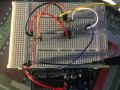
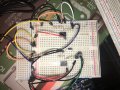
As per request, here is my circuit:
IMG_0294.jpg
 

Thread Starter

Bod

Joined Sep 18, 2016
317
Made a new discovery. Only when the aux cable is attached does it cause the output to be 'floating' as I said previously. With no cable it hovers at 510 so close enough to 2.5.

EDIT: I'm not entirely sure why that happens. I measured from ground to the output and I got 2.352V - that's correct. When I hook up the aux cable, the voltage stays at 2.352V which makes no sense why the output of the Arduino is changing so much when the cable is connected.

Bod
 

djsfantasi

Joined Apr 11, 2010
9,237
Just found out why it wasn't biased to +2.5V. Unlike this breadboard:
View attachment 181613
My breadboard not 2 power rails but 4. V1, V2, V3, and V4. I had everything plugged into V4 apart from the voltage divider plugged into V3. I also had my Arduino Vout plugged into V4. This means the voltage divider wasn't getting power.
This changes a lot:
With no audio playing, the output looks like it is 'floating':
View attachment 181614
When I have my 500hz sine wave playing, it looks like this:
View attachment 181615
It is closer to what the real output should be - but definitely not right.
If it is biased at +2.5V, why is the output sometimes 400 sometimes 600? It should be about 512.

As per request, here is my circuit:
View attachment 181617
Soooo....

When you are testing a sine wave with the Arduino ADC, you are not testing just the peaks. As a matter of course, you cannot predict where on the sine curve you are sampling. Sometimes it will be sampled at the peak. Other times, some random point along the curve. You will see a variation of input voltage.

Hence, you must expect some variation.

One way of resolving this issue is to calculate a rolling average in software.

Another method is to insert a peak detector circuit just before the input to the Arduino.
 

BobTPH

Joined Jun 5, 2013
11,553
It is exactly as expected. The opamp ypu are using cannot go all the way up to 5V and that is exactly what we are seing. If you plotted the output it would look like a sine clipped at the top.

Bob
 

Thread Starter

Bod

Joined Sep 18, 2016
317
When you are testing a sine wave with the Arduino ADC, you are not testing just the peaks. As a matter of course, you cannot predict where on the sine curve you are sampling. Sometimes it will be sampled at the peak. Other times, some random point along the curve. You will see a variation of input voltage.
That makes more sense as to why the values were always different.

Another method is to insert a peak detector circuit just before the input to the Arduino.
I will try the peak detector. I assume the output of the peak detector goes to the input of the LM358?

It is exactly as expected. The opamp ypu are using cannot go all the way up to 5V and that is exactly what we are seing. If you plotted the output it would look like a sine clipped at the top.

Bob
Ok, that's fine - It was briefly discussed back in posts #51 - 54.
I was told it can go up to 2V below the input. If this is still true, can I not just use a higher voltage supply?

What I don't get is why when I have the cable attached, but with no audio, the values are all over the place. They should just be around 510 (like when there's no cable). Look at image 2 in post #144. It should be 510 all the way through, but it's not.
 

iimagine

Joined Dec 20, 2010
512
As I said earlier, that circuit have a gain of 25, was designed for 100mV peak. Since your headphone jack output is around 500mv to 2V, you need to check and adjust the gain down to a factor of maybe 2 or 3, replace the 250k resistor with 30k or less. Anyway, as it is the output should have looked like a square wave.
 

djsfantasi

Joined Apr 11, 2010
9,237
That makes more sense as to why the values were always different.

I will try the peak detector. I assume the output of the peak detector goes to the input of the LM358?
The output of the circuit in post #86 should be input to the peak detector. The output of the peak detector should go to the Arduino.

You can use another LM358 for the peak detector (aka envelope detector)
Or pick another op amp that goes closer to 5V than the LM386. Like a TLV2462 (available on either SparkFun or AdaFruit. I can’t remember which one).

Do you know how to reduce the amplification so the signal isn’t clipped? There is a calculation to determine gain. The 250K resistor is too large. The formula is Rf (250K in the schematic) divided
By Rin (1oK in the schematic). You have a gain of 25... you need something in the range of 4-5. Try a 43K resistor in place of the 250K.
 
Last edited:

Thread Starter

Bod

Joined Sep 18, 2016
317
As I said earlier, that circuit have a gain of 25, was designed for 100mV peak. Since your headphone jack output is around 500mv to 2V, you need to check and adjust the gain down to a factor of maybe 2 or 3, replace the 250k resistor with 30k or less. Anyway, as it is the output should have looked like a square wave.
[QUOTE="djsfantasi, post: 1412558, member: 81714"The formula is Rf (250K in the schematic) divided
By Rin (1oK in the schematic). You have a gain of 25... you need something in the range of 4-5. Try a 43K resistor in place of the 250K.[/QUOTE]

I have changed the gain (56K). It did not fix what I said in the previous post:
What I don't get is why when I have the cable attached, but with no audio, the values are all over the place. They should just be around 510 (like when there's no cable). Look at image 2 in post #144. It should be 510 all the way through, but it's not.
 

djsfantasi

Joined Apr 11, 2010
9,237
[QUOTE="djsfantasi, post: 1412558, member: 81714"The formula is Rf (250K in the schematic) divided
By Rin (1oK in the schematic). You have a gain of 25... you need something in the range of 4-5. Try a 43K resistor in place of the 250K.
I have changed the gain (56K). It did not fix what I said in the previous post:[/QUOTE]

With no audio, your cable is acting as a giant antenna! As such since it’s not tuned, you have to expect wildly varying values. In fact, connecting an unterminated wire to an analog pin, is s common method to seed a pseudo-random number generator.

Results are intrinsically invalid without an audio source (even if it’s DC) connected.

I’m assuming that your audio input is ±1.2V... So for a test, connect a 1.2V battery to ground (1.5v in a pinch). and its + side to your input, beyond the capacitor.
 

Thread Starter

Bod

Joined Sep 18, 2016
317
With no audio, your cable is acting as a giant antenna! As such since it’s not tuned, you have to expect wildly varying values. In fact, connecting an unterminated wire to an analog pin, is s common method to seed a pseudo-random number generator.
It does that even plugged into my phone. In fact, the circuit now, when not plugged into my phone, it hovers around 510, when plugged in it is just a load of random numbers.
 

Thread Starter

Bod

Joined Sep 18, 2016
317
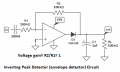
Here’s a typical envelope detector/ follower circuit.

View attachment 181621

You don’t need the cap in the input. You already have that.
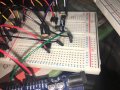
I have just built it and it does nothing. The output is always 0. Here's the circuit - I will continue to look for problems.

IMG_0296.jpgIMG_0295.jpg

EDIT: I did use a 1N4007 instead as I don't have that was on the schematic
 

djsfantasi

Joined Apr 11, 2010
9,237
The best diode is a Schottky diode. The 1N4007 has too great of a Vf. Without looking it up, a typical value would have a 0.7 voltage drop. With a 1.2V signal, that gives you only 0.5V for your signal. A Schottky diode (as I used in my circuit) only drops 0.2V, leaving a 1V signal to follow. Twice the range.

It’s hard to make suggestions. We provide tried and true schematics and you get nothing. It’s difficult to respond in that situation. It works for us, who ostensibly are more experienced, but doesn’t work for you... So what conclusion have you drawn?

A picture is darn near impossible to analyze. Leads that cross, connections that are hidden. No way of identifying the pinouts of ICs used...

For each circuit, redraw the schematic. And before posting, take the time to verify each and every connection. Print out an extra copy of the schematic and as you trace each connection on the breadboard, highlight it on your copy.

A recent post of yours identified that you had made incorrect supply connections. Don’t do that again. Verify manually the circuit, connection by connection. Then post your results.

It happens to the best of us. I’m nowhere near as good as most of the members here. And I often suffer from a missed connection. I had simulated a circuit that I was confident in, but the output was a twentieth of the calculated result. The problem? I missed one ground connection.

Please go back and spend the time to manually verify your circuit. And post an as-built schematic.
 

Audioguru

Joined Dec 20, 2007
11,248
The output of the circuit in post #86 should be input to the peak detector.
With the high output level from your phone you do not need the circuit in post #86 with its gain of 26 times.

You can use another LM386 for the peak detector (aka envelope detector).
Wrong part number. An LM386 is a power amplifier that is already biased and has a gain of 20 times. He bought LM358 opamps.
 

Audioguru

Joined Dec 20, 2007
11,248
Breadboarded circuits are a nightmare. How can you see what is connected to what in that messy tangle of wires and parts all over the place?
In the photos, none of the wires are labeled as input, output, +5V or 0V. You can easily label them in Microsoft PAINT program on your photos.

It looks like you have your phone connected to the input of the amplifier in post #86 that has an average output of +2.5V. Then you are feeding that +2.5V directly into the input of the peak detector circuit in post #152 that must have an input capacitor to block the DC. So of course the output is 0V because when the (-) input of an opamp goes much more positive than the (+) input (which is 0V) then the output of that opamp goes as negative as it can (to 0V).
 

djsfantasi

Joined Apr 11, 2010
9,237
Wrong part number. An LM386 is a power amplifier that is already biased and has a gain of 20 times. He bought LM358 opamps.
Oops, I’ve edited my post. Earlier the TS said he was using a 386; later it was corrected to 358. I got them confused.

Does the peak detector really need the input cap, since the previous stage does?
 
Top