Adjusting this schematic to remove the two 9v batteries.

Audioguru

Joined Dec 20, 2007
11,248
Your simulated and actual output is +2.5V which is the average voltage of the AC input.
The expected output is the output of an inverting peak detector (active rectifier) that is referenced to 0V and has an input coupling capacitor, but its diode prevents the output from going as high as 5V.
 

Thread Starter

Bod

Joined Sep 18, 2016
317
Your simulated and actual output is +2.5V which is the average voltage of the AC input.
The expected output is the output of an inverting peak detector (active rectifier) that is referenced to 0V and has an input coupling capacitor, but its diode prevents the output from going as high as 5V.
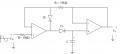
Like this?
Peak_D4.png
It fits your description.
Here's the description from the website:
Here second op-amp acts as a voltage follower. Its input impedance is very high so capacitor discharges very slowly i.e. capacitor almost holding the charge.
 

ebeowulf17

Joined Aug 12, 2014
3,307
I tried it out, along with other variations of your circuit. Unfortunately, they did not work. The value stayed at 1023, even with music.

Bod
This is one of those moments where I wish I was in the same room, watching you work. There's no way a dozen circuits have all been bad. Something weird is going on, and it would probably be obvious if someone else was there with you to look at it with fresh eyes. As it is, we can only go by what you tell us, and something doesn't add up.

Let's eliminate points of uncertainty. Don't play music, play a 60Hz tone at a known voltage level. That will provide a predictable input signal for voltage/gain comparisons. It will also guarantee that your signal is in a frequency range that you should be able to measure with a volt meter.

Then start measuring every voltage you can and figure out where the voltage disappears. Double check supply voltage to any ICs. Write down the voltages at each node on the schematic. If you can't find the problem yourself based on this approach, you can upload the annotated schematic here and it'll give us more to work with in diagnosing your situation.
 

Thread Starter

Bod

Joined Sep 18, 2016
317
This is one of those moments where I wish I was in the same room, watching you work. There's no way a dozen circuits have all been bad. Something weird is going on, and it would probably be obvious if someone else was there with you to look at it with fresh eyes. As it is, we can only go by what you tell us, and something doesn't add up.
I totally agree. I'm not the best at noticing mistakes but there is definitely something fishy going on - what is that though? I have tried different breadboards, chips, analog pins, etc.

Let's eliminate points of uncertainty. Don't play music, play a 60Hz tone at a known voltage level. That will provide a predictable input signal for voltage/gain comparisons. It will also guarantee that your signal is in a frequency range that you should be able to measure with a volt meter.
I don't have a signal generator but I will use a 555 instead. Once I have set it up I will give more details on the frequency and stuff.

Then start measuring every voltage you can and figure out where the voltage disappears. Double check supply voltage to any ICs. Write down the voltages at each node on the schematic. If you can't find the problem yourself based on this approach, you can upload the annotated schematic here and it'll give us more to work with in diagnosing your situation.
Doing what BobTPH said, I will focus on just 1 circuit - number #86. I don't know if this is the best choice so if you feel that I should focus on a different one, say so and I will change.

Thanks,
Bod
 

djsfantasi

Joined Apr 11, 2010
9,237
I agree. I’ve checked some of the posted circuits (one of which is mine) and they have worked fine for me. I have a similar project going on. Audio input to an envelope that is read by an Arduino. There is something else going on.
 

Thread Starter

Bod

Joined Sep 18, 2016
317
I agree. I’ve checked some of the posted circuits (one of which is mine) and they have worked fine for me. I have a similar project going on. Audio input to an envelope that is read by an Arduino. There is something else going on.
It really is odd.

You can use apps to generate tone and use your phone jack to test circuits.

Take and post pics, maybe someone can spot the problems
A good suggestion I will do so.
 

ebeowulf17

Joined Aug 12, 2014
3,307
You can use apps to generate tone and use your phone jack to test circuits.

Take and post pics, maybe someone can spot the problems
+1 for this idea. Easier than 555 circuit, and probably more useful. A 555 outputs a square wave, which is mostly high frequency content - no guarantee how a regular meter will read that as AC.

An app on a smartphone can generate a 60Hz sine wave, which is much better for testing these circuits.
 

Thread Starter

Bod

Joined Sep 18, 2016
317
+1 for this idea. Easier than 555 circuit, and probably more useful. A 555 outputs a square wave, which is mostly high frequency content - no guarantee how a regular meter will read that as AC.

An app on a smartphone can generate a 60Hz sine wave, which is much better for testing these circuits.
I think that's the way to go. Especially because I don't have the right values of capacitor. It's funny that because I just bought 30 quids worth of capacitors!
 

Audioguru

Joined Dec 20, 2007
11,248
If the Arduino can offset the +2.5V AC signal so that it is only the positive peaks then maybe the Arduino can also stretch the duration of the peaks so that they can be seen on an LED.
 

Thread Starter

Bod

Joined Sep 18, 2016
317
This is one of those moments where I wish I was in the same room, watching you work. There's no way a dozen circuits have all been bad. Something weird is going on, and it would probably be obvious if someone else was there with you to look at it with fresh eyes. As it is, we can only go by what you tell us, and something doesn't add up.

Let's eliminate points of uncertainty. Don't play music, play a 60Hz tone at a known voltage level. That will provide a predictable input signal for voltage/gain comparisons. It will also guarantee that your signal is in a frequency range that you should be able to measure with a volt meter.

Then start measuring every voltage you can and figure out where the voltage disappears. Double check supply voltage to any ICs. Write down the voltages at each node on the schematic. If you can't find the problem yourself based on this approach, you can upload the annotated schematic here and it'll give us more to work with in diagnosing your situation.
I have built circuit #86. Using my phone, I am playing a 250hz sine wave. The output is again, different than before. It is detecting the audio and changing the values to it, but it is not centered on +2.5V.
Here is the output.
Screen Shot 2019-07-13 at 14.46.22.png
I suspect the areas with a red bracket around them are the positive peaks of the sine wave and the areas in blue are the negative peaks (the ones below zero). It seems reasonable becuase the values are not centered on +2.5V so when it goes below 0, the Arduino does not register it, hence it being a 0 on the output.

Bod
 
Last edited:

BobTPH

Joined Jun 5, 2013
11,553
What are those numbers? Is that the raw ADC count converted to a floating point number?

Measure the voltage at the output with no input. It should measure 2.5V.

Bob
 

Thread Starter

Bod

Joined Sep 18, 2016
317
What are those numbers? Is that the raw ADC count converted to a floating point number?

Measure the voltage at the output with no input. It should measure 2.5V.

Bob
Yes, they are the raw ADC values.
And the output is not +2.5V (0.0V) when there is no music hence the values being 0 on the Arduino output.
 

djsfantasi

Joined Apr 11, 2010
9,237
Yes, they are the raw ADC values.
And the output is not +2.5V (0.0V) when there is no music hence the values being 0 on the Arduino output.
I just looked at the circuit in post #85. And what did you use for a potentiometer on the input?

What’s the volume setting on your phone when testing? It should be set to maximum.

What is the resistance from the + input of the jack to the pot wiper? Try setting the pot so this resistance is minimized (zero).

Also the specs for the pot are confusing. It’s labelled “Audio” and “Linear”. There are two types of pot. “Audio” or “Logarithmic”. And “Linear”. An audio pot can’t be linear.
 

iimagine

Joined Dec 20, 2010
512
Yes, they are the raw ADC values.
And the output is not +2.5V (0.0V) when there is no music hence the values being 0 on the Arduino output.
Then you wired it wrong or using wrong component value. Are you sure you are using the right resistors? If so, measure its resistance anyway, I have had some wrong color code resistors before, cheap resistors from ebay are not so reliable
 

djsfantasi

Joined Apr 11, 2010
9,237
I have built circuit #84. Using my phone, I am playing a 250hz sine wave. The output is again, different than before. It is detecting the audio and changing the values to it, but it is not centered on +2.5V.
Here is the output.
View attachment 181606
I suspect the areas with a red bracket around them are the positive peaks of the sine wave and the areas in blue are the negative peaks (the ones below zero). It seems reasonable becuase the values are not centered on +2.5V so when it goes below 0, the Arduino does not register it, hence it being a 0 on the output.

Bod

The ADC values you are getting on the maximum side correspond to 0.20 to 0.35V. If the input pot is set to the 20% position, you will get 40 for an input of 2.5V

And I assume that you aren’t using AREF on the Arduino. That pin sets the maximum voltage for the internal ADC. Not to confuse matters, but if you feed that pin from a 100K/100K voltage divider. You’ll get full range audio conversion out of the Arduino.
 

Thread Starter

Bod

Joined Sep 18, 2016
317
I just looked at the circuit in post #85. And what did you use for a potentiometer on the input?

What’s the volume setting on your phone when testing? It should be set to maximum.

What is the resistance from the + input of the jack to the pot wiper? Try setting the pot so this resistance is minimized (zero).

Also the specs for the pot are confusing. It’s labelled “Audio” and “Linear”. There are two types of pot. “Audio” or “Logarithmic”. And “Linear”. An audio pot can’t be linear.
The ADC values you are getting on the maximum side correspond to 0.20 to 0.35V. If the input pot is set to the 20% position, you will get 40 for an input of 2.5V

And I assume that you aren’t using AREF on the Arduino. That pin sets the maximum voltage for the internal ADC. Not to confuse matters, but if you feed that pin from a 100K/100K voltage divider. You’ll get full range audio conversion out of the Arduino.
My bad! In post #132 I meant circuit #86, not #84.

As for the phone volume, it is always on max.
 

djsfantasi

Joined Apr 11, 2010
9,237
*Sigh*! All that time spent analyzing the wrong circuit...

So, in the circuit presented in post #86. What have you done to validate your circuit?

With power applied and no signal, measure from ground to the voltage present at the + input to the LT1366. Is it 2.5VDC? If not, stop and figure out why...

I might suggest dropping the parameters of the capacitor and resistor in series with the - input of the LT1366 to 0.1μf and 1K respectively.

Also, forget the audio input. Connect two AA/AAA batteries to ground and to the - input (after the cap) measure the output... What do you see?
 

iimagine

Joined Dec 20, 2010
512
That circuit was designed for 100mV peak input signal... your phone jack outputs around 500mV to 2V, not gonna work unless u change the gain
 
Top