add solenoid to the pcb in KiCad

Thread Starter

christiannielsen

Joined Jun 30, 2019
389
hi,

i am learning KiCad. Can someone tell me how I add/draw a solenoid to the pcb? when I click "Place symbol" and search solenoid theres no result.

thank you

christian nielsen
 

Picbuster

Joined Dec 2, 2013
1,062
hi,

i am learning KiCad. Can someone tell me how I add/draw a solenoid to the pcb? when I click "Place symbol" and search solenoid theres no result.

thank you

christian nielsen
Hi,
look at the footprint table and select the footprint needed.
When not available you could copy the nearest one and modify to your needs. ( use footprint editor)
Make sure that to copy to a unprotected directory (like /home/kicad/solenoids assuming that you use a real operating system like Linux )
Picbuster
 

Joël Huser

Joined Jun 30, 2019
42
It's very easy to create new schematic components in a new library. And also create new footprint and pcb components library is easy. In the schematic Kicad software, select an existing component, right click and select "edit with library editor"..... then you can duplicate component with new name. When I will be back in front of my computer soon, I can post some printscreen to help you....
 

MaxHeadRoom

Joined Jul 18, 2013
30,771
Very easy to draw or modify a component, and it is a good idea to learn it for future use.
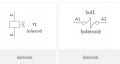
You could just modify or use the Inductor symbol in the Device lib.

Or the symbol is very easy to draw.
Two versions.
Max.

upload_2019-7-4_8-42-39.png
 
Last edited:

Joël Huser

Joined Jun 30, 2019
42
Hi christiannielsen,

I promised you this afternoon to give you some details on how you can create a new component in Kicad Eeschema. We will copy a component and add 1 pin to it to create a derivate of the original component.

I am very sorry, but I am using the 2013 version yet KiCad_stable-2013.07.07-BZR4022_Win_full_version.exe because the last released version is quite more different and I am loosing my tools and habits. BUT ! I think that the method that I will present to you is "compatible" with the actual version of Kicad.

By the way, I would like to schare you something about Kicad: you can do almost everything, but you just have to discover a lot of tricks by yourself or with a forum like allaboutcircuits. I'd like to say : Kicad works only with tricks and gimmicks !

First, you have to open your schematic in Eeschema and you have to load all libraries used by your schematic. You go to "Preferencies" and "Library". Then at least I ask you to add the library where the original component is stored, probably where you'll store the new one.

I attached 8 printscreens of kicad Eeschema 2013. Please download every image, open them one after one while reading my following comments :
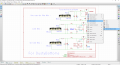
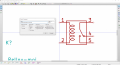
  1. Image HowToDrawASchematicComponentInKicad_A_STEP0.png: You'd like to create a new component similar to K1 the relay. So you right-click on K1, go to "Edit Component" and "Edit with Library editor".
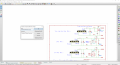
  2. Image HowToDrawASchematicComponentInKicad_B_STEP0.png: You click on top left "Select the working library". You HAVE TO select a library, unless it doesn't work. So I ask you to select the library mentionned above: "where the original component is stored, probably where you'll store the new one".
  3. Image HowToDrawASchematicComponentInKicad_C_STEP0.png: You click 5 buttons on the right on "Create a new component from the current one".
  4. Image HowToDrawASchematicComponentInKicad_D_STEP0.png: Then you give a name to the new component, for example: "TheNameOfTheNewComponent", you save everything by typing "CTRL + S", then you click 3x on "OK" and you quit the library editor software.
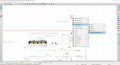
  5. Image HowToDrawASchematicComponentInKicad_E_STEP0.png: Now you are back in Eeschema. Then you type "SHIFT + A" because you want to place a component into your electronic schema. Type something like "TheNameOfTheNewCompo" and click "OK". The programm will find your new component you created before and you can now place it on the schematic. So drag it where you want and place it now by clicking once. Now you have your new component created, but looks like the original one. You'll then have to modify it as you want, for example by "adding 1 pin to it" as mentionned above.
  6. Image HowToDrawASchematicComponentInKicad_F_STEP0.png: Repeat STEP1: right-click on the new component, go to "Edit Component" and "Edit with Library editor".
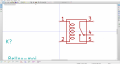
  7. Image HowToDrawASchematicComponentInKicad_G_STEP0.png: Select the tool "create a pin" on the top right, then a dialog box opens and you've to chose for a pin's name and a pin's number, and you click on "OK" and place the pin where you want. This created pin is the element you added to the original component to transform it into the new component. Then you save everything by typing "CTRL + S", you click 3x on "OK" and you quit the library editor software.
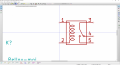
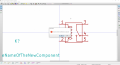
  8. Image HowToDrawASchematicComponentInKicad_H_STEP0.png: Now you are back in Eeschema. I ask you to Zoom in and out to be able to view the old component changed into the new one. Things are done.
Good luck !

Joël
 

Attachments

Thread Starter

christiannielsen

Joined Jun 30, 2019
389
Hi

thank you so much for the guide.
In order to find the one component to copy, alter and save, how do I find exactly the one I need? I have searched for "relay" and looked for one that look like the one you found, but I cant seem to find one that looks like the one you found?
 

Joël Huser

Joined Jun 30, 2019
42
Hi

thank you so much for the guide.
In order to find the one component to copy, alter and save, how do I find exactly the one I need? I have searched for "relay" and looked for one that look like the one you found, but I cant seem to find one that looks like the one you found?
It's because I've redrawn all my components..... I don't like most components in Kicad, the way they are drawn....
 

Joël Huser

Joined Jun 30, 2019
42
Hi

thank you so much for the guide.
In order to find the one component to copy, alter and save, how do I find exactly the one I need? I have searched for "relay" and looked for one that look like the one you found, but I cant seem to find one that looks like the one you found?
Christiannielsen, I can share with you some of my Kicad schematic component libraries....
 
Top