#include "main.h"
#include "stm32f4xx_hal.h"

/* USER CODE BEGIN Includes */

/* USER CODE END Includes */

/* Private variables ---------------------------------------------------------*/
UART_HandleTypeDef huart1;

/* USER CODE BEGIN PV */
/* Private variables ---------------------------------------------------------*/

/* USER CODE END PV */

/* Private function prototypes -----------------------------------------------*/
void SystemClock_Config(void);
static void MX_GPIO_Init(void);
static void MX_USART1_UART_Init(void);

/* USER CODE BEGIN PFP */
/* Private function prototypes -----------------------------------------------*/

/* USER CODE END PFP */

/* USER CODE BEGIN 0 */

/* USER CODE END 0 */

/**
  * @brief  The application entry point.
  *
  * @retval None
  */

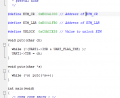
#define ETM_CR  0xE0041000 // Address of ETM_CR

#define ETM_LAR 0xE0041FB0 // Address of ETM_LAR

#define UNLOCK  0xC5ACCE55 // Value to unlock ETM

#define ETM_LSR 0xE0041FB4 // Address of ETM_LSR

// select your desired serial device

void putc(char ch)
{
  while (!(UART1->ISR & UART_FLAG_TXE) );
  UART1->TDR = ch;
}
void puts(char *s)
{
  while (*s) putc(*s++);
}

int main(void)
{
  /* USER CODE BEGIN 1 */

  /* USER CODE END 1 */

  /* MCU Configuration----------------------------------------------------------*/

  /* Reset of all peripherals, Initializes the Flash interface and the Systick. */
  HAL_Init();

  /* USER CODE BEGIN Init */

  /* USER CODE END Init */

  /* Configure the system clock */
  SystemClock_Config();

  /* USER CODE BEGIN SysInit */

  /* USER CODE END SysInit */

  /* Initialize all configured peripherals */
  MX_GPIO_Init();
  MX_USART1_UART_Init();
  /* USER CODE BEGIN 2 */

  /* USER CODE END 2 */

  /* Infinite loop */
  /* USER CODE BEGIN WHILE */

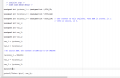
unsigned int *pointer_1 = (unsigned int *)ETM_CR;

unsigned int *pointer_2 = (unsigned int *)ETM_LAR;

unsigned int *pointer_3 = (unsigned int *)ETM_LSR; // The content of this register, when ETM is locked, is 1.
                                                   // when is unlock, is 0.
unsigned int var_1;

unsigned int var_2;

unsigned int var_3;

unsigned int var_4;

var_1 = *pointer_1;

var_2 = *pointer_2;

//To unlock ETM, the content of ETM has to be UNLOCK

*pointer_2 = UNLOCK;

var_2 = *pointer_2;

var_3 = *pointer_3;

sprintf(?);

printf("Value: %p\n", var_3);


  /* USER CODE END 3 */

}

/**
  * @brief System Clock Configuration
  * @retval None
  */
void SystemClock_Config(void)
{

  RCC_OscInitTypeDef RCC_OscInitStruct;
  RCC_ClkInitTypeDef RCC_ClkInitStruct;

    /**Configure the main internal regulator output voltage
    */
  __HAL_RCC_PWR_CLK_ENABLE();

  __HAL_PWR_VOLTAGESCALING_CONFIG(PWR_REGULATOR_VOLTAGE_SCALE2);

    /**Initializes the CPU, AHB and APB busses clocks
    */
  RCC_OscInitStruct.OscillatorType = RCC_OSCILLATORTYPE_HSI;
  RCC_OscInitStruct.HSIState = RCC_HSI_ON;
  RCC_OscInitStruct.HSICalibrationValue = 16;
  RCC_OscInitStruct.PLL.PLLState = RCC_PLL_NONE;
  if (HAL_RCC_OscConfig(&RCC_OscInitStruct) != HAL_OK)
  {
    _Error_Handler(__FILE__, __LINE__);
  }

    /**Initializes the CPU, AHB and APB busses clocks
    */
  RCC_ClkInitStruct.ClockType = RCC_CLOCKTYPE_HCLK|RCC_CLOCKTYPE_SYSCLK
                              |RCC_CLOCKTYPE_PCLK1|RCC_CLOCKTYPE_PCLK2;
  RCC_ClkInitStruct.SYSCLKSource = RCC_SYSCLKSOURCE_HSI;
  RCC_ClkInitStruct.AHBCLKDivider = RCC_SYSCLK_DIV1;
  RCC_ClkInitStruct.APB1CLKDivider = RCC_HCLK_DIV1;
  RCC_ClkInitStruct.APB2CLKDivider = RCC_HCLK_DIV1;

  if (HAL_RCC_ClockConfig(&RCC_ClkInitStruct, FLASH_LATENCY_0) != HAL_OK)
  {
    _Error_Handler(__FILE__, __LINE__);
  }

    /**Configure the Systick interrupt time
    */
  HAL_SYSTICK_Config(HAL_RCC_GetHCLKFreq()/1000);

    /**Configure the Systick
    */
  HAL_SYSTICK_CLKSourceConfig(SYSTICK_CLKSOURCE_HCLK);

  /* SysTick_IRQn interrupt configuration */
  HAL_NVIC_SetPriority(SysTick_IRQn, 0, 0);
}

/* USART1 init function */
static void MX_USART1_UART_Init(void)
{

  huart1.Instance = USART1;
  huart1.Init.BaudRate = 115200;
  huart1.Init.WordLength = UART_WORDLENGTH_8B;
  huart1.Init.StopBits = UART_STOPBITS_1;
  huart1.Init.Parity = UART_PARITY_NONE;
  huart1.Init.Mode = UART_MODE_TX_RX;
  huart1.Init.HwFlowCtl = UART_HWCONTROL_NONE;
  huart1.Init.OverSampling = UART_OVERSAMPLING_16;
  if (HAL_UART_Init(&huart1) != HAL_OK)
  {
    _Error_Handler(__FILE__, __LINE__);
  }

}

/** Pinout Configuration
*/
static void MX_GPIO_Init(void)
{

  /* GPIO Ports Clock Enable */
  __HAL_RCC_GPIOA_CLK_ENABLE();

}

/* USER CODE BEGIN 4 */

/* USER CODE END 4 */

/**
  * @brief  This function is executed in case of error occurrence.
  * @param  file: The file name as string.
  * @param  line: The line in file as a number.
  * @retval None
  */
void _Error_Handler(char *file, int line)
{
  /* USER CODE BEGIN Error_Handler_Debug */
  /* User can add his own implementation to report the HAL error return state */
  while(1)
  {
  }
  /* USER CODE END Error_Handler_Debug */
}

#ifdef  USE_FULL_ASSERT
/**
  * @brief  Reports the name of the source file and the source line number
  *         where the assert_param error has occurred.
  * @param  file: pointer to the source file name
  * @param  line: assert_param error line source number
  * @retval None
  */
void assert_failed(uint8_t* file, uint32_t line)
{
  /* USER CODE BEGIN 6 */
  /* User can add his own implementation to report the file name and line number,
     tex: printf("Wrong parameters value: file %s on line %d\r\n", file, line) */
  /* USER CODE END 6 */
}
#endif /* USE_FULL_ASSERT */

/**
  * @}
  */

/**
  * @}
  */

/************************ (C) COPYRIGHT STMicroelectronics *****END OF FILE****/
Ok i understand, in my case my "Hello wolrd" is a content of the pointer. For example var_1 = *pointer_1.
So i have to do this: sprintf(mystring, var_1); Without the "" because I have to print the contents of the variable, right ?
With this piece of code, through the use of pointers, I want to go see the contents of some of the registers of ETM. To do this I use pointers to particular memory addresses and then I need to print myself on video, through the function that you told me, their content.
After seeing their content I have to change the contents of some logs. This I did always through the use of pointers like this: * pointer_2 = 0xc5acce55;
My concern and if doing so I REALLY change the contents of that memory address.
Thanks
Code:
unsigned int *pointer_1 = (unsigned int *)ETM_CR;

unsigned int *pointer_2 = (unsigned int *)ETM_LAR;

unsigned int *pointer_3 = (unsigned int *)ETM_LSR; // The content of this register, when ETM is locked, is 1.
                                                   // when is unlock, is 0.
unsigned int var_1;

unsigned int var_2;

unsigned int var_3;

unsigned int var_4;

var_1 = *pointer_1;

var_2 = *pointer_2;

//To unlock ETM, the content of ETM has to be UNLOCK

*pointer_2 = UNLOCK;

var_2 = *pointer_2;

var_3 = *pointer_3;
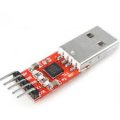
Assuming that there will be times when you want to test your system without using IAR, you would go and get a CP2102 USB-to-UART bridge.
With this, you send the TXD to RXD on the CP2102 which is plugged into a USB port on your PC.
Then you use a PC terminal program such as HyperTerminal or puTTY to display the information.
With this, you send the TXD to RXD on the CP2102 which is plugged into a USB port on your PC.
Then you use a PC terminal program such as HyperTerminal or puTTY to display the information.
With this, you send the TXD to RXD on the CP2102 which is plugged into a USB port on your PC.
Then you use a PC terminal program such as HyperTerminal or puTTY to display the information.
Ok
But about my code do you think that by doing it that way I can actually change the contents of the registers ?
Since I have the impression that I can read the contents of the logs but in writing it seems to me that I do not write directly on the registers but only on the pointer variable.

 Facebook
 Google
 GitHub
 Linkedin