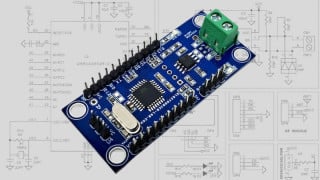
4 X 4 wires load cells into Wheatstone bridge configurations

Status
Not open for further replies.

ericgibbs

Joined Jan 29, 2010
21,572
hi abc,
To check the integrity of the 4 L/C modules I would suggest that you mark them 1 thru to 4, using a felt tip pen etc..
Test each cell in turn connected to the HX711, note the off load value and apply pressure and check for a change
Check the Vext out for each L/C from the HX711

Lets know what you measure
E
 

Thread Starter

abc14

Joined Oct 15, 2017
123
hi abc,
To check the integrity of the 4 L/C modules I would suggest that you mark them 1 thru to 4, using a felt tip pen etc..
Test each cell in turn connected to the HX711, note the off load value and apply pressure and check for a change
Check the Vext out for each L/C from the HX711

Lets know what you measure
E

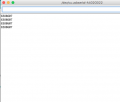
Off load value is around 209113 This raw readout of sensor without calibration, when I placed about 50KG on the load cell, the value dropped to around 1450..
 

ericgibbs

Joined Jan 29, 2010
21,572
hi,
Did you test all 4 cells independently?
The 209113 Off load , reducing when you loaded the L/C could be due to negative Offset voltage within the L/C.
or
you have the White and Green crossed over.?

E
 

Thread Starter

abc14

Joined Oct 15, 2017
123
upload_2018-9-21_18-21-14.png


I have joined all the similar colour wires and my impedance or resistance between White an Green is 270 Ohms and between Black and Red is around 340 ohms, which seems correct since single LC impedance is around 1K between white and green
 

Thread Starter

abc14

Joined Oct 15, 2017
123
hi,
Did you test all 4 cells independently?
The 209113 Off load , reducing when you loaded the L/C could be due to negative Offset voltage within the L/C.
or
you have the White and Green crossed over.?

E
This is the result of independent LC.

This simply reading scale.read()
 

ericgibbs

Joined Jan 29, 2010
21,572
So you are saying all 4 L/C's when tested independently give 209113 Off Load and the count decreases when you apply a load.???

Have you tried changing over the White and Green wires,??

EDIT:
You should get Avg of 20 samples
scale.begin(A1, A0);
Serial.print("Read and Average 20, No Load, Zero Offset Counts: =");
Serial.println(scale.read_average(20)); // Display the average of 20 readings from the ADC for Zero Tare


What Gain level have you set.??
Please post your Arduino Sketch.
 
Last edited:

Thread Starter

abc14

Joined Oct 15, 2017
123
So you are saying all 4 L/C's when tested independently give 209113 Off Load and the count decreases when you apply a load.???

Have you tried changing over the White and Green wires,??

EDIT:
You should get Avg of 20 samples
scale.begin(A1, A0);
Serial.print("Read and Average 20, No Load, Zero Offset Counts: =");
Serial.println(scale.read_average(20)); // Display the average of 20 readings from the ADC for Zero Tare


Am getting this with all 4 load cells connected and with one load cell connected i get around 209113

upload_2018-9-21_18-50-39.png
 

ericgibbs

Joined Jan 29, 2010
21,572
What happens when you apply a load to cells.?

You must put more information into your replies, it is impossible to help without feedback.
 

Thread Starter

abc14

Joined Oct 15, 2017
123
C:
#include "HX711.h"


#define DOUT  A1
#define CLK  A0


HX711 scale(DOUT, CLK,64);


#define SERIAL_BAUD   9600
void setup() {
   Serial.begin(SERIAL_BAUD);


}


void loop() {
 
        
     Serial.println(scale.read());
   
  delay(5000);

  
}
Moderators note : used code tags
 
Last edited by a moderator:

Thread Starter

abc14

Joined Oct 15, 2017
123
What happens when you apply a load to cells.?

You must put more information into your replies, it is impossible to help without feedback.

Nothing happens when I apply load on the load cells. Values are always same. Where as when I was testing with one load cell, apply load changed the values form 209113 to lower number
 

Thread Starter

abc14

Joined Oct 15, 2017
123
upload_2018-9-21_19-11-40.png


I have moved the white and green to channel B, which has default gain of 32, and I could see the number changing on application of weight.
 

ericgibbs

Joined Jan 29, 2010
21,572
Concentrate on getting one cell working and calibrated.
This means adding more lines to your program code.

Post your weight counts and actual weights used.
 

MisterBill2

Joined Jan 23, 2018
28,296
I've never understood the proclivity to wire load cells in parallel, especially in regard to the complexity and time/labor involved to trim each load cell such that the combination produces an acceptable result.

My preference is to sample each load cell independently -- either using separate hi-quality ΣΔ ADCs, or one ΣΔ with multiplexed bipolar inputs -- and process the calibration of each load cell independently. The algorithm to do this is utter simplicity, simply requiring a few different weight inputs (or weight locations) and solving a trivial matrix.

This is much faster and cheaper, and each cell adjustment does not affect the other cells.
Many years back I read a report published by HBM, which at the time was a major producer of strain gauges and load cells. It was in response to questions about summing of loading things supported at multiple points. What they found, and proceeded to recommend, was running identical load cells wired in parallel. But it was heavy on the identical part. Given that condition the results would indeed equate to a sum of the individual loads. But clearly it is vital to also provide identical excitation to all of the load cells. So parallel connection will give the correct sum if the cells are all the same. That is the claim.
 

ericgibbs

Joined Jan 29, 2010
21,572
When designing weighing systems, that use 4 L/C's of the same type, I have always connected the L/C's in parallel.
However it is essential the weighing platform base is designed such the the overall weight is uni formally distributed to the L/C's

The TS is using 4 off, 100kG L/C's so I am assuming that he will be weighing loads upto 400kG on the scale Base..???
 

ericgibbs

Joined Jan 29, 2010
21,572
hi abc,
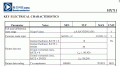
This clip from the d/s gives the Vdiff input range for the max limits of +/-12 Bit output range.
So knowing the mV/V and the gain set, you can work out the maximum +/-binary value for your signal.

E
AA1 24-Sep-18 12.02.gif

EDIT:

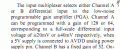
This clip from the d/s also explains the +/-20mV at *128 Gain with a 5Vdd
AA1 24-Sep-18 12.08.gif
 
Last edited:

Thread Starter

abc14

Joined Oct 15, 2017
123
hi abc,
This clip from the d/s gives the Vdiff input range for the max limits of +/-12 Bit output range.
So knowing the mV/V and the gain set, you can work out the maximum +/-binary value for your signal.

E
View attachment 160422
Code:
long HX711::read() {
// wait for the chip to become ready
while (!is_ready()) {
// Will do nothing on Arduino but prevent resets of ESP8266 (Watchdog Issue)
yield();
}
unsigned long value = 0;
uint8_t data[3] = { 0 };
uint8_t filler = 0x00;
// pulse the clock pin 24 times to read the data
data[2] = shiftIn(DOUT, PD_SCK, MSBFIRST);
data[1] = shiftIn(DOUT, PD_SCK, MSBFIRST);
data[0] = shiftIn(DOUT, PD_SCK, MSBFIRST);
// set the channel and the gain factor for the next reading using the clock pin
for (unsigned int i = 0; i < GAIN; i++) {
digitalWrite(PD_SCK, HIGH);
digitalWrite(PD_SCK, LOW);
}
// Replicate the most significant bit to pad out a 32-bit signed integer
if (data[2] & 0x80) {
filler = 0xFF;
} else {
filler = 0x00;
}
// Construct a 32-bit signed integer
value = ( static_cast<unsigned long>(filler) << 24
| static_cast<unsigned long>(data[2]) << 16
| static_cast<unsigned long>(data[1]) << 8
| static_cast<unsigned long>(data[0]) );
return static_cast<long>(value);
}

I am using this function from the HX711 library to read the output from my sensors. I am not too sure, How this select the channel and set the gain. I am getting very high readings liek 209113 for a single load cell. According to specs of my sensor mV/V ratio is between 1- 10%. And 12 bit output register should have max range upto 4096 ?

Moderators note : used code tags
 
Last edited by a moderator:
Status
Not open for further replies.
Top