3D printing observations

Thread Starter

Wendy

Joined Mar 24, 2008
23,798
I truly love this new printer, when I need to make a hole that I intend to use a #4 or M3-0.5 screw in I use a hole that is a radius of 0.55” a metal screw will self tap into the soft plastic with no problem at all I haven't had any cracking yet. The big problem I have is the printer doesn't seem to merge with previous layers with any good strength, requiring me to widen the footprint of the screw mount when I make a box.
 
Last edited:

MrChips

Joined Oct 2, 2009
34,817
I truly love this new printer, when I need to make a hole that I intend to use a #4 or M3-0.5 screw in I use a hole that is a radius of 0.55” a metal screw will self tap into the soft plastic with no problem at all I haven't had any cracking yet. The big problem I have is the printer doesn't seem to merge with previous layers with any good strength, requiring me to widen the footprint of the screw mount when I make a box.
When I need to design a machine threaded hole in a 3-D printed utility box or case, I print a slightly smaller diameter hole.
(You might have noticed that outside finished dimensions turn out to be slightly larger, approx. +0.3 mm, while inside dimensions (as in holes) turn out slightly smaller.)

When comes time to insert a screw or bolt, I gently warm the head of the screw with the soldering iron and then work it in as you would with a machine tap. The result is a perfectly threaded hole.
 

Thread Starter

Wendy

Joined Mar 24, 2008
23,798
I am forever imprinted on the #4/40 x ¼"screw that Radio Shack sold back in the day. I have discovered a close metric alternative in the M5- 0.5 size. Then of course once you have these screws in your handy box you have to have nuts in the same sizes.
 

Ya’akov

Joined Jan 27, 2019
10,235
The big problem I have is the printer doesn't seem to merge with previous layers with any good strength
Hello, Wendy.

There are a few possible reasons for poor layer adhesion. One of the most common is high water content in the filament.

PLA (and other polymers) is very hydroscopic and will very quickly absorb moisture from the air. Once this happens, the process of melting the filament causes the water to boil off.

This has effects ranging from bubbling (sometimes including a crackling noise), to stringy wisps of filament stretching between edges when the too head travels across, to poor layer adhesion. You can have one or all of them.

The solution is drying the filament. You can buy a filament drier but a good one is not cheap. Fortunately, you already own one—your Ender. The heated bed of the Ender will do an excellent job of drying out your filament.

First, a caution: while it is not too much of a risk there are two possible problems you can encounter with this method, both are related to excess heat—

1. Depending on the material the spool is made of, it can be vulnerable to deforming at temperatures your bed can achieve. More heat is only good to a point, after which you are likely to do some harm.​
2. If you really go nuts, you can make the filament stick together—again, the is only a risk if you make the temperature much too high, but it is possible to set your temperature carefully and check it twice.​

So, here's the method:

First, find something that can be used to stand the spool off the bed surface just a bit. The reel is far less likely to be damaged if you avoid putting it in direct contact with the bed. Cardboard can be used for this. Take a strip of cardboard about 12mm wide and about 300mm long and form it into a ring, taping the ends together. This will easily support even a full 1kg spool.

Next, take one of the boxes from the filament (or a similar box) and make it into a cover for the spool. This makes speeds up the process by acting like a little oven. The standoff ring should cause a gap at the bottom—this is good. The moisture has to somewhere!

Now, set your bed to 50°C and let the filament heat for at least 6 hours. This should be enough to make a noticeable difference. You should see a general improvement in print quality—possibly a dramatic one. After the process, store the filament in an airtight container. If you look online you will find planes to use inexpensive storage containers to create "live" boxes—that is, a box that you can leave the spool in, mostly protected from the humid air, and print with it.

If you can't do that, you can repeat the drying process, but for much less time—say an hour—to remove the new moisture.

Good luck, ask any questions you might have. If you already dry your filament I apologize for the redundant advice.
 

Thread Starter

Wendy

Joined Mar 24, 2008
23,798
I'm working on a project to make a filament dryer while it's on the printer, even when it's working. I'll give a week or so and and write it up. When I was machine maintenance in a clean room I worked on a lot of temperature control systems. One problem that comes to mind that I thought was an unusual is they had atec cooler that went through the table top on a console that would stop regulating over the weekend, what the problem turned out to be is the table had a lift extended down about four inches and the console was flush with the back of the table underneath. This would trap heat over the weekend until the air was disturbed by people moving around it and moving the hot air which was floating under the table getting the TEC hot side too hot to regulate the cooling side. the solution was really simple, I mounted a fan underneath the table that they plugged in for a couple of minutes before they started work after the weekend was over. I am going to try something similar with this filament heater. If I was a bit more enterprising I would use a wooden box mounted to the top of the 3D printer arm, but instead I will just use the box that my last filament came in and modify it to see if I can get that to work the same way.

The idea maybe a brain fart on my part but we shall see.
 

Thread Starter

Wendy

Joined Mar 24, 2008
23,798
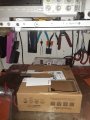
Everyone keeps telling me how I have to keep my filament dry . And I can try it out by putting it in a heater environment for at or near 60°C. So I built a box using a filament using the box that the filament was shipped in and cut out the holes and slot where the filament like so:
Figure 1.jpg
Figure 1
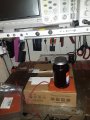
I then cut a hole to mount a 25 Watt heater pad as shown:

Figure 2.jpg
Figure 2

I also put a type K thermocouple into the box about 1” into the empty space on the top.
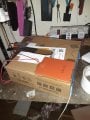
I glued A25W heater on this box with rubber cement as shown:
Figure 3.jpg
Figure 3

I sheathed the top three inches in some ¼ x 12” x 12’ inch Styrofoam I had lying around from a previous project. At this point it occurred to me that I could have made the entire box from Styrofoam. When I finish this properly I will make a new box that is inside space is 9.0” wide x 11.0” high x 4.5” thick Which unless I botched my measurements should fit completely around the spool the spool holder and rest on the top of the 3D printer. Upon finishing this particular project I noted that the 25 Watt heater raise the temperature to around 50°C and during use varies between 40°C and 50°C. This tells me that I am going to need 225 W heaters. I thought strongly about printing this box using my 3D printer but given how PLA does not respond to temperatures very well I changed my mind and I am going to make it with Styrofoam instead. Styrofoam also doesn't handle high temperatures very well so the very top of this box where the heater will be mounted I will use wood I will cut to dimensions to fill that hole.
Figure 4.jpg
Figure 4

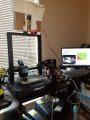
This is what it looked like installed:
Figure 5.jpg
Figure 5[/CENTER]

I also printed Something I called a box stabilizer (mount) and a stabilizer spacer to keep the Filament dryer in the horizontal position. I used a spot of super glue to hold the spacer on its mount. I circled it in red on Figure 5.

It occurred to me after I posted this that I didn't mention the bench supply providing 12V @ 1.89A to the 25W heater.
 

Attachments

Last edited:

Thread Starter

Wendy

Joined Mar 24, 2008
23,798
My personal 3D tools list

Most people who know me know I have workstation set up in my bedroom using a shelf it is at a convenient height for my wheelchair the shelf has a metal plate mounted on it. I use this in several ways.

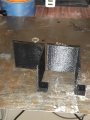
1.Square - I've been meaning to make this tool for several months, I got off my duff and got it done: I made QTY 2. Together they will allow me to square two prints that have a square in common. I left an insert hole for a 5/16” x 5/16” magnet which tax this nicely down to my work station.
20250601_124746.jpg
Click to enlarge.

2. Magnetic Tacks

20250601_130911.jpg
Click to enlarge.

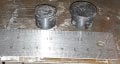
as the name suggests I use these to tack components down they also create a nice clamping action these are PLA sheets on a 5/8” by 1/4” magnet. I think my STL file is corrupt so I may have to redraw the STL file for this part again.

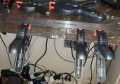
3. Harbor freight clamps (both large and small).

20250601_133702.jpg
Click to enlarge.

4. Small Vice

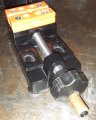
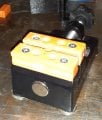
I use this pretty much as you would expect expect for except for some minor modifications light gluing a 5/16” x 1/16” magnet on each corner I also used a 5/16” wooden dowel cut down for about 1 inch and using the Dremel on the handle of device to create a hole that is big enough for this now in the plastic part I insert a number six screw head to the end of one now again dremeled so I can use an electric screwdriver to change device opening when adjusting large amounts.

20250601_140401.jpg 20250601_140438.jpg
..............Click to enlarge.

6. An emery board.
Available pretty much everywhere they are perfect for sanding off Imperfections on a print caused by that stringing problem like this.

20250601_150839.jpg 20250601_154324.jpg
..........Click to enlarge.
 

Attachments

Last edited:

Thread Starter

Wendy

Joined Mar 24, 2008
23,798
i have I have been able to reduce the stringing problem by dropping the head temperature from the default 230°C to 200°C it is not perfect it still has some residual stringing but I am reluctant to drop the temperature down to 195°C since we are skirting so close to the melting point of this PLA.
 

Thread Starter

Wendy

Joined Mar 24, 2008
23,798
I have been playing with a new concept to help me deal with weak PLA plastic. I've been buying 2mm steel rods and 3mm rods. Of the two the 3mm rod has been tried and found more than adequate, I will have to get back with you on the 2mm rods as it bends much much easier than the 3mm. Since I use inches in my 3D prints the 2mm is 0.050” and the 3 is 0.070”. Being steel the rods will clear a path through the plastic on any on any irregularities left in the print. Here is a sample STL file for you to look at and see how it works .
 

Attachments

Last edited:
Top