Facebook
 Google
 GitHub
 Linkedin

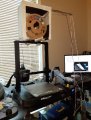
My first prototype worked pretty well, so I went on to design the final revision:
My first prototype worked pretty well, After measuring the spool and its position on the Ender 3 I came up with an inside inside space of 4.5” x 10.0” x 10.0” I use the Styrofoam because it is a good insulator and it is very light. I use 3 sheets of ½” x 12.0” x 12.0”styrofoam and cut them using the pattern in Figure 1, with a new Exacto blade to make a neat cut . Still, cutting Styrofoam is always a messy proposition which the new blade reduced the mess. Figure 2 show the fine detail for mounting holes on front & back panels.
Click to see full image:
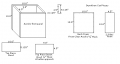
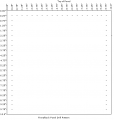
Figure 1 .............................. Figure 2
I used sewing needles with glass heads to join the Styrofoam together , I also use those same needles To connect the acrylic sheet to the Styrofoam through pre drilled holes (see figure 3 and 4).
Click to see full image:
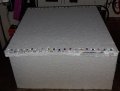
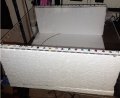
......Figure 3 ............................ Figure 4
On the Styrofoam sheets I pushed the heads of the pins into the Styrofoam so they would be invisible after the tape is applied. I countersunk the holes in the acrylic front sheet and recessed the pins into this sheet Figure 4.I prepared a heat sink By drilling and tapping for a #6/32 screws by super gluing 2 25 W 12V heaters onto this heat sink will be touching the wood top when everything is together, Figure 7. Since they are in series this creates a 24V 50 W heater on the heat sink. If I were to do this again I would recess this wood on the top of the box and attach it with screws. I show both pieces of wood in the plans on Figure 1.I brought the heater wires out of the off the Box. I then inserted 2 type K thermocouples into the side of the box 2.5” And 4.5” from top of the box.
I then sealed all of these sides and top with white duct tape, this has to be an airtight seal as in a hot air balloon.
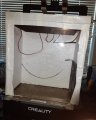
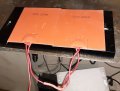
........Figure 6..................Figure 7
I bought the cheapest drawer handles I could find and put them on the top and on the side of the box , the top was easy since it is wood just make sure the screws are shorter and shorter than the wood width is. Since I am in a wheelchair and unable to stand I put a handle on the side of the box also printing a piece of plastic to give the screw nuts something to hang on to without punching through the Styrofoam. I also added a ruler to get the wires away from the moving parts of this machine as shown in the main illustration, ugly but functional.
A note about my setup I have a remote access set up to my 3D printer computer enable and I'm able to turn the printer on and off using a smart plugI am then able to monitor the status of my print by accessing the 3D computer on my main computer and watching the video as it progresses I also Used a thermocouple thermometer I made in this project to monitor the temperature before I had that I used my DVM thermocouple function.
The one thing that took me the longest to work out the details on are the box stabilizers on top of the unit the plans of which are shown on figure 8. I tried to make the box stabilizers out of plastic and then aluminum and ran into hassles doing both so I dug up some half inch plywood I had kicking around and cut it up into one inch strips to make the stabilizers. They keep the box both flat and not touching the spool. I made all of the holes slightly oversized (5/32”) except the retainer screw which I used to #6/32 tap size (7/64”) on the retainer screw which I self tapped using a #6/32 x 2” machine screw into the soft wood as shown in Figure 8.You will also need a plastic piece I call a Wrap around spacer I also made a thin template to help drill the holes in the wood.
Click for full size:
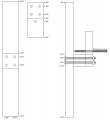
.....Figure 8
Overall my top thermocouple measures between 60° C and 75° C.The top of the spool can reach 75° C if I don't use the filament while I have the have the unit on, I used a variable power supply at 24V @ 1.84A which turns on when I power up the printer. So far I have noticed no bad effects from this temperature on the filament. I also made a type K thermocouple meter w/LED readout in the completed projects.
Since implementing this project I have noticed a major improvement in my horizontal adhesion on my prints which used to vex me something fierce.
Attachments
-
20.2 KB Views: 4
-
20.2 KB Views: 2
Last edited: