3D printing observations

Ya’akov

Joined Jan 27, 2019
10,235
The problem I've been having is the compress the tube causing drag on the filament. when that happens I replace the tube and/or the PC4-M10 connector.
I feel lucky if it locks on the tubing, gennerally I can't get the tube out if they are mated, I just throw the connector away.
Good tubing is exceedingly hard to kink or distort. Is the length correct? If the tube is too long, at the left side of the tool head travel (X = 0), there will be a fair amount of force on it in compression against the connector. If it is too short, on the right side (X ≈ 250) there will be excess force in tension.

Still, it should be very hard to distort even mediocre tubing because it has a very high wall thickness and is quite stiff. I would expect it would take a lot of force to manage it. Is the tubing particularly inexpensive?

There is a trick to removing a tube that seems stuck. The locking is accomplished using a spring steel collet. It is shaped like a truncated cone, pointing towards the outlet side of the connector. It’s diameter is a few hundredths of a millimeter smaller than the tubes and so it flexes to permit the insertion.

This causes the edge of the relatively thin collet to dig into the tubing. Attempts to remove the tube without releasing it causes it to dig in further and the tubing will not come out. It’s quite strong. When the lock release collar is depressed, it deforms the collet making the opening larger. The tube can then (in theory) be withdrawn.
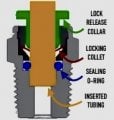
1704020461317.jpeg
a cross section view of the connector and its parts
(please excuse the small size, I made an error while creating it)
While in the Bowden tube application, where no pressure must be maintained, the question of how the locking collet can do this is moot. But, for the sake of completeness: note the sealing o-ring (blue)—when the tube is inserted into the connector, it passes the o-ring before it bottoms out in the cavity sized to contain it. The o-ring makes the actual seal against the tube’s exterior while the locking collet prevents pressure from pushing the tube out. It works very well.
In practice the lock release color may not be able to deform the collet sufficiently to get the edge of the collet out of the groove it has cut in the tube. This makes the tube feel stuck, but with few exceptions a very simple trick will release it.

Depress the collar as far down as you can manage, then, instead of trying to pull the tube out push it in firmly, then pull it out. This should release the collet from the tube. You can see the distortion of the tube made by the collet, it is a shallow groove cut around where the collet dug in.

Note: attempting to pull the tube out without depressing the lock release collar will cause the locking collet to dig much deeper into the tube making removal that much harder.

Sometimes it is hard to push the collar down because of the small space to work in and the narrow rim of the collar. Not being able to use two hands would make it much harder to do while also pushing in on the tube to get it to release.

Here is a tool you can print that reaches down to the collar and provides easier access. You can use one hand to do both by grabbing around the tube and pushing. Your hand will slide enough to release the lock but also continue to put pressure on the tube to free it from the collet.

When you have the lock released and tubing driven home, you can pull back on the tube while maintaining pressure on the lock by sliding the fingers of your closed fist away from the connector while maintaining pressure on the lock release with your thumb.

If this doesn’t work well for you, you can modify the design to the tool so it has a larger top flange, or even so it has lock similar to the collet in the connector.

One more thing, you can modify a connector by drilling the <4mm hole from the threaded side sp the tubing can pass straight through. This connector can be installed on the tube near to the printer’s connector so that their lock releases face each other.

Install a safety lock (print file in the post above) on the modified connector to prevent the depression of its lock release. Now, to remove a stubborn tube is a matter of two steps:

1. Push the modified connector down the tube until it depresses the lock release collar on the printer’s connector. Because of its own locking collet, the connector will maintain the pressure depressing the collar on the printer’s connector.​
2. Push in the tubing, then pull it out. It will come out with difficulty ranging from none to moderate but it will come out.​

After you’ve got the tube off, you can slide the free connector of the end and use it on the new tube.
 

Attachments

Ya’akov

Joined Jan 27, 2019
10,235
Hi,

Are you allowed to lightly grease the tube or does that make it too easy to pull out.
There would be no benefit, the if the tube is getting stuck it’s happening because the locking collet is digging in far enough to make pulling it out difficult, it’s not friction in the sense of surfaces rubbing.
 

geekoftheweek

Joined Oct 6, 2013
1,429
The tool looks good. I think I will print one out next time I fire up the printer and give it a try. I have been having feed issues now and again and am suspecting my tube is getting worn and things need a good cleaning.

I used to deal with these fittings a lot as a semi mechanic on air systems and found a lot of times placing an adjustable end wrench (Crescent wrench as they are often called) over the ring and using it to push it in helps. Although it wouldn't be ideal in this application sometimes a little tap with a hammer on the wrench will also help to break it free. The problem with the hammer trick is parts move on a printer whereas valves on a truck don't. Just make sure you aren't beating your print nozzle into the bed or the end of travel.

In some cases simply removing the fitting with the tube in so you can get a better grip on everything is helpful too. That is usually my go to if it won't come out easily.
 

Thread Starter

Wendy

Joined Mar 24, 2008
23,798
The design have this printer absolutely requires the tube be locked on to the tubing, when you have someone like me that only has one hand once the tube is locked in place it is easier just to throw it away. I have had several prints go dramatically wrong when the tubing pops out of the connector I handle such cases on an individual basis, maybe replacing the connector or trying again on the bad one. If I can get it to stick a second time I'll take a chance on it. If I can't I just create that connector and throw it away.
 

geekoftheweek

Joined Oct 6, 2013
1,429
It's all to easy to forget that some times people don't have the luxuries the rest of us do have. Obviously you have to do what works for you.

Would it be possible to get the parts and have a few tube and fitting assemblies already built and ready for problems? Threading in or removing the fittings with the tube in place won't cause any damage (it was actually a good way to prevent leaks with air) and if you can get a little help making them up ahead of time it may help you in the long run with the tube popping out. Generally speaking in a temperature controlled environment the fittings can be reused multiple times so if you have someone who can help with rebuilding your tube assemblies from time to time it might save you some headaches and a little money.
 

bertus

Joined Apr 5, 2008
22,925
Hello,

I have noticed that the connection sometimes give problems at the locking collar.
When that happens I try to get the hose out and cut the hose above the rim made by the locking collar.

Bertus
 

Ya’akov

Joined Jan 27, 2019
10,235
The design have this printer absolutely requires the tube be locked on to the tubing, when you have someone like me that only has one hand once the tube is locked in place it is easier just to throw it away. I have had several prints go dramatically wrong when the tubing pops out of the connector I handle such cases on an individual basis, maybe replacing the connector or trying again on the bad one. If I can get it to stick a second time I'll take a chance on it. If I can't I just create that connector and throw it away.
@Wendy, I understand the frustration—but if you look at how the connectors work, what you are describing shouldn’t be happening. Look at the drawing in my post—once you have the tube inserted to the bottom, it just can’t come out unless the locking collar is depressed.

So, something is wrong. Here are my suggestions:

POSSIBLE CAUSEPOSSIBLE SOLUTION
The tubing is cut at an angle rather than perpendicular to the axis (90°). This could be causing the tube not to reach far enough into the connector before part of it bottoms out, or it could be getting caught on the collet mechanism.Carefully cut the tubing at 90° to the axis so it is as flat as you can get it. A tubing cutter designed for the job is the best option but a sharp single edged razor blade or hobby knife that can “push cut” without distorting the tube will do fine.
The tubing is cut with a pair of flush cutters, scissors, or other two bladed tool that crushes it, causing it to take an ovoid shape that can’t be fully inserted into the connector. This could vary in severity which could explain sometimes working on the second try.Use a bespoke tubing cutter or sharp blade as above. If they are not available, and you must use something like diagonal cutters, don’t cut through by brute force—instead fix the tube to table or vise or similar, careful not to crush it then take the cutters and apply light pressure while scoring the tube back and forth. Increase the pressure as needed until you‘ve cut through.
The connector (or tubing) is defective or sub-standard. Because a properly working PC connector really can’t behave as yours are doing if the conditions above aren’t in play, I would begin to suspect the condition or quality.

The difference in cost between relatively junky connectors and good ones is little*. Buying Creality branded and sold accessories is a bit of a bulwark against lousy products.

*or nothing! sometimes, there is no difference at all and the seller of junk charges enough that you can buy good quality parts for the same or even less.

(I would believe it possible to buy junk with Creality’s name on it—but I’ve never seen any. They have proven reliable in the get-what-you-pay-for department.)
Buy connectors and tubing from a reliable source. I know that is hard to do when you don’t know what is reliable or not. As I suggested, buying from Creality or Creality dealers seems safe, and you can save some cash buying from companies not selling to the 3DP market but instead to the users of pneumatics.

This is because these connectors are commodities in that community being used in large numbers and they simply must work—that is, lock and hold pressure, so they are under tighter scrutiny.

As I mentioned above, the tubing needs to be designed for 3DP applications because the ID must be smaller than for pneumatics and the tubing must by PTFE or something like it to reduce friction.

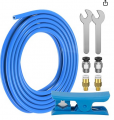
Here is a kit that I have purchased and found more completely acceptable. The tubing is PTFE and the fittings are good quality. You might not have a frequent call for the PC4-M6 connectors, but I think that would be the one on the extruder end.
 

Ya’akov

Joined Jan 27, 2019
10,235
It's all to easy to forget that some times people don't have the luxuries the rest of us do have. Obviously you have to do what works for you.

Would it be possible to get the parts and have a few tube and fitting assemblies already built and ready for problems? Threading in or removing the fittings with the tube in place won't cause any damage (it was actually a good way to prevent leaks with air) and if you can get a little help making them up ahead of time it may help you in the long run with the tube popping out. Generally speaking in a temperature controlled environment the fittings can be reused multiple times so if you have someone who can help with rebuilding your tube assemblies from time to time it might save you some headaches and a little money.
I truly believe that @Wendy’s problem can be solved without special measures of this sort. While accommodating one-handed operation is necessary, that should be able to be done entirely within the normal operations for these parts.

First, the original problem of the tube collapsing and trapping the filament shouldn’t be happening. So, if that can be remediated changes will be far less often. As I mentioned above, perhaps the tube is too long or too short—or maybe it is being cut to size with flush cutters which could be the source of all sorts of trouble, including collapsed tube and unreliable operation of the PC connector.

Second, it should be possible to accommodate one-handed insertion and removal of the tube, even in cases where the tube appears “stuck”. The locking collar operation is definitely a source of aggravation, even for people working two handed. The tool above (perhaps modified by @Wendy to provide more convenient operation with one hand) and knowing that pushing the tube fully in before trying to pull it out works to free it, I think, should be enough.

I am happy to help with this, and I might get a chance to design a tool specifically for one handed bowden tube removal which would be kind of fun and could be very helpful to people who need it (and who strictly speaking don’t, since they are a pain to remove in some cases like my Bambu Lab X1 Carbon’s connector that is behind part of the case).
 

Thread Starter

Wendy

Joined Mar 24, 2008
23,798
When you order the tubing from Amazon a razor blade cutter comes with it. I have found through experimentation 11 inches is seems to be the optimum length do not bend to sharply when the extruder is in the far right position. A lot of what I know is through trial and error.
 

Ya’akov

Joined Jan 27, 2019
10,235
When you order the tubing from Amazon a razor blade cutter comes with it.
When using it be sure the tube doesn’t get squished resulting in a less than flat end. I have seen some tubing/cutter combinations that would produce a cut with a V shaped profile rather than flat—though probably not so severe as it would interfere with operation.

Would you be interested in a model of a one-handed Bowden tube extractor if I worked one up?
 

Thread Starter

Wendy

Joined Mar 24, 2008
23,798
I would be glad to try one right now what I use is 8 inch forceps along with the wrenches to go where I need to go. Along with three inch forceps.
 

geekoftheweek

Joined Oct 6, 2013
1,429
I truly believe that @Wendy’s problem can be solved without special measures of this sort. While accommodating one-handed operation is necessary, that should be able to be done entirely within the normal operations for these parts.
While I agree for the most part I also have had the heartbreak of seeing a 12 hour print fail in the middle of the operation a couple times and was trying to think of any possible way to help.
 

Thread Starter

Wendy

Joined Mar 24, 2008
23,798
What other slicers are compatible with Ender 3's ? I find Cura (the standard for this printer) to be lacking.
 
Last edited:

Ya’akov

Joined Jan 27, 2019
10,235
What other slicers are compatible with Ender 3's ? I find Cura (the standard for this printer) to be lacking.
Orca Slicer (how-to getting started page), which is a fork of Bambu Lab‘s Bambu Studio is very well liked. Even Bambu Studio ships with a profile for the Ender 3. While it was intended to the Bambu Lab X1 and P1P, it is a hybrid of Cura and Prusa—with additional features.

It’s open source, and a very active project. It is my primary slicer, and I do find it quite good. I recently saw some YouTube videos where people were very happy using it on various printers (it has a lot of profiles)

It’s worth a try.
 

Thread Starter

Wendy

Joined Mar 24, 2008
23,798
While the ender 3 Pro is on the list of icons when I hover the cursor over the printer it will not select it I'm not sure why. Any ideas?
 

Ya’akov

Joined Jan 27, 2019
10,235
While the ender 3 Pro is on the list of icons when I hover the cursor over the printer it will not select it I'm not sure why. Any ideas?
I am not near a computer right now, as soon as I get a chance I’ll take a look. Can you post a screen shot the screen you are trying to select from?
 
Top