12V LEDS affecting all devices

Thread Starter

mxabeles

Joined Apr 25, 2009
295
Hi @ AllAboutCircuits,
I've been trouble shooting a project for a week now. Things are almost ready to go. One hanging issue is that I have x3 12V LEDs wired in parallel. These are being PWM'd by the Arduino (I have TIP120 and 12v supply to drive them). When they turn on, every other device I've attached to the microcontroller (servo, x3 potentiometers, x3 buttons) are affected in some way. Its kind of cool to see the servo pulse, but it may wear it out and its of no use to see my button inputs giving false presses just because I've dimmed the LEDs. Interestingly, the buttons are unaffected if the LEDs are either at 0. 1., in between things get gnarly.

I thought it could be the cabling - from the suite with all my devices to the Arduino box I'm using a 25' 15pin serial cable. But I've researched and they seem to be rated for 3 Amps, and high voltage per pin.

I'm soldering the DSUB panel mounts by hand, but I triple checked that and there are no shorts.

Any suggestions as to what the culprit may be?
Best,
-M
 

WBahn

Joined Mar 31, 2012
32,844
Are these LEDs intended to be used by driving them directly with 12 V?

How much current does each one of them take when driven with 12 V?

Is the 12 V supply that is driving the LEDs the same as what is driving, directly or indirectly, the Arduino and the other things that are attached to it?

How much current can the 12 V supply deliver?

A schematic, or at least a block diagram, would be very helpful.
 

Thread Starter

mxabeles

Joined Apr 25, 2009
295
Hi Wbahn,
Thanks for the reply. The 12V LEDs are driven directly by my 4A supply power source. The current draw of each LED is 90mA. The 12v supply is only used to drive the LEDs, of course the ground is tied to TIP120 and to Arduino GND as well.
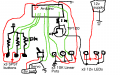
As far as block diagram or schematic, its too simple to even bother. I hope that doesn't sound rude. But its 3 buttons going into the arduino (10K voltage divider to ground for each), 3 potentiometers into analog inputs, 12v LEDs driven by TIP120 + power supply, and servo driven by arduino pwm with separate battery supply to power the motor.
 
Last edited:

Sensacell

Joined Jun 19, 2012
3,785
That statement "too simple to even bother" is why you are having these troubles.

You are making way too many assumptions, the devil is in the details- you must COMMUNICATE the DETAILS.
 

Ian0

Joined Aug 7, 2020
13,132
What base resistor have you used on the TIP120?
And we really do need to see the circuit diagram to be able to give good advice.
 

Ian0

Joined Aug 7, 2020
13,132
That doesn't look too problematic. Have a good look at the 0V connections. Is one missing? Do different power signals share the same ground wire as the processor?
What provides the 5V supply? If it is regulated from the 12V supply, where is the regulator?
I would suspect the servo to be a bigger problem than the LEDs.
 

Thread Starter

mxabeles

Joined Apr 25, 2009
295
Thanks, Ian0.
No, no ground connections are missing - the data isn't that erratic. I have tied the 12v supply GND to the Arduino GND, but I have to for it to work. The 5V+ is supplied by the Arduino....my hunch is I should only be feeding arduino pin TO base of transistor through the serial line, have the 12v supply seperate from serial cable (18AWG cable seperate for that)
 
Last edited:

Pyrex

Joined Feb 16, 2022
502
Hi,
GND connection is under suspection. It's better to use separate pins for GND :
Pin for 12V supply and 6V battery
Pin for potentiometers, buttons, 10 kOhms, etc
Pin for TIP120
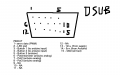
As I can see, there's spare pins in DSUB "9-12". So use them for separate GND lines.
By the way, pin "2" is used for what? There's no GND point for LED's on the sketch?
 

Thread Starter

mxabeles

Joined Apr 25, 2009
295
Thank you, Pyrex.
This I've never heard, and I appreciate the feedback. To clarify, the gnd lead from LEDS goes to collector of TIP120. This emitter is connected to GND of 12v and GND of Arduino.
As far as using seperate pins for different GNDs on the DSUB serial side of things, I may give that a try. Could you elaborate on why that could help? In my mind, all grounds need to be tied at some point in order for everything to work (for example, if the 6V supply to the motor wasn't tied to Arduino GND the PWM signal from Arduino wouldn't be received by the motor, and so on - yes?)....so what effect does seperating them at the cable level acheive?

Best,
-M
 

Thread Starter

mxabeles

Joined Apr 25, 2009
295
Just found this online, maybe part of what you are describing: "
Usually ICs recommend using seperate GNDs for analog and digital because of ground loops mostly caused by high frequency transients. When digital signals switch from a 0 to 1, there is a current spike as the power supply reacts to this greater current demand. This isn't too big a problem for digital circuits because the logic levels for digit signals have a large tolerance built in (+0.5V is still a digital 0 for example). But for analog devices it is a significant problems, especially with an ADC where +0.5V difference in an analog signal is HUGE. What is then recommending is to use 'Star Grounding'. This is a pretty good article explaining star grounding. Essentially, you connect all your grounds at 1 centrallized location. And This is a good article about grounding in general, which also touches on star grounding.

Just connect the two separate ground pins (AGND and DGND) at a single point, like the analog ground pin on the GPIO of the RPi. The document linked by Alex Forencich, states that if doing star grounding, make it as close to the supplies as possible to improve noise performance on the analog side.

A capacitor will only limit DC but the noise from the digital side will be high frequency. If needed you can throw on a ferrite bead, but make sure you know the affects first. I think I have referred to this document a few times."
 

WBahn

Joined Mar 31, 2012
32,844
Have you measured the current that the LEDs consume when connected directly to 12 V?

Do you have a part number for them? Or a link to data sheet for them?

I'm not familiar with Arduino. What is the current it can source per output pin? What is the total current that it can source from all output pins combined?
 

Thread Starter

mxabeles

Joined Apr 25, 2009
295
Ok great. I'm on break today, but I will upload a refined sketch of exactly how the grounds are connected, from devices on sculpture, through serial cable, to Arduino. Id love input about how to make the GND connections less noisy based off that sketch. I don't want to root around with soldering gun and wire clippers just yet. Thank you again . . .
 

dl324

Joined Mar 30, 2015
18,329
I'm not familiar with Arduino. What is the current it can source per output pin? What is the total current that it can source from all output pins combined?
This is for ATmega328 used in the Uno:
1700411674559.png

OP hasn't given I/O numbers or Arduino type (Uno, Nano, Mega, ...). Some Arduino users mistakenly think they can sink/source the abs max of 40mA from each pin.

I have an Arduino Uno knockoff that I suspect can't source 20mA.
 

Thread Starter

mxabeles

Joined Apr 25, 2009
295
***The arduino MEGA is not driving the LEDS directly, thats what the TIP120 is for. Arduino pin, to IK resistor, to TIP120 which drives the 12v LEDs. Each LED is around 90mA. I ordered them in batch years ago and that particular model is obsolete. Ive used tons of these LEDS with Arduino boards + transistor arrays, just x3 as shown here is really miniscule.
 

djsfantasi

Joined Apr 11, 2010
9,237
So measure the current being drawn directly from the pin connected to the 1kΩ resistor by placing your DVM leads in series between the GPIO pin and the resistor.

And to be complete, also measure the current to the servo’s control wire.
 

Thread Starter

mxabeles

Joined Apr 25, 2009
295
I know its been some time - I ended up doing well simply not PWMing the 12v LEDs. For a recently completed projected, I experimented with only have ground and data lines going through serial cable - and as suggested ground was tied to three pins on the serial cable. I ended up having power lines totally separate from the serial cable, 6V and 12V adapters were installed into the sculpture itself, feeding into the junction box. I had zero issues this time around, PWM LEDs worked without affecting motors or other lighting. Only issue is very slight glitching with all the motors. I'm guessing bypass caps on power supply would help there....Thanks!
 
Top