Wireless trigger for a simple on/off circuit

wraujr

Joined Jun 28, 2022
260
Reverse your diode direction, it should only conduct when the coil is turned off and the decaying magnetic field in the coil develops a negative voltage.

And resistor should be 75 ohm when you change to 7.2V.

On relay if C-B are normally open, then C-A should be normally closed .
 

Thread Starter

hugocodi

Joined Mar 5, 2016
44
Reverse your diode direction, it should only conduct when the coil is turned off and the decaying magnetic field in the coil develops a negative voltage.

And resistor should be 75 ohm when you change to 7.2V.

On relay if C-B are normally open, then C-A should be normally closed .
Thank you @wraujr ! I am not sure how to draw the relay, but I understand what you are saying.

1681940328225.png
 

wraujr

Joined Jun 28, 2022
260
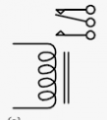
The end of the moving "arm" connected to C goes between the A-dot and B-dot and rests on the A-dot (i.e. A is normally connected to c, when it is at rest.
That would be close enough.. The absolutely correct symbol takes into account that when the coil is energized, the arm moves toward the coil. So in your diagram, the "arm" should be at rest on B and then move to A when energized. In this case C-B is normally closed (coil not energized) and C-A in normally open and closed when coil energized.
 

wraujr

Joined Jun 28, 2022
260
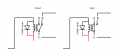
So the left diagram is non-energized coil (i..e. 5V not applied) and the right when coil energized (arm moves toward coil).
Note that with your corrected symbol, your camera wants to connect to A and C (the normally open and closed when coil energized)

Schematics show the relay when the coil is not energized, therefore the left symbol is what should be used in the schematic.
Here's a more accurate example.
1681942460515.png
 

wraujr

Joined Jun 28, 2022
260
To help you understand, the two parallel lines represent the core (say metal rod) and the coil is actually wrapped around the metal bar. When voltage is applied to the coil, the coil/core become an electromagnet and the resulting magnetic field draws the moving contact (C in your diagram) toward the coil resulting in the upper contact breaking connection and the lower contact making connection. If you used the above symbol your camera would be connected to the center and lower "dots"
 

wraujr

Joined Jun 28, 2022
260
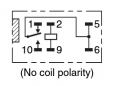
Here is the relay symbol/connection diagram for the relay I suggested. Note this is bottom view looking at pins and is from the data sheet.

1681942975524.png
So the coil are pins 2 and 9 and as noted polarity of applied voltage does not matter.
You would be connecting the camera to pins 10 and (5 or 6)
 

Thread Starter

hugocodi

Joined Mar 5, 2016
44
Got it, that makes sense now. Thank you so much for the thorough explanation! For fun, I updated the drawing, I hope I goit it right now :)

1681944350210.png
 

wraujr

Joined Jun 28, 2022
260
That looks correct.
One final thing is what is the camera expecting for the switch.
Is the switch momentary close (i.e. shutter release, take picture)?
Or is it more like an ON/OFF switch (i.e. toggle)?
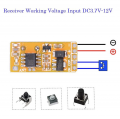
You should review the details of the wireless card as it seems that how it operates depends on a configuration
procedure (I believe "connect set point" means short the two contacts labeled J20)

This is from the description and explains how you "select" the 3 different modes:

Working model :
Momentary---------1Button -----Press the button is ON .Release the button is OFF
Toggle------------1 Button ----- Press one button for one time is ON .press the same button again is OFF
Delay time : Press remote control A button, the corresponding relay actuates and keeps working until the time out.(5S)

How to change working model :
Momentary: Connect the set point . Until the receiver Led indicator flash for 1 times, it mean Change Momentary successfully.
Toggle: Connect the set point . Until the receiver Led indicator flash for 2 times, it mean Change Toggle successfully.
M4 Signal temporary : Connect the set point . Until the receiver Led indicator flash for 4 times, it mean Change Delay time successfully.
 

Thread Starter

hugocodi

Joined Mar 5, 2016
44
That looks correct.
One final thing is what is the camera expecting for the switch.
Is the switch momentary close (i.e. shutter release, take picture)?
Or is it more like an ON/OFF switch (i.e. toggle)?
You should review the details of the wireless card as it seems that how it operates depends on a configuration
procedure (I believe "connect set point" means short the two contacts labeled J20)

This is from the description and explains how you "select" the 3 different modes:

Working model :
Momentary---------1Button -----Press the button is ON .Release the button is OFF
Toggle------------1 Button ----- Press one button for one time is ON .press the same button again is OFF
Delay time : Press remote control A button, the corresponding relay actuates and keeps working until the time out.(5S)

How to change working model :
Momentary: Connect the set point . Until the receiver Led indicator flash for 1 times, it mean Change Momentary successfully.
Toggle: Connect the set point . Until the receiver Led indicator flash for 2 times, it mean Change Toggle successfully.
M4 Signal temporary : Connect the set point . Until the receiver Led indicator flash for 4 times, it mean Change Delay time successfully.
Thank you! Yes I saw something about that. My camera is a movie film camera. So I think it’d be best if it’s more like a toggle or latching. I am not sure a momentary would work for this.
 

Thread Starter

hugocodi

Joined Mar 5, 2016
44
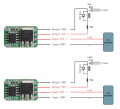
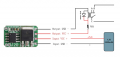
This is interesting, I saw this picture on the description.

1682006258863.png
Does that mean that you can also wire a simple latch spst switch to the device and have the dual function of wireless + wired?
 

wraujr

Joined Jun 28, 2022
260
I think they're trying to illustrate that COM/ON pins function as a push button switch.
You would not connect a switch to this pins.
That said you could wire a momentary pushbutton switch in parallel with COM/ON that would
give you another way to trigger camera.
Either relay would close (when wireless activated) or push-button would trigger camera
 

Thread Starter

hugocodi

Joined Mar 5, 2016
44
I think they're trying to illustrate that COM/ON pins function as a push button switch.
You would not connect a switch to this pins.
That said you could wire a momentary pushbutton switch in parallel with COM/ON that would
give you another way to trigger camera.
Either relay would close (when wireless activated) or push-button would trigger camera
thank you! I’m going to redo my diagram later implementing all this.
 
Top