433 MHz Wireless RF relay switch explanation

Thread Starter

Dpetervan2

Joined Mar 4, 2024
4
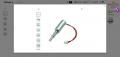
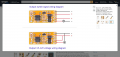
I received this RF relay switch receiver along with the corresponding transmitter keyfob device. https://a.co/d/02n2ABQ0. My goal is to control a small linear actuator to trigger a surgical device. I am hoping that someone would be able to help me understand how to wire this device correctly. It seems that the diagrams associated with this device are not correct, (or I am too dumb to understand them). I am trying to use a single small battery (3.3v or so) that will power both devices. Therefore, I believe I am supposed to follow the wiring diagram at the bottom. However, It seems that if I connect the devices as shown, the battery will be short-circuited when the relay is activated. That is, when the relay is activated, the com will switch from the NC to the NO, which is connected to the positive pole of the battery, creating a short circuit. Maybe I do not understand what the "X" within the circle is trying to represent. Therefore, I am not certain where I connect the actuator module. I have not been able to find a schematic anywhere for this particular device, but have extensively researched other relay schematics, and understand how they work in general. But this diagram has me stumped. I would really appreciate any insight into how this should work, or if anyone understands how this is wired internally so that I can understand how to properly hook everything up. Sorry if I am being relatively vague, but maybe just knowing what the X within the circle represents will help in understanding this device. Any help is truly appreciated! Thank you!1771035787081.png
 

ronsimpson

Joined Oct 7, 2019
4,645
I am trying to use a single small battery (3.3v or so) that will power both devices.
This board needs 3.7 to 12V. I think 3.3V is not enough for the smarts to work.
I do not understand what the "X" within the circle is trying to represent.
The "X" is the load or the thing you want to drive. In the top picture a separate battery (+) connects to the COM (common) of the relay. The NO (normally open) sends the power to the load and back the (-) of the battery.

In the bottom picture there is only one battery.

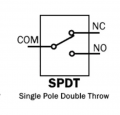
On a relay the COM is connected to NC most of the time. NC=Normally Closed. The COM is connected to NO when you push "on button". NO will never connect to NC!

1771045594355.png
If you connect everything but the ON and OFF are backwards, then disconnect from NO and connect to NC.
 

Thread Starter

Dpetervan2

Joined Mar 4, 2024
4
This board needs 3.7 to 12V. I think 3.3V is not enough for the smarts to work.

The "X" is the load or the thing you want to drive. In the top picture a separate battery (+) connects to the COM (common) of the relay. The NO (normally open) sends the power to the load and back the (-) of the battery.

In the bottom picture there is only one battery.

On a relay the COM is connected to NC most of the time. NC=Normally Closed. The COM is connected to NO when you push "on button". NO will never connect to NC!

View attachment 363437
If you connect everything but the ON and OFF are backwards, then disconnect from NO and connect to NC.
I very much appreciate your kind and timely response! I am having the darndest time trying to understand this. But your response has helped me clarify this. First, thank for the advice on the voltage level. I willl use a higher voltage battery.

So when using just one battery to power both devices, the device I am trying to control will only have one lead connected to the relay device, and that would be the + lead of the device to the "NO" terminal, and then the - lead of the device connect to the negative lead of the battery, correct? I then need to attach the positive lead from the battery to BOTH the + and to the "COM" on the relay, correct? Thank you once again!
 

panic mode

Joined Oct 10, 2011
4,864
congrats..

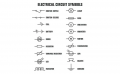
btw if you search web for "electrical symbols"
you will see more or less complete list. here is a short one and circle with X is a lamp. but in your case load is solenoid.
1771881383149.png
 

MisterBill2

Joined Jan 23, 2018
27,159
Very interesting: It works! I make that comment because I see no relay wirh contacts on that circuit module. Possibly the relay is on the other side of the PCB, which we do not see. the preview image is visible but I can not access it.
Maybe the relay is on the side that I can't access.
My concern is that if the switching is not a machanical relay, but rather a transistor of some sort, there would be a connection between one of the power feed terminals and one of the output switched terminals. On quite a few circuit modules there are direct connections between at least two terminals. With no statemment about isolation ,that might be the case. THAT could lead to problems
 
Top