Windows Calculator bug in logarithm functions

Thread Starter

WBahn

Joined Mar 31, 2012
33,040
If you are like me, you may use a calculator such as the Windows Calculator on a regular basis. I just discovered a bug while working on a project that appears to have been introduced with their latest update in June (and they wonder why we don't like automated updates).

Starting somewhere between 7.80e33 and 7.81e33, all of the logarithm functions (ln, log, log_y) return 0.

The antilog functions appear to function correctly, as do the various root functions.

The version I have is 11.2605.9.0

I checked the GitHub repository (this app is Open Source) and this bug has been reported.
 

Thread Starter

WBahn

Joined Mar 31, 2012
33,040
Collecting antique electronic devices with errors is new to me ... I guess it is akin to finding rare postal stamps with printing errors in them.
As with the stamps, it's not the antiqueness that makes them valuable, but the rarity. Most people that had one of the HP35 calculators that had the error threw it away since they couldn't count on it. Since it was only the very early units that had the bug to begin with, the number of surviving calculators with the bug is rather small, especially since the original market for the calculators was relatively small to begin with. Consider the Pentium chips with the FDIV error. While those have some collector's value, it isn't much because Intel shipped millions of them and many users simply lived with the bug, so CPUs with and without the bug are about equally available.
 

Futurist

Joined Apr 8, 2025
902
If you are like me, you may use a calculator such as the Windows Calculator on a regular basis. I just discovered a bug while working on a project that appears to have been introduced with their latest update in June (and they wonder why we don't like automated updates).

Starting somewhere between 7.80e33 and 7.81e33, all of the logarithm functions (ln, log, log_y) return 0.

The antilog functions appear to function correctly, as do the various root functions.

The version I have is 11.2605.9.0

I checked the GitHub repository (this app is Open Source) and this bug has been reported.

Do you have a concrete example rather than "somewhere between" ? is your system Intel or AMD?

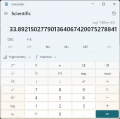
1785858389842.png

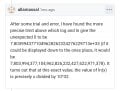
1785858417955.png

You say the bug has been reported, but where?
 
Last edited:

Thread Starter

WBahn

Joined Mar 31, 2012
33,040
Do you have a concrete example rather than "somewhere between" ? is your system Intel or AMD?


View attachment 370108

View attachment 370109

You say the bug has been reported, but where?
Why isn't "somewhere between" good enough to establish that a bug exists????

Use any value above 7.81e33 and you get zero. How is that not a concrete example?

Why do I have to figure out the exact bound where the bug manifests itself before you will believe that the bug exists?

I should have been able to just say that it returns zero for ln(1e34) and been done with it. Instead, I provided further information about where the boundary is, identifying it to well under ±0.1%. How tight do you expect me to narrow down the boundary before letting people know that the app has a bug? I have other things to do with my time. If you want to know the boundary more tightly, then you can either spend the time to do so, or simply do a search and find where others have done so.

My system is Intel, but this is not a hardware issue, it's a regression in the app. This bug was introduced in June. Prior versions worked. It will likely get fixed in the next release, which may or may not be put our ahead of the normal schedule. That will depend on whether the developers feel it is warranted.

Since today is Microsoft Tuesday, I wouldn't be surprised to see it working tomorrow. But that's assuming that updates to Calculator happen as part of Patch Tuesday, and I don't know that they do. Since it is an open source project, they may happen independently via the Microsoft Store. I'm certainly going to check.

It was reported on the GitHub project linked in the App's Settings page.
 

Futurist

Joined Apr 8, 2025
902
Why isn't "somewhere between" good enough to establish that a bug exists????

Use any value above 7.81e33 and you get zero. How is that not a concrete example?

Why do I have to figure out the exact bound where the bug manifests itself before you will believe that the bug exists?

I should have been able to just say that it returns zero for ln(1e34) and been done with it. Instead, I provided further information about where the boundary is, identifying it to well under ±0.1%. How tight do you expect me to narrow down the boundary before letting people know that the app has a bug? I have other things to do with my time. If you want to know the boundary more tightly, then you can either spend the time to do so, or simply do a search and find where others have done so.

My system is Intel, but this is not a hardware issue, it's a regression in the app. This bug was introduced in June. Prior versions worked. It will likely get fixed in the next release, which may or may not be put our ahead of the normal schedule. That will depend on whether the developers feel it is warranted.

Since today is Microsoft Tuesday, I wouldn't be surprised to see it working tomorrow. But that's assuming that updates to Calculator happen as part of Patch Tuesday, and I don't know that they do. Since it is an open source project, they may happen independently via the Microsoft Store. I'm certainly going to check.

It was reported on the GitHub project linked in the App's Settings page.
You said "between 7.80e33 and 7.81e33" So I tried 7.801e33 which meets the criteria and took the log, and as you can the result was not zero, did I do something wrong?
 
Top