Why is my clock looking so bad?

Thread Starter

robotDR

Joined Mar 17, 2020
138
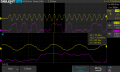
First picture is with a 0 ohm series resistor at the source, 49.9k pull down at the connector, and no extra capacitance.

Second picture (looks the best to me) I swapped out the 0 ohm series resistor for a 22 ohm resistor.

Third picture I added 2.7pF capacitance.


AnalogKid

Joined Aug 1, 2013
12,126
There can be several reasons, but at 25 MHz a likely cause is an improperly terminated transmission line causing reflections. Increase the source resistor to 47 ohms and see if things improve.

At the destination end, you need a termination impedance that matches the characteristic impedance of the signal wire / trace / whatever. This can be tricky, because whatever is driving the line might not be able to source/sink enough current to drive the theoretically correct termination impedance. We need to know more about the system, the source driver, the receiver, etc. go further. Schematics.

ak
 

Thread Starter

robotDR

Joined Mar 17, 2020
138
Source is a TI Sitara AM62A. destination is an SD connector/ card. Samsung evo+ UHS3 compatible has been used and also a pro endurance UHS1.

The Sitara is on my custom motherboard pcb. Then an ffc cable takes DAT, CLK, CMD, SDCD, PWR off board to and adapter board, purely pass through, and then to another FFC off to the programming board with the SD connector, TVS diodes, Power switch.

Schematics follow the AM62A EVM really closely.

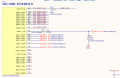
motherboard circuitry:
U6I is one component of the entire SITARA part.

Also, the clock is only for like 500-800 ms. Could the Sitara be shutting it off for some reason? For bad clock quality?

Are you sayin
1728676434656.png


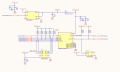
On the Programming Board:
1728676495743.png
 

nsaspook

Joined Aug 27, 2009
16,321
A strange looking clock signal on the oscilloscope does not necessarily indicate that the signal is bad. Oscilloscopes, probes and connections can add artefacts that are not actually there in the signal. You need to be aware of the limitations of your test equipment and your test procedures.
Exactly. Crappy looking signals on the scope will still operate perfectly with clocked circuits.
https://forum.allaboutcircuits.com/...nfigured-as-an-spi-slave.192845/#post-1811466

1728685988039.png
 

Thread Starter

robotDR

Joined Mar 17, 2020
138
I’m aware of that but
The waveform suggests signal reflections due to cable impedance mismatch.
thank you for taking a look.

Well the motherboard has the processor, and then it goes over a 0.25mm pitch ffc to an adapter pcb (pass through only) and then another 0.25mm pitch ffc to the programming board which is constructed totaly different than the motherboard.

what can I do to counteract what you’re saying the waveform is suggesting? Add more impedance on the programming board ( connector side?)
 

Thread Starter

robotDR

Joined Mar 17, 2020
138
Update,

the probing definitely helps the processor get further along in booting from as card. So I added 10pF to the clock near the Sd connector and changed the series resistor at the processor to 47 ohm. Now I don’t need to probe fit it to get so far along in the boot process. But we are still having trouble with the clock just disappearing sometimes and not fully booting off the Sd card
 

MrChips

Joined Oct 2, 2009
34,807
The problem is most likely not with the test procedure but the cabling between the two devices. How long is the FFC cable?
 

Thread Starter

robotDR

Joined Mar 17, 2020
138
They are 4” each, and then the adapter board is about 1.5-2” between connectors. So maybe up to 10”.

I’m thinking about redoing the adapter board and putting the sd card on that board and taking better care of the traces. Thst will cut down the cabling by half

do I need a series resistor at the destination of the clock? I’ve only always put them at the source.
 

Thread Starter

robotDR

Joined Mar 17, 2020
138
Tomorrow I’m going to try this:
I will cut out the Sd lines from the ffc cable at the mother board and then solder shirt wires from the motherboard to the programming board. That will swap out about 8-10 inches of cable and adapter board and make it maybe 2-3”

really only need to do 6 signals: clk, cmd, D0:3.

im also going to try removing the tvs diodes, and maybe cut in a series resistor at the connector.
 

MrChips

Joined Oct 2, 2009
34,807
For now, remove all series and parallel resistors.
If any signal requires pullup resistors, add those.
Keep all cabling as short as possible.
Instead of FFC cable, use twisted pair, i.e. one wire is signal, the other wire is ground.
 

Thread Starter

robotDR

Joined Mar 17, 2020
138
Really remove the series resistor even at the source? Go back to 0ohm? Ok I’ll try that. I’ll try twisted pair too. Thanks for the help, I’ll report back tomorrow with updates
 

Thread Starter

robotDR

Joined Mar 17, 2020
138
Posts #2 and #6 - ?

ak
I apologize, while I mention in a post I did take your advice and moved to a 47ohm resistor and it helped, I was still having some troubles. I do appreciate your help on that and I did read it. I am designing another adapter board that will have the sd card on it, passing all other signals onto the programming board. I have added some pads on the clock to add termination resistors and some capacitance if needed.

The 47 ohm resistor made it so that the sitara would keep the clock up even when i wasn't probing it with the scope. For some reason, when I had 22ohm or 0 ohm, the sitara would stop the clock after 500-800ms. Going to 47ohm changed the behavior so the sitara kept the clock up and continued through the booting process.

Everything boots, it turned out to be the software engineer's code :/

So still my clock looks bad on the scope. Scope is a 100mhz 2Gs/s scope. Maybe that has something to do with it? Doesn't look attenuated just yet so not sure.
 
Top