What do you define in a Program ?

Thread Starter

vead

Joined Nov 24, 2011
629
Hello Everyone
when we start to write c program,we write header file and than define identifiers. I see some example for LED ,LCD Motor...etc

identifier for LED Program
Code:
#include<reg51.h>           //header file for microcntroler//
#define LED         P2      // Led connected to port P2//
#define LED_ON      0xff    // Make port P2 High //
#define LED_OFF     0x00    // make port P2 Low //
identifier for LCD Program
Code:
#include<reg51.h>           //header file for microcntroler//
#define LCDPORT      P1     // data pins connected to port P1 //
#define RS           P2_2   // RS pin connected to Port pin P2_2 //
#define RW           P2_1   // RW pin connected to Port pin P2_1 //
#define E            P2_0
define Identifier for device
Code:
#include<reg51.h>           //header file for microcntroler//
#define ??????????/
#define ?????????????/
#define ??????????????
if any other device is connected to microcontroller than I don't understand what should I have to define in program ? What I need to know before start to write code ?I am not asking for whole part of program. I am just asking for basic concept. how to define identifier to control device?
 

MrChips

Joined Oct 2, 2009
34,807
Code libraries, define statements and header files are essential for proper project management and maintenance when your project starts to become large and unmanageable.

If your program is shorter than 50-100 lines of code you can ignore this. When the code grows to hundreds or thousands of lines, you need to pay attention to proper program management and style.

The first step is to think in terms of functional modules. Separate code into modules, for example, graphics, communications, data acquisition, etc.
Each module (that is, .c file) will have its own accompanying header file (.h file).

#define statements will go in the header file.

The purpose of the #define statement is to declare all code constants and hardware specific assignments. You want to make all .c files portable so that you can reuse the same .c file in different projects. You do not want to have to search through all your .c files to make code changes every time you need to make a change for a different project.

The rule of thumb is: avoid using constant values in your code. Use a defined constant instead. Use all caps for defined constants.
For example:

volts = adc_value/VSCALE;

Do NOT use defined constants where it is obvious that the constants are known and will not change.
For example:

tempF = tempC*9/5 + 32;

Use define constants for hardware assignments, for example,

#define LED_PORT P2
#define RED_LED P3.4

You can use #define statements to enhance code readability, for example:

#define TRUE 1
#define FALSE 0

#define ON 1
#define OFF 0

example code:

RED_LED = ON;

(actual implementation will vary depending of the MCU family and compiler).

Always think of #define as text substitution. That is, the compiler will substitute the definition text wherever the symbol is used.

Another purpose for #define statements is for conditional assembly. That is, you can have two options in your code depending on which option is selected. For example,

#define VERSION_B2

#ifdef VERSION_B2
:
:
#else
:
:
#endif
 

Thread Starter

vead

Joined Nov 24, 2011
629
Code libraries, define statements and header files are essential for proper project management and maintenance when your project starts to become large and unmanageable.

If your program is shorter than 50-100 lines of code you can ignore this. When the code grows to hundreds or thousands of lines, you need to pay attention to proper program management and style.

The first step is to think in terms of functional modules. Separate code into modules, for example, graphics, communications, data acquisition, etc.
Each module (that is, .c file) will have its own accompanying header file (.h file).

#define statements will go in the header file.

The purpose of the #define statement is to declare all code constants and hardware specific assignments. You want to make all .c files portable so that you can reuse the same .c file in different projects. You do not want to have to search through all your .c files to make code changes every time you need to make a change for a different project.

The rule of thumb is: avoid using constant values in your code. Use a defined constant instead. Use all caps for defined constants.
For example:

volts = adc_value/VSCALE;

Do NOT use defined constants where it is obvious that the constants are known and will not change.
For example:

tempF = tempC*9/5 + 32;

Use define constants for hardware assignments, for example,

#define LED_PORT P2
#define RED_LED P3.4

You can use #define statements to enhance code readability, for example:

#define TRUE 1
#define FALSE 0

#define ON 1
#define OFF 0

example code:

RED_LED = ON;

(actual implementation will vary depending of the MCU family and compiler).

Always think of #define as text substitution. That is, the compiler will substitute the definition text wherever the symbol is used.

Another purpose for #define statements is for conditional assembly. That is, you can have two options in your code depending on which option is selected. For example,

#define VERSION_B2

#ifdef VERSION_B2
:
:
#else
:
:
#endif
Thanks for your quick response and big explanations. I think you didn't understand what I am asking. suppose I have 8051 Microcontroller, LED, LCD, Motor And seven segment display. now I want to write C program for every device one by one. first I connected Microcontroller with LED and write code for LED Blinking , where we write following line after the header file
Code:
#include<reg51.h>           //header file for microcntroler//
#define LED         P2      // Led connected to port P2//
#define LED_ON      0xff    // Make port P2 High //
#define LED_OFF     0x00    // make port P2 Low //
I connect Microcontroller with LCD and write code for Display MY NAME , where we write following line
Code:
#include<reg51.h>           //header file for microcntroler//
#define LCDPORT      P1     // data pins connected to port P1 //
#define RS           P2_2   // RS pin connected to Port pin P2_2 //
#define RW           P2_1   // RW pin connected to Port pin P2_1 //
#define E            P2_0
I connect microcontroller with motor and write code to run and stop. what will be line after header file
Code:
#include<reg51.h>           //header file for microcntroler//
#define ??????????/
#define ?????????????/
#define ??????????????
Same things I Connect 8051 with seven segment display. what will be line after header file
Code:
#include<reg51.h>           //header file for microcntroler//
#define ??????????/
#define ?????????????/
#define ??????????????
I have seen in many program they define but I don't understand whats the logic. if you have 8051 and device and you want to control that device using program. what will be line after header file.
 

nsaspook

Joined Aug 27, 2009
16,321
One method is to define the needed data points/commands and then create structures with the needed information about the device initialization and control.


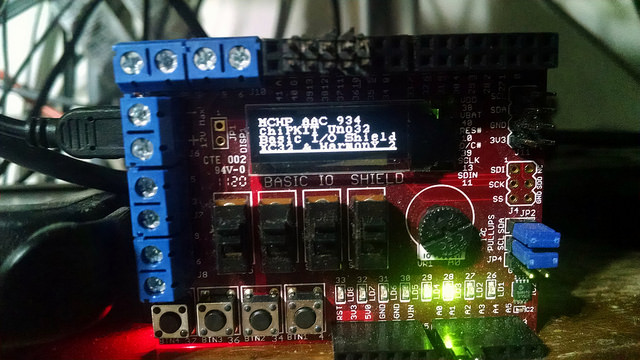
A simple Uno32 code fragment example for the OLED display on a chipKIT I/O shield.
C:
//#define    cmdOledDisplayOn    0xAF
//#define    cmdOledDisplayOff    0xAE
//#define    cmdOledSegRemap        0xA1    //map column 127 to SEG0
//#define    cmdOledComDir        0xC8    //scan from COM[N-1] to COM0
//#define    cmdOledComConfig    0xDA    //set COM hardware configuration
//#define    cmdOledComSeqLR        0x20    //sequential COM, left/right remap enabled

enum {
    cmdOledDisplayOn = 0xAF,
    cmdOledDisplayOff = 0xAE,
    cmdOledSegRemap = 0xA1,        //map column 127 to SEG0
    cmdOledComDir = 0xC8,        //scan from COM[N-1] to COM0
    cmdOledComConfig = 0xDA,    //set COM hardware configuration
    cmdOledComSeqLR = 0x20        //sequential COM, left/right remap enabled
};


enum {
    d_seq_single_width = 1, d_seq_one_width = 4, d_seq_two_width = 5
}; // command byte-width sizes

struct oled_init_data {
    uint32_t init_delay_msecs;
    uint8_t d_off[d_seq_single_width];
    uint8_t d_on[d_seq_single_width];
    uint8_t d_charge_setup[d_seq_one_width];
    uint8_t d_origin_memory[d_seq_two_width];
};

static const struct oled_init_data oled_ssd1306 = {
    .init_delay_msecs = 100,
    .d_off = {cmdOledDisplayOff},
    .d_on = {cmdOledDisplayOn},
    .d_charge_setup = {0x8D, 0x14, 0xD9, 0xF1}, //Send the Set Charge Pump and Set Pre-Charge Period commands
    .d_origin_memory = {cmdOledSegRemap, cmdOledComDir, cmdOledComConfig, cmdOledComSeqLR, cmdOledDisplayOn},
};

const struct oled_init_data *oled_ptr = &oled_ssd1306;
We then define standard cmd/data values, create a structure (oled_ssd1306 from oled_init_data) to group the cmd/data values in a easy to use and understand format. Initialize the structure (the method used here might not work with older C compilers) and then create a pointer (oled_ptr) to the data structure (used here as an example) to make it possible to use more than one display device type in the same program.

C:
void OledDevInit(void)
{
    DRV_SPI_BufferAddWrite(SPIHandle, (uint8_t *) oled_ssd1306.d_off, sizeof(oled_ssd1306.d_off), 0, 0);
    prtReset = 0;
    DelayMs(1);
    prtReset = 1;
    DRV_SPI_BufferAddWrite(SPIHandle, (uint8_t *) oled_ssd1306.d_charge_setup, sizeof(oled_ssd1306.d_charge_setup), 0, 0);
    prtVbatCtrl = 0;
    DelayMs(oled_ssd1306.init_delay_msecs);
    DRV_SPI_BufferAddWrite(SPIHandle, (uint8_t *) oled_ptr->d_origin_memory, d_seq_two_width, 0, 0);
}
Here we use the oled_init_data structure to send data/cmds via the SPI port using XC32 and the Harmony 2.0 SPI dynamic driver. For the last DRV_SPI_BufferAddWrite function the oled_ptr is used as a example instead of the direct oled_ssd1306 structure variable.

C:
        OledClearBuffer();
        OledSetCursor(0, 0);
        sprintf(headder, "MCHP AAC %d ", pot1);
        OledPutString(headder);
        OledSetCursor(0, 1);
        OledPutString("chipKIT Uno32");
        OledSetCursor(0, 2);
        OledPutString("Basic I/O Shield");
        OledSetCursor(0, 3);
        OledPutString("XC32 & Harmony 2");

        OledMoveTo(0, irow & 31);
        OledDrawRect(127, 31);
        OledMoveTo(0, irow & 31);
        OledLineTo(127, irow & 31);
        OledUpdate();
        irow++;
Application display state machine C code block.
 
Last edited:

BobaMosfet

Joined Jul 1, 2009
2,211
Thanks for your quick response and big explanations. I think you didn't understand what I am asking. suppose I have 8051 Microcontroller, LED, LCD, Motor And seven segment display. now I want to write C program for every device one by one. first I connected Microcontroller with LED and write code for LED Blinking , where we write following line after the header file
Code:
#include<reg51.h>           //header file for microcntroler//
#define LED         P2      // Led connected to port P2//
#define LED_ON      0xff    // Make port P2 High //
#define LED_OFF     0x00    // make port P2 Low //
I connect Microcontroller with LCD and write code for Display MY NAME , where we write following line
Code:
#include<reg51.h>           //header file for microcntroler//
#define LCDPORT      P1     // data pins connected to port P1 //
#define RS           P2_2   // RS pin connected to Port pin P2_2 //
#define RW           P2_1   // RW pin connected to Port pin P2_1 //
#define E            P2_0
I connect microcontroller with motor and write code to run and stop. what will be line after header file
Code:
#include<reg51.h>           //header file for microcntroler//
#define ??????????/
#define ?????????????/
#define ??????????????
Same things I Connect 8051 with seven segment display. what will be line after header file
Code:
#include<reg51.h>           //header file for microcntroler//
#define ??????????/
#define ?????????????/
#define ??????????????
I have seen in many program they define but I don't understand whats the logic. if you have 8051 and device and you want to control that device using program. what will be line after header file.
You use #define for any constant that is otherwise ambigous. It is to solve 3 problems: 1) Code amgiguity- makes code easier to read, and 2) value changing - If you use the same value in a application many times, what happens if you need to alter that value? It's easier to make a change in one place, and have that take effect everywhere. 3) Logic control- If you want to have a program output debug information (for example, or alter its behavior for some other purpose), you can use define a __DEBUG__ constant, and then use #ifdef around code blocks that output debug info. When __DEBUG__ = TRUE, the debug code is compiled in. When FALSE, it is eliminated from the output.

Those 3 cases pretty much identify every possibility as to where, why, and how you use defines (aka constants).

Header files are for your linker. Header files make only the portions of a c file that you want made externally accessible to be visible to other C files. This is why every C file that has code that can be referenced by another C file, has an H file associated that the other C file includes (ie. links in).

C files can also have defines/constants that are not known externally-- they exist just within the scope of the C file, but are not in the H file associated with that C file, so are not global.
 

MrChips

Joined Oct 2, 2009
34,807
There is one more purpose for header files.
Header files store prototypes of functions.

Suppose you want to create a library of graphics functions.
You may want a function such has DrawPixel( int x, int y) or ClearScreen( ).
These functions are called by your main program but main.c has no knowledge of such functions.
That information goes in the header file such as graphics.h, not the coding of the functions.

Your main.c file will contain a statement such as

#include "graphics.h"
 

MrChips

Joined Oct 2, 2009
34,807
Thanks for your quick response and big explanations. I think you didn't understand what I am asking. suppose I have 8051 Microcontroller, LED, LCD, Motor And seven segment display. now I want to write C program for every device one by one. first I connected Microcontroller with LED and write code for LED Blinking , where we write following line after the header file
Code:
#include<reg51.h>           //header file for microcntroler//
#define LED         P2      // Led connected to port P2//
#define LED_ON      0xff    // Make port P2 High //
#define LED_OFF     0x00    // make port P2 Low //
I connect Microcontroller with LCD and write code for Display MY NAME , where we write following line
Code:
#include<reg51.h>           //header file for microcntroler//
#define LCDPORT      P1     // data pins connected to port P1 //
#define RS           P2_2   // RS pin connected to Port pin P2_2 //
#define RW           P2_1   // RW pin connected to Port pin P2_1 //
#define E            P2_0
I connect microcontroller with motor and write code to run and stop. what will be line after header file
Code:
#include<reg51.h>           //header file for microcntroler//
#define ??????????/
#define ?????????????/
#define ??????????????
Same things I Connect 8051 with seven segment display. what will be line after header file
Code:
#include<reg51.h>           //header file for microcntroler//
#define ??????????/
#define ?????????????/
#define ??????????????
I have seen in many program they define but I don't understand whats the logic. if you have 8051 and device and you want to control that device using program. what will be line after header file.
Neither I do not understand your question.

Go back and read my explanation in post #2.
 

nsaspook

Joined Aug 27, 2009
16,321
FYI For int numeric constants you can usually use an enum instead. This puts information in the debugger instead of being set in the preprocessor.
  1. static const int var = 5;
  2. #define var 5
  3. enum { var = 5 };
Enumerations provide a convenient way to associate constant values with names, an alternative to #define with the advantage that the values can be generated for you. Although variables of enum types may be declared, compilers need not check that what you store in such a variable is a valid value for the enumeration. Nevertheless, enumeration variables offer the chance of checking and so are often better than #defines. In addition, a debugger may be able to print values of enumeration variables in their symbolic form.
K&R's The C Programming Language
 

shteii01

Joined Feb 19, 2010
4,644
1.
You are NOT REQUIRED to define anything. This is very important. You don't have to use defines at all. It is not a requirement.

2.
I am lazy. When I write a program I am going to use certain device features again, and again, and again, and again... Remember, I am lazy! So. Instead of using some strange combination of letters and numbers I am going to define the feature as something I can easily read and understand. This way I can write code more easily and code is easier to read.
 

spinnaker

Joined Oct 29, 2009
7,830
1.
You are NOT REQUIRED to define anything. This is very important. You don't have to use defines at all. It is not a requirement.
I would not use such a blanket statement. It is confusing.


If you are writing all of your own code then no, you do not need to use defines but it makes your software more configurable in the event that you would want to make changes, You simply change the defines. A lot easier than hunting for the code that needs to be changed.

You would also use defines to make the code easier for others to adapt to their needs in the event you want to share. So if you are using someone else's code that uses defines for code customization then you are going to have to use those defines to get the code to work. So in that event, use of defines is required.
 

shteii01

Joined Feb 19, 2010
4,644
I would not use such a blanket statement. It is confusing.


If you are writing all of your own code then no, you do not need to use defines but it makes your software more configurable in the event that you would want to make changes, You simply change the defines. A lot easier than hunting for the code that needs to be changed.

You would also use defines to make the code easier for others to adapt to their needs in the event you want to share. So if you are using someone else's code that uses defines for code customization then you are going to have to use those defines to get the code to work. So in that event, use of defines is required.
The key word in my blanket statement is: REQUIRED!

Nobody REQUIRES you to use defines.
 

hexreader

Joined Apr 16, 2011
619
I fully agree with shteii01

Vead is a noob (despite his statements claiming to be experienced)

I would go even further.... defines are not REQUIRED, and when first starting out, as vead is (and has been for years) can add complication and confusion IMHO.

For simple learner programs, using an actual port number can be clearer, AS LONG AS A COMMENT EXPLAINS USE OF THE PORT CLEARLY!

vead would do well to start simple with port definitions, then move on to defines as a later lesson.

Sadly vead seems to want to run before he walks, which might explain why he is still "noob" after all these years.

Just my thoughts and observations, nobody has to agree

"Try to use some else's code with out them." I would say that using somebody else's code can be easy if good commenting is provided as an alternative. The problem is that lack of defines usually goes along with little or no comments. I will accept that defines become important once coding becomes substantial or professional. vead's code is trivial and definitely not professional. vead's ambitions appear to far exceed his understanding.
 
Last edited:

Thread Starter

vead

Joined Nov 24, 2011
629
I fully agree with shteii01

Vead is a noob (despite his statements claiming to be experienced)

I would go even further.... defines are not REQUIRED, and when first starting out, as vead is (and has been for years) can add complication and confusion IMHO.

For simple learner programs, using an actual port number can be clearer, AS LONG AS A COMMENT EXPLAINS USE OF THE PORT CLEARLY!

vead would do well to start simple with port definitions, then move on to defines as a later lesson.

Sadly vead seems to want to run before he walks, which might explain why he is still "noob" after all these years.

Just my thoughts and observations, nobody has to agree

"Try to use some else's code with out them." I would say that using somebody else's code can be easy if good commenting is provided as an alternative. The problem is that lack of defines usually goes along with little or no comments. I will accept that defines become important once coding becomes substantial or professional. vead's code is trivial and definitely not professional. vead's ambitions appear to far exceed his understanding.
I apologize for my mistake. I accept that I have made many mistake and know I take long time to understand. Yas I realized that I have made many mistake but If you will see my all threads I always respect to all members. I know all members are helping student like me that does not know anything. They gives their valuable time. And I appreciate their time and effort. When I ask on forum, my aim is not to hurt someone. and I don’t demand for answers. some time I could not explain what I am asking. My problem is that I don’t understand thing easily but if you think in my point of view you will see I have learnt many things on this forum in my past years. I have written some c programs. you can check my post. I have successfully burned program to 8051 controller. but when some doubt raise on my mind I ask here may be stupid question for you but really I learnt something form every post . may be my learning speed is very slow for you but really I am doing my best for learning. Again I apologize for my mistakes
 
Last edited:

Thread Starter

vead

Joined Nov 24, 2011
629
I feel bad now :( maybe I am too harsh or too mean....

sorry
don't feel bad , that was my mistake. now my question was , what the common things we should know to write program after header file for every new device that's connected to microcontroller. now I am trying to explain answer of my question

I think when ever we start to write code for any device we need to know which port or pin of mcu connected to devices so that we can write in program. I know the LED is connected to port P2 of 8051
//so we write header fie fist //
#include<headerfile.h>

#define we define port , port pins

Example 1: if LED is connected to port P2.1

We can write #define LED P2

Example 2 : If LCD is connected to Port P1

We can write #define LCD P1 in program

From the above example . its clear for me If I start to write any code for any device that is connected to controller I need to know which port and Pin of mcu connected with device

Code:
Step 1 include header file
#include<headerfile.h>

Step 2 First we need to know how  device connected with ports of MCU so that I can define in program.
#define LED P2

Step 3 How does device work

LED will ON or off

#define LED_ON 0xff

#define LED_Off 0x00

Step 4. Prototype function

Step 5. Start main function

Void main ()

{

Write code

}
I was asking common logic for all devices thats connects with microcontroller related to program. all I have explained with taking LED example. with same logic we write program for any other device such as LCD , Motor , seven segment display, keypad ...etc
 
Last edited:

hexreader

Joined Apr 16, 2011
619
Exact syntax depends on compiler, but I found these code snippets on internet:

Code:
#define LCD_data P2
#define LCD_D7 P2_7
#define LCD_D6 P2_6
#define LCD_D5 P2_5
#define LCD_D4 P2_4
#define LCD_D3 P2_3
#define LCD_D2 P2_2
#define LCD_D1 P2_1
#define LCD_D0 P2_0
#define LCD_rs P1_0
#define LCD_rw P1_1
#define LCD_en P1_2

#define SegmentValue P2 //PORT2.0 is connected to segment 'a'
#define SegmentSlection P0 //PORT0.0 is selection line 'S1'
#define SegOne 0x01
#define SegTwo 0x02
#define SegThree 0x04
#define SegFour 0x08
#define NoSeg 0x00

#define ROW_1 P2.7
#define ROW_2 P2.6
#define ROW_3 P2.5
#define ROW_4 P2.4
#define COL_1 P2.3
#define COL_2 P2.2
#define COL_3 P2.1
#define COL_4 P2.0
Notice greatly varying styles and syntax for different compilers. There is no exact answer.

At the end of the day, #define simply substitutes one bit of text for another

Simple motor is just like LED, either on or off
 
Top