What Do You Check First When a Circuit Stops Working?

MrChips

Joined Oct 2, 2009
35,268
Sometimes the simplest yet unexpected causes will confound you.

Here is an example.

Someone brought to a Repair Café a 2-slice toaster that was not holding down.

Firstly, you needed to know how the electro-mechanical mechanism works that holds down the toast carrier.
When you press down the carrier, electrical contacts close and an electromagnet is energized. This holds down the carrier.

The first suspects are, bad contacts, bad wiring (sometimes rivets are used), no power to the solenoid, or bad coil.
Everything checked out ok.

The culprit: tiny pieces of bread crumbs sitting on the head of the electromagnet. This created a sufficient gap to prevent the magnetic flux from flowing between the metal pieces. Remove the bread crumbs and we're making toasts again.
 

wayneh

Joined Sep 9, 2010
18,180
I'm a little surprised no one else has mentioned this: The first thing to check is what is the item worth. Is it worth your time to fix or is it headed to the dump anyway? Maybe there's even a fee to get rid of it?

The people here are fixers by nature and will crack something open just to see what went wrong, and to seek that potential little thrill of making a repair. That's fine, I'm as guilty as any of us, but it isn't necessarily what you'd recommend for someone not similarly inclined. Would you spend an hour of your time diagnosing and repairing a cheap garden LED light? Maybe, if you enjoy the challenge, but would you recommend it to someone else?
 

MisterBill2

Joined Jan 23, 2018
28,485
Many of the devices that I repair are not mine, and so I am not going to give my thoughts as to their value to the owner. In many cases that would be very offensive. Of course, the opposite may also be the case, stating that the item is quite valuable and certainly worth repairing because of it's high value.
I have been present when another service person stated "That the item was junk and never worth repairing" without even giving it a close look. I found that remarkquite offensive, and I was theother service person, not the owner. I was also theone to spot a loose connection after a short examination. Quick Fix!!

Repairing my own items would not require the same level of tact as when dealing with others.
 

MisterBill2

Joined Jan 23, 2018
28,485
Certainly there are instances when something has failed and is destroyed. "Fuses" are a classic example of that. Also burned-out light bulbs. But there are many more instances where either ignorance or laziness of the evaluator is the problem. An overload cutout tripped due to an operator error in at least one case.
 
There is a lot of good advice in the posts so far. Don’t overlook the obvious, frequently the problem will be found there. Use all your senses, look, listen, smell, touch. First follow the steps MrChips said in #2. After that, I generally “Divide-and-Conquer”. Virtually all electronic circuits can be broken down into a series chain of inputs, stages and outputs. Make sure you have ALL the required inputs and loads. What these are depends on what it is you are troubleshooting but generally includes power and the appropriate input signal and at least a simulation of the proper load. Once you have these, look for the correct output.

If not, divide the whole “chain” approximately in half, or at least into major blocks. Do you have the correct (output) signal expected at the half-way point? If yes, then you know the problem is further down the chain. If not, then you know the problem is before the half-way point. Continue this logic of breaking down the remaining chain of stages in half until the faulty stage is found.

From here, any advice becomes specific to the exact circuit you are looking at. But generally, once the faulty stage is found, look for the correct voltages around the active devices and decide which kind of component failure could result in those readings.

Don’t forget that a wire or PC trace is also a “component”. A good rule to follow for fuses is “If a fuse blows once, so what. If a fuse blows twice – there IS a problem.”

Often you will be tempted to not follow this half-way divide and conquer logic because some causes are more likely than others. And sometimes that is the faster way to troubleshoot, but very often it is not. If the “most likely” can be verified with one or two quick measurements, then fine. Otherwise, stick with a disciplined divide and conquer.
 

MisterBill2

Joined Jan 23, 2018
28,485
After my brief visual inspection, which assumes that the circuit actually exists in real hardware, not just in simulation, and after seeing no obviously damaged parts. Iusually start by looking at the output port, assumung that there is one. That might be a visual display or just lights, or even a mechanical device like a motor. Checking for voltages that are close to the anticipated values follows closely.
Almost always anydiagnostics of a circuit or system requires understanding what it is supposed to do. THAT is quite important!!
 

MrChips

Joined Oct 2, 2009
35,268
Here is another example of simple but not so obvious repair.

VGA monitor not working. Power-on screen appears but no display from PC.
Problem: bent pin in the video connector.
 

MrChips

Joined Oct 2, 2009
35,268
Here is an easy one to diagnose but difficult to isolate: a shorting decoupling capacitor across the power supply rails.

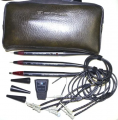
The culprit could be any one of a few dozens of decoupling capacitors. One trouble shooting technique is to use an HP 546A pulser and HP 547A current tracer if you are so fortunate to have the set.

1792810988713.png
 

MrChips

Joined Oct 2, 2009
35,268
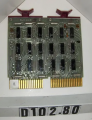
On another case, I had the privilege of having to locate a short across the power rails on a DEC PDP-15 minicomputer. This era of minicomputers used Flip-Chip modules mounted vertically.

1792811336195.png

The fault was a splash of solder hidden underneath a DIP IC. The computer functioned for many years, but over time, the elevated temperature inside the 19" cabinet caused the solder to gradually creep owing to gravity until it shorted across the power rails.
 
If it's a breadboard, I look try to find out which cable got disconnected. If it's a ready-made module, disconnect and reconnect it to the power supply. Most of the time there is nothing I can do to repair it.
 

MrChips

Joined Oct 2, 2009
35,268
A short across the power rails is a common failure mode. Since there can be many dozen components connected to power, finding the faulty component is quite a challenge. Besides the many ICs powered directly from the power rails, there are typically numerous 0.1 μF ceramic decoupling capacitors as well as higher capacitance electrolytic capacitors wired across the power rails.

The first suspects are electrolytic capacitors, especially if they are tantalum capacitors. In any case, pinpointing the culprit is still a challenge.

Here are various techniques for locating a short circuit.

1) Apply power and use a thermal imaging camera to locate the hot spot.
2) Apply power and use a cold mist to locate the hot spot.
3) Use HP 547A current probe kit. With this tool kit, you can follow along the PCB trace where the current is going. In my experience, this is the most effective method.
4) The last resort is to begin cutting away at power traces. Use the binary search approach. Divide the PCB in half and determine which half contains the short.
 

Ian0

Joined Aug 7, 2020
13,306
You don’t begin by replacing parts. You locate the problem first.
There is no single solution to cover all cases.

This is where you become a detective in solving a murder mystery.

You start with a conversation with the owner. Learn about the history of the appliance, age, usage, circumstances, for example, water damage. What were the conditions leading up to the failure.

Next comes a visual inspection, look, smell, touch (while unit is powered, or use a thermal imaging camera to locate hot spots, after you have done the first things below).

As you said, start with the simple things first, fuse, power cord, plugs, switches. A very common failure point is the power cord at the neck of the plug or socket.

The testmeter is used to check for AC voltage coming in and DC voltages at the power supply (assuming that it is DC powered).
The first thing to check is anything that the customer says he has already checked.
 
Use HP 547A current probe kit. With this tool kit, you can follow along the PCB trace where the current is going.
In my first job I was taught to find ground loops in high-gain audio amplifiers by using a simple scope probe dragged across the ground and sometimes the power trace. You look for the largest amplitude relative to where you placed the ground lead of the scope.
 
Lots of good tips in previous posts. Some of the things I do:
  • Sniff for the burned chip smell. If you smell it, you know the repair is going to involve replacing components.
  • Take pictures before you dig in, capturing chip numbers and resistor color codes if possible. Sometimes you need them later.
  • Look for traces that are burned or discolored from getting too hot. Sometimes the (often green) solder mask will have peeled back, revealing the copper underneath.
  • Look for chips with cracks or small craters in the top. That is usually a sign that the internal semiconductor got too hot and split the plastic IC package.
  • Look for electrolytic capacitors with bulging ends or tantalum capacitors that have leaked. You can also test them with a meter using the capacitance scale; you should generally read at least half of the nominal value (perhaps much more, since you don't know what is connected in parallel with them). If the board is old but still valuable, it might be worth replacing all of the electrolytics before going on.
  • If the PCB is really dirty, clean it up. This can make it easier to see damage, and occasionally fixes the problem (e.g. when transistors are connected to heat sinks with mica insulation). IPA is usually safe, but it sometimes it erases labels and other useful info.
  • Check whether the current draw is reasonable (ideally compare with working boards of the same type). Using a current-limited supply can prevent causing further damage.
    • If it draws no current (or there are no signs of life), check fuses, broken wires, etc. Check the polarity of the power supply (if DC). Start checking the voltage at the power source and follow it until it goes away. If it has a transformer, this can get complicated. Be especially careful if working with more than 50V (e.g. learn about arc flash). If you are unsure, connect the meter to the circuit with clip leads and stand back while turning the power on.
    • If the current draw is really high, figure out what is getting hot. A thermal camera works great, if you have one. If not, power up the device for a second or so, turn it off, and tap things with your finger to see if they are hot (use short taps to avoid getting blisters; you can't move fast enough once you feel the heat). Of course some chips (e.g. linear regulators) should get warm, but if the board is drawing too much power, something is getting hotter than normal and the hottest thing is likely either the problem or upstream of the problem. Most chips should stay cool enough to touch during operation (but even then don't touch them if they have high voltages).
  • Check that all power supply voltages are OK. If not, power down and check the resistance across each power supply rail (from the power net to "ground"). For example, if you find a LM7805 regulator, Google for the datasheet and you will find that pin 3 is the output; it should not be shorted to pin 2, "ground". You should measure at least a few ohms, often a few hundred to a few thousand ohms. Ohm's law won't tell you how much current it will draw, as the "resistance" you measure is from devices that aren't resistors and have a non-linear response.
    • If a power supply rail is shorted, you can use the resistance of the power traces (assuming the PCB doesn't use a power plane) to figure out where the short is. It is hard to measure really small resistances directly, so I usually solder wires to the shorted power supply rail and common (aka "ground") and connect them to a AA or AAA battery through a 10Ω resistor. The low battery voltage prevents damaging semiconductors and the resistor limits the current enough to avoid melting traces. You can then measure voltage drops along the length of the power trace. Set the meter to measure millivolts and connect one meter lead to the wire with the positive voltage. Use the other meter probe to see how much the voltage drops as you measure points along each branch of the power trace. You are looking for the largest drops in voltage, as that indicates the largest amount of current flowing in the trace. Follow the branch with the greatest voltage drop until you find where it quits dropping; that is typically where the short is. Often it is the power pin of a chip that has failed.
      • If the PCB's "ground" is also done with traces rather than an internal PCB plane, you can do the same thing on those traces. If the voltage drops along those traces leads to a pin of the same chip you identified using the power traces, it is very likely to be bad.
      • This method works to find PCB shorts, whether they are in the PCB itself or a solder bridge (both more common on new PCBs than repairs). I suppose it would also work to find tin whiskers, although I haven't dealt with them.
    • As a last resort, if you get stuck and the alternative is throwing the board away, you can limit the voltage on a lab supply to what that power rail should be and increase the current in an attempt to to burn out whatever is causing the short. This usually results in a burned trace or a small crater in the top of a chip (and a bad stink). If the traces hold and a chip pops, you can try replacing the chip and see if that fixes things. Otherwise, it probably isn't worth any more of your time. Take pictures first if you don't have another way to know what the parts should be, as IC numbers often become unreadable when they pop :)
  • If the PCB uses a microprocessor with an external crystal, use an oscilloscope to make sure it is oscillating. If it is not, replacing the crystal sometimes fixes it. If that doesn't fix it, the MCU is probably dead. Replacing the MCU probably won't work, as it likely needs to be programmed with specific software.
  • Before microprocessors included internal COP watchdogs, it was pretty common to use a DS1232/128x or similar chip to monitor the power rail and look for a "I'm still working" periodic pulse from the MCU. If the monitor chip didn't like what it saw, it would reset the system (generally including the MCU). The datasheet for those monitor chips show which pin and voltage level resets the system. If it is stuck in reset or resetting over and over, use the monitor chip's datasheet to find the possible causes.
  • You can probe around with a scope. Be careful or you can short between pins and cause more damage. Most address and data signals should have nice square pulses, although sometimes a data line will float (such as when no chip select is active). If signals look rounded, try using a shorter ground lead on your scope probe. If you sometimes see a half-step, two lines are probably shorted together with one pulling high and one pulling low (make sure your scope probe isn't stuck between two pins). I2C signals should have nice square edges when going low, but may be slower returning high again. USB and other high-speed signals are completely different and beyond the scope here.
  • Asking an AI chatbot can be good for generating ideas about what else to check, but blindly following its suggestions will probably waste your time.
  • If you don't find any problems, put it back together and test it again. It is amazing how often taking something apart, cleaning it up, and putting it back together "fixes" it. It is very unsatisfying and doesn't give you any confidence that it will keep working, but sometimes just having it work for now is good enough.
 
Last edited:
Top