What could have possibly burnt my ESP32-CAM

Thread Starter

lichurbagan

Joined Jul 4, 2025
120
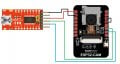
This was the case. I was working with my ESP32-CAM. As usual it was connected to the laptop. Connected to it was an FTDI module too. A python script was running to get image from the ESP32-CAM. Then my laptop battery was nearly dead. I charged my laptop for one or two hours, while the camera was connected to the laptop. After that I discovered that the ESP32-CAM was no longer dected by the laptop. One component was burning hot when I conencted the camera to the laptop. Was it my mistake not to disconnect the camera while by laptop was charging? Did this act possibly caused an overcurrent flow and killed my camera?
 

MisterBill2

Joined Jan 23, 2018
27,159
Most video cameras, ESPECIALLY the less expensive ones, have a very narrow safe supply voltage range. It seems that somehow the battery charging voltage got to your camera. My guess is that wherever you connected it was not an adequately regulated voltage point.
 

Thread Starter

lichurbagan

Joined Jul 4, 2025
120
problem is not that you connected it to computer. problem is that you connected it wrong.
The connection between the FTDI and the ESP32-CAM was as usual. I connected the camera the same way before. Once the code is uploaded I disconnect the connection between Io0 and GND and press the RST button.

If I connect the FTDI to my laptop, the camera never communicated. I always had to connect the camera with an USB cable to the laptop. By the way, my FTDI module is not the official one from sparkfun. It's a local clone. esp32cam_ftdi2.jpg
 

Thread Starter

lichurbagan

Joined Jul 4, 2025
120
Most video cameras, ESPECIALLY the less expensive ones, have a very narrow safe supply voltage range. It seems that somehow the battery charging voltage got to your camera. My guess is that wherever you connected it was not an adequately regulated voltage point.
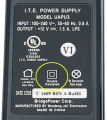
The laptop was directly being charged from a 220V outlet. Is that wrong?
 

ericgibbs

Joined Jan 29, 2010
21,390
hi lich,
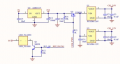
Which component got very hot, was it the 3.3V regulator near the onboard RST push button on the back of the PCB..??

They tend to get hot even when the '5V' voltage pin is at 5v, if the 5v gets higher the 3.3v Vreg will overheat.

I use the ESP32-CAM-MB module in place of the FTDI.

E
EG 1816.png
 
Last edited:

MisterBill2

Joined Jan 23, 2018
27,159
The laptop was directly being charged from a 220V outlet. Is that wrong?
EVERY laptop computer that I have seen would be recharged by an external, usually "mains powered" power supply. Some of those supplies are intended to connect to 220 volt AC mains. Most laptop computers are intended to be used with a very specific model of external power supply, BUT often the connector is a common type found on many different power supplies.

IN this case, given a guess that the correct power supply was used for recharging, it appears that the error was elsewhere.
Based on this happening, my advice is to always disconnect everything from the laptop when recharging.
 

panic mode

Joined Oct 10, 2011
4,864
every laptop i have seen is using 3-wire power cable (with ground) or it is at least double insulated. and has wide input range (100-240V).
1762179012649.png
 
Last edited:

geekoftheweek

Joined Oct 6, 2013
1,429
It would seem highly unlikely that charging the laptop would cause issues considering you are connecting to USB power which has its own regulated power supply within the laptop. An idea would be to measure USB voltage while charging to see what it is.
 

MisterBill2

Joined Jan 23, 2018
27,159
The fact that I can not see what the actual cause of some occurrence happening does not, in itself, prove that it did not happen. And since the TS tells us that the camera became damaged, the reasonable approach would be to disconnect the camera when charging is to be done. The fact that I do not see a cause does not mean that there is no cause.
 
Top