What component could be causing this audio distortion?

Thread Starter

NiceProduction

Joined Dec 26, 2023
8
I'm trying to find the source of a weird type of distortion I've not encountered before in an audio signal.

Signal path is: electret condenser microphone in a headset/boom configuration (claimed to be able to handle up to 153 dBA but no distortion specs available) -> 3.5mm TRS connector with signal pin linked to ground through a reverse polarity 2V zener diode (to drop the electret bias voltage) -> Sennheiser EW DX SK digital radio mic transmitter with no internal gain -> Sennheiser EW DX EM2 digital radio mic receiver -> Midas DL431 preamp (24-bit, 96KHz).

The audio source is an actor speaking, singing and shouting. I've varied the Midas preamp gain from 0dB to 30dB with no effect on the distortion. I believe the distortion is occuring before the preamp stage in the Sennheiser EW DX SK transmitter, as I've heard the same sound on these mics using analog SK500 and SK300 FM transmitters. At the time I blamed the transmitters and their companders.

The distortion appears to happen once the waveform exceeds a very specific level, before which a sine wave remains intact, and above which, the quarter portion of the waveform around the peak, appears scooped. The further the waveform exceeds the threshold, the more scooped that quarter of the waveform appears. By scooped, I mean it sags almost instantaneously, then reforms the shape of the sine wave once the level has lowered. It adds a kind of sawtooth look to the peaks of the sine wave.

There is no classic clipping of the waveform, so I don't think any components are being overdriven. The waveform can and does exceed the threshold level by a large amount.

My suspicion originally was that it's something to do with the zener diode, but I've used the microphone with connecters that don't have a zener, and thus with a higher bias voltage. The distortion still occurs.

The reason for the zener is that the electret capsule is rated for 5V but the Sennheiser radio mic transmitters deliver 7 or 8V. The mics still work at that voltage, with a higher output, but the supplier advises using the adapters with zeners, to protect the capsules.

Here are some screencaps showing the waveform as it starts to distort, and the waveform in full distortion. The yellow lines are about -13dB in this waveform editing software, but that's unrelated to the original signal level. The fundamental frequency is around 840 Hz:
Wave start of distortion.png

Wave full distortion.png

I don't have any standard EE test equipment here, unfortunately.
 

Audioguru again

Joined Oct 21, 2019
6,826
You provided no schematic showing a "reverse-biased zener diode" that has no part number to show its extremely low voltage of only 2V.

The signal pin of your electret mic never needs a zener diode to ground on it. To reduce its DC voltage then simply increase the resistance of its bias resistor.
 

Thread Starter

NiceProduction

Joined Dec 26, 2023
8
Thanks for your response and the interesting links. Unfortunately the capsule is 3mm wide, on the end of a thin boom, and sealed with glue, so I can't access it to modify it.

Do you know if it's possible for electret capsules to distort in a way that results in a waveform like the one that I posted? It almost looks as though the capacitor is shorting for a small time during each cycle of the fundamental sine wave. I don't know how possible or likely this is though.
 

Thread Starter

NiceProduction

Joined Dec 26, 2023
8
You provided no schematic showing a "reverse-biased zener diode" that has no part number to show its extremely low voltage of only 2V.

The signal pin of your electret mic never needs a zener diode to ground on it. To reduce its DC voltage then simply increase the resistance of its bias resistor.
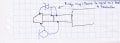
Thanks for your response. I've drawn a basic schematic showing the components that I have physical access to.

imx4.jpg

The ring and sleeve are linked as per the diagram at the bottom of page 33 of this documentation from Sennheiser, the manufacturer of the wireless microphone systems I'm using.

As I mentioned in the title of this thread, I am interested to know what electronic component would fail in a way that produces the kind of distorted waveform in my attached image. I included the information about the zener diode for the sake of a complete picture, but I did point out that I don't think that it is the cause, or even has anything to do with the problem, as the distortion also occurs in microphones that are terminated to a connector with no zener diode attached.

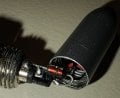
Nevertheless, since you remarked about the zener diode, here is a photo of it. I can't see any markings, but the distributor of these microphones informs me that it is a 2V 0.5W zener diode.

imx.jpg

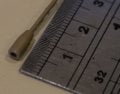
Your suggestion to increase the value of the bias resistor in the electret capsule would indeed reduce the DC voltage, were the capsule accessible, but it's 3mm wide, sealed with glue, and on the end of a thin boom on a headset microphone used for actors in musical theatre, and completely inaccessible to me. The manufacturer seems to make one model of microphone and then adjust its bias voltage by using the zener diodes in order to adapt it to various radio mic brands that use different bias voltages ranging from 2v to 8v from their transmitter packs.

imx_2.jpg

If you can remove the blindfold of ignorance from my eyes and suggest what kind of component might be causing the very unusual distortion in the signal, I'd be very grateful. Otherwise, thanks for your time, and I'll take your suggestions on board in the future when dealing with things at a larger and more manageable scale.
 

Audioguru again

Joined Oct 21, 2019
6,826
The location of the 2V zener diode on your schematic is completely destroying the audio signal.
I cannot see where it is or if it is reversed on the photo of the connector.

A zener diode would clamp the DC and audio signal with extreme distortion when connected directly to the microphone's output.

The system's operating manual has 290 pages that take time to turn the pages so I gave up looking at it.
 

bassbindevil

Joined Jan 23, 2014
918
Do you know if it's possible for electret capsules to distort in a way that results in a waveform like the one that I posted? It almost looks as though the capacitor is shorting for a small time during each cycle of the fundamental sine wave.
I don't know what the waveform looks like when they are overloaded. Possibly that slope after the peak is clipping, but doesn't have the obvious flat top because of a capacitor discharging.

edit: That 153 dBA rating might just be carried over from the mic capsule manufacturer's specs, and aren't attainable in this application.

Here's some other pages about mic capsules.
http://www.johncon.com/john/wm61a/
https://www.firstpr.com.au/rwi/mics/2009-09-b/
 
Last edited:

Thread Starter

NiceProduction

Joined Dec 26, 2023
8
The location of the 2V zener diode on your schematic is completely destroying the audio signal.
The microphone signal is fine with the zener diode in place. I just finished mixing a season with 15 of these mics. The distortion is happening both with and without the zener diode in place, once the mic level exceeds a particular threshold. The signal is not clipping, and can get substantially louder without clipping. It appears that the distortion may be frequency-related.

I've already told you that the zener isn't part of the issue. It looks like you're not able to help here, so thanks for your time and please don't waste any more of your time replying in this thread.
 

Thread Starter

NiceProduction

Joined Dec 26, 2023
8
I don't know what the waveform looks like when they are overloaded. Possibly that slope after the peak is clipping, but doesn't have the obvious flat top because of a capacitor discharging.

edit: That 153 dBA rating might just be carried over from the mic capsule manufacturer's specs, and aren't attainable in this application.

Here's some other pages about mic capsules.
http://www.johncon.com/john/wm61a/
https://www.firstpr.com.au/rwi/mics/2009-09-b/
The audio definitely isn't clipping. Other sections of audio exceed the levels at which the distortion occurs, without experiencing distortion. However, the distortion always occurs when the loudest harmonic is around the 800 - 900 Hz region.
 

Ya’akov

Joined Jan 27, 2019
10,226
Welcome to AAC.

Your second waveform looks like the result of harmonic distortion which could even be a mechanical problem with the capsule. How are you creating your sine wave input, is it just a function generator or oscillator through a speaker? Have you tried to sweep the signal to see if it changes with frequency as well as amplitude?
 

Thread Starter

NiceProduction

Joined Dec 26, 2023
8
Hi Ya'akov, thanks for your reply. All of my audio samples are recordings of a musical theatre show I have been mixing for the last few weeks, during which I had issues with this strange distortion on numerous actors, always during the same passages in the show, on the same words. I don't have any test equipment available, but am working on building a simple setup that will allow me to tone sweep at various SPLs. I am waiting on a high-quality Sennheiser XLR phantom power adapter for the 3.5mm mic connection so that I can connect the mics directly to an audio interface without the radio mic step in between.

In the past I've tried recording tonesweeps through the mics using a small dynamic speaker from earbuds wedged at one end of a short piece of plastic tubing, with the mic inserted at the other end, but I have no way of determining the SPL at the microphone, or knowing whether or not the dynamic speaker itself is distorting, or if there are resonances in the short piece of tubing that are causing issues.

My current plan is to build a small enclosure packed with sound-absorbant material, that can be sealed to the front of a small powered speaker. I can measure the SPL inside with a calibrated measurement mic through a small, sealed hole, and then seal the mic boom in the same position and take measurements from there.

Your suggestion that it could be a mechanical issue is one that I've been considering myself. An electret mic is afterall just a tightly-stretched circle of foil. Unfortunately I don't know the tension and therefore what resonant modes it would have, being 3mm in diameter.
 

Ya’akov

Joined Jan 27, 2019
10,226
Hi Ya'akov, thanks for your reply. All of my audio samples are recordings of a musical theatre show I have been mixing for the last few weeks, during which I had issues with this strange distortion on numerous actors, always during the same passages in the show, on the same words. I don't have any test equipment available, but am working on building a simple setup that will allow me to tone sweep at various SPLs. I am waiting on a high-quality Sennheiser XLR phantom power adapter for the 3.5mm mic connection so that I can connect the mics directly to an audio interface without the radio mic step in between.

In the past I've tried recording tonesweeps through the mics using a small dynamic speaker from earbuds wedged at one end of a short piece of plastic tubing, with the mic inserted at the other end, but I have no way of determining the SPL at the microphone, or knowing whether or not the dynamic speaker itself is distorting, or if there are resonances in the short piece of tubing that are causing issues.

My current plan is to build a small enclosure packed with sound-absorbant material, that can be sealed to the front of a small powered speaker. I can measure the SPL inside with a calibrated measurement mic through a small, sealed hole, and then seal the mic boom in the same position and take measurements from there.

Your suggestion that it could be a mechanical issue is one that I've been considering myself. An electret mic is afterall just a tightly-stretched circle of foil. Unfortunately I don't know the tension and therefore what resonant modes it would have, being 3mm in diameter.
If you have an iPhone or iPad there are several very good signal generator apps that could be used in a pinch, I like this one. There is also a very good FFT app. If you are using Android I know there are some good options there, too, but unfortunately I don’t use the platform very much (I have a tablet they gets used occasionally) so I can’t help there but searching would surely get you something.

There are also (potentially calibrated) SPL meter apps, like this one I find useful (though on my newer iPad it doesn’t display properly). While these aren’t lab grade instruments they do help to test things. I don’t think you need to worry about calibration, initially, to characterize your distortion problem. If you can sweep and find behavioral changes it might point more clearly at the source.

Are you using only one mic/channel to see the distortion or is it a mix?
 

Thread Starter

NiceProduction

Joined Dec 26, 2023
8
If you have an iPhone or iPad there are several very good signal generator apps that could be used in a pinch, I like this one. There is also a very good FFT app. If you are using Android I know there are some good options there, too, but unfortunately I don’t use the platform very much (I have a tablet they gets used occasionally) so I can’t help there but searching would surely get you something.

There are also (potentially calibrated) SPL meter apps, like this one I find useful (though on my newer iPad it doesn’t display properly). While these aren’t lab grade instruments they do help to test things. I don’t think you need to worry about calibration, initially, to characterize your distortion problem. If you can sweep and find behavioral changes it might point more clearly at the source.

Are you using only one mic/channel to see the distortion or is it a mix?
The recordings are multitracks of individual mic channels for the actors and the band.

I can generate tone sweeps easily, using the same software that displayed these waveforms. I'll be using SMAART to measure SPL, and it's quite easy to set that up with a reference mic and a mic calibrator. Once I have a reference point, I can calculate SPLs from relative dB levels in the recorded waveforms, so none of that will present a problem. It's just a long, slow process to go through instead of having a decent oscilloscope to hand to view the waveforms in realtime. It's also a few weeks away due to the shipping time for the XLR phantom adapter.
 

Ya’akov

Joined Jan 27, 2019
10,226
The recordings are multitracks of individual mic channels for the actors and the band.

I can generate tone sweeps easily, using the same software that displayed these waveforms. I'll be using SMAART to measure SPL, and it's quite easy to set that up with a reference mic and a mic calibrator. Once I have a reference point, I can calculate SPLs from relative dB levels in the recorded waveforms, so none of that will present a problem. It's just a long, slow process to go through instead of having a decent oscilloscope to hand to view the waveforms in realtime. It's also a few weeks away due to the shipping time for the XLR phantom adapter.
Audacity can also generate tones. I was thinking of something relatively portable, cheap, and readily available. Of course a real SPL meter is better.

For audio frequencies you can get a very serviceable scope cheaply.
 

Alec_t

Joined Sep 17, 2013
15,101
The soundcard of a PC can be used with free software as a basic oscilloscope for audio frequencies. Have you tried that?
 

Thread Starter

NiceProduction

Joined Dec 26, 2023
8
The soundcard of a PC can be used with free software as a basic oscilloscope for audio frequencies. Have you tried that?
That's a good suggestion, thanks. Once the XLR phantom adapter arrives, I'll make up a couple of probes with an XLR connector. I'll still need to build the enclosure with a driver inside in order to measure and control SPL and frequency while testing.
 
Top