VGA adaptor for rotating image 90 degrees

Thread Starter

oleoleo2

Joined Jan 3, 2009
33
I need two computer monitors on a splitter cable to show the same image, but one of them has to be rotated 90 degrees. I was wondering if anybody know if such an adaptor exists. And if not, I was thinking if it would be possible to modify an existing cable (eg. interchange H and HS with V and VS). Has anybody any experience with that?

Best regards

Ole.
 

GopherT

Joined Nov 23, 2012
8,009
Software in a Windows computer can already do that. You just need a second video card (if you don't have one already). Some LCD monitors can be pivoted - Larger Dell monitors for sure. You can also try the DVI + VGA outputs to two separate monitors. It works on most computers and you can elect to Duplicate or Extend (same vs. different) image. Look in the Displays control panel.
 

Thread Starter

oleoleo2

Joined Jan 3, 2009
33
Well GopherT. Thanks! But I already know that, but this is not what I need :) It has to be done transparently in hardware. I am running on an Imac 27" with a second display, that's the one that has got to be doubled and rotated!
 

crutschow

Joined Mar 14, 2008
38,526
Such a device has to have memory to store the image and then output it in the rotated position. A quick search gave this device, but it's not available right now, for some reason. As you can see, they are not cheap.
 

wayneh

Joined Sep 9, 2010
18,108
I am running on an Imac 27" with a second display, that's the one that has got to be doubled and rotated!
So you already have two monitors, and you want the second one rotated to vertical?

Which iMac do you have, and what OS are you running?
 

Thread Starter

oleoleo2

Joined Jan 3, 2009
33
A hypothetical question: If I just interchanged the vertical and horizontal lines (crossed in the cable). What I would expect, would be a rotated but cropped image? But if it then where possible to change the aspect ratio in the driver(?). It is said that the monitor nr. 2 does not have to have a nice aspect ratio, it is just sort of a quick view for the rotated monitor nr. 3
 

MrChips

Joined Oct 2, 2009
34,828
Forget about interchanging control signals. That will never work. The simplest solution is to rotate the monitor.
 

crutschow

Joined Mar 14, 2008
38,526
Yes of cause, But then I loose the 16:9 aspect ratio..
How do you expect to rotate the picture and still maintain the 16:9 ratio? Rotating the picture will not change the aspect ratio since that would require information that's not in the picture. Upon rotation the ratio will by 9:16 (width divided by height).
 

wayneh

Joined Sep 9, 2010
18,108
Does this information help? Macs have been able to rotate the monitor image for years. I just checked on my Macbook - it still works with the latest OS.
 

GopherT

Joined Nov 23, 2012
8,009
Well, no! I need a second and third monitor with 90 degrees angle in between them..
You seem to completely mis-understand how a video signal works. This is more of a hardware issue than a cable re-arrangement issue. You cannot solve this problem by changing the pins on a VGA cable.

Also, you need to define what you are after with a 16:9 aspect ratio of a 90-Degree rotated screen but still have a duplication of a non-rotated display - what the heck does that mean? Let us know how that would look - show us an artists rendering of both screens so we can understand that concept.

That being said, what other solutions are acceptable to you
- investment in a converter box,
- investment in a second PC that mirrors the image of another computer?
- other...
 

MrChips

Joined Oct 2, 2009
34,828
Another simple solution:

Get a webcam, turn it 90° and aim it at a monitor. Now you've got an image rotated 90°.
 

wayneh

Joined Sep 9, 2010
18,108
No, I wan't the second one doubled to a third one that is rotated..
Ah, so a total of 3 monitors, one of which is rotated. You'd probably have more luck rotating the built in display and then just have 2 identical external displays.

You could take a look at Display Port hubs. I'm not sure if they support different rotations but they are built to give more monitor options out of a DisplayPort output as the iMac has.
 

Thread Starter

oleoleo2

Joined Jan 3, 2009
33
You seem to completely mis-understand how a video signal works. This is more of a hardware issue than a cable re-arrangement issue. You cannot solve this problem by changing the pins on a VGA cable.
I guess you are right. A video signal works by a vertical and horizontal sync and a 'time-unit-count'. Related to the Mhz it will control the amount of pixels that can be printed to the screen before sync to the next line. Wasn't thinking that tough to the end; the horizontal sync signal is only activated at the 'bottom of the screen', so of cause it's not gonna work interchanging the signals :)

Also, you need to define what you are after with a 16:9 aspect ratio of a 90-Degree rotated screen but still have a duplication of a non-rotated display - what the heck does that mean? Let us know how that would look - show us an artists rendering of both screens so we can understand that concept.
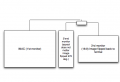
Skærmbillede 2014-12-01 kl. 21.06.01.png

Ok! With the danger of confusing the addressed issue. In reality the 2'nd monitor is actually the one that is rotated. The 3'rd has to "rotate back" (90 or 270 deg.). The addressed problem is that there has to be 90 deg. between monitor 2 and 3 (so if you find it more confusing now, please ignore that last explanation!).

That being said, what other solutions are acceptable to you
- investment in a converter box,
Well, it depends of cause on the costs..

- investment in a second PC that mirrors the image of another computer?
It would have to have a card with a video input then, and some software running I guess..(?), sounds like a bit of a mess..
 
Last edited:

Thread Starter

oleoleo2

Joined Jan 3, 2009
33
Ah, so a total of 3 monitors, one of which is rotated. You'd probably have more luck rotating the built in display and then just have 2 identical external displays.

You could take a look at Display Port hubs. I'm not sure if they support different rotations but they are built to give more monitor options out of a DisplayPort output as the iMac has.
I have been looking on some hubs. Haven't really seen rotation features in them..
 

Thread Starter

oleoleo2

Joined Jan 3, 2009
33
Another simple solution:

Get a webcam, turn it 90° and aim it at a monitor. Now you've got an image rotated 90°.
Haha! I like your thinking. The 3'rd monitor has to be the one with the normal picture. It will be used to audio-dub/lib-sync, so it has to be pretty clear..
 
Top