
 Facebook
 Google
 GitHub
 Linkedin
Hello,
I ran out of analog inputs on my Arduino Nano, so trying RCtime with a 10k linear potentiometer.
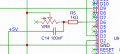
The circuit I'm using is attached.
The code I'm using comes from the Arduino tutorial example, however, I am trying to modify the code with the constrain() to keep the results within a set
of values lie so;
Sincere thanks for any advice/help. Appreciated.
TonyAm
I ran out of analog inputs on my Arduino Nano, so trying RCtime with a 10k linear potentiometer.
The circuit I'm using is attached.
The code I'm using comes from the Arduino tutorial example, however, I am trying to modify the code with the constrain() to keep the results within a set
of values lie so;
Code:
void loop()
{

   Serial.println( RCtime(sensorPin) );
   delay(10);

}

long RCtime(int sensPin){
   long result = 0;
   pinMode(sensPin, OUTPUT);       // make pin OUTPUT
   digitalWrite(sensPin, HIGH);      // make pin HIGH to discharge capacitor - study the schematic
   delay(1);                                  // wait a  ms to make sure cap is discharged

   pinMode(sensPin, INPUT);        // turn pin into an input and time till pin goes low
   digitalWrite(sensPin, LOW);     // turn pullups off - or it won't work
   while(digitalRead(sensPin)){    // wait for pin to go low
      result++;
      constrain(result, 0, 3); //keep result within a range of 0 to 3. <----- will putting constrain() here work as assumed?
   }
   return result;                   // report results
}TonyAm
Attachments
-
 37 KB Views: 9





