Using crystals with PICs and their accuracy ..#2

Thread Starter

cmartinez

Joined Jan 17, 2007
8,777
Nope... I can't make this darn thing work. I've already gone through the code and see nothing wrong with it, other than the fact that no CCPx pin has been defined as an output (as per the datasheet's specs) for the compare mode interrupt to work.

Here's my code. The LED is flashing every two seconds instead of one, as it should. That means that only one of the two interrupts (Timer1 overflow, and match compare) is working. Most likely only overflow, which is the one that was working fine already.

Code:
RESET_VECTOR: ORG    0x000                       ;processor reset vector
              goto Init                          ;go to beginning of program

INT_VECTOR:   ORG    0x004                       ;interrupt vector location
               call Increment_Timekeeping  ;update internal seconds counter by adding
                                           ;one second to its counter
             
               bsf FLAGS, TIMER1_OV_FLAG   ;set the Timer Overflow Flag to signal
                                           ;that the Timer_Servicing routine must be 
                                           ;called. Located in common RAM

               call FLASH_LED

               ;Clear both Timer1 Overflow and Compare match interrupt flags before
               ;leaving
               banksel PIR1          ;Bank 0
               bcf PIR1, TMR1IF      ;clear the Timer1 interrupt flag 
               bcf PIR1, CCP1IF      ;clear the compare mode interrupt flag
       retfie


Init:
       call Set_31_KHz_Int_Osc

       ;INTCON is present in all Banks, so no Bank select is necessary       
       bsf INTCON, PEIE  ;enable all active peripheral interrupts       
       bsf INTCON, GIE   ;enable all active general interrupts
       call Start_Timer1

Button_Sense_Loop:
       btfss PORTC, PUSHBUTTON_PIN ;check if the push button has been pressed
        call Eval_Button_State     ;evaluate its state if it has
       btfsc FLAGS, TIMER1_OV_FLAG ;check if a Timer1 overflow has happened
        call Timer_Servicing
      goto Button_Sense_Loop

Start_Timer1:

       ;set the Compare 16-bit register to half its maximum value.
       banksel CCPR1L             ;bank 5
       clrf CCPR1L                ;set compare register low byte to zero
       clrf CCPR1H                ;set compare register high byte to zero
       bsf CCPR1H, 7D             ;set compare register high byte to 128, 
                                  ;this sets the whole compare register to 32,768
       
       ;Enable compare mode software interrupt
      ;banksel CCP1CON            ; bank 5
       movlw b'00001010'          ; software interrupt on match
       movwf  CCP1CON

       ;Clearing the interrupt flag and the counter before starting Timer1 is 
       ;recommended by the datasheet
       banksel PIR1               ;Bank 0
       clrf PIR1                  ;clear all peripheral interrupt flags
       ;banksel TIMR1L            ;Bank 0
       clrf TMR1L                 ;clear both bytes of the
       clrf TMR1H                 ;Timer1 counter

       ;enable Timer1 overflow and compare interrupts
       banksel PIE1               ;Bank 1
       bsf PIE1, TMR1IE           ;enable Timer1 overflow interrupt
       bsf PIE1, CCP1IE           ;enable Timer1 compare mode interrupt

       ;Finally, set Timer1 parameters amd start the timer
       ;the bit structure of T1Con is as follows:
       ;  TMR1CS    |   T1CKPS    |T1OSCEN| /T1SYNC |  -  | TMR1ON|
       ; 7      6      5      4       3       2        1      0   |

       ;Clock source is pin or oscillator  (10)
       ;Prescaler is 1:1                   (00)
       ;Oscillator circuit enabled          (1)
       ;External Clock Input Sync disabled  (1)
       ;bit 1 is not used                   (0)
       ;Timer1 start                        (1)
       banksel T1CON              ;Bank 0
       movlw b'10001101'
       movwf T1CON

       ;Timer1 interrupt period is now given by 2^16/32.768 KHz = 2 seconds exactly
       ;and compare mode will also yield the same interrupt period, but with a one
       ;second difference

  return

 END
 

Thread Starter

cmartinez

Joined Jan 17, 2007
8,777
hi cm,
Do you have a full code listing you could post.?
E
Thanks Eric. This is a large project and the code spans a few thousand lines. Most of them comments, of course.

What I'm going to do is hack the code and set it to work in as few lines as possible so as to make a LED flash in my circuit. Once I get that working, I'll try to enable the compare and match interrupt, and post said code here.
 

ericgibbs

Joined Jan 29, 2010
21,448
hi cm.
I was trying the Oshonsoft Assembler simulator, but there are so many short comings in Oshonsoft, it looks like non starter.:(

E
 

Thread Starter

cmartinez

Joined Jan 17, 2007
8,777
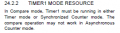
According to the datasheet:

1605641781236.png

The problem is that when I clear the /T1SYNC bit to zero, so as to enable the External Clock Input Sync option in T1CON, as to the datasheet's recommendation. The darn thing stops oscillating altogether.

If I set the /T1SYNC bit then Timer1 overflow interrupt works fine, but Compare Mode simply won't work...

What gives?
 

MrChips

Joined Oct 2, 2009
34,829
I could lend a hand but it is over 15 years since I have programmed a Microchip PIC.
Then again, I probably coded in C.
 

jpanhalt

Joined Jan 18, 2008
11,087
I tried MPLab SIM. Of course it assembles, but there are enough calls and a push button input that it is hard to tell. Under limitations, the older simulator (not emulator) lists:

1605647597284.png
I suspect that is for TMR1 as a counter, not timer.

I've had problems simulating capture before with 1xF1xxx chips (notably 12F1840). But that was in simulation, and I thought you were doing hardware. So, I got nowhere.

EDIT:

One thing I do with pure hardware is set a small (1 mA) led to turn on at some point, e.g., when TMR1IF is set. I have used as many as 3 such led's. It's cumbersome, but works. Now, I generally use hardware simulation. With only 1 or 3 breakpoints available, it's very similar.

Are you detecting the trouble similarly?
 
Last edited:

jpanhalt

Joined Jan 18, 2008
11,087
@cmartinez
1) Can you post the "Timer_Servicing" and "Eval_Button_State" routines.
2) Your processor set-up code -- don't need the entire thing for simulation, but will need to see how pins are set up so I can inject an asynchronous signal.. Are analog inputs disabled on the push-button pin? Which pin is used for the button switch? Does it idle high and go low when asserted?

Today is my weekly trip to Cleveland. Should be back about 1 or 2 PM (EST) and will try to simulate again.
 

Thread Starter

cmartinez

Joined Jan 17, 2007
8,777
@cmartinez
1) Can you post the "Timer_Servicing" and "Eval_Button_State" routines.
2) Your processor set-up code -- don't need the entire thing for simulation, but will need to see how pins are set up so I can inject an asynchronous signal.. Are analog inputs disabled on the push-button pin? Which pin is used for the button switch? Does it idle high and go low when asserted?

Today is my weekly trip to Cleveland. Should be back about 1 or 2 PM (EST) and will try to simulate again.
Thanks, John.

I've hacked my original code so as to leave only the LED flash routine. Every redundant variable and routine has been removed from the code, and the program is working perfectly fine except for the compare and match interrupt feature. That is, the LED is flashing every two seconds, instead of every second as it should.

If I clear the /T1SYNC bit (External Clock Input Sync) in the T1CON register, the program will stop working altogether. That is, the LED won't flash at all.

Here is the complete and unabridged code of said test:

Code:
;*****************************************************************************************
;*****************************************************************************************
       errorlevel    -302                        ;suppress cross bank messages

       list          p=PIC16LF1823               ;list directive to define processor
       #include      p16lf1823.inc               ;processor specific variable definitions
       radix         dec

       ; CONFIG1:
       ; - Internal oscillator activated
       ; - Watchdog timer disabled
       ; - Power-up tamer disabled
       ; - MCLR pin enabled (although it's not used)
       ; - Flash program memory code protection disabled
       ; - Data memory code protection disabled
       ; - Brown-out reset enabled
       ; - Clock out function disabled
       ; - Internal/External oscillator switchover disabled
       ; - Fail-safe clock monitor disabled
       ; CONFIG2:
       ; - Flash moemory self-write protection disabled
       ; - 4x PLL disabled
       ; - Stack overflow/underflow reset enabled
       ; - Brown-out reset low trip point selected
       ; - Low-voltage programming enabled

; CONFIG1
; __CONFIG 0xCFE4
__CONFIG _CONFIG1, _FOSC_INTOSC & _WDTE_OFF & _PWRTE_OFF & _MCLRE_ON & _CP_OFF & _CPD_OFF & _BOREN_ON & _CLKOUTEN_OFF & _IESO_OFF & _FCMEN_OFF
; CONFIG2
; __CONFIG 0xFEFF
__CONFIG _CONFIG2, _WRT_OFF & _PLLEN_OFF & _STVREN_ON & _BORV_LO & _LVP_ON


;**********************************  I/O definitions *************************************
RA0_PIN             EQU RA0     ;input, WPU enabled
RA1_PIN             EQU RA1     ;input, WPU enabled
RA2_PIN             EQU RA2     ;input, WPU enabled
RA3_PIN             EQU RA3     ;input, WPU enabled
XTAL1_PIN           EQU RA4     ;input, external crystal oscillator, WPU disabled
XTAL2_PIN           EQU RA5     ;input, external crystal oscillator, WPU disabled

RC0_PIN             EQU RC0     ;input, WPU enabled
RC1_PIN             EQU RC1     ;input, WPU enabled
RC2_PIN             EQU RC2     ;input, WPU enabled
PUSHBUTTON_PIN      EQU RC3     ;input, pushbutton, logic low, WPU enabled
LED_PIN             EQU LATC4   ;output, LED, WPU disabled
RC5_PIN             EQU RC5     ;input, WPU enabled

;******************************* Zone of General Purpose RAM *****************************
; in this architecture, general purpose registers are located in addresses 020H through
; 06FH in Bank 0, and 0A0H and 0BF0H in Bank 1
;*****************************************************************************************

;********************************** Zone of common RAM ***********************************
;  Only 16 bytes are available, but there's no need to switch memory Banks to work on it
;*****************************************************************************************
TEMPVAR1   EQU 70H
TEMPVAR2   EQU 71H


;*****************************************************************************************
;                       Reset and Interrupt program memory locations
;*****************************************************************************************
RESET_VECTOR: ORG    0x000                       ;processor reset vector
              goto Init                          ;go to beginning of program

INT_VECTOR:   ORG    0x004                       ;interrupt vector location
               ;Only Timer1 and Compare Mode interrupts will be serviced here
               ;It doesn't matter which is which, sice both parameters are set up so
               ;as to produce an interrupt every two seconds, with a one second
               ;difference between them. This results in an interrupt exactly once
               ;every second.

               call Flash_Led_Once

               ;Clear both Timer1 Overflow and Compare match interrupt flags before
               ;leaving
               banksel PIR1          ;Bank 0
               bcf PIR1, TMR1IF      ;clear the Timer1 interrupt flag
               bcf PIR1, CCP1IF      ;clear the compare mode interrupt flag

       retfie ;Return from interrupt. Previous memory Bank will automatically be restablished

;*****************************************************************************************
;                                   Main program start
;*****************************************************************************************
Init:
       call Set_31_KHz_Int_Osc
      ;clrf   INTCON      ;make sure that all interrupts are disabled for now (not
                          ;necessary, default state is zeroes)

;************************************* I/O definitions ***********************************

       ;Check pin settings in the I/O descriptions to understand the following instructions

       ;************ PORTA
       banksel ANSELA     ;Bank 3
       clrf ANSELA        ;no analog inputs in this port, so clear the analog select register
                          ;which for some stupid reason is enabled by default ... otherwise
                          ;the digital i/o functions won't work
     
       ;- Internal Weak Pull Up setup:
       banksel WPUA       ;Bank 4
       movlw b'00001111'  ;0 = Disabled, 1 = Enabled
       movwf WPUA

       ;- I/O configuration setup:
       banksel TRISA      ;Bank 1
       movlw b'11111111'  ;0 = Push-Pull Output, 1 = Tri-State Input
       movwf TRISA

       ;- Set initial output state
       banksel LATA       ;Bank 2
       movlw b'00000000'  ;Data Latch, the LATA state of an input does not matter
       movwf LATA

     
       ;************ PORTC
       banksel ANSELC     ;Bank 3
       clrf ANSELC        ;no analog inputs in this port, so clear the analog select register
     
       ;- Internal Weak Pull Up setup:
       banksel WPUC       ;Bank 4
       movlw b'00101111'  ;0 = Disabled, 1 = Enabled
       movwf WPUC

       ;- I/O configuration setup:
       banksel TRISC      ;Bank 1
       movlw b'00101111'  ;0 = Push-Pull Output, 1 = Tri-State Input
       movwf TRISC

       ;- Set initial output state
       banksel LATC       ;Bank 2
       clrf LATC          ;Data Latch, set all output pins as low, the LATC state of an
                          ;input does not matter

       ;we can now clear the NOT_WPUEN bit in OPTION_REG to enable the general weak
       ;pull-up feature at all the pins
       banksel OPTION_REG
       bcf OPTION_REG, NOT_WPUEN


;*****************************************************************************************
     
       ;INTCON is present in all Banks, so no Bank select is necessary     
       bsf INTCON, PEIE  ;enable all active peripheral interrupts     
       bsf INTCON, GIE   ;enable all active general interrupts

       ;**** and lastly, start Timer1     
       ;Set Timer1 to run in sync with the system clock, which is using the 32.768 KHz
       ;external crystal.
       call Start_Timer1 ;returns with active Bank 0


;*****************************************************************************************
;                                   Main Program Loop
;*****************************************************************************************
       ;Bank 0 will now be the permanent active Bank, unless it's changed inside the
       ;Timer_Servicing routine. In which case it will revert back to Bank 0 before
       ;returning.
Button_Sense_Loop:
      goto Button_Sense_Loop
;*****************************************************************************************


;*****************************************************************************************
;                Flash the LED once, with a delay of 0.15s before returning
;                    This routine will exit with active memory Bank 0
;*****************************************************************************************
Flash_Led_Once:
       banksel LATC            ;Bank 2
       bsf LATC, LED_PIN       ;turn on the LED connected to RC5
       call Delay_0.005_sec    ;wait for 0.005 seconds
       bcf LATC, LED_PIN       ;turn the LED off before leaving

       movlw d'30'
       movwf TEMPVAR2          ;common RAM
Flash_Led_Once_Loop:
         call Delay_0.005_sec  ;wait for 0.15 seconds before leaving
        decfsz TEMPVAR2, f
       goto Flash_Led_Once_Loop

   return


;*****************************************************************************************
;                             Delay for 0.005 seconds at 31 KHz
;     Remember that the "real" working frequency is 31,000/4 per instruction cycle
;     That means that we need 38.75 cycles for a 0.005 second delay
;*****************************************************************************************
Delay_0.005_sec:                   ;(2) cycles to make the CALL
       ;the following sequence will produce 2 + 3*11 = 35 cycles   
       movlw d'10'                 ;(1) load W with the value of 2
       movwf TEMPVAR1              ;(1) TEMPVAR1 now holds the value of 2

Delay_Loop_00:
                decfsz TEMPVAR1, f ;(1) decrement TEMPVAR1, and skip next instruction
               goto Delay_Loop_00  ;(2) if it's zero

   return                          ;(2)


;*****************************************************************************************
;                Set the internal oscillator to work at 31 KHz, very low power
;*****************************************************************************************
Set_31_KHz_Int_Osc:
       ;set the internal oscillator frequency to 31 KHz (the lowest possible), this is done
       ;by clearing the IRCF bits, which belong in bit locations 4, 5 and 6, respecively
       banksel OSCCON     ;select memory Bank 1
       movlw b'00000011'  ;the W register has been loaded with the IRCF bits as zeroes
       movwf OSCCON

       btfss OSCSTAT, LFIOFR ;stay here until the low frequency internal oscillator
        goto $-2             ;is ready and stable
     
       movlb 0            ;set Bank 0 before exiting
  return


;*****************************************************************************************
;                                Set up and Start Timer1
; Timer1 is set up as an asynchronous counter, with a 32.768 KHz crystal oscillator as
;its external source. This allows us to put the device to sleep and wake up every time
;Timer1 overflows, thus saving important power.
; This routine will exit with active Bank 0
;
; 17 NOV 2020, 10:59:51 AM: Compare mode interrupt added to obtain one second interrupt
; intervals. With this technique, Timer1 will overflow every two seconds, and the compare
; interrupt will also fire up every two seconds, but with a one second difference between
; them
;*****************************************************************************************
Start_Timer1:

       ;enable Timer1 overflow and compare interrupts
       banksel PIE1               ;Bank 1
       bsf PIE1, TMR1IE           ;enable Timer1 overflow interrupt
       bsf PIE1, CCP1IE           ;enable Timer1 compare mode interrupt
    
       ;set the Compare 16-bit register to half its maximum value.
      ; banksel CCPR1L            ;bank 5
       clrf CCPR1L                ;set compare register low byte to zero
       clrf CCPR1H                ;set compare register high byte to zero
       bsf CCPR1H, 7D             ;set compare register high byte to 128,
                                  ;this sets the whole compare register to 32,768
     
       ;Enable compare mode software interrupt
       banksel CCP1CON            ; bank 5
       movlw b'00001010'          ; software interrupt on match
       movwf  CCP1CON

       ;Clearing the interrupt flag and the counter before starting Timer1 is
       ;recommended by the datasheet
       banksel PIR1               ;Bank 0
       clrf PIR1                  ;clear all peripheral interrupt flags
       ;banksel TIMR1L            ;Bank 0
       clrf TMR1L                 ;clear both bytes of the
       clrf TMR1H                 ;Timer1 counter


       ;Finally, set Timer1 parameters amd start the timer
       ;the bit structure of T1Con is as follows:
       ;  TMR1CS    |   T1CKPS    |T1OSCEN| /T1SYNC |  -  | TMR1ON|
       ; 7      6      5      4       3       2        1      0   |

       ;Clock source is pin or oscillator  (10)
       ;Prescaler is 1:1                   (00)
       ;Oscillator circuit enabled          (1)
       ;External Clock Input Sync disabled  (1)
       ;bit 1 is not used                   (0)
       ;Timer1 start                        (1)
       ;banksel T1CON            ;Bank 0
       movlw b'10001101'
       movwf T1CON

       ;Timer1 interrupt period is now given by 2^16/32.768 KHz = 2 seconds exactly
       ;and compare mode will also yield the same interrupt period, but with a one
       ;second difference

  return

END
 

JohnInTX

Joined Jun 26, 2012
4,787
@cmartinez
;set the Compare 16-bit register to half its maximum value.
; banksel CCPR1L ;bank 5 <-- this is commented out so you are not accessing CCPR1H
clrf CCPR1L ;set compare register low byte to zero
clrf CCPR1H ;set compare register high byte to zero
bsf CCPR1H, 7D ;set compare register high byte to 128,
;this sets the whole compare register to 32,768
Finally got a quick look. See highlighted above.
I'd also recommend you don't use bsf to bugger up a constant. It's valid for now but eventually will bite you.

Babies are up. I'll look at it more later.

EDIT: Seems to work in the sim. Interrupts every 32768 tiks on average.
 
Last edited:

Thread Starter

cmartinez

Joined Jan 17, 2007
8,777
@cmartinez
Finally got a quick look. See highlighted above.
I'd also recommend you don't use bsf to bugger up a constant. It's valid for now but eventually will bite you.

Babies are up. I'll look at it more later.

EDIT: Seems to work in the sim. Interrupts every 32768 tiks on average.
That line is commented out because of some hasty editing I did before posting the code. My bad. But in the code it's perfectly enabled alright.

I've just noticed something IMPORTANT! : The darn thing is sometimes flashing every two seconds, and sometimes every second! ... and not in a concrete pattern. That is, sometimes it flashes three times in a row in one second interval, and then about 5 or 6 times in two seconds interval. Then 5 or 6 in one second interval, and again 3 times in two seconds interval... it's behaving chaotically.
 

jpanhalt

Joined Jan 18, 2008
11,087
When simulating with some other changes, and removing that edit (i.e., making the correct bank change) interrupt on match worked fine.

The other changes:
1) Since MPLab SIM doesn't support crystals, I changed the source for TMR1 to the system clock and set that to 32 kHz. Thus, I set T1CON to b'01000001'.
2) Because I did that, I changed "Set_31_KHz_Int_Osc:" simply to "return" (first instruction after label). Otherwise it will hang there in simulation.

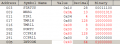
This is the Watch window:
1605736917306.png

PIR1,2 is CCP1IF. With a breakpoint at "call Flash_LED_Once," it alternates between TMR1 interrupt (PIR1,0) and CCP1 interrupt (PIR1,2).

It seems to work.
 

JohnInTX

Joined Jun 26, 2012
4,787
It may be the delay-flashing the LED stuff. Try just a simple toggle on each interrupt. The LED should flash on for 1 sec, off for 1 sec etc.
 

jpanhalt

Joined Jan 18, 2008
11,087
I didn't pay much attention to the LED code. I focused on the compare match part. This is how I alternately turn on and off an LED for the period of a TMR1 interrupt:
Code:
  movlw     b'00001000'    ;toggle LED
  xorwf     PORTB,f        ;     "
And I realize one reads a port and writes a latch, but I like to test the gods every now and then.
 

Thread Starter

cmartinez

Joined Jan 17, 2007
8,777
I didn't pay much attention to the LED code. I focused on the compare match part. This is how I alternately turn on and off an LED for the period of a TMR1 interrupt:
Code:
  movlw     b'00001000'    ;toggle LED
  xorwf     PORTB,f        ;     "
And I realize one reads a port and writes a latch, but I like to test the gods every now and then.
I tested your snippet of code, John, and it worked fine when I assigned the correct bit location for the LED (bit 4):

Code:
               banksel PORTC            ;Bank 2
               movlw     b'00010000'    ;toggle LED
               xorwf     PORTC, f       ;
And BTW, performing either "xorwf PORTC, f" or "xorwf LATC, f" both worked equally well.

Now for the interesting part:

My code worked erratically, but worked nevertheless, when the external sync option in T1CON was disabled. With the LED toggling on and off either every two seconds (most of the time), or every second (less often but with 3 to 5 events in a row sometimes).

But something funny happened when I enabled the sync option that I hadn't noticed before. I thought that the LED was not flashing, but that was because it was flashing only once every 16 seconds and I hadn't noticed. I'm able to notice that now because the LED is being toggled on for 16 seconds and off for another 16 seconds. I have not yet measured exactly said time but I suspect it is essentially repetitive.

What gives? Has the prescaler somehow been altered? Or is the external oscillator unable to properly sync with the the internal oscillator and only reacts when things accidentally overlap internally?

I'll be doing some more testing and get back here when I can.
 
Last edited:

jpanhalt

Joined Jan 18, 2008
11,087
My thinking is that if you want a 1-second interrupt with TMR1 and a synchronized LED, you can use compare, but do something similar by using xorlw 0x80 with the CCPR1H byte.

Alternatively, you can just use TMR1 overflow and set TMR1H,7 each time.
 

bloguetronica

Joined Apr 27, 2007
1,544
I remember doing an experience with tuning fork crystals and PICs. My objective at the time was to fine tune the loading capacitors, and I found out that they made quite a difference. Unfortunately, my frequency was of by a couple of hundreds of Hz, so, I had to repeat the calibration. I found out that a capacitor between 22pF and 27pF worked best in my case.

Attached is is the schematic of the original, non-revised project where I've used such a crystal. The values of C6 and C7 should be 22pF and 27pF, instead of 12pF and 15pF. Also, excuse my for the crudeness of the diagram. I didn't use blocks at the time, so it is a connected mess of wires.

Just a tidbit, but mileage may vary.

Kind regards, Samuel Lourenço
 

Attachments

Thread Starter

cmartinez

Joined Jan 17, 2007
8,777
My thinking is that if you want a 1-second interrupt with TMR1 and a synchronized LED, you can use compare, but do something similar by using xorlw 0x80 with the CCPR1H byte.
Will look into that, thanks

Alternatively, you can just use TMR1 overflow and set TMR1H,7 each time.
That's what I tried at first, but I was getting about 14 missing seconds per day whey I compared the device's timekeeping with my computer. And it's been observed by others (and the datasheet) that it's not good practice to write into the timer's counters while it's running. In fact, when I stopped doing that and simply kept count of the default two second interrupt, the missing seconds problem was solved and the device keeps track of time quite accurately. About one second error or less per day.

But I need to be able to get one second interrupts for my application to work the way I want it to.

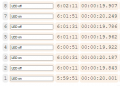
Here's another interesting bit: Using an online chronometer, I measured the exact time the LED toggles on and off in the circuit now that the external sync feature has been enabled, and it is doing so at exactly 20 second intervals. I blame the difference between lapses on my lousy reflexes when I had to click the mouse:

1605744631882.png
 

bloguetronica

Joined Apr 27, 2007
1,544
My suggestion would be fine tune the crystal first using a program that excites the crystal and outputs its frequency (a replica of the signal) on a third pin, so you can measure the frequency without loading the crystal. Only then, you should compensate for the missing seconds in software.

You can also use a DS32KHZ TCXO from Maxim. Then, the 5ppm(ish) deviation of your tuning fork crystal is no longer a factor (because I suspect, from my experience, that the deviation was measured inside a room with constant temperature, no wind, and also during the right phase of the moon, and something in the order of 200ppm would be more realistic for that crystal).
 
Top