Facebook
 Google
 GitHub
 Linkedin

Xpost with edits.
I'm surprised I haven't seen more notice or discussion of this. If you aren't using an official AVR/Microchip programmer or toolchain, this is neato.
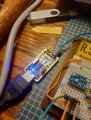
Using streef's upditerm, I have serial coms working on an ATtiny 3224 in Windows 11 and compiling/programming ATtiny through the Arduino IDE. I'm using the same usb/serial CH340 based programmer jtag2updi that is detailed in megatiny/DX cores. I made the Schottky version. Gave like $8 for two. upditerm is written for AVR-GCC, but can easily be used with the Arduino IDE.
upditerm is using undocumented registers that are part of the closed source debug toolchain to create a virtual uart on the chip that communicates through the one wire updi pin. You don't have to use a separate serial on low pin chips, no switches or circuits have to be changed.
It isn't using the IDE serial terminal. I haven't tried bidirectional yet. Terminal is a command line based python script:
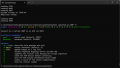
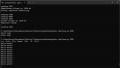
Quickly replaced serial on a program where I'm using it to debug. Need to work on my printf formatting. Two free pins!
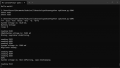
I get the "Short read" response twice, rerun the command, and the terminal opens. Not sure why. Hold ctrl and 'e', press 'e' again to exit. upditerm must be closed to program chip in Arduino IDE.
Some discussion here
Hello world transcribed from above discussion, a few comments added.
I'm surprised I haven't seen more notice or discussion of this. If you aren't using an official AVR/Microchip programmer or toolchain, this is neato.
Using streef's upditerm, I have serial coms working on an ATtiny 3224 in Windows 11 and compiling/programming ATtiny through the Arduino IDE. I'm using the same usb/serial CH340 based programmer jtag2updi that is detailed in megatiny/DX cores. I made the Schottky version. Gave like $8 for two. upditerm is written for AVR-GCC, but can easily be used with the Arduino IDE.
upditerm is using undocumented registers that are part of the closed source debug toolchain to create a virtual uart on the chip that communicates through the one wire updi pin. You don't have to use a separate serial on low pin chips, no switches or circuits have to be changed.
It isn't using the IDE serial terminal. I haven't tried bidirectional yet. Terminal is a command line based python script:
Quickly replaced serial on a program where I'm using it to debug. Need to work on my printf formatting. Two free pins!
I get the "Short read" response twice, rerun the command, and the terminal opens. Not sure why. Hold ctrl and 'e', press 'e' again to exit. upditerm must be closed to program chip in Arduino IDE.
Some discussion here
Hello world transcribed from above discussion, a few comments added.
C:
//updi_stdio.c, updi_stdio.h, updi_uart.c, updi_uart.h in directory with sketch.
//run upditerm.py from commandline
//python upditerm.py -h for options
//python upditerm.py COMn
#include "updi_uart.h"
#include "updi_stdio.h"

void setup() {
  //setup will wait until updi has a connection to termninal before continuing if the following block is uncommented.
  /*
while (!updi_uart_enabled()){
  delay(100);
  }

  */

  //Redirect stdio to UPDI UART
  updi_stdio_init();

  //Print Hello, World! to UPDI UART
  printf("Hello world!\n");
}

void loop() {
  delay(1000);
  printf("Hello world!\n");
}