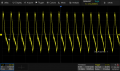
See how the HW F counter don't agree with 147 Hz ?
Shift the trigger level up some above where your mouse pointer is and away from the ringing at the step in that falling edge.
For this sort of signal you don't need the features of a Pulse trigger when a simple Edge trigger at an appropriate level will provide stable triggering.
OK. Updated the firmware, although curious the instructions weren't in 1.1.3.8. I had to go back to 1.1.3.6 to find the instructions. Also hooked up a mouse.
How do I connect it to my wifi? Do I need an ethernet cable?
As the guys on EEVblog said a WiFi AP in Bridge mode can provide you with a wireless connection otherwise just use a LAN cable if you have one nearby.
You only need a LAN connection for NTP time or when you need to connect to a PC for the various features available, screenshots directly to you PC or network drives and remote control via the scopes webserver.

 Facebook
 Google
 GitHub
 Linkedin