Ubuntu Installation

Thread Starter

SamR

Joined Mar 19, 2019
5,470
Resurrecting a Dell XPS 630i Tower that has become unusable on Win10. It has an LGA775 socket with an Intel Core 2 Quad Q9650 processor running at 3GHz. Capable of 8Gb of RAM @ 800MHz but one of the 4 sockets appears to be dead. Has a Toshiba R/W CD/DVD and a Western Digital 1Tb and 500Gb drives. But with USB 2.0! Booting with the Ubuntu ISO on a 32Gb FAT32 memory card in a USB stick it did a dual WIN8 and Ubuntu trial install. It had been Win10 but reverted after the primary 500Gb disk failed and was able to resurrect it by using its secondary 1Tb drive.

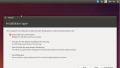
Cannot get Ubuntu to do an erase and install. The WiFi connection is installed and working and I am able to use FireFox. Install fails and gives me a possible reason that the install media was recorded at too fast of a rate. Which is why I also tried an install from an iso burned CD. I am at the point now of pulling the 1Tb drive and using my WIN10 to diskpart it and do a 1Tb FAT32 format on it as the repartitioning from 500Gb win/500Gb ubuntu seems to be the problem. Any ideas? Right now, I'm somewhere between Dante's Seventh Circle (Anger) and Ninth Circle (Treachery) of Hell getting this thing going!
 

Thread Starter

SamR

Joined Mar 19, 2019
5,470
It is booting, both from USB Device and CD. And was from its hard disk until I tried the first Ubuntu install W/partition erase. Reformating the 1Tb drive now as FAT32 and will reinstall it and boot from CD and try the Ubuntu install again... This time it won't have to erase anything as it will be a clean disk to work on.
 

dl324

Joined Mar 30, 2015
18,216
Were you planning to do things with Ubuntu that Win10 and WSL2 can't do? Linux is better with WSL2 (than with WSL1), though not as good as it could be. For example, it can't mount ext4 and they don't install man pages.

But a huge plus is being able to run Linux commands on Windows file systems.
 

Thread Starter

SamR

Joined Mar 19, 2019
5,470
But a huge plus is being able to run Linux commands on Windows file systems.
Window NT came with a NutCracker utility which allowed you to run Unix. We were using Foxboro IA control systems that were written to run on Unix systems and were running Venix and Xenix on desktop PCs. Windows NT and NutCracker allowed Foxboro to move into the Windows business. Don't know what happened to NutCracker but it sure saved Foxboro from rewriting a ton of code.
I simply want to refresh myself a bit on Unix as I haven't used it for quite a while. That and the old computer will run a whole lot better on Ubuntu than it was on Win10 which pretty much brought it to its knees.
 
Last edited:

dl324

Joined Mar 30, 2015
18,216
I simply want to refresh myself a bit on Unix as I haven't used it for quite a while
I used Unix at work for almost 30 years (Eunice, Ultrix, SunOS, AIX, HP-UX, and a few others - all at the same company). Took a break when I retired, but then started using Debian because that's what the single board computers I used were based on. I played with Ubuntu, but decided I'd stick with Debian.
That and the old computer will run a whole lot better on Ubuntu than it was on Win10 which pretty much brought it to its knees.
I recently installed Debian on an old Pentium 4. Couldn't run Win10, but fine for Linux. I didn't know that Windows has had scp for a while, so I finally stopped using pscp and set up password-less logins between them to make scp more convenient.
 

djsfantasi

Joined Apr 11, 2010
9,237
You can configure a dual boot system with Win10 and Linux. The only limitation being that Windows has to be the primary partition. I’d explain how to do it, but it’s been too many years.
 

Thread Starter

SamR

Joined Mar 19, 2019
5,470
Yeah DJ, I originally did that because my wife had a ton of pictures on the old system before it crashed. I did a couple of all-nighters (not too good on an old guy) and managed to retrieve all her photos onto a half Tb memory stick. After losing its primary 500Gb drive it would reboot as Win8 instead of Win10 when I made the secondary 1 Tb drive primary. After getting it to reboot in Win8 and save the files I downloaded Ubuntu and it repartitioned the 1Tb into 2 500Gb partitions and allowing me to choose which I wanted to boot as. So, I initially had it booting with dual systems but the Ubuntu was quite a bit faster. After that I decided to keep the Ubuntu and 86 windows. I just got it to install the absolute minimum for Ubuntu from the CD with a single system boot and Ubuntu recognized both the 1Tb and a refurbished 500Gb hard drives. So hopefully problem solved. Still have to create an Ubuntu account and download all the desktop software and updates but it looks like I finally solved my conundrum. I did learn to get real familiar with windows diskpart that I've never used before. I was also using an external drive USB interface that allows you to connect an external drive through a USB3 connection to do the initial formatting of the drives for the XPS machine on my win10 Alien R5 machine.
 
Last edited:

Ramussons

Joined May 3, 2013
1,567
You can configure a dual boot system with Win10 and Linux. The only limitation being that Windows has to be the primary partition. I’d explain how to do it, but it’s been too many years.
No, not really. Its only the Bootloader (GRUB) that has to be in the Primary partition.

Install the Windows first.

Create a Ext4 partition and install Linux.

Linux will automatically detect Windows and give a Boot option.

There is so muchinormation in the Web for a Dual Boot of Linux and Windows.
 
Last edited:

Thread Starter

SamR

Joined Mar 19, 2019
5,470
UPDATE: Doing the minimal installation and then trying to once again do an "erase and install" failed. The Ubuntu install fails every time there is an existing Ubuntu install of any kind even though the install is selected for one to erase and overwrite. It just won't do it! I ended up pulling the 1Tb drive and hooking it up as a remote USB drive to my Alien R6 and formatting it as a single NTFS partition. Put it back into the XPS and booted to the Ubuntu ISO CD. Let it do its thing until it came to the Try or Install screen and selected the install. It did not recognize NTFS but went ahead and overwrote it. I also selected the update when installing option and had to put in my NET Router password so it downlaoded the updates during the install. Rebooted and changed the boot device to the hard drive and it booted up and allowed me to update all of the installs. Ubuntu partitioned the 1Tb with Win95 FAT 500Gb partitions which is far greater than the normal 32Gb FAT32 partition. I don't see the 500Gb secondary drive that is installed but it will be a long time before I need it so plenty of time to work on that detail. So, at this point, Ubuntu is correctly installed as a single operating system and working properly. Quite a bit of blindly flailing about to get to this point but satisfied with the results so far.
 

djsfantasi

Joined Apr 11, 2010
9,237
No, not really. Its only the Bootloader (GRUB) that has to be in the Primary partition.

Install the Windows first.

Create a Ext4 partition and install Linux.

Linux will automatically detect Windows and give a Boot option.

There is so muchinormation in the Web for a Dual Boot of Linux and Windows.
Windows won’t successfully boot from a Linux GRUB installation. Just not gonna happen. That’s why it had to be the other way around.

Unless some genius has resolved this issue. Have you done it?
 

Ramussons

Joined May 3, 2013
1,567
UPDATE: Doing the minimal installation and then trying to once again do an "erase and install" failed. The Ubuntu install fails every time there is an existing Ubuntu install of any kind even though the install is selected for one to erase and overwrite. It just won't do it! I ended up pulling the 1Tb drive and hooking it up as a remote USB drive to my Alien R6 and formatting it as a single NTFS partition. Put it back into the XPS and booted to the Ubuntu ISO CD. Let it do its thing until it came to the Try or Install screen and selected the install. It did not recognize NTFS but went ahead and overwrote it. I also selected the update when installing option and had to put in my NET Router password so it downlaoded the updates during the install. Rebooted and changed the boot device to the hard drive and it booted up and allowed me to update all of the installs. Ubuntu partitioned the 1Tb with Win95 FAT 500Gb partitions which is far greater than the normal 32Gb FAT32 partition. I don't see the 500Gb secondary drive that is installed but it will be a long time before I need it so plenty of time to work on that detail. So, at this point, Ubuntu is correctly installed as a single operating system and working properly. Quite a bit of blindly flailing about to get to this point but satisfied with the results so far.
I don't know of any option of "erase and install". There is an option of a second install or format and fresh install.
Install Windows in a new partition. You will still notice that Linux has disappeared when you install windows. The GRUB would have been erased.
You will need to boot Linux externally and use the Boot Rescue application to get back the installed Linux.
 

Thread Starter

SamR

Joined Mar 19, 2019
5,470
I don't know of any option of "erase and install".
If there was anything installed on the 1Tb hard disk, it would not work. It only worked for me with a bare formatted NTFS 1Tb drive disk which it repartitioned and formatted as a 500Gb Win95 FAT with other 500Gb partitions. Surprised me to see Win95?
1640889763486.png
 

Ramussons

Joined May 3, 2013
1,567
Hmmmm... I have not really paid attention to this page :oops:
I have gone straight to "something else" choice.
That gives a lot more options - partition size, allocation, ....

Which version Ubuntu ?
 

Thread Starter

SamR

Joined Mar 19, 2019
5,470
Which version Ubuntu ?
Ubuntu 20.04.3 LTS, 64-bit, GNOME Version 3.36.8, Windowing System X11

Also, this system "died" and would not boot. Part Hard Drive failure and part RAM failure. The XPS 630i motherboard has 4 RAM slots for a MAX 8Mb. The hard drive failure has been remediated with a new drive. When the system died it had 4 - 1Mb RAM boards installed. I could only get it to boot with a single 1Mb RAM board in Slot 0. I ordered 2 - 2Mb RAM boards so there is now 4Mb of RAM. However, running an Ubuntu command line utility tells me the BIOS can take 4-32Mb RAM boards. How can I pipe the output of $ sudo dmidecode --type memory | less to a file?

EDIT: Arghhh it's Gb not Mb.
 
Last edited:

Thread Starter

SamR

Joined Mar 19, 2019
5,470
K, thanks Bertus. That's what I sort of remembered but it's been too many years ago. Was a tossup between > & |
 

Ya’akov

Joined Jan 27, 2019
10,226
@SamR The pipe | “pipes” the output to another program via stdin. The redirect > redirects the output to a file (handle).

So when connecting two programs together, use pipe | but when trying to redirect the output to a file or device, use >.

EDIT:

I should also mention that > redirects stdout but not stderr. This can drive you crazy if a programs output is (unknown to you) being sent to stderr since it will just not show up in the file. The redirect for stderr is 2>. You can send both to a file with 2>&1. In bash and zsh (and maybe some other shells) &> is a shortcut for this.
 
Last edited:

Thread Starter

SamR

Joined Mar 19, 2019
5,470
I still have my Unix books and had several Unix cheat cards that I probably gave away long ago or buried in a box in the attic. Nobody wanted the Unix books is the only reason I still have them.
 
Top