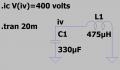
"iv" needs to be a net name attached to the net. It can't be a comment, and it can't be a spice command. If you look at my original schematic you can see that on the net itself, it is a different color. Upload your .asc file and I'll fix it for you.
Thought I fixed it
LTspice 24.0.12 for Windows
Circuit: * C:\Users\be80b\OneDrive\Documents\Draft1.asc
Start Time: Tue Oct 1 19:44:50 2024
solver = Normal
Maximum thread count: 8
tnom = 27
temp = 27
method = modified trap
ERROR: Node V is floating and connected to current source IC
Direct Newton iteration for .op point succeeded.
Total elapsed time: 0.180 seconds.
LTspice doesn't know when to ignore spaces, so you can't have a space between 400 and volts as it thinks that's two different variables.
Instead do 400v or 400volts.
Also you need to add the uic option (below) in the transient command to avoid large values of inductor current from the normal initial operating point calculation at the start of the transient analysis (especially for low values of inductor series resistance since that initial current will be V(iv) divided by the inductor resistance).
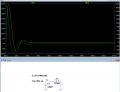
Below is the sim result after those two changes:
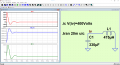
@crutschow had it right it was the space between the 400 and the units of Volts. To use the "plot settings" file remove the .txt suffix from "Draft1 (1).plt.txt" to plot current in the inductor, the derivative of current with respect to time and the voltage V(iv). I also added the switch on the .tran command to skip the initial operating point solution. On my system I have the net name "iv" a different color than the spice command text or comment text
Although specifying "Volts" is good practice for unambiguous intent, LTspice would be quite happy without so specifying and would assume Volts are intended. Likewise the H and the F are optional as units, but note that there's a gotcha: 1F, for example, will be interpreted as 1 femtoFarad, not 1 Farad.
When there is a .plt file with the same name as the .asc file the plots will be created. To effect certain changes in the scaling it is necessary to "Reload Plot Settings". You do this in LTspice XXIV by clicking on the waveform window and using the keyboard shortcut Ctrl+Space. You can also click on the waveform window and use the menu selection Plot Settings | Reload Plot Settings. In LTspice XVII the keyboard shortcut is not available, and you have to use the menu option. I no longer have a version of LTspice IV so I don't what is required there.
Can you copy the file to a file without the.txt extension?
Maybe the mods would consider allowing the .plt extension for file to eliminate this nasty little bugger of a problem.
Anyway, it looks like you're getting the hang of things.
The only thing you are missing is the derivative of the current.
In the waveform viewer you use the following expression.
d ( I(L1) )
This will plot the time derivative of the current in the inductor
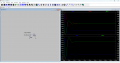
Linux let me use the posted files They probably both work Just Linux it using a little older LTspice and windows Version 24.0.12
Linux is 17.1 I couldn't install the newer one I need file to update wine didn't want run them down so i installed what worked with what I have installed.

 Facebook
 Google
 GitHub
 Linkedin