toshiba harddisk pcb repair

Thread Starter

The_Duke

Joined Mar 3, 2019
2
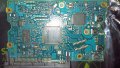
Hi there, recently one of my harddisks stopped working. it spins up but wont appear in bios, desktop and so forth. i have a replacement pcb from an identical hdd but when i swapped the pcbs the old disk with new board didnt work nor did the new disk with the old board. i set the voltmeter to continuity and tested some of the smts, which i think were diodes, on both boards and found one (highlighted) on the old non functioning board that reads 0.345 and the corresponding smt on the new board reads 1.121. To me it seems like this is the faulty component and replacing it should fix the harddisk but my electrical knowledge only goes as far as knowing which way batteries go in a torch. As long as this is the only problem does it sound like this will work? any advice is greatly appreciated.IMAG0026highlighted.jpg
 

dl324

Joined Mar 30, 2015
18,337
Welcome to AAC!
any advice is greatly appreciated.
IMO, it's not worth the bother. When a drive first starts acting up, you should clone it and mark the original as bad. The only thing it's good for is salvage.

If you attempt a repair, you have no way of testing the drive for reliability. Any data you put on it would be subject to being lost irrecoverably.
 

Thread Starter

The_Duke

Joined Mar 3, 2019
2
thanks for the reply. i had no warning that the drive was going. one day it was fine and then it just disappeared from the computer. the platters still spin up so its receiving power and after a bit of reading toshiba drives seem to suffer from pcb related problems.
 

dl324

Joined Mar 30, 2015
18,337
i had no warning that the drive was going. one day it was fine and then it just disappeared from the computer. the platters still spin up so its receiving power and after a bit of reading toshiba drives seem to suffer from pcb related problems.
You have at least a couple options. If the drive has important information, you could go to a data recovery company (they're expensive), or you could try to get it working long enough to get the data off.

In the future, you should implement a backup strategy to avoid losing important information.

I have a script that runs daily on our main computer to backup my data. I used to copy it to a drive on another computer, but I don't keep any of them running 24x7 anymore, so I manually copy to an external drive every week or two. I also make images of my hard drive whenever I make changes that I don't want to have to do again (like installing software).

Seagate and Western Digital have free copies of a stripped down version of Acronis True Image available on their websites.
 
Top