Toggling Lights with a push button

panic mode

Joined Oct 10, 2011
4,995
well... using microcontroller is usually not a problem as one can choose product with particular features (low idle current, sleep mode, etc). even when current is never zero. for products that are actually assemblies (Arduino, RPI etc), idle current is no longer insignificant.
 

Thread Starter

teenflon5

Joined Apr 19, 2021
27
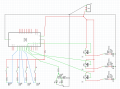
Here is the current plan, Blue is data in from the switch, green is output to the mosfets and two small LEDs at the bottom

1641656148654.png
 

MrSalts

Joined Apr 2, 2020
2,767
Here is the current plan, Blue is data in from the switch, green is output to the mosfets and two small LEDs at the bottom

View attachment 257133
Your n-channel mosfets are "backwards" and you should put them on the low-side of your load.
Your switches should have the resistor connected to your +5v rail and the input wire connected on the other side of the resistor (and that node should also be connected to the switch which connects to ground. Your switch will be "active low" in the setup I described.
What is the goal of LEd 4 and 5? Why two LEDs? Typically, each LED would have its own resistor.
 

Reloadron

Joined Jan 15, 2015
7,891
If you are going to use the circuit posted in post #42 you may want to consider low side switching rather than high side as drawn. You also want to use low side switching with a gate resistor to ground. Why using a micro-controller rather than simple On / Off push button switches as I linked to previously still escapes me but your project so use whatever you choose.

Ron
 

eetech00

Joined Jun 8, 2013
4,705
Hello,

I'm working on a little project to power some old Airbus overhead lights using LEDs and the built in push buttons, however I'm a little stuck on the solution for this.

Essentially the unit has momentary push buttons for toggling the lights on and off. I intend to power some LEDs and toggle them on and off using the existing buttons, but I dont know the right approach.

I tried thinking of using an S/R latch to toggle the LEDs on or off, however connecting the S and R pins to the button at the same time didnt really work, I tried putting some gates in between but that just made things worse!

There must be a simple solution to toggle an output based on pressing momentary push buttons but I'm not aware whats out there. Is there a simple IC or component that can do this?

Thanks
Use one of these...

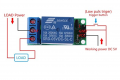
https://www.amazon.com/Bluejaye-IO25A01-Flip-Flop-Bistable-Self-locking/dp/B07587WC2S

1641658434373.png
 

eetech00

Joined Jun 8, 2013
4,705
That's a nice find. I want to know what that 4 pin chip is on the board. Think it would have be a custom micro as there are no other components except the diode for the relay and the relay is not a latching type.
Yup...a uC was the first thing I looked for on the board but didn't see any...
 

Reloadron

Joined Jan 15, 2015
7,891
That's a nice find. I want to know what that 4 pin chip is on the board. Think it would have be a custom micro as there are no other components except the diode for the relay and the relay is not a latching type.
Part of the board description reads:
5V Flip-Flop Latch Relay Module Bistable Self-locking Switch Board for Arduino
Best guess would be the 4 pin chip is a simple D flip flop chip which would afford the latching function. Likely a custom chip and I doubt a uC since a uC is really overkill and the boards like this are really inexpensive. Also, since the relay is a common Songle flavor the relay coil current for a 5.0 volt coil is about 71 mA it will need a driver capable of 71 mA and I doubt you will find that on any simple uC design for a DO (Digital Out). Cards like this are very common and designed to be driven by a uC or similar low current source.

Ron
 

panic mode

Joined Oct 10, 2011
4,995
Of course one can make the same thing with couple of relays.

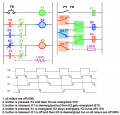
Here is an example of using three DPDT relays (or 2x DPDT and 1x SPDT). of course, if button has more contacts number of relays could be reduced. nice thing is that this can be implemented on both AC and DC circuits and different voltages. also when off, current is zero.

load can be connected directly across K3 coil but that means K1 would need to handle that current too.

1641700948593.png

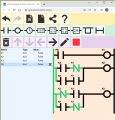
failed to get link to simulator so here is a screenshot and video is attached.
1641701115581.png
 

Attachments

Reloadron

Joined Jan 15, 2015
7,891
Here is my story and I am sticking to it.
SW PB On Off.png

One per LED circuit, push On and push Off. This can be as simple or as complex as anyone wants it to be. Think I saw mention of an ESP 32 (Node MCU) which could be used so the LED lamps could be turned ON / Off using a smartphone. If we really want a cool factor go with a common off the shelf WiFi relay card Then with any number of IOT applications, like Amazon Alexa you can control your lights (or anything else) using a smartphone from just about anywhere. Wireless relay cards can be had in single and multi channel flavors and controlled by Amazon Alexa or other IOT software routines. So a project like this can be as simple os a switch or as complex and feature packed as anyone could want.

Ron
 

Thread Starter

teenflon5

Joined Apr 19, 2021
27

Thread Starter

teenflon5

Joined Apr 19, 2021
27
Here is my story and I am sticking to it.


One per LED circuit, push On and push Off. This can be as simple or as complex as anyone wants it to be. Think I saw mention of an ESP 32 (Node MCU) which could be used so the LED lamps could be turned ON / Off using a smartphone. If we really want a cool factor go with a common off the shelf WiFi relay card Then with any number of IOT applications, like Amazon Alexa you can control your lights (or anything else) using a smartphone from just about anywhere. Wireless relay cards can be had in single and multi channel flavors and controlled by Amazon Alexa or other IOT software routines. So a project like this can be as simple os a switch or as complex and feature packed as anyone could want.

Ron
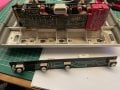
I would change the switch, unfortunately I plan to use as much of the original circuitry as possible, the lighting panel has momentary pushbuttons under each of the four buttons and I intend to create a plug/ribbon cable to connect to the original socket on the board, hence why I cant use new pushbuttons.

The two LEDs in my design will power the little light that illuminates the seat numbers when the attendant button is pressed. Here are some pictures. First one shows the PCB with the four momentary pushbuttons attached, on the other side is a plug which a wire harness connects to.image1.jpeg image0 (1).jpeg
 

Thread Starter

teenflon5

Joined Apr 19, 2021
27
Your n-channel mosfets are "backwards" and you should put them on the low-side of your load.
Your switches should have the resistor connected to your +5v rail and the input wire connected on the other side of the resistor (and that node should also be connected to the switch which connects to ground. Your switch will be "active low" in the setup I described.
What is the goal of LEd 4 and 5? Why two LEDs? Typically, each LED would have its own resistor.
I'm not sure what you mean by low side of the load? The arduino will send the switching signal, the mosfet will toggle that on and off on the high current side of the system? Is that not right?
For the switches the arduino has an input pullup function which stops the voltage floating when not pressed which I think achieves the same thing, but again tell me if thats not right! Just how I've always done it.
LEDs 4 and 5 are the two small LEDs that illuminate the seat light signs when the attendant button is pressed in the picture in my last post.
 

MrSalts

Joined Apr 2, 2020
2,767
I'm not sure what you mean by low side of the load? The arduino will send the switching signal, the mosfet will toggle that on and off on the high current side of the system? Is that not right?
For the switches the arduino has an input pullup function which stops the voltage floating when not pressed which I think achieves the same thing, but again tell me if thats not right! Just how I've always done it.
LEDs 4 and 5 are the two small LEDs that illuminate the seat light signs when the attendant button is pressed in the picture in my last post.
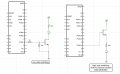
The MOSFET does not "work" by simply setting a pin on the Arduino to high and connecting it to the Mosfet gate pin.
In reality, a Mosfet "works" (allows current to flow) by raising the gate pin to some voltage above the voltage of the source pin.
pin your design, you connect your load between the Mosfet source and ground. Don't do that. You will not be able to raise the gate pin to enough volts above the Mosfet source pin to turn the Mosfet on fully.
Do connect the N-channel Mosfet Source pin to ground. Then connect the load between the Mosfet Drain pin and your 5v supply.
Also not the pull-down resistor to make sure the gate pin doesn't Float vs the Source pin.
and the gate resistor is always a good idea - generally between 10 ohms to 330 ohms (depending on switching speed and gate capacitance and the specific load being switched but other values may be needed to minimize interference/RF noise.
FD72B1E7-20CC-4B1E-86FF-1EB404F25458.jpeg
 

Thread Starter

teenflon5

Joined Apr 19, 2021
27
The MOSFET does not "work" by simply setting a pin on the Arduino to high and connecting it to the Mosfet gate pin.
In reality, a Mosfet "works" (allows current to flow) by raising the gate pin to some voltage above the voltage of the source pin.
pin your design, you connect your load between the Mosfet source and ground. Don't do that. You will not be able to raise the gate pin to enough volts above the Mosfet source pin to turn the Mosfet on fully.
Do connect the N-channel Mosfet Source pin to ground. Then connect the load between the Mosfet Drain pin and your 5v supply.
Also not the pull-down resistor to make sure the gate pin doesn't Float vs the Source pin.
and the gate resistor is always a good idea - generally between 10 ohms to 330 ohms (depending on switching speed and gate capacitance and the specific load being switched but other values may be needed to minimize interference/RF noise.
View attachment 257305
Ah thanks :) I should have paid more attention in my lecture and less to internet articles! I will do that.
 

MrSalts

Joined Apr 2, 2020
2,767
Ah thanks :) I should have paid more attention in my lecture and less to internet articles! I will do that.
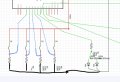
Also, look at how your inputs need to be rewired. The connection to your input pins should be between the switch and the resistor. As my image shows, the inputs are connected to ground through the resistor (which will still read zero volts. When the switch is closed, a direct connection to your 5v supply is realized so your Arduino will sense a digital HIGH. You will not have a direct short to ground because of resistor. Also note, your input is not LOW by default when not connected to anything. It must be connected to ground to be "LOW".
DC0CE1AB-F8FA-404F-990D-1D1DA226EEE1.jpeg
 
Top