Thoughts On Using CNC Machines For Circuit Board 'Etching'

Irving

Joined Jan 30, 2016
5,144
Hi,

Oh ok thanks, that looks interesting too.
I was wondering though is there an executable for FluidNC or do you have to build it yourself with an IDE like with C source code?
You can just download the binary and install via USB. Once installed you can update via wifi if preferred. http://wiki.fluidnc.com/en/installation explains all...

I also use jlcpcb for anything more than a few tht parts or a couple of small chips - its quick and cheap - sometimes quicker than milling it out if you break the cutter and don't have spares to hand!
 

Thread Starter

MrAl

Joined Jun 17, 2014
13,720
You can just download the binary and install via USB. Once installed you can update via wifi if preferred. http://wiki.fluidnc.com/en/installation explains all...

I also use jlcpcb for anything more than a few tht parts or a couple of small chips - its quick and cheap - sometimes quicker than milling it out if you break the cutter and don't have spares to hand!
Hello again,

Oh yes, ha, thanks for the tip. I am still looking into this and may go with that idea for PC boards. Still have some things to think about here.
Thanks for all the ideas, very interesting and i believe will be helpful in the near future.
 

Ya’akov

Joined Jan 27, 2019
10,258
JLCPCB has free software called EasyEDA that does schematic capture, BoM (directly form an online catalog), and produces a result that can be submitted directly.

They are integrated with LCSC (one of the largest parts suppliers in China) and will sell you the parts cheap and offer assembly for SMD at low cost. The part minimums are often for more than you can use on the boards you are having made but the ship the excess to you and we are talking pennies a part.

They will also make an SMD stencil for you, do aluminum and flex PCBs, and offer 3D printing services. They have an excellent reputation and have engineers check the submission and contact you about exceptions.

Overall, the whole operation is really impressive.
 

Thread Starter

MrAl

Joined Jun 17, 2014
13,720
Hello again,

Some more questions.

First, when a CNC machine ad says that it works with GRBL does that mean that you download some software and enter in G codes and then that can translate into GRBL and send it to the CNC machine?

I will not mind learning some G codes, and I guess M codes.
 

MrChips

Joined Oct 2, 2009
34,881
G code is all readable text.
You can enter the commands using a text editor. Just give the file to your CNC controller program and let it run.

But the only reason I can see for learning G code is so that you can modify and tweak the file already generated by a CAD program. You would not dare think of generating all the movements yourself.
 

Sensacell

Joined Jun 19, 2012
3,786
This concept of milling PCB's comes up frequently.
it does "work" - but there are significant, painful limitations.

The resolution of the circuit pattern is limited by the diameter of the cutter, tiny cutters need to be run at VERY high RPM (screaming loud) and require precision
collets and spindle bearings to run true and concentric- most cheap desktop CNC machines don't have very good spindle mechanics, this causes tool breakage and poor cutting.

The board must be held rigid and be VERY flat, this is hard to realize in practice.
The bed of your machine must be aligned with great precision to maintain a consistent cutting depth.

When you attempt to mill a board with any practical level of size or complexity, the time you spend listening to the screaming spindle motor, breathing toxic fiberglass dust while waiting for cutters to snap will quickly sour you to the idea.

The concept is really only viable for:

Very simple thru-hole or SMD boards with no critical small features.
Very small boards.
Boards with large copper pours (minimal routing).
Boards you absolutely need RIGHT NOW - no waiting for shipping.

It would be a frustrating mistake to make milling your PRIMARY PCB prototype solution.
Use this where it makes sense, but master other techniques to fill the gaps.
 

Thread Starter

MrAl

Joined Jun 17, 2014
13,720
G code is all readable text.
You can enter the commands using a text editor. Just give the file to your CNC controller program and let it run.

But the only reason I can see for learning G code is so that you can modify and tweak the file already generated by a CAD program. You would not dare think of generating all the movements yourself.
Hi,

Well, I also do a lot of programming so I would end up creating macros that I could use for everything once I built up a library. That would mean that eventually most of the G coding would be done by a program, with more human-like instructions that relate more directly to the application. For example:
IC DIP 16 PIN
IC DIP 14 PIN
R 0.25 WATTS
Things like that.

That's unless I found some sort of good CAD program.
 

Thread Starter

MrAl

Joined Jun 17, 2014
13,720
This concept of milling PCB's comes up frequently.
it does "work" - but there are significant, painful limitations.

The resolution of the circuit pattern is limited by the diameter of the cutter, tiny cutters need to be run at VERY high RPM (screaming loud) and require precision
collets and spindle bearings to run true and concentric- most cheap desktop CNC machines don't have very good spindle mechanics, this causes tool breakage and poor cutting.

The board must be held rigid and be VERY flat, this is hard to realize in practice.
The bed of your machine must be aligned with great precision to maintain a consistent cutting depth.

When you attempt to mill a board with any practical level of size or complexity, the time you spend listening to the screaming spindle motor, breathing toxic fiberglass dust while waiting for cutters to snap will quickly sour you to the idea.

The concept is really only viable for:

Very simple thru-hole or SMD boards with no critical small features.
Very small boards.
Boards with large copper pours (minimal routing).
Boards you absolutely need RIGHT NOW - no waiting for shipping.

It would be a frustrating mistake to make milling your PRIMARY PCB prototype solution.
Use this where it makes sense, but master other techniques to fill the gaps.
This is very interesting. It sounds like this might not work as well as I had hoped.
They do make special cutters for PC board work now though, they look stronger than most regular milling cutters because the point is like the point on a pencil rather than a tiny cylinder.

They also have laser heads now for cutting which have beam diameters of 0.05mm. I wonder if they could dig through the copper layer. The laser head replaces the milling motor head.
 

shortbus

Joined Sep 30, 2009
10,049
They also have laser heads now for cutting which have beam diameters of 0.05mm. I wonder if they could dig through the copper layer. The laser head replaces the milling motor head.
I worked where they had a very, very expensive Trumf laser CNC. Copper and brass both didn't cut well. This machine could cut any thing from 0.015 to 2 inches steel stainless steel but most non ferrous material didn't work well at all.
 

Thread Starter

MrAl

Joined Jun 17, 2014
13,720
I worked where they had a very, very expensive Trumf laser CNC. Copper and brass both didn't cut well. This machine could cut any thing from 0.015 to 2 inches steel stainless steel but most non ferrous material didn't work well at all.
Hi,

That's good to know too thanks. Yes copper would be for the PCB's so that presents a problem. I would have to use the regular cutters and motor.
 

Thread Starter

MrAl

Joined Jun 17, 2014
13,720
Hi,

Thanks, that looks interesting too. I should have mentioned that I also want to use it for making small mechanical parts.
 

Thread Starter

MrAl

Joined Jun 17, 2014
13,720
Hello again,

I have now seen a program called "Candle" that supposedly works to turn G code into machine code for the CNC machines.

Any idea how well this works, or anyone here use that yet?
 

MrChips

Joined Oct 2, 2009
34,881
Candle is a popular CNC control application. It is one of two programs which I use on my CNC machines. It does not convert G code into machine code. It takes the G code, interprets it, and sends commands via USB to the CNC controller hardware which controls the CNC stepping motors.
 

Thread Starter

MrAl

Joined Jun 17, 2014
13,720
Candle is a popular CNC control application. It is one of two programs which I use on my CNC machines. It does not convert G code into machine code. It takes the G code, interprets it, and sends commands via USB to the CNC controller hardware which controls the CNC stepping motors.
Hi,

Ok thanks. So the program just takes human readable G code and sends it to the controller. That's good enough.
I thought the controller needed GRBL code, which I interpreted as 'machine code'.

It looks like they use a COM port for the communications, with the controller board maybe having one of those USB to COM port chips like the 340. So I guess it is mostly an RS232 interface.

Just guessing at a lot of this though so far.
 

MrChips

Joined Oct 2, 2009
34,881
Hi,

Ok thanks. So the program just takes human readable G code and sends it to the controller. That's good enough.
I thought the controller needed GRBL code, which I interpreted as 'machine code'.

It looks like they use a COM port for the communications, with the controller board maybe having one of those USB to COM port chips like the 340. So I guess it is mostly an RS232 interface.

Just guessing at a lot of this though so far.
I am not certain of the exact details, but yes, the controller uses GRBL which is the software running on an Arduino (Atmel ATmega328 MCU).
Candle running on your PC sends the G-code to GRBL controller board.

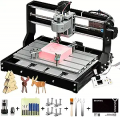
The CNC3018 is one of the popular hobbyist CNC engraving machine.
https://www.amazon.com/Genmitsu-3018-PRO-Control-Engraving-300x180x45mm/dp/B07P6K9BL3/

1697725368556.png

It comes with GRBL ready. All you need is to download Candle which is free.
Then you need a CAD program to create the PCB layout. KiCad is popular and free.
 

MaxHeadRoom

Joined Jul 18, 2013
30,692
Most of the higher end CAD-CAM programs have a post processer where you can state what version/Type of machine you have, as many systems differ as to the options included and how certain features are handled when converted to machine code. (G-code).
For example, most follow the original standard used in all Fanuc CNC machines, so the post processor creates the G-code accordingly.
 

Thread Starter

MrAl

Joined Jun 17, 2014
13,720
I am not certain of the exact details, but yes, the controller uses GRBL which is the software running on an Arduino (Atmel ATmega328 MCU).
Candle running on your PC sends the G-code to GRBL controller board.

The CNC3018 is one of the popular hobbyist CNC engraving machine.
https://www.amazon.com/Genmitsu-3018-PRO-Control-Engraving-300x180x45mm/dp/B07P6K9BL3/

View attachment 305313

It comes with GRBL ready. All you need is to download Candle which is free.
Then you need a CAD program to create the PCB layout. KiCad is popular and free.
Hi,

Thanks for the info.

That's one of the ones i was looking at. Do you think it is good enough for small PC boards? I was thinking 3 inches by 4 inches probably. Maybe even smaller. DIP packages are probably good enough, but the larger SMD 0.05 pitch packages would be nice to use also. What do you think?

I looked into Candle a little bit so far, but now KiCad sounds pretty interesting too, that's next.

Yeah, it's a little comical that they use the 328P chip like the Arduino, but also nice because I am very familiar with that chip.

I might get a cheap one like that just to get into it and learn how the control works and basic stuff like that.
I do see some of the frames are made of Bakelite plastic and some of aluminum. I wonder if Bakelite is good enough. I know it is stiff, which is desirable for this application, but it breaks.
 
Top