Thoughts On Using CNC Machines For Circuit Board 'Etching'

MrChips

Joined Oct 2, 2009
34,887
Hello again,

Yeah i guess there is a lot to it when trying to hand code the machine instructions, but i have also read now that to get the best 'efficiency' you would have to know how to hand code as well. What they mean by efficiency i am not sure, maybe smaller board size or faster router run time or less tool wear.

It's all kind of interesting though for sure. Since i have programmed in various languages since the 1970's i would not be too uncomfortable writing some code to simplify the image to machine instructions part. When i first got into microcontrollers i didn't like the simulators that were available so i wrote my own simulator. Takes a couple weeks, but then you can always add something later if you like, or mod something that makes it better.
At first i probably would not want to do this though.

Thanks for the explanation of the process.
Your comment about hand-coding and efficiency might be taken out of context.
The original graphics package for the Macintosh computer was written in Pascal. Then the graphics primitives were hand-coded in ASM for machine execution and space efficiency before burning in ROM, certainly not for human coding efficiency.

While tweaking any computer algorithm for speed can bring rewards, CNC machine operations are measured in milliseconds. Trying to trim a few microseconds of execution time is not going make any difference.
 

atferrari

Joined Jan 6, 2004
5,016
Hello there,

I had been considering the purchase of a CNC machine for making small, one-off circuit boards using copper clad fiberglass boards.
The price on these things has come down a lot, under $200 USD. I don't need it to be too large either, board 2x4 inches would be good enough for now.

My questions are twofold.
First, anyone here can recommend a reasonably priced machine? I would say it has to have enough accuracy to do SMD parts but if it is limited to the 0.05 inch pin spacing that would be ok for now.

Second, i see bits being sold that go from 0.8mm diameter and up. Would that be good enough to do SMD 0.05 pin spacing parts like IC's that have that spacing?
Also, do they make any smaller ones, like 0.5mm? I know that is small and probably some bit breakage now and then, but it might be good to do some things with the 0.5mm bits if they make them.
Also, do they make any POINTED bits to use for engraving or something like that? That would be a bit similar to a regular blunt face bit but with a point on it so the deeper you go, the wider the cut.

Thanks for any information and/or links.
Hola @MrAl

A few years ago I managed to collect convincing and complete info about the kit to modify a Proxxon M70 machine sold bundled with all the software and ancillary parts destined to milling PCBs.

Mi intention of buying the whole thing in Germany , never happened because of a failed trip to Europe.

If I recall right the site was usovo.de

The emails I sent for details were dutifully answered every time. Same my phone calls.

Buena suerte.
 

Thread Starter

MrAl

Joined Jun 17, 2014
13,722
Your comment about hand-coding and efficiency might be taken out of context.
The original graphics package for the Macintosh computer was written in Pascal. Then the graphics primitives were hand-coded in ASM for machine execution and space efficiency before burning in ROM, certainly not for human coding efficiency.

While tweaking any computer algorithm for speed can bring rewards, CNC machine operations are measured in milliseconds. Trying to trim a few microseconds of execution time is not going make any difference.
Hi,

I was actually talking about working with gcode not asm. The gcode doesn't seem completely unmanagable.
I'm not sure why they said it is best to know both the automatic software as well as the gcode commands. All I did was read the web page.

Since I have not done any of this yet I can not say much for sure (ha ha).
 

Thread Starter

MrAl

Joined Jun 17, 2014
13,722
Hola @MrAl

A few years ago I managed to collect convincing and complete info about the kit to modify a Proxxon M70 machine sold bundled with all the software and ancillary parts destined to milling PCBs.

Mi intention of buying the whole thing in Germany , never happened because of a failed trip to Europe.

If I recall right the site was usovo.de

The emails I sent for details were dutifully answered every time. Same my phone calls.

Buena suerte.
Hola,

Oh then I guess you never got to try this.
For me it would be a great way to make boards because i need one-offs and not sure how expensive that would get to send out for boards made by some board making company. If anyone has experience doing that too that would be good to hear about some inexpensive one or two-offs for a small board maybe 3x4 inches.

The only thing i don't like so far is that CNC sounds a little complicated to get into and i already have things going on.
 

dendad

Joined Feb 20, 2016
4,641
If anyone has experience doing that too that would be good to hear about some inexpensive one or two-offs for a small board maybe 3x4 inches.
I use JLCPCB as mentioned earlier. https://jlcpcb.com
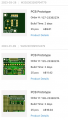
Here is an example of a few of my orders..
1687128888871.png
The last board is an Arduino shield so that will give you an idea of price for size.
These prices an in Australian dollars, so in $US, it will be lower. Most of the time, the postage is almost the biggest part of the cost. Just make sure on checkout, you select the cheaper postage rate. Unless, of course you need the boards faster at a much higher freight cost.
All these boards are double sided, plated through holes with solder mask and parts layout silk screen top and bottom.
I've also had them do a few 4 layer boards too. Their board are very high quality and I'm very satisfied with their service.
JLCPCB are not the only place that offers very good service.
EDIT:
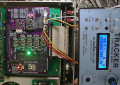
Here is a much larger board...
1687129709444.png

This cost me AU$47 for 25 boards, plus postage that was for a total of about AU$75. Not too bad for $3 per board!
The Arduino Nano gives the scale.
 
Last edited:

Thread Starter

MrAl

Joined Jun 17, 2014
13,722
I use JLCPCB as mentioned earlier. https://jlcpcb.com
Here is an example of a few of my orders..
View attachment 296636
The last board is an Arduino shield so that will give you an idea of price for size.
These prices an in Australian dollars, so in $US, it will be lower. Most of the time, the postage is almost the biggest part of the cost. Just make sure on checkout, you select the cheaper postage rate. Unless, of course you need the boards faster at a much higher freight cost.
All these boards are double sided, plated through holes with solder mask and parts layout silk screen top and bottom.
I've also had them do a few 4 layer boards too. Their board are very high quality and I'm very satisfied with their service.
JLCPCB are not the only place that offers very good service.
EDIT:
Here is a much larger board...
View attachment 296637

This cost me AU$47 for 25 boards, plus postage that was for a total of about AU$75. Not too bad for $3 per board!
The Arduino Nano gives the scale.
Hello again,

Oh thanks, i am going to have to check that out. I hope the prices are similar here in the US.
That might be just good enough, thanks a bunch.
I'll get back here once i check this out.
 

Thread Starter

MrAl

Joined Jun 17, 2014
13,722
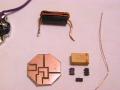
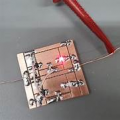
Another way to prototype HF SMD circuits is to create channels and islands on double sided copper laminate.
I have done this by hand using an X-Acto knife.

View attachment 296639

View attachment 296640

There is nothing to stop you from writing the CNC gcode to do this.
Hello again

Oh yes I've done that before but i think the designs i have in mind right now would be a bit too complicated for that method as there would be dip packages and possibly SMD packages. For smaller stuff though that would be great.
The method i used to use in the past was drawing right on the copper with magic marker but that's so time consuming it makes you dread having to make a board after a while.
Oh yeah, I also tried the laser printer technique but had mixed results with the iron on part of it. Didn't work too well so I gave that up entirely.

Yeah i was thinking of learning the gcode a little bit and see where it takes me. If it starts to become too difficult or time consuming I'll just have to back up to the free software's and see how that goes. Maybe i can deal with it anyway.

There is another thing called GRBL control, have any idea what that is?
 

MrChips

Joined Oct 2, 2009
34,887
GRBL is the name of one CNC control software platform. Candle is based on GRBL. So basically, Candle is running a version of GRBL. It accepts gcode and drives the motors on the CNC machine.
 

Thread Starter

MrAl

Joined Jun 17, 2014
13,722
g-code is plain readable text instructions.

For example:
G21 ;this will set the dimensions to metric
G0 X0 Y0 Z0 ;moves the tool to the home position
G1 X50 Y100 ;moves the tool to (50, 100) mm.

https://howtomechatronics.com/tutorials/g-code-explained-list-of-most-important-g-code-commands/
Hi,

Oh yes ok, that sounds good. I'd just have to learn all the commands for speed and all that i guess.
Not sure how you do the surface mapping with that though.

This is interesting even if it is a little difficult to learn it all.
 

MrChips

Joined Oct 2, 2009
34,887
Really, you don’t need to learn g-code at all. Candle will do everything for you.
Have faith that all the heavy lifting has already been done.
 

Thread Starter

MrAl

Joined Jun 17, 2014
13,722
Really, you don’t need to learn g-code at all. Candle will do everything for you.
Have faith that all the heavy lifting has already been done.
Hi,

Ok i will try that first then.

I lost faith in ready-made software long ago when i found that whoever makes it has their own idea of what humans like when it comes to software, so i never assume anything is going to work for my purposes. This problem continues to this day from the 1980's until now.
A more recent problem came up when i tried Windows 10 and my program to read the desktop icon positions. In Windows 7 it worked perfectly, in Windows 10 it doesn't work at all because one of the Api calls does not function for some reason. It might be a 'security' issues but that doesn't help much to know that.
I used this kind of program to migrate my system stuff to either another machine or to the same machine after reinstalling the op system. One of those things was the desktop icons. I wanted the icons on one machine to match the other so i used the program to gather the icons and positions, then have the program rearrange the icons back into the correct places on the desktop screen. Since it failed in Win10 i have to rely on a completely different method that does not use the desktop anymore, which is a complete waste of having a desktop with icons.
And that is just one of the many problems that have come up over the years.
 

Irving

Joined Jan 30, 2016
5,153
I have an old but serviceable MAXNC10 mini-mill. I scrapped the original controller & software and now run it with three DM542 controllers on a 45v supply controlled by FluidNC, a GRBL fork for ESP32 boards. I generate GERBER files from KiCAD7 and convert to GCode with FlatCAM and then download the GCode to the controller using Universal GCode Sender though I have also been trialling bCNC as well.
 

Thread Starter

MrAl

Joined Jun 17, 2014
13,722
I have an old but serviceable MAXNC10 mini-mill. I scrapped the original controller & software and now run it with three DM542 controllers on a 45v supply controlled by FluidNC, a GRBL fork for ESP32 boards. I generate GERBER files from KiCAD7 and convert to GCode with FlatCAM and then download the GCode to the controller using Universal GCode Sender though I have also been trialling bCNC as well.
Hi,

Oh ok thanks, that looks interesting too.
I was wondering though is there an executable for FluidNC or do you have to build it yourself with an IDE like with C source code?
 

Thread Starter

MrAl

Joined Jun 17, 2014
13,722
I use JLCPCB as mentioned earlier. https://jlcpcb.com
Here is an example of a few of my orders..
View attachment 296636
The last board is an Arduino shield so that will give you an idea of price for size.
These prices an in Australian dollars, so in $US, it will be lower. Most of the time, the postage is almost the biggest part of the cost. Just make sure on checkout, you select the cheaper postage rate. Unless, of course you need the boards faster at a much higher freight cost.
All these boards are double sided, plated through holes with solder mask and parts layout silk screen top and bottom.
I've also had them do a few 4 layer boards too. Their board are very high quality and I'm very satisfied with their service.
JLCPCB are not the only place that offers very good service.
EDIT:
Here is a much larger board...
View attachment 296637

This cost me AU$47 for 25 boards, plus postage that was for a total of about AU$75. Not too bad for $3 per board!
The Arduino Nano gives the scale.
Hi,

Ok i checked and they want about $7 USD for 5 boards which is really good, but $17 USD for shipping 2 to 4 days.
The time is good but the shipping sounds a little steep.
I didn't check for more boards, like 10 or 20, which probably would not increase the cost too much, comparatively.

Still have to generate a Gerbie Gerber :)
 

Thread Starter

MrAl

Joined Jun 17, 2014
13,722
US$7 + $17 for 5 boards works to about $5 per board. Seems inexpensive to me.
Hi,

Yes, i guess not that bad, but often I just need one board so I am guessing that the shipping would still be a little steep.
I just checked though, and I see that 5 is the minimum board count allowable.
If it is something important though I would not mind paying that.
 

MaxHeadRoom

Joined Jul 18, 2013
30,693
Check out a few of the popular board manuf, as some offer alternative shipping options.
e.g. PCBWAY offer qty5 100mm x 100mm for CAN$5.00, +many options for shipping, e.g. AliExpress - CAN$8.60.
 

Thread Starter

MrAl

Joined Jun 17, 2014
13,722
Check out a few of the popular board manuf, as some offer alternative shipping options.
e.g. PCBWAY offer qty5 100mm x 100mm for CAN$5.00, +many options for shipping, e.g. AliExpress - CAN$8.60.
Oh that sounds good too, i'll check that out, thanks.
 
Top